1. Úvod a systémview
This manual provides essential information for the installation, operation, and maintenance of your Swann 1080p Full HD 8-Channel Wired DVR Security System. This system is designed to provide comprehensive surveillance for homes and businesses, featuring high-definition video recording, advanced motion detection, and remote access capabilities.
Mezi klíčové vlastnosti patří:
- Rozlišení Full HD 1080p: Zachycuje jasné a podrobné video footage.
- Barevné noční vidění: Integrated spotlights enable color video recording in low-light conditions up to 32ft (10m).
- True Detect™ Heat & Motion Sensing: Utilizes PIR sensors to detect heat signatures and movement from humans and vehicles, reducing false alerts.
- Kabelové připojení: Ensures stable and reliable video transmission without Wi-Fi interference.
- 1TB pevný disk: Provides local storage for up to 12 months of continuous recording.
- Rozšiřitelný systém: Supports up to 8 cameras, allowing for scalable coverage.
- Vzdálený přístup: View živá krmiva, review footage, and receive alerts via the Swann Security app on your smartphone.

Image 1.1: The Swann 8-channel DVR with eight included bullet cameras.

Obrázek 1.2: Konecview of Swann 1080p DVR system features including True 1080p HD Resolution, Advanced Motion Detection, 1TB HDD, Trusted Wired Connection, and 32' Color Night Vision.
2. Co je v krabici
Your Swann Security System package includes the following components:
- 8-Channel Digital Video Recorder (DVR) with 1TB Hard Drive
- 8 x 1080p Bullet Cameras
- 8 x BNC Cables (60ft/18m each)
- Napájecí adaptéry pro DVR a kamery
- HDMI kabel
- Ethernetový kabel
- USB myš
- Montážní šrouby a hmoždinky
- Operating Instructions / Quick Start Guide
- Samolepky odstrašující krádež

Obrázek 2.1: Podrobný view of a 1080p bullet camera, highlighting its motion sensing light, color night vision, heat & motion sensor, weatherproof seal, and secure adjustable mounting stand.
3. Nastavení a instalace
3.1 Hardwarové připojení
- Připojení kamer: Attach each camera to the DVR using the provided BNC cables. Ensure connections are secure.
- Připojení DVR k monitoru: Use the HDMI cable to connect the DVR to a monitor or TV.
- Připojení USB myši: Plug the USB mouse into an available USB port on the DVR.
- Internetové připojení: Connect the DVR to your router using the Ethernet cable for remote access and updates.
- Zapnutí: Connect the power adapters to the cameras and the DVR, then plug them into power outlets. The system will power on automatically.
3.2 Počáteční konfigurace softwaru
Upon first startup, the DVR will launch a 'Startup Wizard' to guide you through essential settings. Follow the on-screen prompts to configure your system.
- Nastavit heslo: Create a strong password for your DVR to secure access.
- Nastavení jazyka a času: Select your preferred language, video format (NTSC for USA/Canada, PAL for UK/Australia/New Zealand), resolution (1080p recommended), time zone, and date format.
- Konfigurace e-mailu: Set up email alerts for motion detection or system events. You will need to enter your email account details (SMTP server, port, username, password) and a recipient email address. Ensure 'Less secure app access' is enabled for Gmail accounts if using a Gmail address for sending alerts.
- Konfigurace NTP: Enable Network Time Protocol (NTP) to automatically synchronize the DVR's time with an internet time server.
- Letní čas (DST): Configure DST settings as applicable for your region.
Video 3.1: Toto video poskytuje celkový pohledview of the Swann Security System setup wizard, demonstrating initial configuration steps including password creation, language settings, and email alert setup.
4. Obsluha systému
4.1 Živě Viewnahrávání a nahrávání
The DVR provides continuous 24/7 recording. You can view live feeds from all cameras simultaneously or select individual cameras for a larger view na připojeném monitoru.
4.2 Detekce pohybu a upozornění
The system utilizes True Detect™ PIR motion sensing to accurately identify human and vehicle movement, minimizing false alarms. When motion is detected, the system can trigger recording, activate built-in spotlights on cameras, and send email notifications.
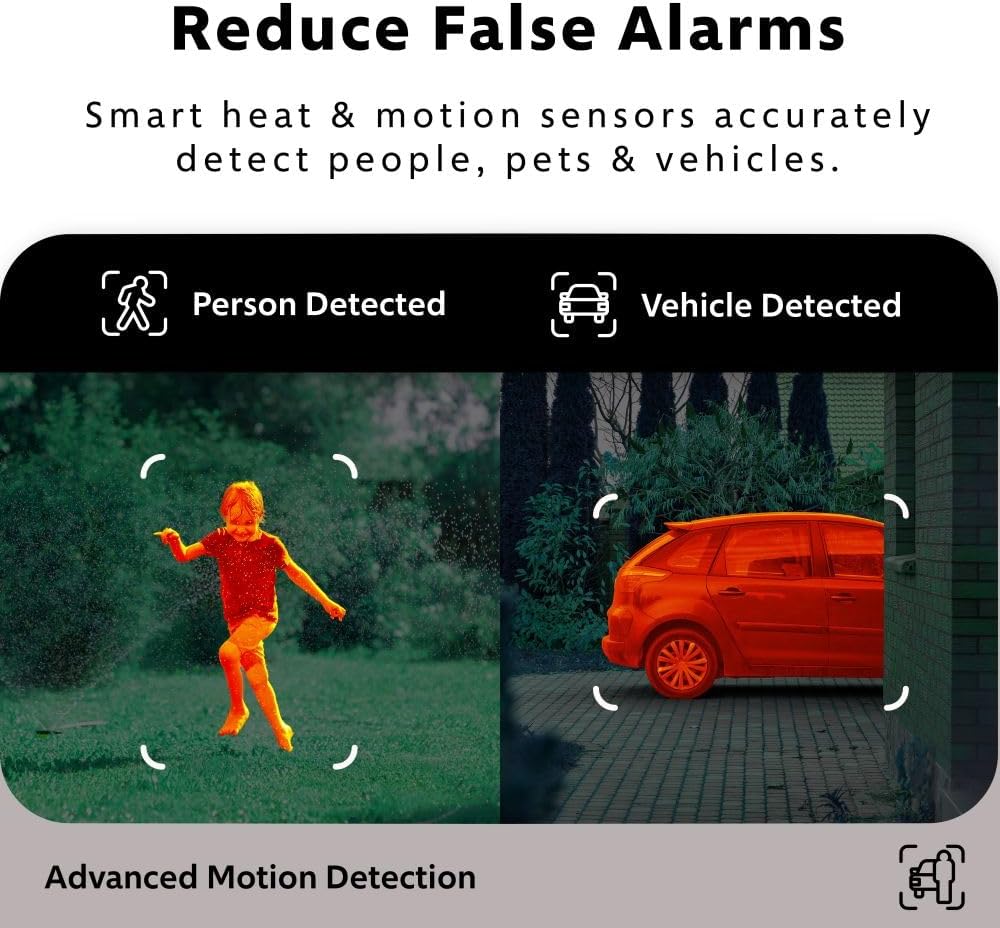
Image 4.1: Illustration of the system's advanced motion detection distinguishing between a person and a vehicle to reduce false alarms.
4.3 Smart Search Playback
Na review zaznamenané footage, use the Smart Search function. This allows you to select a specific area within the video frame, and the system will scan recordings for motion in that location, making it easier to find relevant events.

Image 4.2: A monitor displaying live footage from multiple cameras, demonstrating the ease of viewing and the Smart Search feature for reviewna konkrétní události.
4.4 Přizpůsobitelné detekční zóny
You can define specific motion detection zones and adjust sensitivity levels for each camera. This allows you to focus monitoring on high-priority areas and reduce unnecessary alerts from irrelevant activity.
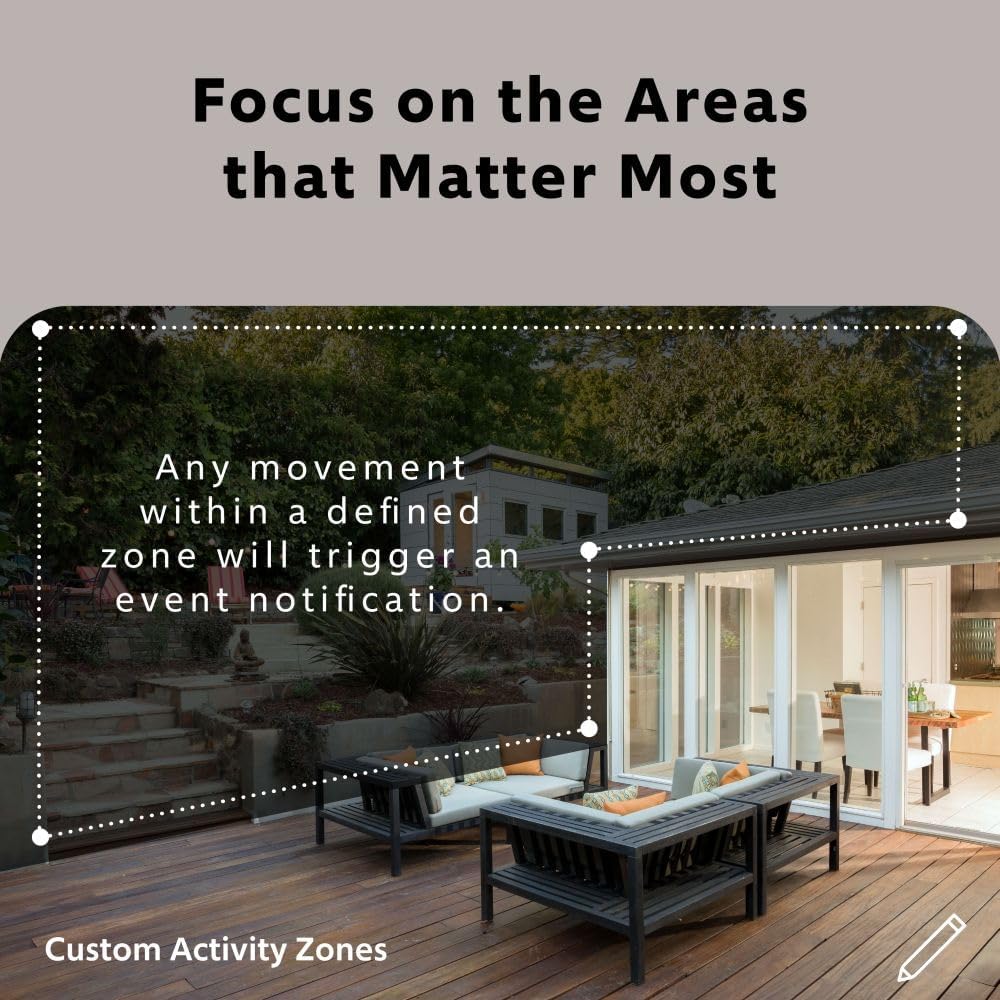
Obrázek 4.3: Bývalýample of custom activity zones being set up to focus motion detection on specific areas of interest.
4.5 Remote Access via Swann Security App
The Swann Security app allows you to view živá krmiva, review zaznamenané footage, and receive push notifications directly on your smartphone from anywhere with an internet connection.

Image 4.4: A smartphone showing an instant app alert notification from the Swann Security system, indicating a triggered event.
5. Údržba
- Pravidelný úklid: Pravidelně čistěte objektivy a kryty fotoaparátů, abyste zajistili ostrý obraz. Používejte měkký,amp tkanina.
- Aktualizace firmwaru: Check the Swann support website regularly for firmware updates for your DVR. Updates can improve performance and add new features.
- Stav pevného disku: The 1TB hard drive is designed for continuous recording. Monitor its health through the DVR's system settings. Back up important footage podle potřeby.
- Kontrola kabelů: Periodically inspect all cables for wear, damage, or loose connections, especially for outdoor installations.
6. Řešení problémů
- Bez zobrazení videa: Ensure the DVR is powered on, the monitor is connected correctly via HDMI, and the input source on the monitor is set to HDMI. Check camera power and BNC cable connections.
- Bez vzdáleného přístupu: Verify the DVR is connected to your network via Ethernet and has an active internet connection. Check router settings and ensure the Swann Security app is correctly configured with your DVR's P2P ID. Confirm email settings for alerts are correct and 'Less secure app access' is enabled for Gmail if applicable.
- Upozornění na falešný pohyb: Adjust the sensitivity of motion detection and refine custom detection zones in the DVR settings to minimize triggers from environmental factors like moving trees or shadows.
- Špatná kvalita obrazu: Clean camera lenses. Ensure cameras are positioned correctly and not facing direct light sources that could cause glare. Check resolution settings on the DVR.
- Bez nahrávání: Verify the hard drive is installed and functioning correctly. Check recording schedules and motion detection settings to ensure they are enabled.
7. Specifikace
- Značka: Swann
- Číslo modelu: SWDVK-846808WL-US
- Technologie připojení: Kabelové
- Rozlišení záznamu videa: 1080p Full HD
- Počet kanálů: 8
- Úložná kapacita paměti: 1TB HDD
- Barva: White (Cameras)
- Zdroj napájení: Elektrický kabel
- Rozměry položky (D x Š x V): 11.02 x 14.77 x 11.62 palce
- Operační systém: Linux
- Doporučená použití: Dohled
- Kompatibilní zařízení: Smartphones (via Swann Security App)
- Další vlastnosti fotoaparátu: Bullet type, IP66 weatherproof, Night Vision, Motion Detection, Sensor Spotlights
- Technologie pro slabé osvětlení: Color Night Vision (with spotlights), Black-and-White Night Vision (up to 100ft/30m)
- Snímková frekvence: 15 FPS
- Režim nahrávání: Continuous, Motion Detection
- Celkový počet portů USB: 2
- Hardwarové rozhraní: USB 2.0
- Typ objektivu: Opraveno
- UPC: 840236144716
8. Záruka a podpora
Swann products are backed by a manufacturer's warranty. For specific warranty details, registration, and technical support, please visit the official Swann support webnebo se obraťte na jejich zákaznický servis. Uschovejte si doklad o koupi pro případ reklamace.
For additional assistance, visit: Swannova podpora


