Zavedení
This manual provides detailed instructions for the installation, operation, and maintenance of your OMBAR T2 Dash Cam. Please read this manual thoroughly before using the device to ensure proper functionality and safety. Keep this manual for future reference.
Obsah balení
Ověřte, zda jsou v balení obsaženy všechny níže uvedené položky:
- OMBAR T2 Dash Cam (Front Camera) x1
- Zadní kamera x1
- Držák GPS x1
- Type-C Cigarette Lighter Power Cable (11.5ft/3.5m) x1
- Kabel zadní kamery x1
- 64GB SD karta x1
- Car Wire Trim Tool x1
- 3M Adhesive Stickers x2
- 2x elektrostatické samolepky
- Alcohol Prep Pads x2
- Uživatelská příručka x1
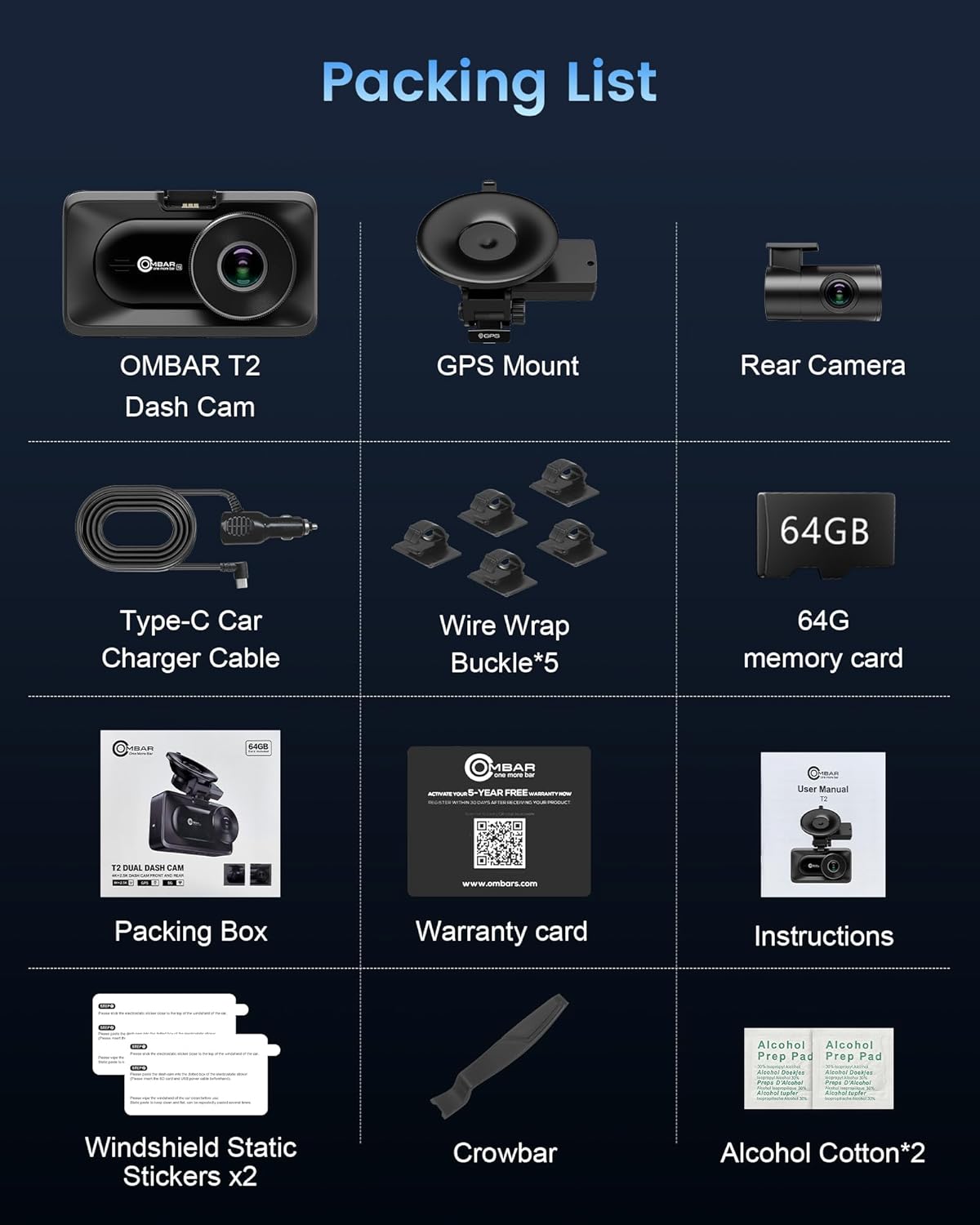
Image: All components included in the OMBAR T2 Dash Cam package, laid out neatly.
Konec produktuview
Vlastnosti předního fotoaparátu:
- Zobrazit: 3.16-inch IPS Screen for clear viewIng.
- Rezoluce: 4K Ultra HD (Front) and 2.5K (Rear) for high-quality video capture.
- Široký úhel: 170° front and 150° rear lenses to cover multiple lanes and reduce blind spots.
- Noční vidění a HDR: F2.0 large aperture and Wide Dynamic Range (WDR) technology ensure clear video in low-light conditions.
- Konektivita: Built-in 5G Wi-Fi for fast footage transfer to the RoadRec app.
- GPS: Built-in high-precision GPS for tracking speed and location data.
- Skladování: Supports up to 512GB SD card (64GB card included).
- Zdroj napájení: Supercapacitor for enhanced durability and temperature resistance.
Součásti hlavní jednotky:
The front dash cam unit includes the main lens, a 3.16-inch IPS display, control buttons, and ports for power, rear camera, and GPS mount.

Image: The OMBAR T2 Dash Cam main unit with its suction cup mount, the rear camera, and a smartphone displaying the RoadRec app interface.

Image: Visual representation of the 170-degree front camera and 140-degree rear camera coverage, showing a car from front and back perspectives on a road.

Image: A comparison showing the effectiveness of Super Night Vision and HDR technology in low-light conditions, making license plates and street signs clearer.
Průvodce instalací
1. Prepare for Installation:
- Clean the windshield area where the dash cam will be mounted using an alcohol prep pad. Ensure the surface is dry before proceeding.
- Apply an electrostatic sticker to the windshield first, then attach the suction cup mount to the sticker. This helps prevent residue on the windshield.
2. Install the Front Dash Cam:
- Attach the GPS mount to the main dash cam unit.
- Secure the suction cup mount firmly to the prepared area on your windshield. Ensure it is positioned to provide an unobstructed view silnice.
- Adjust the angle of the dash cam to capture the desired view.

Obrázek: Detail view of the drip glue suction cup mount, highlighting its strong and durable attachment to the windshield, designed to withstand various temperatures.
3. Install the Rear Camera:
- Mount the rear camera on the inside of your rear windshield, typically at the top center, using the provided adhesive sticker.
- Route the rear camera cable along the headliner and A-pillar, down to the front dash cam unit. Use the included wire trim tool to tuck the cable neatly under the trim.
- Connect the rear camera cable to the "REAR" port on the main dash cam unit.
4. Připojení napájení:
- Plug the Type-C cigarette lighter power cable into your vehicle's 12V power outlet.
- Connect the Type-C end of the power cable to the "USB" port on the dash cam's GPS mount.
- Ensure all cables are securely connected and neatly routed to avoid obstructing your view nebo zasahování do ovládání vozidla.

Image: Diagram illustrating the correct mounting positions for the front dash cam and rear camera, along with cable routing for power and rear camera connection.
Počáteční nastavení
1. Insert SD Card:
Insert the provided 64GB SD card into the dash cam's SD card slot. Ensure the card is inserted correctly until it clicks into place. The dash cam supports up to 512GB SD cards.
2. Zapnutí:
Once connected to power, the dash cam will automatically turn on and begin recording. If it does not, press the power button.
3. Format SD Card:
It is recommended to format the SD card within the dash cam's settings before first use and periodically thereafter to ensure optimal performance and prevent data corruption.
- Press the Menu button to access settings.
- Přejděte na možnost „Formát“.
- Confirm to format the SD card.
Základní operace
1. Recording Modes:
- Nahrávání ve smyčce: The dash cam continuously records video in short segments. When the SD card is full, the oldest unlocked files jsou přepsány.
- G-senzor (nouzové nahrávání): V případě náhlého nárazu nebo kolize vestavěný G-senzor automaticky detekuje událost a uzamkne aktuální segment videa, čímž zabrání jeho přepsání.
- Sledování parkování: With the optional hardwire kit (sold separately), the dash cam can monitor your vehicle 24/7. It will automatically record if motion or impact is detected while parked.
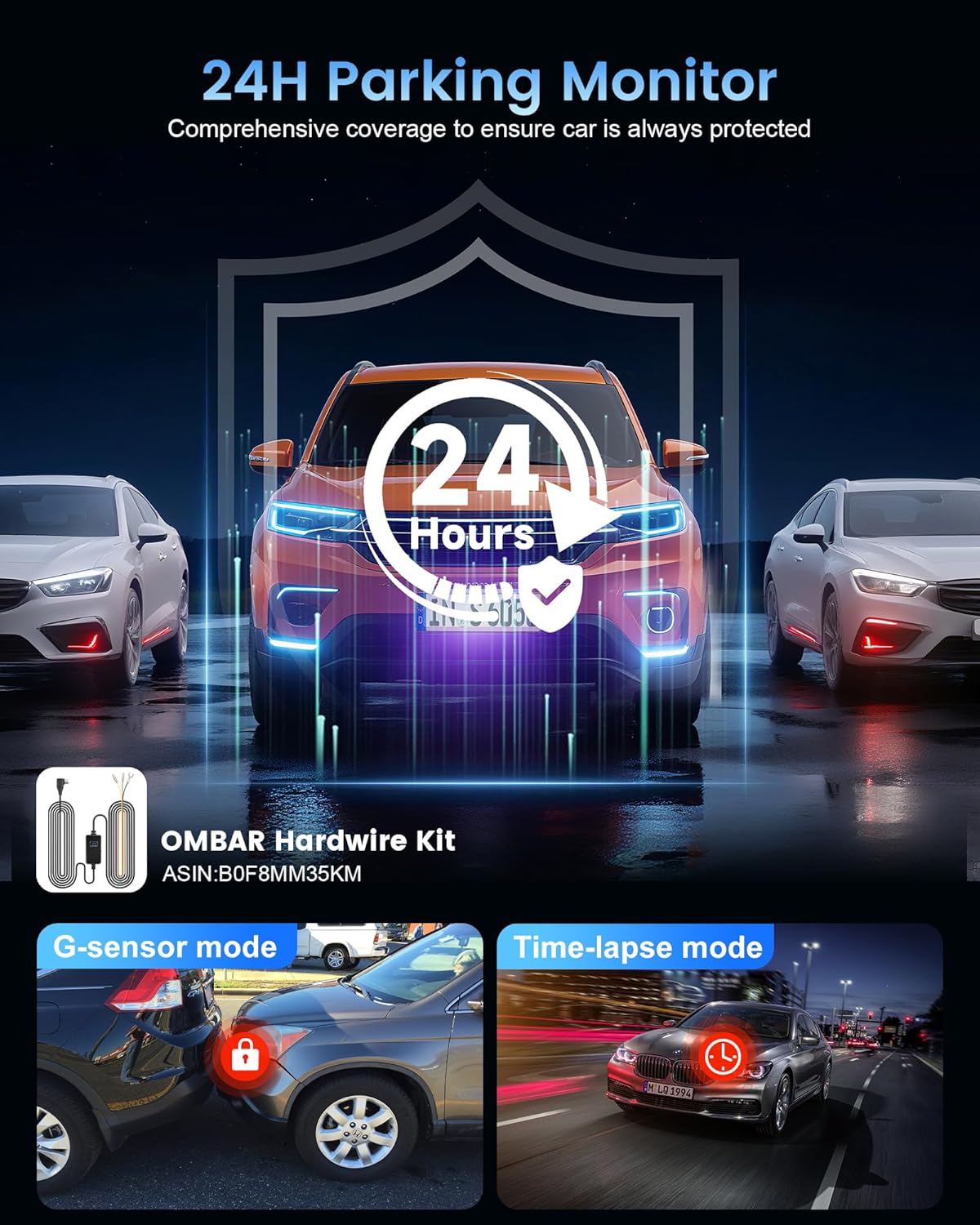
Image: Illustration of the 24-hour parking monitor feature, showing a car being bumped and the G-sensor activating to record the event. It also shows time-lapse parking mode.

Image: Visual explanation of the auto loop recording feature, demonstrating how older, unlocked videos are automatically overwritten to ensure continuous recording.
2. Přehrávání:
Videos can be played back directly on the dash cam's screen or by connecting to the RoadRec app via Wi-Fi.
- Press the Menu button and navigate to the Playback option.
- Select 'Front' or 'Rear' to view recordings from the respective cameras.
- Use the navigation buttons to select and play videos.
Wi-Fi & App Connection (RoadRec App)
The OMBAR T2 Dash Cam features 5G Wi-Fi for quick and easy connection to the RoadRec app on your smartphone (iOS/Android).
1. Download the RoadRec App:
Download the "RoadRec" app from the App Store (iOS) or Google Play Store (Android).

Image: Screenshot showing the RoadRec app icon and download options from Google Play and App Store, with a smartphone displaying the app interface.
2. Connect via Wi-Fi:
- On the dash cam, navigate to the Wi-Fi settings and enable 5G Wi-Fi. The SSID (e.g., DC-T2-YKGA) and password (e.g., 12345678) will be displayed.
- On your smartphone, go to Wi-Fi settings and connect to the dash cam's Wi-Fi network using the provided SSID and password.
- Open the RoadRec app. The app will automatically connect to the dash cam, allowing you to view živé footage, download videos, and adjust settings.

Image: A smartphone connected to the dash cam via 5G Wi-Fi, showing the RoadRec app interface for real-time video viewing and faster downloading.
Funkce GPS
The built-in high-precision GPS module records your driving route, speed, and location data. This information can be viewed through the RoadRec app or a dedicated GPS player on your computer.
- The OMBAR T2 supports quad-mode GPS, compatible with GPS, BeiDou, Galileo, and GLONASS systems for enhanced accuracy.
- Download the free OMBAR GPS Player (Windows and Mac compatible) from the official webmísto na view GPS tracks on a map.

Image: A dash cam with GPS functionality, showing a map on a smartphone with a highlighted driving route and location pins, indicating high-precision GPS tracking.
Údržba
- Vyčistěte objektiv: Pravidelně čistěte přední a zadní čočky fotoaparátu měkkým hadříkem, který nepouští vlákna, abyste zajistili čistou kvalitu videa.
- Formátovat SD kartu: Format the SD card monthly to maintain optimal recording performance and extend its lifespan.
- Aktualizace firmwaru: Check the official OMBAR website or the RoadRec app for available firmware updates to ensure your dash cam has the latest features and improvements.
- Teplota: The supercapacitor design allows the dash cam to operate in extreme temperatures (-4°F to 158°F). However, avoid prolonged exposure to direct sunlight when parked to prevent overheating.

Image: A visual representation of the dash cam's supercapacitor, highlighting its ability to withstand extreme temperatures from hot deserts (158°F) to cold snowy environments (-4°F).
Odstraňování problémů
| Problém | Možná příčina | Řešení |
|---|---|---|
| Palubní kamera se nezapne. | Chybí napájení; uvolněné připojení. | Check power cable connection; ensure vehicle's 12V outlet is working. |
| Video footage je rozmazané nebo nejasné. | Protective film on lens; dirty lens; incorrect focus. | Remove protective film; clean lenses; ensure lens is not obstructed. |
| Problémy s připojením k Wi-Fi. | Incorrect password; distance from dash cam; app issues. | Verify Wi-Fi password; ensure phone is close to dash cam; restart app and dash cam. |
| Chyba SD karty. | Card not formatted; faulty card; incompatible card. | Format SD card in dash cam; try a different high-speed (Class 10 or U3) SD card. |
| Parkovací režim nefunguje. | No hardwire kit; incorrect settings. | Ensure hardwire kit is installed correctly; check parking mode settings in the menu. |
Specifikace
- Název modelu: OMBAR T2
- Rozlišení záznamu videa: 4K Front, 2.5K Rear
- Pole View: 170 stupňů (vpředu), 150 stupňů (vzadu)
- Velikost obrazovky: 3.16 palce IPS
- Technologie připojení: 5G Wi-Fi, APP, GPS
- Speciální vlastnosti: HDR, Night Vision, G-Sensor, Loop Recording, 24H Parking Mode, Supercapacitor
- Skladování: Podporuje Micro SD kartu s kapacitou až 512 GB (64 GB je součástí balení)
- Typ montáže: Windshield Mount (Drip Glue Suction Cup)
- Zdroj napájení: Type-C Car Charger Adapter
- Provozní teplota: -4 °F až 158 °F (-20 °C až 70 °C)
- Rozměry produktu: 1 x 1 x 1 cm (přibližně)
- Hmotnost položky: 1.3 libry
Záruka a podpora
OMBAR offers a 5-year free warranty for the T2 Dash Cam. To activate your warranty, register your product within 30 days of receiving it. Scan the QR code on the included warranty card or visit the official OMBAR website for registration and after-sales service.
For further assistance, please refer to the contact information provided in your user manual or on the official OMBAR webmísto.


