1. Úvod
Děkuji za nákupasing the EONON X3UJ 1DIN Car Audio System. This manual provides detailed instructions for the installation, operation, and maintenance of your new device. Please read this manual thoroughly before use to ensure proper functionality and to maximize your user experience. Keep this manual for future reference.

2. Vlastnosti produktu
The EONON X3UJ is a versatile 1DIN car audio system designed to enhance your in-car entertainment and connectivity. Key features include:
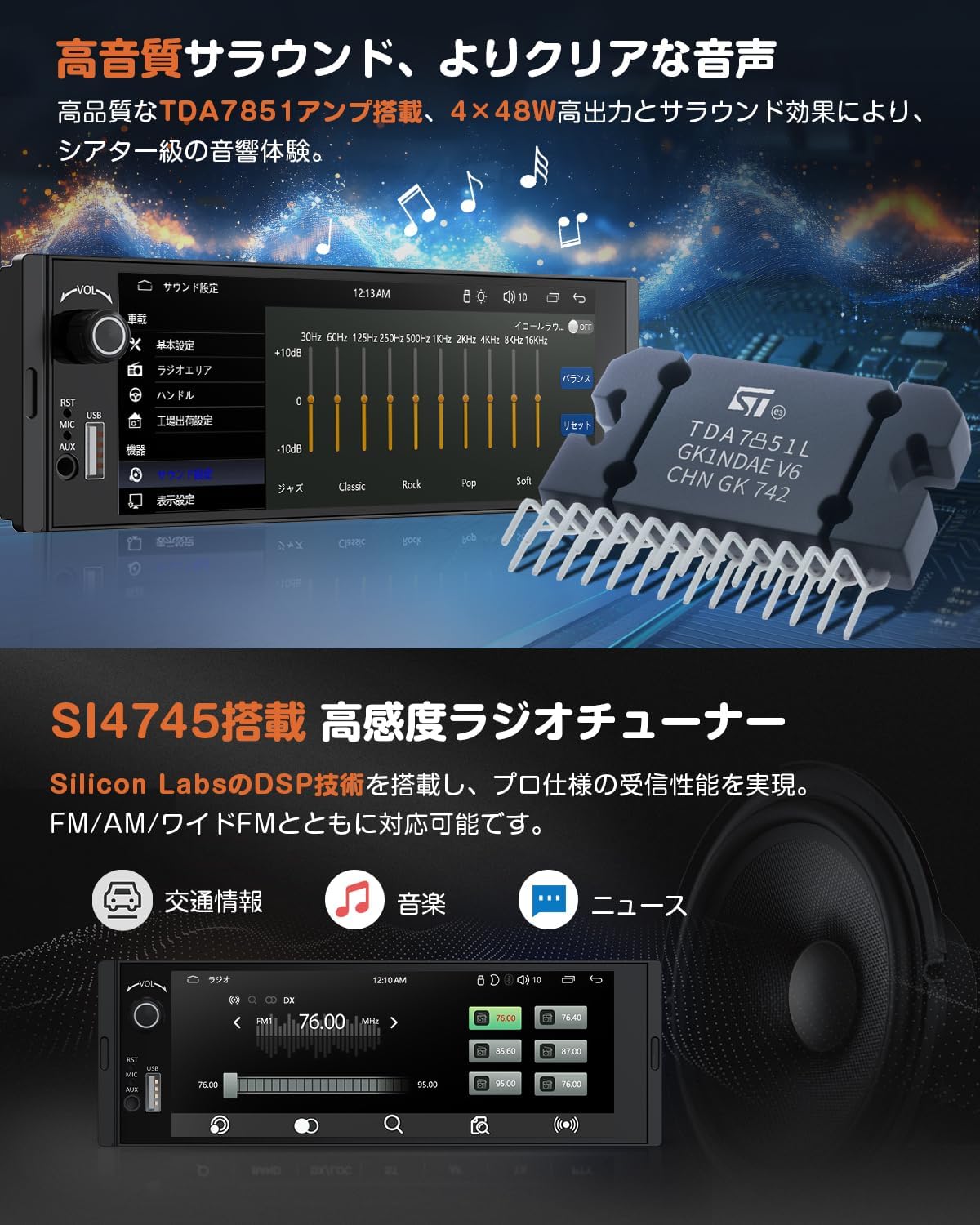
- High-Quality Audio & Radio: Equipped with a TDA7851 amplifier for 4x48W high output and surround sound effects, offering a theater-level audio experience. A 10-band EQ allows for detailed sound customization. The SI4745 high-sensitivity radio tuner ensures stable reception for FM/AM/Wide FM, providing access to traffic information, music, and news.
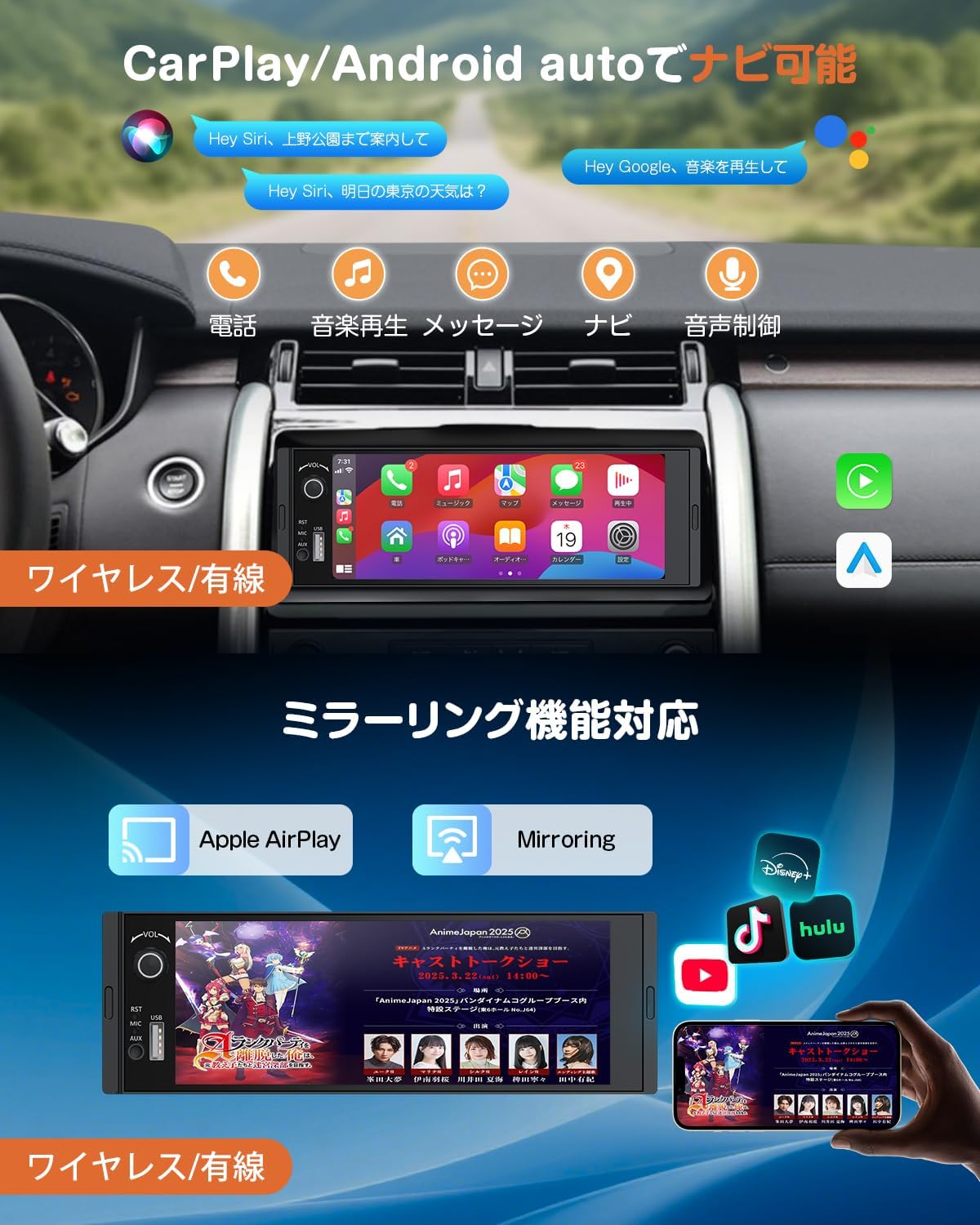
- Inteligentní připojení: Supports wireless and wired CarPlay/Android Auto for seamless smartphone integration, enabling navigation, music, weather forecasts, and voice assistant access via touch panel or voice commands. Mirroring function allows displaying smartphone content (e.g., maps, videos) on the car audio screen.
- Bluetooth 5.3: Features Bluetooth 5.3 for stable music playback and phonebook synchronization. Supports hands-free calling with an external microphone for clear, noise-free conversations while driving.
- Ovládání na volantu: Compatible with steering wheel controls, allowing safe operation of volume, track changes, and channel selection without removing hands from the steering wheel.
- Záložní kamera: Includes an IP68 waterproof backup camera that automatically displays the rear view when the vehicle is in reverse gear, enhancing parking safety.
- Multifunctional USB Port: Provides a USB port for wired CarPlay/Android Auto connection, smartphone charging (not fast charging), and USB memory playback of music, videos, and images. Supports 8-128GB USB memory.
- Multi-Terminal Output: Offers 3-system output for easy connection to external displays or speakers, and 2-system input for flexible external device connections, allowing shared viewing and audio across multiple devices.
- 6.36-inch IPS Touch Panel & Physical Knob: Features a capacitive multi-touch IPS screen with 1280*480p resolution for smooth and precise operation. A physical volume knob provides convenient control.
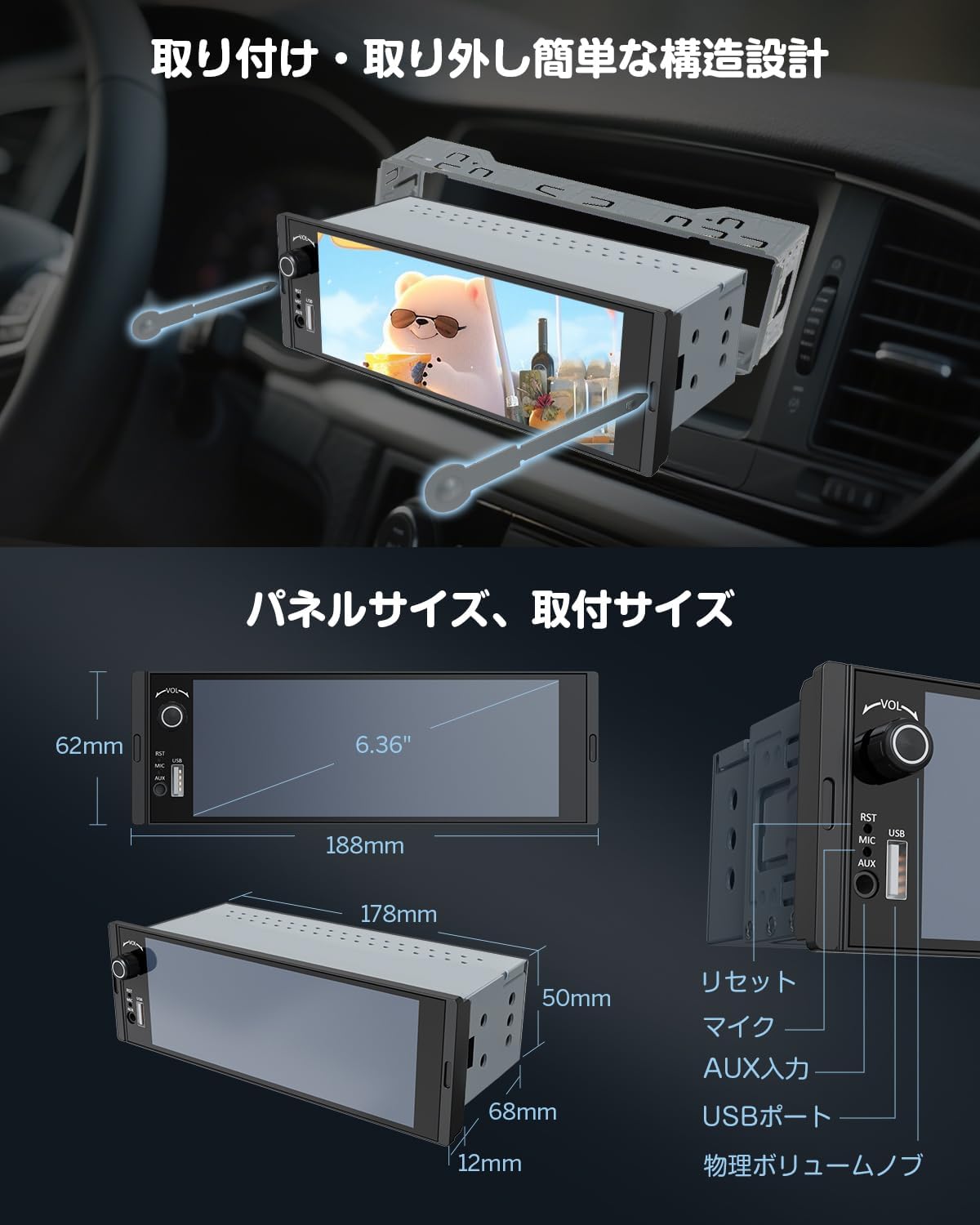
- Easy Installation Design: Designed for simple installation and removal, with two standard removal keys included.

3. Nastavení
3.1. Instalace
The EONON X3UJ is designed for 1DIN car audio slots. Due to variations in vehicle models and dashboard configurations, professional installation is highly recommended. Ensure the unit fits correctly into your vehicle's 1DIN space. The unit features an easy installation/removal design using the provided keys.
- Kontrola před instalací: Verify the dimensions of the unit against your car's dashboard opening.
- Montáž: Secure the unit using the provided mounting screws.
- Odstranění: Insert the two removal keys into the slots on either side of the unit until they click, then gently pull the unit out.
3.2. Schéma zapojení
Refer to the detailed wiring diagram below for correct connections. Incorrect wiring can damage the unit or your vehicle's electrical system. If you are unsure, consult a professional installer.

3.3. Dodávané příslušenství
The following items are included in your EONON X3UJ package:
- Napájecí kabel x 1
- 15A Fuse x 1
- External Microphone x 1
- Návod k použití x 1
- Backup Camera x 1
- Speaker Output Cable x 1
- Removal Keys x 2
- Montážní šrouby x 2

4. Návod k obsluze
4.1. Základní obsluha
- Zapnutí/vypnutí: The unit typically powers on with the vehicle's ignition. To manually turn off, press and hold the power button (usually integrated with the volume knob).
- Ovládání hlasitosti: Use the physical volume knob on the front panel to adjust the audio level.
4.2. Radio (FM/AM/Wide FM)
Access the radio function from the main menu. Use the on-screen controls to scan for stations, save presets, and switch between FM, AM, and Wide FM bands. The SI4745 tuner provides stable reception.
4.3. Připojení Bluetooth
- Párování: Go to the Bluetooth settings on the unit and enable Bluetooth on your smartphone. Hledat the EONON X3UJ device and pair them.
- Hands-free volání: Once paired, you can make and receive calls directly through the unit. The external microphone ensures clear voice transmission.
- Bluetooth audio: Stream music from your smartphone to the car audio system wirelessly.

4.4. CarPlay a Android Auto
Connect your smartphone to enable CarPlay or Android Auto functionalities.
- Kabelové připojení: Connect your smartphone to the unit's USB port using a compatible USB cable.
- Bezdrátové připojení: For wireless CarPlay/Android Auto, ensure your smartphone supports 5GHz Wi-Fi and has the latest Android Auto app installed (for Android Auto).
- Funkce: Access navigation, music, messages, and voice assistants (Siri, Google Assistant) directly from the unit's screen.
4.5. Mirroring Function
The mirroring function allows you to display your smartphone's screen on the EONON X3UJ. This can be done via wired or wireless connection.
- Používání: Ideální pro viewing maps, photos, or videos from your phone.
- Poznámka: Due to copyright restrictions, some apps like Netflix may not support mirroring.
4.6. Přehrávání médií z USB
Insert a USB memory device (8-128GB) into the USB port to play various media files.
- Podporované formáty obrázků: JPEG, BMP, PNG
- Podporované video formáty: MPG, DAT, TS, AVI, MP4, MOV, 3GP, ASF, VOB, MKV, FLV, RM, RMVB
- Podporované zvukové formáty: MP3, WMA, WAV, OGG, AAC, FLAC, APE

4.7. Couvací kamera
When the vehicle is shifted into reverse gear, the unit will automatically switch to display the rear view from the connected backup camera. This feature enhances safety during parking maneuvers.
4.8. Ovládání na volantu
If your vehicle supports steering wheel controls, you can configure them to operate the EONON X3UJ. This allows you to adjust volume, change tracks/channels, and manage calls without distraction.
- Nastavení: Access the steering wheel control settings in the unit's menu. Follow the on-screen instructions to program each button.

4.9. Nastavení zvuku (ekvalizér)
Utilize the 10-band equalizer to fine-tune the audio output to your preference. Adjust various frequency bands to achieve your desired sound profile.
5. Údržba
To ensure the longevity and optimal performance of your EONON X3UJ car audio system, follow these maintenance guidelines:
- Čištění obrazovky: Dotykovou obrazovku jemně otřete měkkým hadříkem, který nepouští vlákna. V případě odolných šmouh lehceampOtřete hadřík vodou nebo čisticím prostředkem vhodným pro obrazovky. Vyhněte se agresivním chemikáliím nebo abrazivním materiálům.
- Generální úklid: Udržujte zařízení bez prachu a nečistot. K čištění okolí tlačítek a portů použijte měkký kartáč nebo stlačený vzduch.
- Teplota: Avoid exposing the unit to extreme temperatures, both hot and cold, as this can affect its electronic components.
- Kontakt s kapalinou: Prevent any liquids from entering the unit. In case of accidental spills, immediately power off the unit and allow it to dry completely before use.
- Připojení kabelů: Pravidelně kontrolujte všechna kabelová připojení, abyste se ujistili, že jsou bezpečná a nepoškozená.
6. Řešení problémů
If you encounter issues with your EONON X3UJ, refer to the following common problems and solutions:
| Problém | Možná příčina | Řešení |
|---|---|---|
| Žádná síla | Uvolněné připojení napájení, spálená pojistka, problém s autobaterií. | Check power cables, inspect the 15A fuse (replace if blown), ensure vehicle battery is charged. |
| Žádný zvuk | Volume too low, mute activated, incorrect audio source, loose speaker wires. | Increase volume, check mute status, select correct audio source, verify speaker connections. |
| Bluetooth se nepřipojuje | Bluetooth off on unit/phone, device not in pairing mode, interference. | Ensure Bluetooth is enabled on both devices, put unit in pairing mode, try re-pairing, move closer to the unit. |
| CarPlay/Android Auto nefunguje | Incorrect USB cable, phone not compatible, app not updated, wireless connection issues. | Use original/certified USB cable, check phone compatibility, update app, ensure 5GHz Wi-Fi for wireless. |
| Couvací kamera se nezobrazuje | Loose camera connection, reverse trigger wire not connected, faulty camera. | Check camera cable, verify reverse trigger wire connection, test camera functionality. |
| Dotyková obrazovka nereaguje | Softwarová závada, znečištěná obrazovka, fyzické poškození. | Restart the unit, clean the screen, if issue persists, contact support. |
If the problem persists after trying these solutions, please contact EONON customer support for assistance.
7. Specifikace
| Funkce | Detail |
|---|---|
| Název značky | Eonon |
| Číslo modelu | X3UJ |
| Kompatibilní zařízení | chytré telefony |
| Barva | Černý |
| Použití baterie | Žádný |
| Výrobce | EONON |
| Další funkce | IPS Touch Screen, Wireless/Wired Android Auto+CarPlay Compatible |
| Technologie připojení | Bluetooth, USB |
| Velikost obrazovky | 6.36 palců |
| Rozměry produktu | 7 x 17.8 x 5 cm |
| Hmotnost položky | 0.5 kg |
| Typ ovladače | Mechanický knoflík |
| Typ konektoru | USB typu A |
| Režim zvukového výstupu | Surround |
8. Záruka a podpora
EONON products are designed for reliability and performance. For warranty information, please refer to the warranty card included with your product or visit the official EONON website. If you require technical assistance, troubleshooting, or have questions about your EONON X3UJ, please contact EONON customer support. Details can typically be found on the EONON webna webu nebo v dokumentaci k nákupu.


