1. Důležité bezpečnostní informace
Před použitím projektoru si prosím přečtěte všechny bezpečnostní pokyny. Uschovejte si tento návod k obsluze pro budoucí použití.
- Neblokujte větrací otvory. Zajistěte dostatečný prostor kolem projektoru pro správné proudění vzduchu.
- Zabraňte přímému vystavení světlu z objektivu projektoru.
- Neumisťujte projektor do blízkosti zdrojů tepla ani na přímé sluneční světlo.
- Používejte pouze napájecí adaptér dodaný se zařízením.
- Nepokoušejte se projektor otevírat ani opravovat sami. Veškerý servis svěřte kvalifikovanému personálu.
- Chraňte projektor před vodou nebo jinými kapalinami.
2. Obsah balení
Ověřte, zda jsou v balení přítomny všechny položky:
- Chytrý projektor Aurzen Roku TV (D1R Cube)
- Napájecí kabel
- Dálkové ovládání (vyžaduje 2 baterie AAA, nejsou součástí balení)
- Uživatelská příručka (tento dokument)
3. Konec produktuview
Aurzen D1R Cube je kompaktní chytrý projektor s vestavěným televizorem Roku pro integrované streamování. Nabízí rozlišení 1080p Full HD, Dolby Audio a uzavřený optický engine pro zvýšenou odolnost a jasnější obraz.
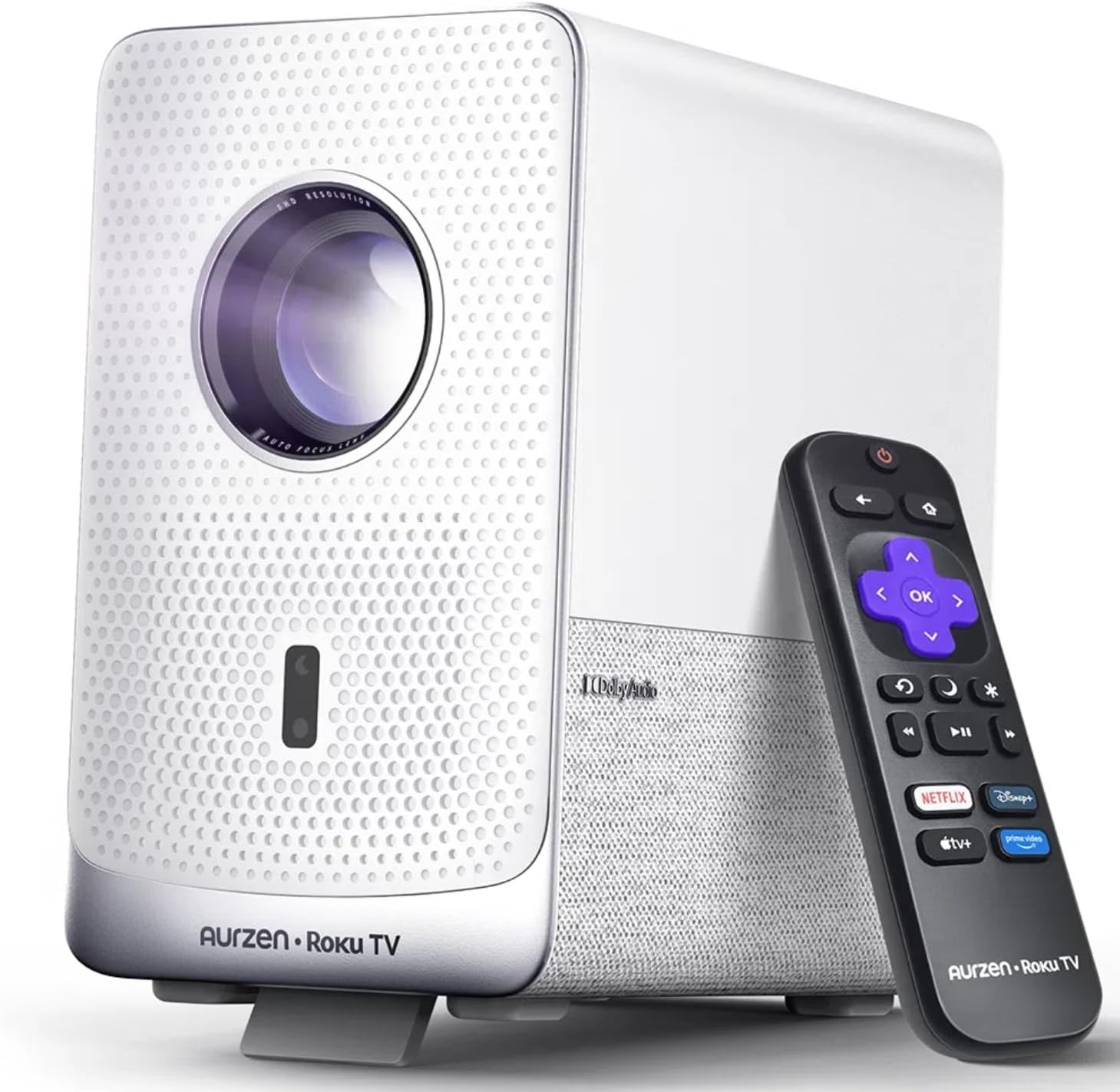
Obrázek: Chytrý projektor Aurzen D1R Cube s dálkovým ovladačem. Projektor je bílý s texturovaným předním panelem a viditelnou čočkou.
Klíčové vlastnosti:
- Vestavěná televize Roku: Získejte přímý přístup k oblíbeným streamovacím službám.
- Utěsněný optický motor: Chrání před prachem, zachovává kvalitu obrazu a prodlužuje životnost.
- Rozlišení 1080P FHD: Poskytuje ostrý a jasný obraz.
- Dolby Audio: Poskytuje vylepšený zvukový zážitek.
- Automatické ostření a korekce lichoběžníkového zkreslení: Automatické nastavení obrazu pro rychlé nastavení.
- Dvoupásmové Wi-Fi a Bluetooth 5.2: Pro bezproblémové připojení.
- Apple AirPlay: Snadné sdílení obsahu ze zařízení Apple.
- Kompatibilita chytré domácnosti: Funguje s Apple HomeKit, Siri, Alexou a Google Assistant.

Obrázek: Schéma vnitřního zapojení znázorňující uzavřený optický motor projektoru Aurzen D1R Cube a zdůrazňující jeho prachotěsnou konstrukci.
4. Nastavení
4.1 Počáteční umístění
Umístěte projektor na stabilní, rovný povrch. Pro optimální viewUmístěte jej přímo před projekční plochu (stěnu nebo plátno). Projektor je vybaven automatickým ostřením a korekcí lichoběžníkového zkreslení pro úpravu obrazu, ale doporučuje se relativně přímý úhel.

Obraz: Vizuální znázornění funkcí automatického ostření a automatické korekce lichoběžníkového zkreslení projektoru, které ukazuje, jak se obraz automaticky upravuje a vytváří tak dokonalý obdélníkový obraz.
4.2 Připojení napájení
- Připojte napájecí kabel ke vstupnímu portu projektoru.
- Zapojte druhý konec napájecího kabelu do vhodné elektrické zásuvky.
- Projektor se zapne automaticky nebo jej lze zapnout pomocí tlačítka napájení na zařízení či dálkovém ovladači.
4.3 Nastavení dálkového ovládání
Vložte dvě baterie AAA (nejsou součástí balení) do dálkového ovladače. Dbejte na správnou polaritu. Dálkový ovladač je předem spárován s projektorem.
4.4 Počáteční nastavení televizoru Roku
Po prvním zapnutí postupujte podle pokynů na obrazovce a nastavte televizor Roku. Patří sem:
- Výběr jazyka.
- Připojení k síti Wi-Fi (je vyžadováno stabilní připojení k internetu).
- Aktivace vašeho účtu Roku. Pokud jej nemáte, budete vyzváni k vytvoření bezplatného účtu.
- Instalace požadovaných streamovacích kanálů.
5. Návod k obsluze
5.1 Zapnutí/vypnutí
Stisknutím tlačítka napájení na projektoru nebo na dálkovém ovladači zapnete nebo vypnete zařízení.
5.2 Navigace na domovské obrazovce Roku
Pro navigaci na domovské obrazovce Roku použijte směrový ovladač a tlačítko OK na dálkovém ovladači. Získejte přístup ke streamovaným kanálům, vyhledávejte obsah a upravujte nastavení.

Obrázek: Snímek obrazovky domovské obrazovky Roku TV zobrazující různé ikony streamovacích aplikací a možnosti navigace.
5.3 Streamovací aplikace
Platforma Roku TV poskytuje přístup k široké škále streamovacích aplikací, jako jsou Netflix, Prime Video, Disney+, Hulu, YouTube a další. Vyberte aplikaci na domovské obrazovce a spusťte streamování.

Obrázek: Grafická ukázkaasinloga různých populárních streamovacích služeb dostupných na platformě Roku TV, včetně Netflixu, Disney+ a Hulu.
5.4 Připojení externích zařízení
Projektor je vybaven porty HDMI a USB pro připojení externích zařízení.
- HDMI: Připojte herní konzole, přehrávače Blu-ray nebo jiná zařízení s podporou HDMI. Vyberte odpovídající vstup HDMI z nabídky Roku TV.
- USB: Přehrát média file(fotografie, videa, hudbu) z paměťového zařízení USB.
5.5 Připojení Bluetooth
Pro vylepšený zvukový zážitek připojte Bluetooth sluchátka nebo reproduktory.
- Přejděte do nastavení televizoru Roku.
- Vyberte „Dálkové ovladače a zařízení“ a poté „Zařízení Bluetooth“.
- Přepněte své zařízení Bluetooth do režimu párování.
- Vyberte zařízení ze seznamu na promítací ploše projektoru, které chcete spárovat.

Obrázek: Diagram znázorňující připojení Bluetooth projektoru Aurzen D1R Cube, který ukazuje jeho připojení k různým externím zvukovým zařízením.
5.6 Apple AirPlay
Sdílejte obsah ze svých zařízení Apple (iPhone, iPad, Mac) do projektoru bez námahy pomocí Apple AirPlay.
- Ujistěte se, že vaše zařízení Apple a projektor jsou připojeny ke stejné síti Wi-Fi.
- Na svém zařízení Apple otevřete obsah, který chcete sdílet (např. fotografie, videa).
- Klepněte na ikonu AirPlay (obvykle obdélník se šipkou směřující nahoru).
- Vyberte si svůj projektor Aurzen D1R Cube ze seznamu dostupných zařízení.

Obrázek: Rodina sleduje obsah promítaný ze zařízení Apple na velkou obrazovku přes Apple AirPlay s využitím projektoru Aurzen D1R Cube.
5.7 Hlasové ovládání a integrace chytré domácnosti
Projektor podporuje hlasové ovládání prostřednictvím mobilní aplikace Roku a je kompatibilní s Apple HomeKit, Siri, Alexou a Google Assistant pro širší integraci s chytrou domácností.
- Mobilní aplikace Roku: Stáhněte si mobilní aplikaci Roku a používejte hlasové příkazy, snadno píšte a ovládejte projektor ze svého smartphonu.
- Asistenti chytré domácnosti: Propojte svůj účet Roku s preferovaným ekosystémem chytré domácnosti (Apple Home, Amazon Alexa, Google Home) a ovládejte projektor hlasovými příkazy.
6. Údržba
6.1 Utěsněný optický motor
Aurzen D1R Cube je vybaven uzavřeným optickým motorem, který zabraňuje hromadění prachu na vnitřních součástech. To snižuje potřebu pravidelného čištění vnitřku a pomáhá udržovat konzistentní kvalitu obrazu v průběhu času.

Obrázek: Srovnání ukazující rozdíl v hromadění prachu mezi uzavřeným optickým motorem (vlevo) a otevřeným optickým motorem (vpravo) po určité době používání.
6.2 Obecné čištění
- Vnější: Vnější povrch projektoru otřete měkkým, suchým hadříkem. Nepoužívejte abrazivní čisticí prostředky ani rozpouštědla.
- Čočka: Jemně očistěte čočku projektoru hadříkem na čištění čoček nebo speciálním roztokem na čištění čoček. Nedotýkejte se čočky prsty.
- Větrání: Ujistěte se, že větrací otvory jsou čisté od prachu a nečistot. V případě potřeby je jemně očistěte měkkým kartáčem nebo stlačeným vzduchem.
6.3 Skladování
Pokud projektor delší dobu nepoužíváte, skladujte jej na chladném a suchém místě mimo dosah přímého slunečního záření a extrémních teplot. Zvažte použití ochranného krytu nebo pouzdra, abyste zabránili hromadění prachu.
7. Řešení problémů
Pokud se s projektorem Aurzen D1R Cube setkáte s problémy, podívejte se na následující běžná řešení:
| Problém | Možné řešení |
|---|---|
| Žádná síla | Ujistěte se, že je napájecí kabel bezpečně připojen k projektoru i k elektrické zásuvce. Vyzkoušejte zásuvku s jiným zařízením. |
| Žádný obrázek | Zkontrolujte, zda je projektor zapnutý. Ověřte, zda je správně vybrán vstupní zdroj (HDMI, USB). Ujistěte se, že je sejmuta krytka objektivu. |
| Rozmazaný obrázek | Projektor má automatické ostření. Pokud obraz zůstává rozmazaný, zkuste projektor přemístit nebo jej restartovat, aby se automatické ostření znovu spustilo. Ujistěte se, že je objektiv čistý. |
| Žádný zvuk | Zkontrolujte úroveň hlasitosti na projektoru a všech připojených externích zvukových zařízeních. Ujistěte se, že je zvuk Bluetooth správně spárován nebo že jsou externí reproduktory správně připojeny. |
| Problémy s připojením k Wi-Fi | Ujistěte se, že váš Wi-Fi router funguje. Restartujte projektor a router. Ověřte, zda je v nastavení televizoru Roku správné heslo k Wi-Fi. |
| Dálkové nereaguje | Vyměňte baterie AAA v dálkovém ovladači. Ujistěte se, že mezi dálkovým ovladačem a projektorem nejsou žádné překážky. |
Pro další pomoc se prosím obraťte na online zdroje podpory nebo na zákaznický servis Aurzen.
8. Specifikace
Podrobné technické specifikace chytrého projektoru Aurzen D1R Cube:
| Funkce | Specifikace |
|---|---|
| Značka | Aurzen |
| Model | Kostka D1R |
| Maximální rozlišení displeje | 1920 x 1080 (1080P Full HD) |
| Technologie připojení | WiFi (dvoupásmové 2.4G/5G), Bluetooth 5.2, HDMI, USB, audio |
| Speciální funkce | Chytrý projektor Roku TV, uzavřený optický procesor, Dolby Audio, Apple AirPlay, kompatibilita s chytrou domácností |
| Hmotnost položky | 5.68 libry |
| Rozměry produktu | 7.42 x 7 x 7.83 palce |
| Barva | Bílý |
9. Záruka a podpora
9.1 Záruka na produkt
Na produkty Aurzen se vztahuje záruka výrobce. Prostudujte si prosím záruční list, který je součástí produktu, nebo navštivte oficiální webové stránky Aurzen. webkonkrétní záruční podmínky naleznete na webových stránkách.
9.2 Zákaznická podpora
Pro technickou podporu, pomoc s řešením problémů nebo reklamace se obraťte na zákaznický servis společnosti Aurzen prostřednictvím jejich oficiálních kanálů. Více informací a kontaktní možnosti naleznete na Značkový obchod Aurzen na Amazonu.


