1. Úvod
Thank you for choosing the KODAK V500 Video Light. This professional-grade video light is designed to provide powerful, adjustable illumination for various photography and videography needs. Featuring a wide color temperature range from 2800K to 6500K, a high Color Rendering Index (CRI) of 96, and dimmable brightness, the V500 ensures accurate and versatile lighting. Its lightweight design, intuitive LCD display, and wireless remote control make it an essential tool for both studio and on-location use.
2. Důležité bezpečnostní pokyny
Please read all safety instructions carefully before using the KODAK V500 Video Light. Failure to follow these instructions may result in electric shock, fire, or serious injury.
- Ne operate the light with wet hands or in wet conditions.
- Ne block the ventilation openings on the light fixture. Overheating can cause damage or fire.
- Ne look directly into the light source when it is operating at high brightness. This can cause eye damage.
- Keep the light away from flammable materials and liquids.
- Ensure the light is securely mounted on a stable stand before operation.
- Používejte pouze specifikovaný napájecí adaptér a příslušenství.
- Disconnect the power supply before cleaning or when not in use.
- Tento výrobek není hračka. Uchovávejte mimo dosah dětí.
- If any malfunction occurs, immediately disconnect power and contact customer support.
3. Obsah balení
Ověřte, zda jsou v balení přítomny všechny položky:
- KODAK V500 Video Light Unit
- Bezdrátové dálkové ovládání
- Napájecí adaptér
- Standardní reflektor
- Návod k použití
4. Konec produktuview
Familiarize yourself with the components of your KODAK V500 Video Light and its remote control.
4.1. KODAK V500 Video Light Unit
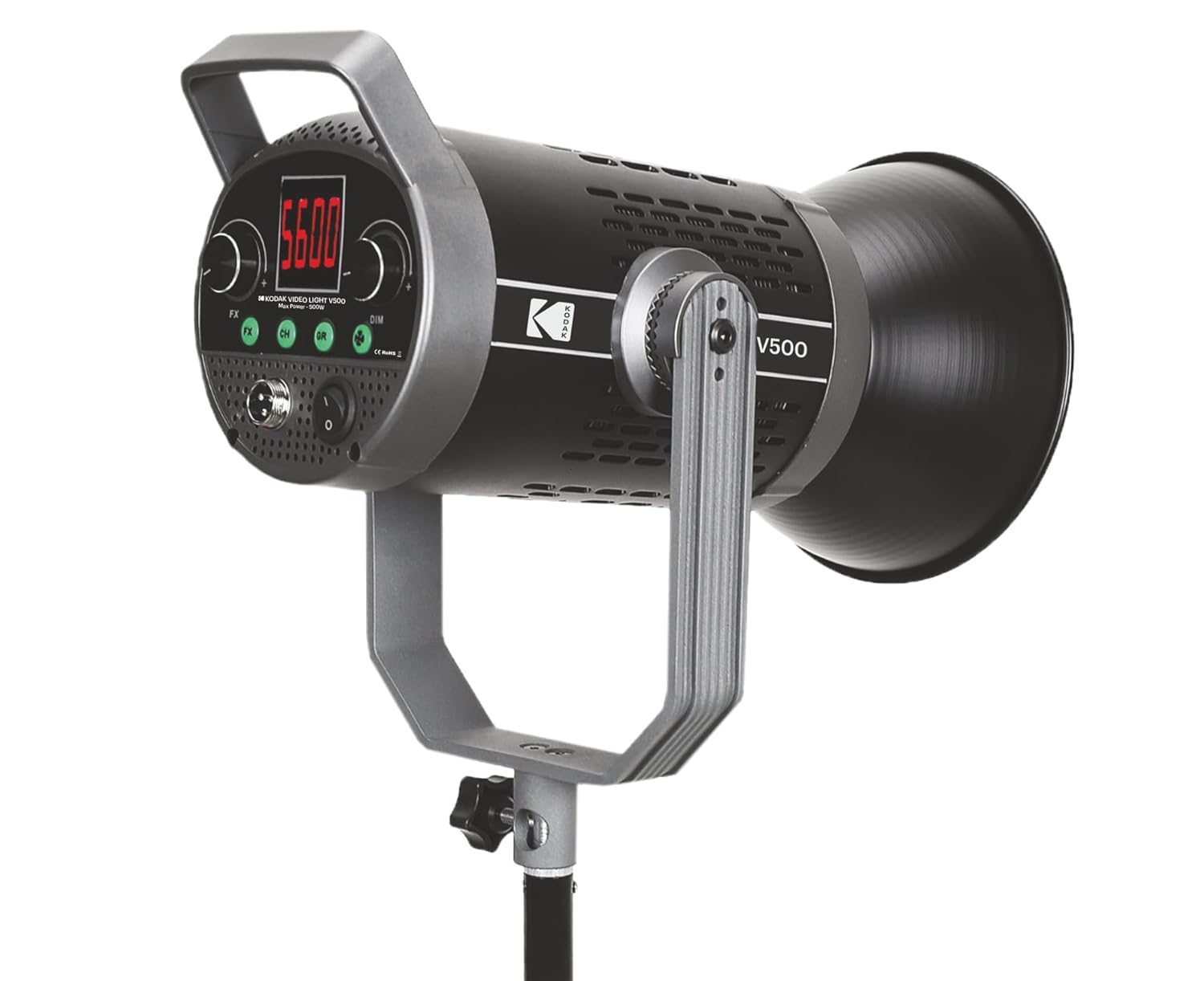
Obrázek 1: Přední view of the KODAK V500 Video Light with reflector attached, mounted on a light stand.

Obrázek 2: Rear control panel of the KODAK V500 Video Light.
- Reflektor: Directs and focuses the light output.
- Zdroj světla LED: High-power LED array.
- Montážní držák: Allows attachment to a light stand and adjustment of tilt angle.
- Zamykací knoflík: Secures the light's tilt angle.
- LCD displej: Shows current settings such as color temperature, brightness, and channel/group.
- Tlačítko FX: Activates special effects modes (if available).
- CH/GR Buttons: Selects the operating channel or group for wireless control.
- DIM Dial: Adjusts brightness intensity.
- CCT Dial: Adjusts color temperature (Correlated Color Temperature).
- Vstupní napájení (DC IN): Připojuje se k napájecímu adaptéru.
- Vypínač: Zapíná nebo vypíná světlo.
4.2. Bezdrátové dálkové ovládání

Obrázek 3: KODAK V500 Wireless Remote Control.
- Vypínač: Zapíná nebo vypíná světlo.
- CCT/MODE Button: Switches between Color Temperature adjustment and other modes.
- Tlačítko SET: Confirms selections or enters menu.
- +/- tlačítka: Adjusts values (brightness, color temperature) or navigates menus.
- KODAK Logo: Identifikace značky.
5. Pokyny k nastavení
Follow these steps to set up your KODAK V500 Video Light for use.
- Montáž světla:
- Attach the KODAK V500 Video Light to a compatible light stand using the mounting bracket.
- Tighten the locking knob on the light stand to secure the light.
- Adjust the tilt angle of the light using the locking knob on the light's mounting bracket, then tighten to secure.
- Připevnění reflektoru:
- Align the reflector with the front of the light unit.
- Otáčejte reflektorem ve směru hodinových ručiček, dokud bezpečně nezapadne na své místo.
- Připojení napájení:
- Connect the power adapter cable to the DC IN port on the rear of the light unit.
- Zapojte napájecí adaptér do vhodné elektrické zásuvky.
6. Návod k obsluze
Learn how to power on, adjust settings, and utilize the features of your KODAK V500 Video Light.
6.1. Zapnutí/vypnutí
Stiskněte tlačítko Vypínač napájení on the rear control panel of the light unit to turn the light ON or OFF. Alternatively, use the Tlačítko napájení na bezdrátovém dálkovém ovladači.
6.2. Nastavení jasu
The KODAK V500 offers dimmable brightness control:
- Na světelné jednotce: Otočte DIM Dial clockwise to increase brightness and counter-clockwise to decrease brightness. The brightness level will be displayed on the LCD.
- Použití dálkového ovládání: Stiskněte tlačítko +/- tlačítka pro nastavení úrovně jasu.
6.3. Úprava teploty barev
The color temperature can be adjusted from 2800K (warm) to 6500K (cool):
- Na světelné jednotce: Otočte CCT Dial clockwise to increase the color temperature (cooler light) and counter-clockwise to decrease it (warmer light). The color temperature will be displayed on the LCD.
- Použití dálkového ovládání: Stiskněte tlačítko CCT/MODE Button to enter CCT adjustment mode, then use the +/- tlačítka to change the color temperature.
6.4. Wireless Control (Channel and Group)
The KODAK V500 supports wireless control, allowing you to manage multiple lights simultaneously.
- Setting Channel (CH): Stiskněte tlačítko Tlačítko CH on the light unit or remote. Use the +/- tlačítka (on remote) or DIM/CCT Dials (on light) to select a channel (e.g., 1-16). Ensure all lights you wish to control together are set to the same channel.
- Setting Group (GR): Stiskněte tlačítko Tlačítko GR on the light unit or remote. Use the +/- tlačítka (on remote) or DIM/CCT Dials (on light) to select a group (e.g., A, B, C). This allows for independent control of lights within the same channel but different groups.
- Párování dálkového ovladače: The remote should automatically pair with lights on the same channel and group. If not, ensure both the light and remote are set to the desired channel and group.
6.5. Speciální efekty (FX)
The KODAK V500 may include various special effects modes for creative lighting scenarios.
- Stiskněte tlačítko Tlačítko FX on the light unit to cycle through available special effects.
- Použijte DIM/CCT Dials to adjust parameters within the selected effect, if applicable.
7. Údržba
Proper maintenance ensures the longevity and optimal performance of your KODAK V500 Video Light.
- Čištění: Use a soft, dry cloth to wipe the exterior of the light. For stubborn dirt, a slightly damp Lze použít hadřík a poté suchý hadřík. Ne nepoužívejte agresivní chemikálie, rozpouštědla ani abrazivní čisticí prostředky.
- Skladování: Pokud světlo nepoužíváte, skladujte ho na chladném a suchém místě, mimo dosah přímého slunečního záření a nadměrné vlhkosti.
- Péče o čočky: Keep the LED light source clean and free of dust. Use a lens blower or a soft brush to remove dust. Avoid touching the LED surface directly.
8. Řešení problémů
If you encounter issues with your KODAK V500 Video Light, refer to the following common problems and solutions.
| Problém | Možná příčina | Řešení |
|---|---|---|
| Světlo se nerozsvítí. | No power supply; Power adapter not connected; Power switch off. | Ensure power adapter is securely connected and plugged into a working outlet. Check if the power switch is in the ON position. |
| Dálkové ovládání nefunguje. | Remote batteries low/dead; Incorrect channel/group setting; Obstruction between remote and light. | Replace remote batteries. Ensure the remote and light are set to the same channel and group. Remove any obstructions. Operate within effective range. |
| Jas ani teplotu barev nelze upravit. | Controls locked; Malfunction. | Check if any lock function is active (refer to advanced settings if applicable). If the issue persists, contact customer support. |
| Světlo bliká nebo se chová nepravidelně. | Unstable power supply; Overheating; Internal fault. | Ensure a stable power source. Allow the light to cool down if it has been operating for an extended period. If the problem continues, discontinue use and contact support. |
9. Specifikace
Detailed technical specifications for the KODAK V500 Video Light.
| Funkce | Detail |
|---|---|
| Číslo modelu | V500 |
| Výkon | 500W |
| Rozsah teploty barev | 2800K - 6500K |
| Index podání barev (CRI) | 96 |
| Nastavení jasu | Stmívatelné |
| Kontrolní metoda | On-board controls, Wireless Remote Control |
| Rozměry produktu (DxŠxV) | 33.5 x 19.5 x 15.5 cm |
| Hmotnost položky | 2.88 kg |
| Země původu | Čína |
10. Záruka a zákaznická podpora
KODAK products are manufactured to high-quality standards. For warranty information, please refer to the warranty card included with your product or visit the official KODAK website. For technical assistance, troubleshooting, or service inquiries, please contact KODAK customer support.
Kontakt na výrobce:
BHATIA PHOTO INDUSTRIES PVT LTD
Floor No.3, Kundan House, Nehru Place, New Delhi, Delhi, 110019
Kontakt: 9999535381
Email: Lapstuffmart204@gmail.com


