Zavedení
This manual provides detailed instructions for the safe and effective use of your BAOFENG F22 FRS Two-Way Radio. Please read this manual thoroughly before operating the device to ensure proper function and to prevent damage.
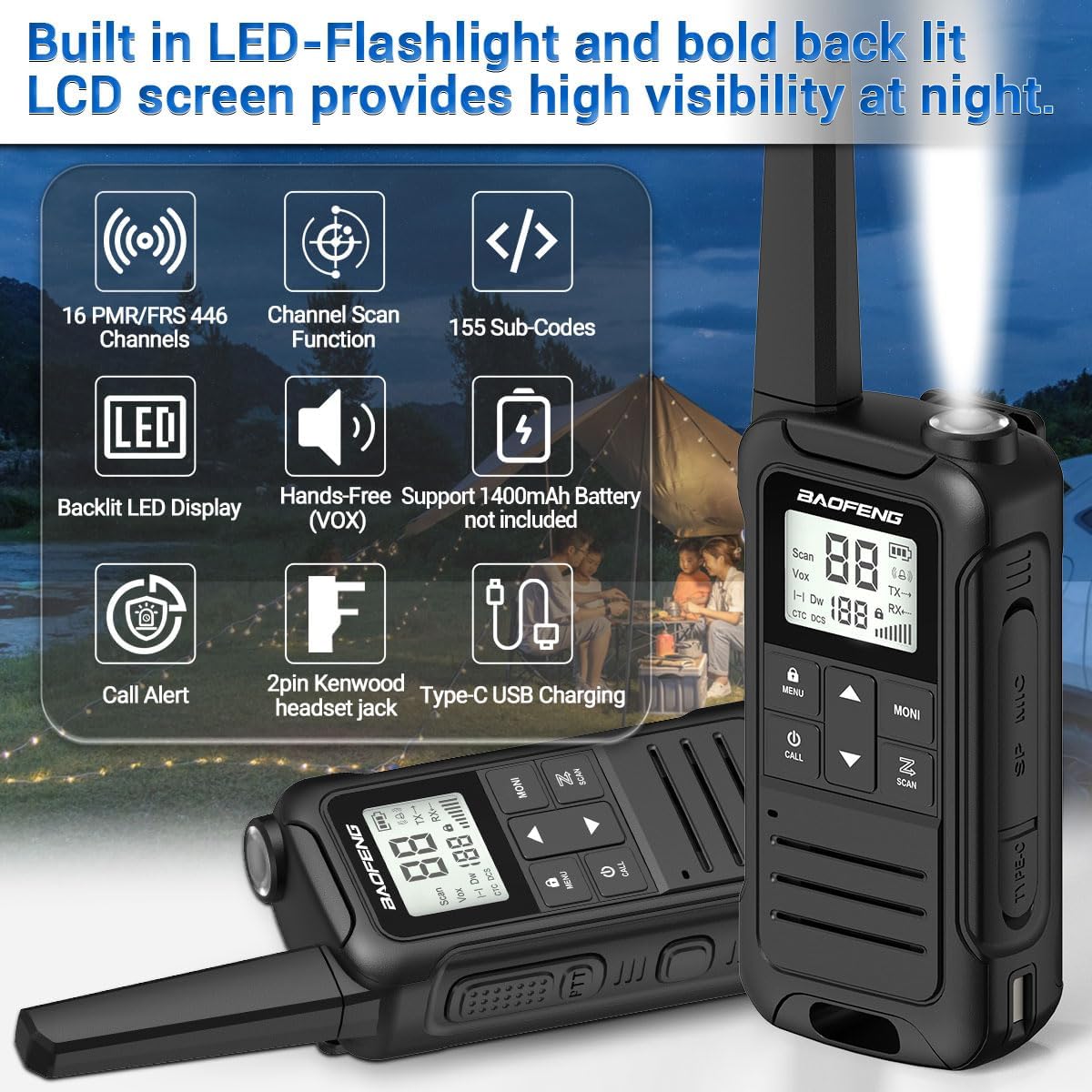
Image: BAOFENG F22 Two-Way Radio showing its built-in LED flashlight, backlit LCD screen, 16 PMR/FRS 446 channels, channel scan, 155 sub-codes, hands-free (VOX) support, 1400mAh battery (not included in image, but supported), call alert, 2-pin Kenwood headset jack, and Type-C USB charging.
Obsah balení
Ověřte, zda jsou v balení přítomny všechny položky:
- BAOFENG F22 Walkie Talkie (2 units)
- Spona na opasek (2 jednotky)
- Hand Strap (2 units)
- 1400 mAh Rechargeable Li-ion Battery (4 units)
- Uživatelský manuál (1 jednotka)
- 2-in-1 Type-C USB Charger (1 unit)
Konec produktuview
Familiarize yourself with the components and controls of your F22 radio.
Image: Diagram illustrating the BAOFENG F22 radio's components, including Antenna, Belt Clip Lock Tab, Flashlight, Backlit LCD Display, UP Button, Menu/Lock Button, Power/Call Button, DOWN Button, Speaker, PTT (Push-To-Talk) Button, Weather Monitor Button, Accessory Port, Scan Button, Type-C USB Charging Port, and Battery Release Latch. Dimensions are also shown: 2.16 inches width, 1.34 inches depth, and 6.89 inches height.
Nastavení
1. Instalace baterie
- Najděte přihrádku na baterie na zadní straně rádia.
- Stiskněte západku pro uvolnění baterie a sejměte kryt baterie.
- Insert the 1400 mAh Li-ion battery pack, ensuring the contacts align correctly.
- Nasaďte kryt baterie zpět a ujistěte se, že bezpečně zacvakne na místo.

Image: Two 1400mAh Li-ion battery packs (Model: BL-T22 and LB-T22) for the BAOFENG F22 radio, showing their specifications and safety warnings.
2. Nabíjení baterie
- Connect the Type-C USB charger to the charging port on the side of the radio.
- Plug the other end of the charger into a compatible USB power source (e.g., wall adapter, power bank, computer USB port).
- The charging indicator on the radio will illuminate. Allow sufficient time for a full charge (approximately 3-4 hours for a depleted battery).
- Po dokončení nabíjení odpojte nabíječku.

Image: Illustration of the BAOFENG F22 radio being charged via its Type-C USB port, showing connections to various power sources like a wall adapter, power bank, and car charger. It also depicts the rechargeable Li-ion battery pack and the option to use 3xAA non-rechargeable alkaline batteries (not included).
3. Připevnění spony na opasek
- Zarovnejte klip na opasek s drážkami na zadní straně rádia.
- Slide the belt clip downwards until it locks into place.
- To remove, lift the belt clip lock tab and slide the clip upwards.
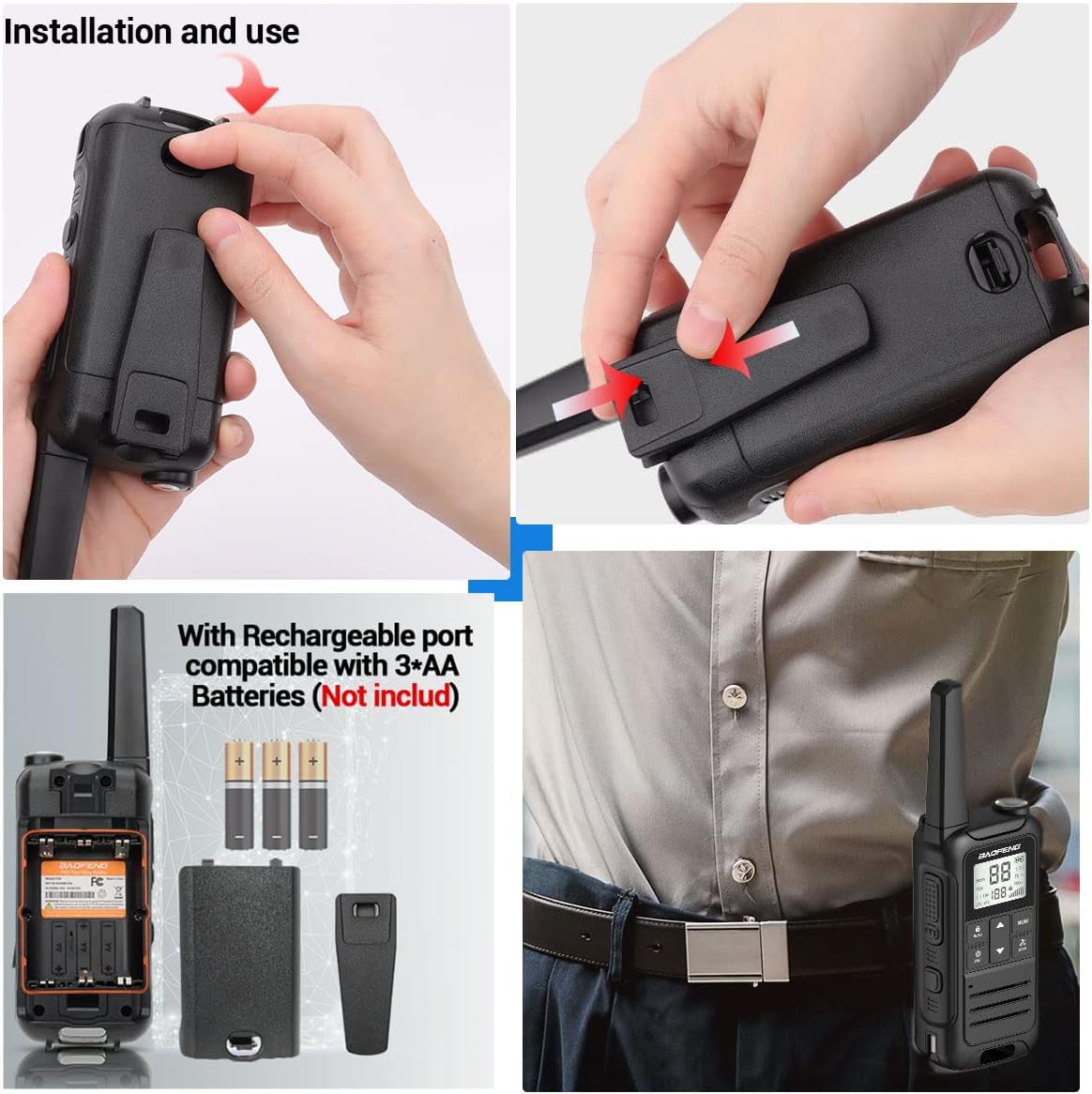
Image: A four-panel image demonstrating the installation of the battery cover and belt clip on the BAOFENG F22 radio, along with an illustration of the internal battery compartment and the radio being worn on a belt.
Návod k obsluze
1. Zapnutí/vypnutí
- Zapnutí: Stiskněte a podržte Tlačítko napájení/volání dokud se nerozsvítí LCD obrazovka.
- Vypnutí: Stiskněte a podržte Tlačítko napájení/volání dokud se obrazovka nevypne.
2. Výběr kanálu
- Použijte UP a DOLŮ pro výběr jednoho z 22 kanálů FRS.
- Ujistěte se, že všechny rádiové stanice, se kterými chcete komunikovat, jsou nastaveny na stejný kanál.
3. Kódy ochrany osobních údajů (CTCSS/DCS)
- The F22 supports 50 CTCSS and 105 DCS privacy codes.
- To set a privacy code:
- Stiskněte tlačítko Tlačítko Nabídka/Zámek pro vstup do menu.
- Navigate to the CTCSS or DCS setting using the NAHORU/DOLŮ tlačítka.
- Stiskněte Tlačítko Nabídka/Zámek again to select the setting.
- Použití NAHORU/DOLŮ to choose your desired code.
- Stiskněte Tlačítko Nabídka/Zámek pro potvrzení a ukončení.
- Pro komunikaci musí být obě rádia na stejném kanálu a mít nastavený stejný privátní kód.
4. Vysílání a příjem (PTT)
- K přenosu: Stiskněte a podržte Tlačítko PTT (Push-To-Talk). on the side of the radio. Speak clearly into the microphone. Release the PTT button to stop transmitting.
- Pro příjem: The radio will automatically receive signals when the PTT button is not pressed and it is on the same channel and privacy code as the transmitting radio.
5. Funkce VOX (hands-free ovládání)
- The VOX function allows you to transmit without pressing the PTT button, by detecting your voice.
- To activate/deactivate VOX:
- Stiskněte tlačítko Tlačítko Nabídka/Zámek pro vstup do menu.
- Přejděte do nastavení VOX.
- Stiskněte Tlačítko Nabídka/Zámek znovu pro výběr.
- Použití NAHORU/DOLŮ to set the VOX sensitivity level (higher number for lower sensitivity). Select "OFF" to deactivate.
- Stiskněte Tlačítko Nabídka/Zámek pro potvrzení a ukončení.
6. Meteorologické varování NOAA
The F22 radio can scan 12 NOAA Weather channels and provide alerts for severe weather conditions.
- To activate Weather Alert:
- Stiskněte tlačítko Tlačítko pro sledování počasí (often labeled "MONI" or with a weather icon) to enter NOAA weather mode.
- Rádio bude vyhledávat aktivní meteorologické výstrahy.
- When an alert is detected, the radio will sound an alarm.
- This feature is crucial for outdoor activities to stay informed about potential hazards.

Image: The BAOFENG F22 radio highlighting its NOAA Service capability, showing the radio in an outdoor setting with icons representing various weather phenomena like blizzards, fires, earthquakes, and rainstorms, indicating its ability to withstand extreme weather conditions and listen to all hazards weather channels and alerts.
7. Provoz svítilny
- Stiskněte tlačítko Flashlight Emergency Button (usually located on the top or side) to turn the LED flashlight on or off.
8. Další funkce
- Skenování kanálů: Stiskněte tlačítko Tlačítko skenování to initiate channel scanning. The radio will stop on an active channel. Press again to resume scanning.
- Upozornění na hovor: Stiskněte tlačítko Volací tlačítko to send an audible alert tone to other radios on the same channel.
- Zámek klávesnice: Stiskněte a podržte Tlačítko Nabídka/Zámek to lock or unlock the keypad, preventing accidental changes.
- Dual Monitoring Mode: Allows monitoring of two channels simultaneously. Refer to the on-screen indicators for active channel.
- 8 Ring Tone Options: Customizable call tones. Access through the menu settings.
Údržba
1. Péče o baterie
- Pro maximalizaci životnosti baterie ji před prvním použitím plně nabijte.
- Avoid overcharging or completely discharging the battery frequently.
- Pokud baterie nepoužíváte, skladujte je na chladném a suchém místě.
- If using AA alkaline batteries, remove them if the radio will not be used for an extended period to prevent leakage.
2. Čištění
- Otřete vnější povrch rádia měkkým hadříkemamp tkanina.
- Nepoužívejte drsné chemikálie ani abrazivní čisticí prostředky.
- Ensure the Type-C USB port and headset jack are free of dust and debris.
3. Skladování
- Rádio skladujte v suchém a bezprašném prostředí mimo dosah extrémních teplot.
- Remove batteries if storing for more than 30 days.
Odstraňování problémů
| Problém | Možná příčina | Řešení |
|---|---|---|
| Rádio se nezapne. | Baterie je vybitá nebo nesprávně nainstalovaná. | Nabijte baterii. Znovu vložte baterii a dbejte na správný kontakt. |
| Nelze vysílat ani přijímat. | Nesprávný kanál nebo privátní kód. Rádia mimo dosah. | Verify both radios are on the same channel and privacy code. Move closer to the other radio. |
| Špatná kvalita zvuku. | Low battery. Obstructions. Volume too low. | Nabijte baterii. Přejděte do otevřeného prostoru. Upravte hlasitost. |
| Klávesnice nereaguje. | Zámek klávesnice je aktivní. | Stiskněte a podržte Tlačítko Nabídka/Zámek pro odemknutí klávesnice. |
| NOAA Weather Alert not working. | Not in NOAA mode. No active alerts in the area. | Ensure you have pressed the Tlačítko pro sledování počasí. Check local weather conditions. |
Specifikace
- Model: BAOFENG F22
- ID FCC: 2AJGM-F22
- kanály: 22 FRS Channels, 12 NOAA Weather Channels
- Kódy ochrany osobních údajů: 50 CTCSS, 105 DCS
- Typ baterie: 1400 mAh Rechargeable Li-ion Battery Pack (included), compatible with 3xAA Alkaline Batteries (not included)
- Nabíjení: Typ C USB
- Jack pro sluchátka: 2-Pin Kenwood compatible
- Vlastnosti: Built-in Flashlight, Backlit LCD Display, VOX (Hands-Free), Channel Scan, Call Alert, Keypad Lock, Dual Monitoring Mode, 8 Ring Tone Options, Low Battery Audible Alert
- Rozměry (přibližně): 2.16 in (W) x 1.34 in (D) x 6.89 in (H) (including antenna)
Záruka a podpora
For warranty information, please refer to the documentation provided with your purchase or visit the official BAOFENG website. For technical assistance or customer service inquiries, please contact the seller or manufacturer directly. Customer service is available to assist with any purchase-related concerns.