Zavedení
Welcome to your new NIMO 15.6" FHD Laptop N151. This manual provides essential information to help you get started, operate, maintain, and troubleshoot your device. Please read through these instructions carefully to ensure optimal performance and longevity of your laptop.
Nastavení
1. Rozbalení a počáteční kontrola
Opatrně vyjměte všechny položky z obalu. Ujistěte se, že jsou přítomny následující součásti:
- 1 x Nimo N151 Laptop
- 1 x Type-C 65W PD Fast Charger
- 1 x Uživatelská příručka (tento dokument)
- Windows 11 Home (předinstalovaný)
Inspect the laptop for any physical damage. If any components are missing or damaged, contact customer support immediately.
2. Charging the Laptop
Before first use, fully charge your laptop. Connect the provided Type-C 65W PD Fast Charger to the Type-C charging port on your laptop and then to a power outlet. The charge LED indicator will illuminate.

Image: The NIMO laptop connected to its Type-C PD fast charger, illustrating the charging process.
3. Zapnutí a počáteční nastavení
Press the power button located on the keyboard. The laptop will boot up and guide you through the initial Windows 11 Home setup process. Follow the on-screen instructions to configure your language, region, network, and user account.
Ovládání notebooku
Zobrazit
Your NIMO laptop features a 15.6-inch Full HD (1920x1080) Anti-Glare IPS display. This display offers clear visuals and reduced eye strain, suitable for various tasks from work to entertainment.

Image: The NIMO laptop's 15.6-inch FHD IPS display, highlighting its narrow bezels and vibrant visual capabilities.
Keyboard and Fingerprint Sensor
The laptop is equipped with a backlit keyboard for comfortable typing in various lighting conditions and a numeric keypad for efficient data entry. A fingerprint sensor is integrated for secure and quick login.

Image: Close-up of the NIMO laptop's backlit keyboard, showcasing the fingerprint sensor and numeric keypad.
Webvačka
2MP webcam is integrated for video calls and online meetings.
Porty a konektivita
The NIMO N151 offers a variety of ports for versatile connectivity:
- USB porty: 3.0 Pro vysokorychlostní přenos dat.
- Port USB 2.0: Pro připojení periferií.
- Port HDMI: Pro připojení k externím displejům.
- Porty typu C: One for charging (PD Fast Charger) and one for multifunction use.
- Slot pro kartu Micro SD: Pro rozšíření úložiště nebo přenos files.
- Headphone Combo Jack: Pro audio vstup/výstup.
- Slot zámku Kensington: Pro fyzické zabezpečení.
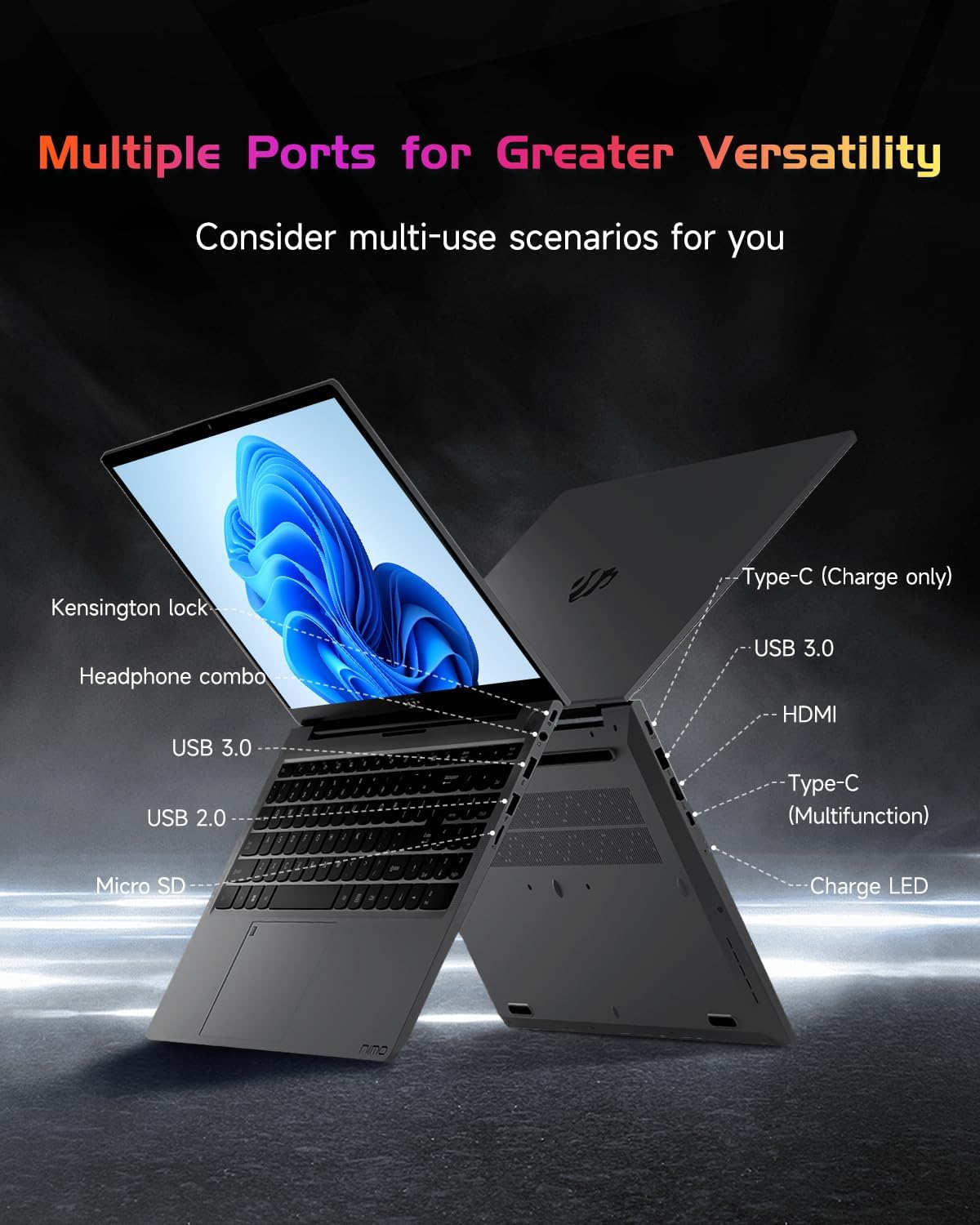
Obrázek: Boční profesionálfile of the NIMO laptop, displaying its array of ports for diverse connectivity needs.
Stay connected with integrated Wi-Fi 6 for fast wireless internet and Bluetooth 5.2 for connecting wireless accessories.
Procesor a výkon
Powered by the Intel Alder Lake-N100 12th Gen processor, the NIMO N151 delivers reliable performance for multitasking, streaming, and everyday computing tasks. It comes with 16GB DDR4 RAM and a 256GB PCIe SSD for fast startups and seamless operation.

Image: A visual representation of the Intel Alder Lake-N100 12th Gen processor, highlighting its role in the laptop's performance.
Operační systém
The laptop comes pre-installed with Windows 11 Home, offering a modern and intuitive user experience.
Údržba
Obecná péče
- Keep the laptop in a clean, dry environment away from extreme temperatures.
- Avoid spilling liquids on the keyboard or screen.
- K čištění obrazovky a vnějšího povrchu používejte měkký hadřík, který nepouští vlákna. Nepoužívejte agresivní chemikálie.
- Zajistěte správné větrání tím, že nebudete blokovat větrací otvory.
Péče o baterie
Chcete-li prodloužit životnost baterie, vyvarujte se častého úplného vybíjení. Doporučuje se udržovat baterii nabitou, pokud je to možné, mezi 20 % a 80 %.
Odstraňování problémů
Běžné problémy a řešení
- Notebook se nezapne: Ensure the charger is properly connected and the battery has sufficient charge. Try holding the power button for 10-15 seconds to perform a hard reset.
- Obrazovka je prázdná: Připojte externí monitor a zkontrolujte, zda je problém s displejem. Restartujte notebook.
- Problémy s připojením Wi-Fi: Zkontrolujte, zda je v nastavení systému Windows povolena Wi-Fi. Restartujte router a notebook.
- Pomalý výkon: Close unnecessary applications, check for malware, and ensure Windows is up to date.
For persistent issues, refer to the online support resources or contact NIMO customer service.
Specifikace
| Funkce | Detail |
|---|---|
| Značka | NIMO |
| Název modelu | Nimo N151 |
| Velikost obrazovky | 15.6 palce |
| Rozlišení obrazovky | 1920 x 1080 pixelů (FHD) |
| Procesor | Intel Pentium Quad Core N100 (up to 3.4 GHz) |
| BERAN | 16 GB DDR4 |
| Rychlost paměti | 3200 MHz |
| Pevný disk | 256 GB SSD (PCIe) |
| Grafický koprocesor | Integrovaná grafika |
| Operační systém | Windows 11 Home |
| Bezdrátový typ | 802.11a/b/g/n/ac (Wi-Fi 6) |
| Bluetooth | Bluetooth 5.2 |
| Porty USB 2.0 | 1 |
| Porty USB 3.0 | 3 |
| Průměrná životnost baterie | 5 hodiny |
| Hmotnost položky | 3.8 libry |
| Rozměry produktu | 14.07 x 8.98 x 0.76 palce |
| Speciální funkce | Backlit Keyboard, Fingerprint Reader, HD Audio, Memory Card Slot, Numeric Keypad |
Záruka a podpora
Your NIMO laptop is covered by a 2letá záruka výrobce, ensuring peace of mind for your purchase. Additionally, NIMO offers a 90denní bezproblémová politika vrácení zboží.
For technical assistance, warranty claims, or returns, please contact NIMO customer support through their official channels. Refer to the contact information provided with your product or on the NIMO webmísto.
Produktová videa
Watch these official videos for a comprehensive overview and demonstration of your NIMO laptop's features.
NIMO 15.6 Laptop Comprehensive Introduction
Video: A detailed introduction to the NIMO 15.6" FHD Laptop, showcasinjeho design a klíčové funkce.
NIMO Laptop: Perfect for Work and Study, Anytime, Anywhere
Video: This video highlights the NIMO laptop's versatility for both work and study environments, emphasizing its portability.
NIMO 15.6 FHD Laptop for Students Home Work
Video: A demonstration of the NIMO 15.6" FHD Laptop's suitability for students and home-based work tasks.
Efficiency Meets Convenience: Nimo Laptop
Video: This video showcases the NIMO laptop's efficiency and convenient features for daily use.
NIMO Laptop UGC
Video: User-generated content featuring the NIMO laptop, demonstrating real-world usage scenarios.
NIMO 15.6 FHD Laptop Promotion Video
Video: A promotional video for the NIMO 15.6" FHD Laptop, showcasinjeho vlastnosti a výhody.


