1. Úvod
This manual provides detailed instructions for the Tenlamp G9 Podcast Equipment Audio Mixer. Please read this manual thoroughly before using the device to ensure proper operation and to maximize its features. The G9 mixer is designed for podcasting, live streaming, short video recording, and other audio content creation, offering a range of audio control and enhancement functions.
2. Konec produktuview
Tenlamp G9 is a versatile audio mixer featuring a 4.5-inch HD screen for real-time audio adjustments. It includes a 3-band EQ, dual reverb, voice changer, and noise reduction capabilities. The device is designed for plug-and-play compatibility with PCs, Macs, and mobile devices.
2.1 Klíčové vlastnosti
- Plug and Play: Quick connection to PC, Mac, or mobile devices without complex setup.
- Visual Audio Mixing: 4.5-inch HD screen displays audio adjustments in real-time.
- Redukce šumu: Ensures clear voice output for recordings and live broadcasts.
- Komplexní ovládání: Individual controls for microphone, music, headphone, main output, 3-band EQ, dual reverb, and pitch.
- Přizpůsobení hlasu: Includes voice changer and auto-tune functions.
2.2 Obsah balení
- 1x Tenlamp G9 Audio Mixer
- 1x USB kabel pro napájení
- 1x 3.5mm audio kabel TRRS
- 1x USB-C OTG kabel
- 1x Uživatelská příručka (tento dokument)
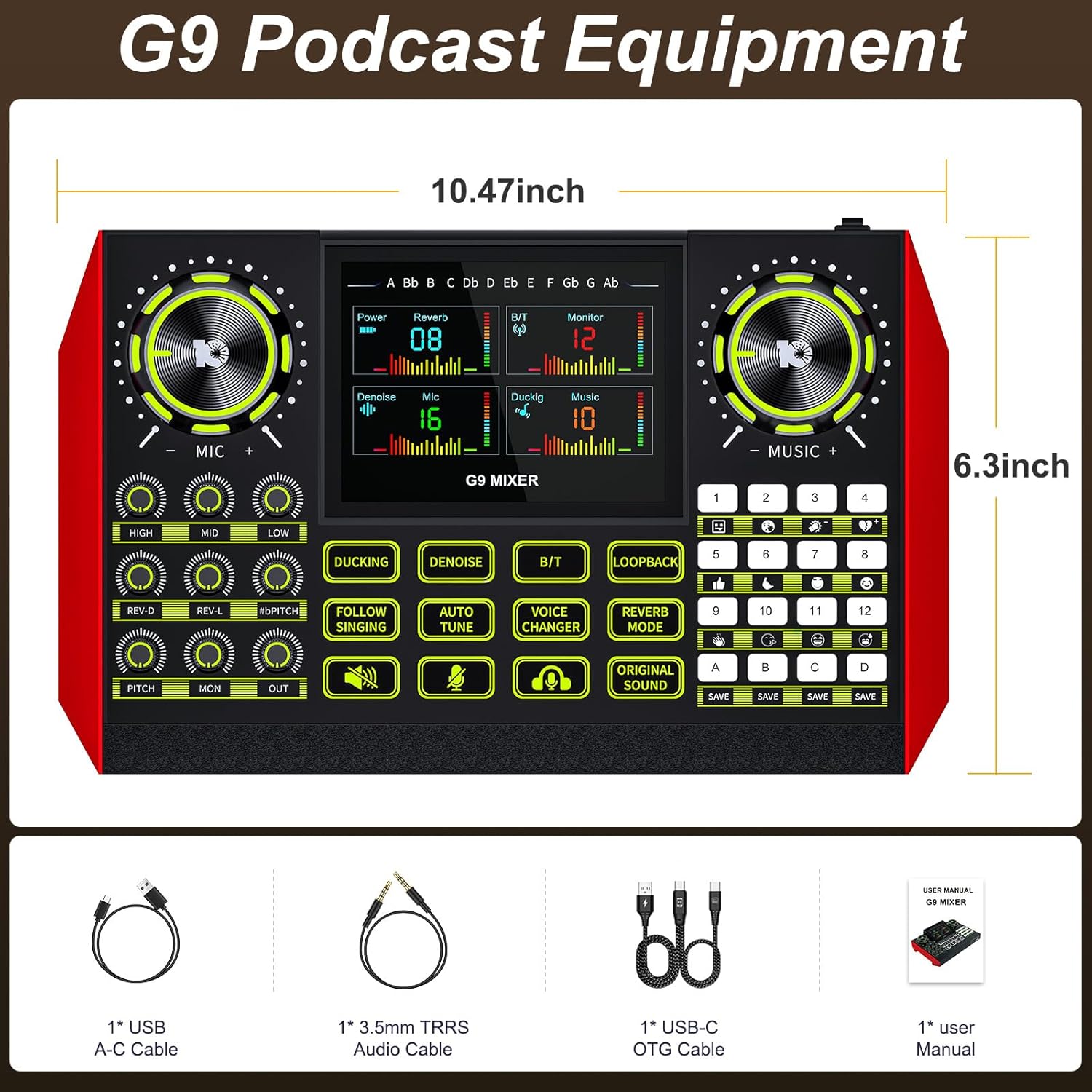
The G9 mixer measures approximately 10.47 inches in width and 6.3 inches in height.
3. Nastavení
Tenlamp G9 mixer is designed for straightforward setup. Follow these steps to connect your device.
3.1 Připojení k napájení
Connect the provided USB A-C cable to the DC 5V port on the mixer and to a power source (e.g., computer USB port, USB wall adapter). The mixer also features a built-in battery for portable use.
3.2 Připojení mikrofonů a nástrojů
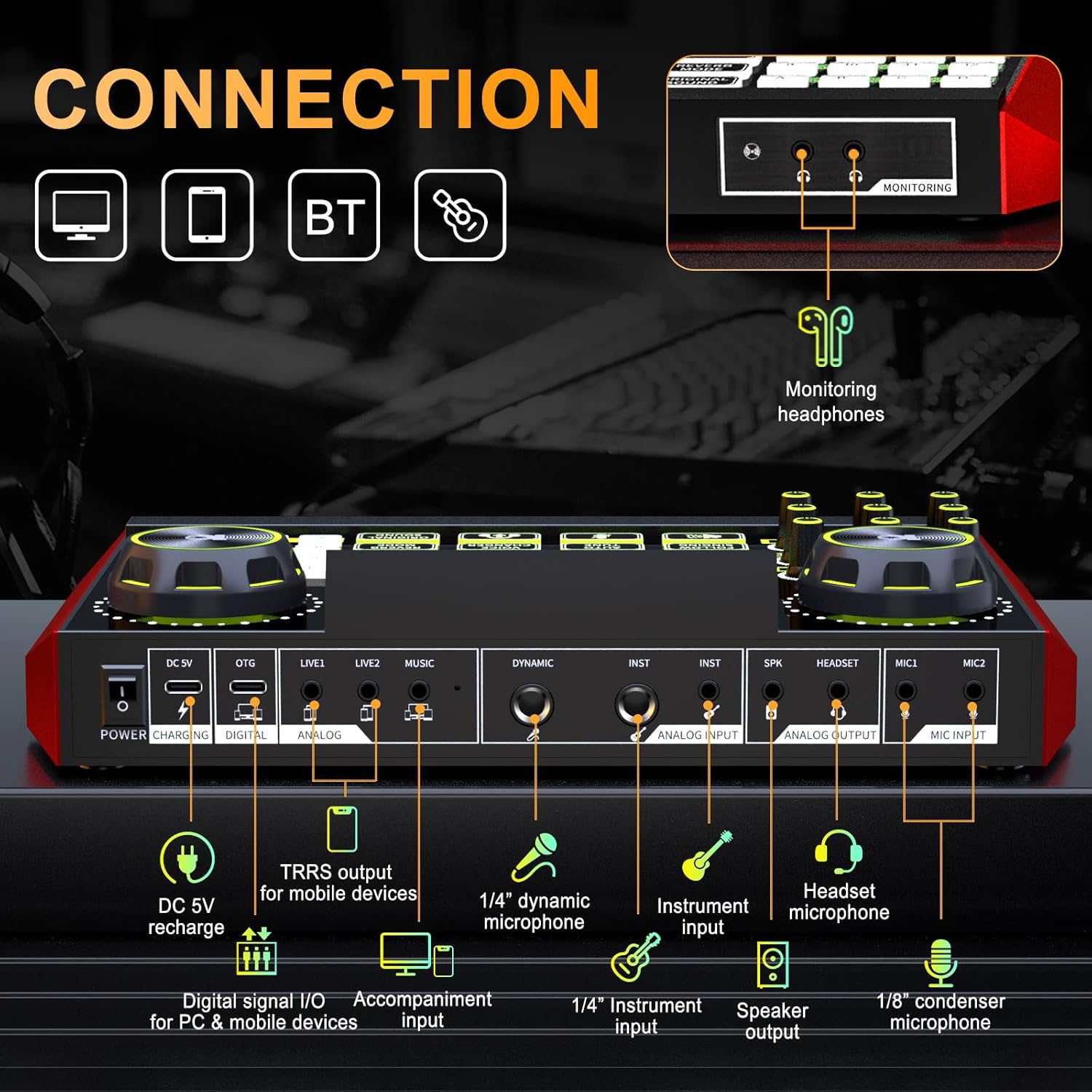
- Microphone Input (MIC1, MIC2): Use 1/8" (3.5mm) condenser microphones.
- Dynamic Microphone Input (DYNAMIC): Use a 1/4" dynamic microphone.
- Instrument Input (INST): Connect instruments via a 1/4" jack.
- Mikrofon na sluchátka: Connect a headset with a microphone to the dedicated headset port.
3.3 Connecting to Devices (PC, Mac, Mobile)
- Digital Signal I/O (DIGITAL): Use the USB-C OTG cable to connect to a PC, Mac, or compatible mobile device for digital audio input and output.
- Analog Input/Output (LIVE1, LIVE2, MUSIC): Use 3.5mm TRRS audio cables for analog connections to mobile devices or other audio sources.
- Bluetooth (BT): Activate Bluetooth on the mixer and your device to pair wirelessly for music input.
3.4 Monitoring Headphones and Speaker Output
- Monitoring Headphones (MONITORING): Connect headphones to the 3.5mm monitoring jack to hear your mix in real-time.
- Speaker Output (SPK): Connect external speakers for audio playback.
4. Provoz
The G9 mixer provides intuitive controls for managing your audio. The 4.5-inch HD screen displays current settings and levels, allowing for precise adjustments.
4.1 Zapnutí/vypnutí
Press and hold the Power button to turn the mixer on or off. The screen will illuminate upon activation.
4.2 Adjusting Microphone Settings
Use the dedicated knobs for VYSOKÝ, STŘEDNÍa NÍZKÝ to adjust the 3-band equalizer for your microphone. The REV-D a REV-L knobs control the dual reverb depth and length. The PITCH knob adjusts the microphone's pitch.

4.3 Music and Output Volume
The HUDBA knob controls the input volume of background music. The PO knob adjusts the monitoring volume for your headphones, and the VEN knob controls the main output volume.
4.4 Speciální funkce
- DUCKING: Automaticky snižuje hlasitost hudby na pozadí, když mluvíte.
- DENOISE: Activates the noise reduction feature for clearer vocals.
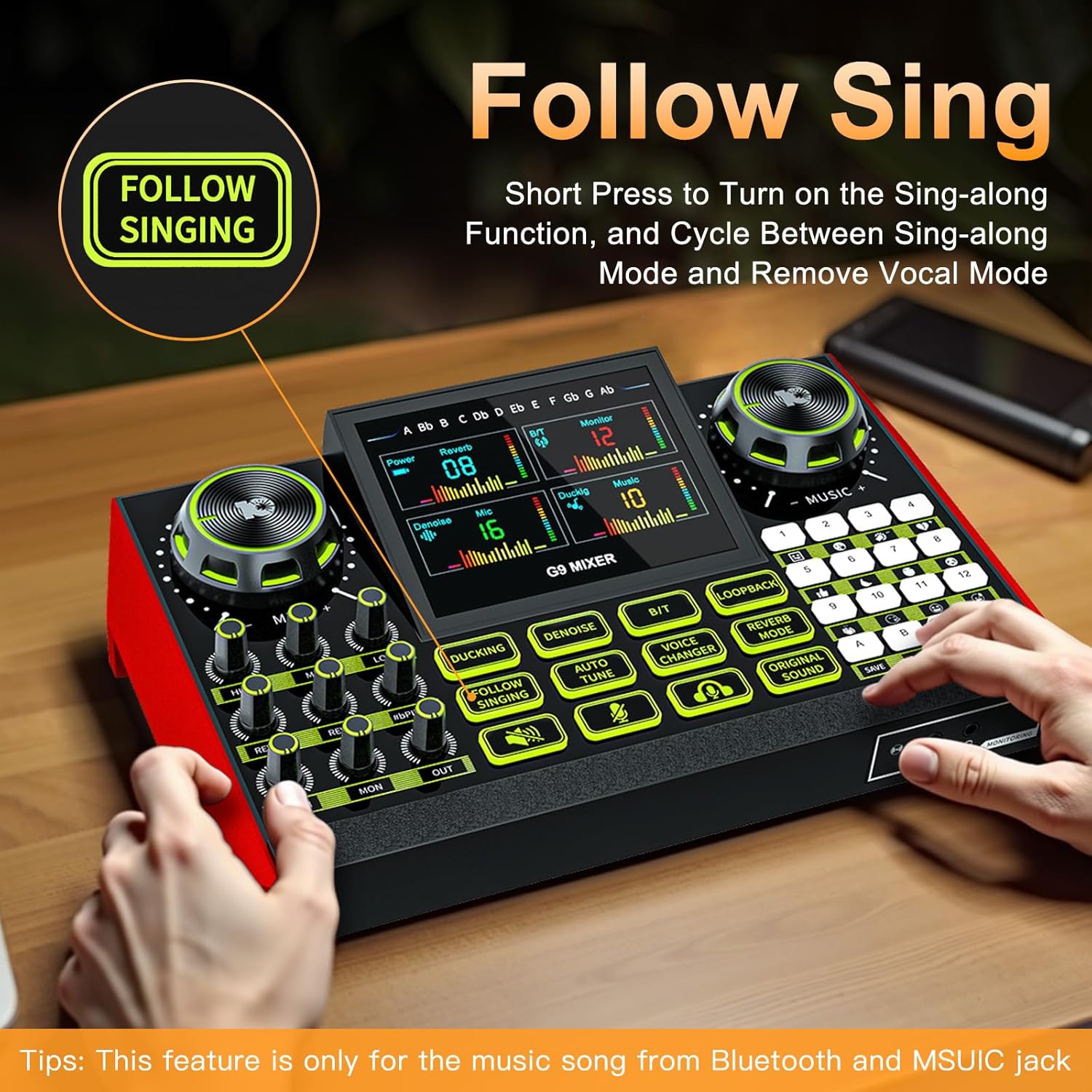
- FOLLOW SINGING: Short press to turn on the sing-along function, which cycles between sing-along mode and vocal removal mode. Note: This feature is primarily for music from Bluetooth and the MUSIC jack.
- AUTOMATICKÉ LADĚNÍ: Engages the auto-tune effect for vocals.
- VOICE CHANGER: Cycles through four different voice changing modes (female voice, uncle voice, baby voice, magic voice).
- LOOPBACK: Enables or disables the loopback function, which sends the output audio back to the input for recording or streaming.
- REVERB MODE: Upravuje efekt reverbu.
- ORIGINAL SOUND: Restores the original sound without effects.

4.5 Customizable Sound Pads
The G9 mixer features four customizable sound pads (A, B, C, D). You can save your favorite voice modes, including current microphone volume, EQ, reverb, pitch, and auto-tune settings, to these pads for quick recall.

5. Údržba
To ensure the longevity and optimal performance of your Tenlamp G9 Audio Mixer, follow these maintenance guidelines:
- Čištění: Use a soft, dry cloth to clean the surface of the mixer. Avoid using abrasive cleaners, solvents, or harsh chemicals.
- Skladování: Mixér skladujte na chladném a suchém místě mimo dosah přímého slunečního záření a extrémních teplot.
- Zacházení: S přístrojem zacházejte opatrně. Zabraňte jeho pádu nebo silným nárazům.
- Expozice tekutin: Keep the mixer away from liquids. Moisture can damage internal components.
6. Řešení problémů
If you encounter issues with your Tenlamp G9 Audio Mixer, refer to the following common problems and solutions:
6.1 Žádný zvukový výstup
- Zkontrolujte připojení: Ensure all audio cables (microphone, headphones, speakers, device connections) are securely plugged into the correct ports.
- Úrovně hlasitosti: Ověřte, že MIC, HUDBA, POa VEN volume knobs are not set to minimum or muted.
- Nastavení zařízení: On your connected PC, Mac, or mobile device, ensure the G9 mixer is selected as the default audio input and output device.
- Moc: Confirm the mixer is powered on and has sufficient battery charge or is connected to a power source.
6.2 Poor Audio Quality / Noise
- Redukce šumu: Aktivujte ODŠUMIT function to reduce background noise.
- Umístění mikrofonu: Ensure the microphone is positioned correctly and not too far from the sound source.
- Kvalita kabelu: Use high-quality, shielded audio cables to minimize interference.
- Úrovně zisku: Adjust microphone gain to prevent clipping or distortion.
6.3 Voice Changer / Effects Not Working
- Aktivace funkce: Ensure the specific effect button (e.g., MĚNIČ HLASU, AUTOMATICKÉ LADĚNÍ) is pressed and active.
- Vstup pro mikrofon: Confirm that your microphone is properly connected and receiving input.
6.4 Difficulty with Initial Setup
While the G9 is plug-and-play, some users may find initial setup challenging. Double-check all physical connections and ensure the mixer is recognized by your operating system. Refer to the
Související dokumenty - G9
 |
Tenlamp Uživatelská příručka pro venkovní zvukovou kartu KB11 Komplexní uživatelská příručka pro Tenlamp Venkovní zvuková karta KB11, která zahrnuje nastavení, funkce, připojení, řešení problémů a technické specifikace pro živé vysílání, podcasting a nahrávání. |
 |
Uživatelská příručka k audio konzoli G1: Přenosný zvukový mixážní pult pro streamování a podcasting Tato uživatelská příručka poskytuje podrobné informace o Tenlamp G1 Audio Console, multifunkční zvukový mixážní pult pro začátečníky. Zahrnuje produkt přes...view, specifikace, rozložení panelu, průvodci připojením pro chytré telefony a počítače, nastavení Bluetooth, řešení problémů a tipy na odstranění šumu pro živé streamování, podcasting a nahrávání. |
 |
tenlamp Uživatelská příručka k audio konzoli G5Pro - Živé vysílání, podcasting, nahrávání Komplexní uživatelská příručka pro tenlamp Audio konzole G5Pro, všestranné řešení typu „vše v jednom“ pro živé streamování, podcasting, nahrávání a zpěv. Mezi funkce patří vokální efekty, digitální nahrávání, připojení Bluetooth a plug-and-play. |
 |
tenlamp Uživatelská příručka k USB mikrofonu OU200 Komplexní uživatelská příručka pro tenlamp USB mikrofon OU200, popis funkcí, nastavení pro Windows a Mac, specifikace a použití pro podcasting, streamování a nahrávání v domácím studiu. |
 |
tenlamp G10 Portable Audio Mixer Uživatelská příručka Komplexní uživatelská příručka pro tenlamp Přenosný audio mixážní pult G10 s podrobným popisem jeho funkcí, specifikací, průvodců připojením a tipů pro řešení problémů s živým streamováním, podcastingem a nahráváním na mobilních zařízeních a počítačích. |
 |
tenlamp Uživatelská příručka pro audio konzoli G3: Živé streamování a mixáž podcastů Komplexní uživatelská příručka pro tenlamp G3 Audio Console, přenosný USB audio mixážní pult pro živé streamování, podcasting a nahrávání na chytrých telefonech a počítačích. Zjistěte více o funkcích, připojení a řešení problémů. |