1. Úvod
Děkuji za nákupasing the Maypug Mini Projector. This manual provides essential information for setting up, operating, and maintaining your projector. Please read it thoroughly before use to ensure optimal performance and safety.
2. Bezpečnostní informace
- Neblokujte větrací otvory. Zajistěte dostatečné proudění vzduchu kolem projektoru.
- Zabraňte přímému vystavení světlu z objektivu projektoru.
- Chraňte projektor před vodou, vlhkostí a extrémními teplotami.
- Používejte pouze dodaný napájecí adaptér.
- Nepokoušejte se projektor rozebírat ani opravovat sami. Požádejte o pomoc zákaznickou podporu.
3. Obsah balení
Zkontrolujte prosím, zda jsou v balení přítomny všechny položky:
- Maypug Mini Projector
- Dálkové ovládání
- Napájecí adaptér
- Uživatelská příručka
4. Konec produktuview
The Maypug Mini Projector is a compact and versatile device designed for home entertainment and presentations. It features Android TV, 1080P native resolution with 4K support, high brightness, and various connectivity options.

Obrázek: Přední strana view of the Maypug Mini Projector, showcasing its compact design and smart features with various streaming app logos in the background.

Image: An infographic summarizing key features including 1080P FHD, 4K support, 20000LM brightness, 180° rotation, flexible zoom, 2GB RAM, 16GB ROM, Android TV 11.0, Bluetooth 5.4, and WiFi 6.
5. Nastavení
5.1 Umístění
Position the projector on a stable, flat surface. The integrated stand allows for flexible placement and projection angles. You can adjust the height and rotate the projector up to 180 degrees to project onto walls or ceilings.

Image: The projector shown with its adjustable stand, demonstrating its 180-degree rotation feature for versatile projection angles, including ceiling projection.
5.2 Projekční vzdálenost a velikost promítací plochy
The optimal projection distance ranges from 1 to 4 meters, supporting screen sizes from 40 to 130 inches. Adjust the projector's distance from the projection surface to achieve your desired screen size.
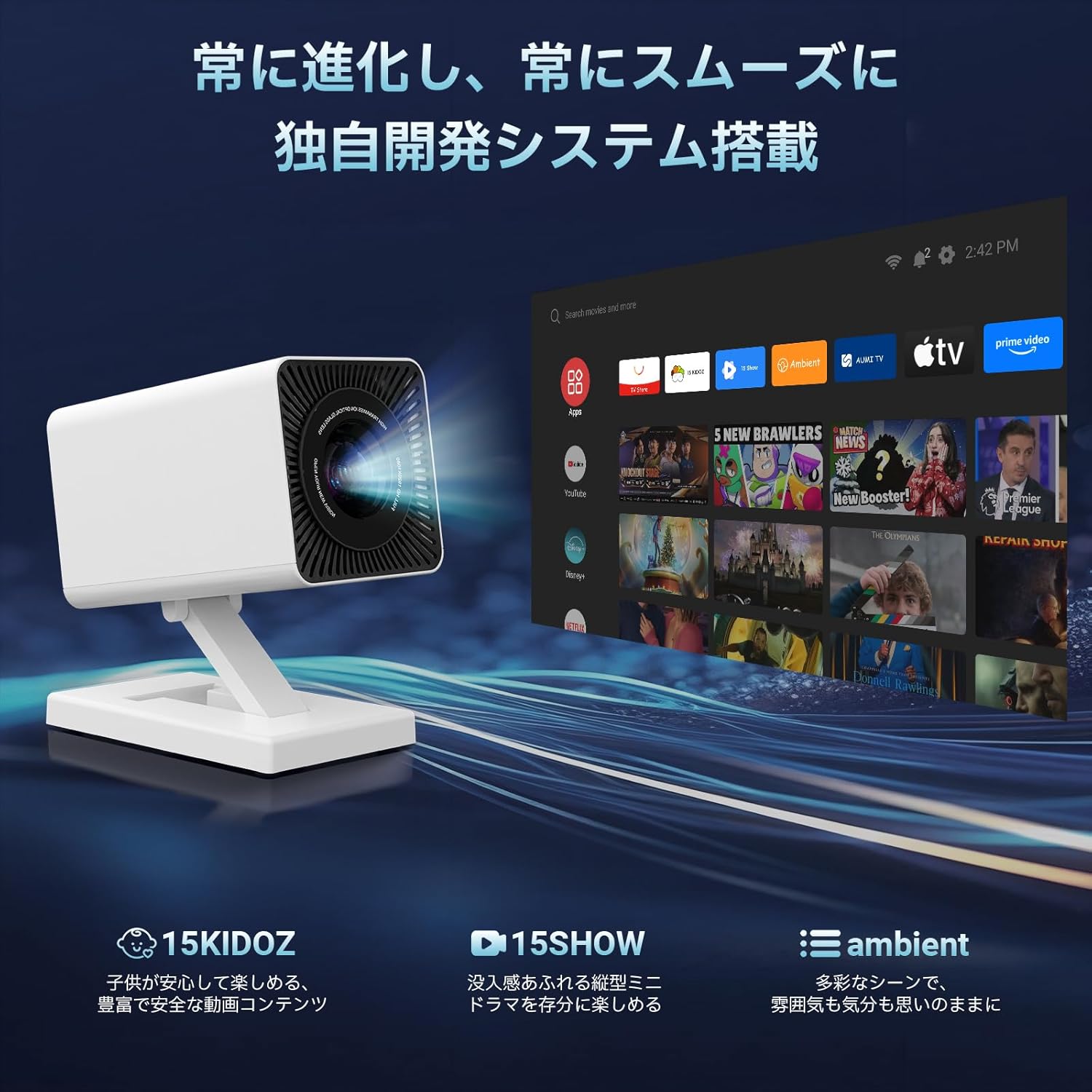
Image: A diagram illustrating recommended projection distances (1.2m, 2m, 4m) and corresponding screen sizes (40", 100", 130") for the projector.
5.3 Připojení napájení
- Připojte napájecí adaptér ke vstupnímu portu projektoru.
- Zapojte napájecí adaptér do elektrické zásuvky.
6. Návod k obsluze
6.1 Zapnutí/vypnutí
- Zapnutí: Stiskněte tlačítko napájení na projektoru nebo dálkovém ovladači.
- Vypnout: Znovu stiskněte tlačítko napájení. V případě potřeby potvrďte vypnutí.
6.2 Počáteční nastavení
Upon first power-on, follow the on-screen instructions to set up your language, Wi-Fi network, and Google account (for Android TV features).
7. Konektivita
7.1 Wi-Fi Connection (Wi-Fi 6)
The projector supports high-speed dual-band Wi-Fi 6 (2.4GHz and 5GHz) for stable and fast wireless connections. Navigate to the network settings to connect to your home Wi-Fi network.

Image: The projector displaying a screen with WiFi 6 connection status, indicating faster and more stable wireless performance, alongside a smartphone mirroring its screen to the projector.
7.2 Připojení Bluetooth (Bluetooth 5.4)
Connect external Bluetooth speakers, headphones, or other compatible devices using Bluetooth 5.4. Go to Bluetooth settings to pair your devices.
7.3 Kabelová připojení
The projector includes HDMI, USB, and a 3.5mm audio jack for connecting various devices such as PCs, game consoles (PS5, Switch), USB storage, and external audio systems. (HDMI cable sold separately).
8. Chytré funkce
8.1 Android TV and Apps
Equipped with a smart OS, the projector supports both its own app store and Google Play, providing access to over 8,000 applications and 600,000+ movies and TV shows. Popular streaming apps like YouTube and Android TV are readily available.

Image: The projector displaying its 'Smart Lilac OS' interface, showing various streaming service icons like Hulu, Prime Video, and Netflix, indicating its smart TV capabilities.
8.2 Přizpůsobení domovské obrazovky
The home screen is customizable, allowing you to arrange frequently used apps and settings for quick access and a smoother user experience.
8.3 System Updates and Additional Features
Regular system updates enhance functionality. Recent updates include the '15KIDOZ' video app for children and '15SHOW' for English mini-dramas. The 'Ambient' function allows you to project photos and videos from your smartphone onto walls, creating dynamic backgrounds.

Image: The projector displaying new features like '15KIDOZ', '15SHOW', and 'Ambient' mode, highlighting continuous system evolution and content updates.
9. Úprava obrazu
9.1 Automatická korekce lichoběžníkového zkreslení
The projector features automatic keystone correction (up to 15°) to ensure a perfectly rectangular image, even if the projector is placed at an angle. Manual keystone correction is also available for fine-tuning.
9.2 Nastavení zaostření
Both manual and automatic focus adjustments are supported, providing a clear image within seconds.
9.3 Funkce zoom
Adjust the screen size from 50% to 100% using the digital zoom function to fit your viewing environment without moving the projector.

Image: A visual representation of the projector's automatic keystone correction and flexible zoom (50%-100%) capabilities, showing how the image can be adjusted to fit the screen perfectly.
10. Audio
The projector is equipped with a built-in 5W stereo sound system, delivering clear and powerful audio. For an enhanced audio experience, you can connect external speakers via Bluetooth or the 3.5mm audio jack.
11. Údržba
11.1 Čištění objektivu
K jemnému čištění čočky projektoru použijte měkký hadřík bez žmolků, speciálně určený pro optické čočky. Nepoužívejte abrazivní materiály ani agresivní chemikálie.
11.2 Čištění exteriéru
Vnější povrch projektoru otřete měkkým, suchým hadříkem. Nepoužívejte tekuté čisticí prostředky přímo na zařízení.
11.3 Větrání
Ensure the ventilation openings are free from dust and obstructions to prevent overheating. Periodically clean the vents with a soft brush or compressed air.
12. Řešení problémů
- Bez napájení: Check if the power adapter is securely connected to both the projector and the power outlet.
- Bez obrázku: Ensure the input source is correctly selected. Check all cable connections (HDMI, USB). Adjust focus and keystone correction.
- Žádný zvuk: Verify that the volume is not muted or set too low. Check audio output settings and external speaker connections.
- Rozmazaný obrázek: Adjust the focus manually or use the auto-focus function. Ensure the projection surface is flat.
- Problémy s připojením Wi-Fi/Bluetooth: Restart the projector and your router/Bluetooth device. Ensure the projector is within range.
If problems persist, please contact Maypug customer support.
13. Specifikace

Image: An illustration highlighting the projector's image quality features: 20000LM brightness, 4K support, 1080P native resolution, 15000:1 contrast ratio, and 50000+ hours light source life.
| Funkce | Popis |
|---|---|
| Značka | Maypug |
| Nativní rozlišení | 1920x1080P (Full HD) |
| Podpora 4K | Ano |
| Jas | 20000 XNUMX lumenů |
| Kontrastní poměr | 15,000:1 |
| Život světelného zdroje | 50,000+ hodin |
| Operační systém | Smart OS (Android TV compatible) |
| Interní úložiště (ROM) | 16 GB |
| CPU | 4jádrový |
| Wi-Fi | Wi-Fi 6 (duální pásmo 2.4 GHz/5 GHz) |
| Bluetooth | Bluetooth 5.4 |
| Vestavěný reproduktor | 5 W stereo |
| Velikost projekce | 40-130 palců |
| Projekční vzdálenost | 1-4 metry |
| Korekce lichoběžníkového zkreslení | Automatic (up to 15°) & Manual |
| Nastavení zaostření | Automaticky a ručně |
| Funkce zvětšení | 50–100 % |
| Úhel rotace | 180° |
| Vstupní porty | HDMI, USB, 3.5mm audio konektor |
| Hmotnost | Přibližně 0.46 kg |
| Power Voltage | 120 V (AC) |
14. Záruka a podpora
14.1 Záruka
Tento produkt je dodáván s a 1-letá záruka from the date of purchase. If you encounter any defects or issues with your projector during this period, please contact our customer service team.
14.2 Zákaznická podpora
For any questions, technical assistance, or warranty claims, please contact us via email. Our support team is available to help you. The system supports multiple languages, and you can select your preferred language in the settings. An electronic version of the Japanese instruction manual is available upon request from customer service.


