1. Úvod
The Birdfy Smart Bird Feeder Camera is designed to enhance your birdwatching experience with advanced features. This manual provides essential information for setting up, operating, and maintaining your device.
Klíčové vlastnosti:
- 1080p HD Camera: Capture clear footage with dual night vision (infrared and full-color).
- Slow-Motion Feature: Playback bird moments at 0.1×–1× speed directly within the Birdfy app.
- Prodloužená životnost baterie: Up to 132 days with 10 daily clips (20s each), or 51 days with 50 daily clips. Compatible with Birdfy solar panel for continuous power.
- Rozpoznávání umělé inteligence: Identifies 99% of backyard bird species and sends instant alerts.
- IP66 voděodolný: Durable design to withstand various weather conditions.
- Zabezpečená data: Backed by Amazon Web Services for data security and privacy.
- Ekologický design: Crafted from recycled plastic.
2. Obsah balení
Než začnete, ujistěte se, že máte v balení všechny položky:
- Birdfy Feeder Rookie
- Modul kamery
- Instalační příslušenství
- Uživatelská příručka (tento dokument)
- Tips for Beginner Guide
3. Nastavení a instalace
Follow these steps to set up your Birdfy Smart Bird Feeder Camera:
- Nabijte kameru: Fully charge the camera's built-in lithium-ion battery before first use.
- Sestavení podavače: Attach the camera module to the Birdfy Feeder Rookie using the provided installation accessories.
- Mount the Feeder: Choose a suitable outdoor location for surface mounting. Ensure the feeder is stable and has a clear view pro kameru.
- Download the Birdfy App: Hledat "Birdfy" in the Apple App Store or Google Play Store and install the application on your smartphone.
- Spárovat s aplikací: Open the Birdfy app and follow the on-screen instructions to pair your camera using the QR code. Ensure a stable 2.4GHz Wi-Fi connection.
- Fill with Seed: Fill the feeder with appropriate bird seed (capacity 2.8 pounds).

Image: The Birdfy Feeder Rookie, highlighting its lightweight and simple design, perfect for new birdwatchers.

Image: The Birdfy Feeder Rookie shown in an outdoor setting, emphasizing its long-lasting battery life and 2.4GHz Wi-Fi connection for continuous birdwatching.
4. Návod k obsluze
4.1 Funkce fotoaparátu
- 1080p HD video: The camera captures high-definition video of visiting birds.
- Duální noční vidění: Switch between infrared and full-color night vision modes via the Birdfy app for clear footage za slabého osvětlení.
- Slow-Motion Capture: Review bird activity in slow motion (0.1×–1× speed) directly within the app.
- Rozpoznávání ptáků pomocí umělé inteligence: The built-in AI identifies over 6,000 bird species and sends real-time notifications to your phone.

Image: A blue jay captured in slow motion by the Birdfy camera, demonstrating the slow-motion feature.

Image: A cardinal captured in slow motion by the Birdfy camera, illustrating the slow-motion video capability.
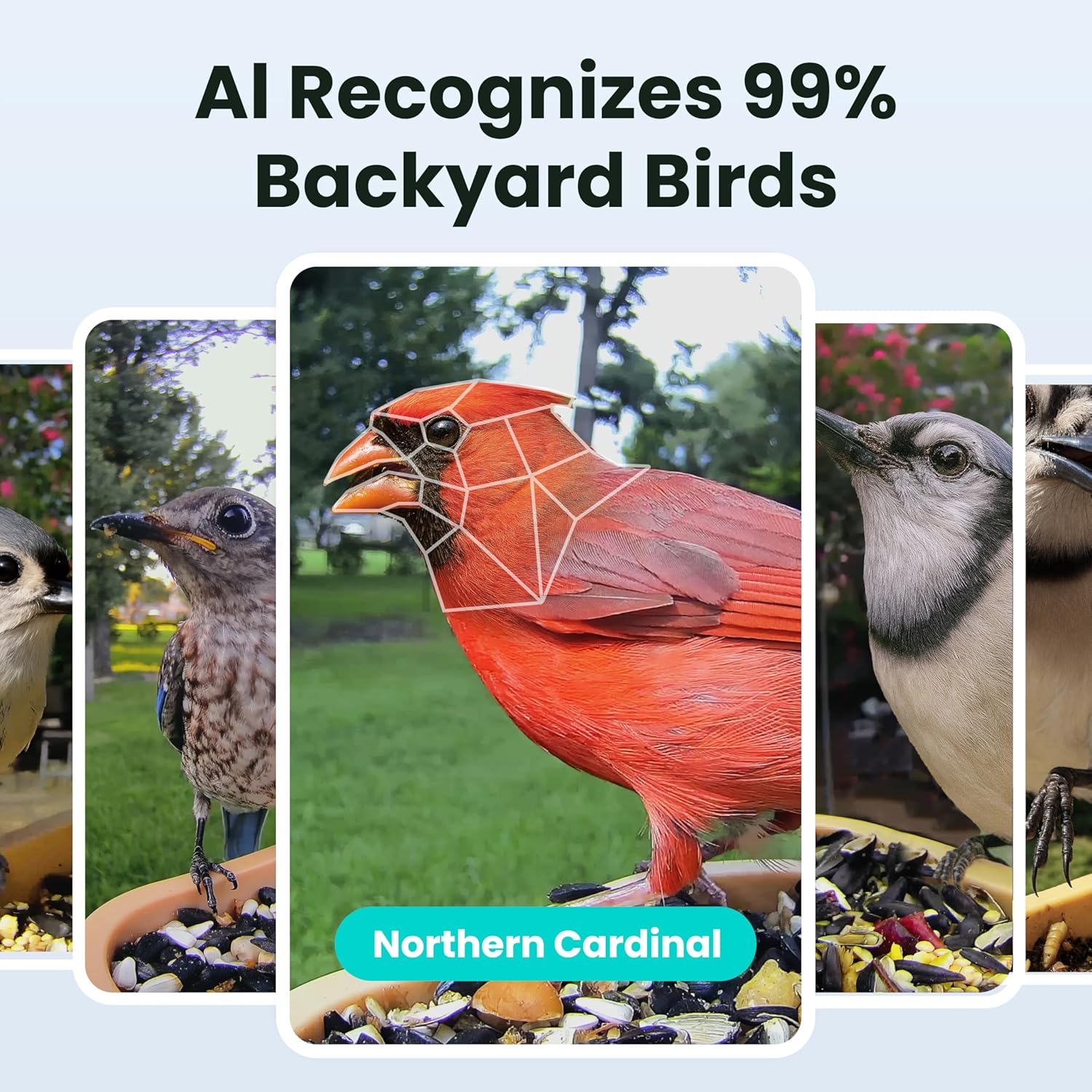
Image: The Birdfy camera's AI recognition feature identifying a Northern Cardinal, showing the species identification overlay.

Image: A smartphone screen displaying a Birdfy app notification, indicating that a Blue Jay has visited the feeder, demonstrating the AI notification feature.
4.2 Používání aplikace
- Živý přenos: View foo v reálném časetage from your feeder.
- Záznam události: The camera records clips when motion is detected.
- Cloudové úložiště: Enjoy unlimited cloud storage with 30-day retention (check specific plan details).
- Sdílení: Easily share captured photos and videos with friends and family.
- Přístup pro více uživatelů: Share access to your feeder's camera with other users via the app.

Image: A smartphone screen showing the Birdfy app interface with a vertical view of a bird and options for instant sharing.

Image: The Birdfy app interface displaying multiple bird captures, indicating unlimited cloud storage for recorded moments.

Image: The Birdfy app demonstrating its multi-user access feature, allowing sharing of the feeder's view s rodinou a přáteli.

Image: The Birdfy app logo with download buttons for the Apple App Store and Google Play, indicating availability on both platforms.
4.3 Oficiální produktová videa
Video: A House Finch visiting the Birdfy Smart Bird Feeder. This video demonstrates the camera's ability to capture clear footage ptáků.
Video: A 1080P Full HD video captured by the Birdfy Bird Feeder Camera, showcasing the high-quality video capabilities.
Video: A Blue Jay visiting the Birdfy Smart Bird Feeder, demonstrating the camera's clear daytime recording.
Video: A Cardinal visiting the Birdfy Smart Bird Feeder, showcasing the camera's ability to capture vibrant bird colors.
Video: A Blue Jay captured by the Birdfy Bird Feeder Camera, highlighting the camera's clear image quality.
5. Údržba
- Čištění: Regularly clean the feeder and camera lens to ensure optimal performance and hygiene for birds. Use a soft, damp cloth for the camera.
- Ochrana proti počasí: The feeder has an IP66 waterproof rating, making it resistant to rain and snow. However, extreme weather conditions may require temporary relocation or additional protection.
- Správa baterie: Monitor battery levels via the app. Recharge as needed or connect to a compatible Birdfy solar panel for continuous power.
- Aktualizace firmwaru: Keep the Birdfy app and camera firmware updated for the best performance and new features.

Image: The Birdfy Smart Bird Feeder Camera depicted in sunny, snowy, and rainy conditions, illustrating its all-weather durability.
6. Řešení problémů
- Problémy s připojením: Ensure your Wi-Fi network is 2.4GHz and the camera is within range. Restart your router and the camera if connection problems persist.
- Rychlé vybíjení baterie: Check if the camera is recording too frequently due to high motion sensitivity. Adjust settings in the app. Ensure the solar panel (if used) is receiving adequate sunlight.
- Špatná kvalita obrazu: Clean the camera lens. Ensure there are no obstructions. Check network stability for live stream quality.
- AI Recognition Errors: Ujistěte se, že kamera je čistá view of the birds. Update the app and camera firmware.
- Feeder Not Attracting Birds: Experiment with different types of bird seed. Place the feeder in a quiet, safe location away from predators.
7. Specifikace
| Funkce | Detail |
|---|---|
| Značka | Birdfy |
| Číslo modelu | AMZ-P22 |
| Cílový druh | Seed-Eating Birds |
| Doporučené použití | Venkovní |
| Materiál | Akrylonitrilbutadienstyren (ABS) |
| Speciální funkce | Built-In Camera, Smart App, Weather Resistant |
| Typ montáže | Povrchová montáž |
| Rozměry produktu (D x Š x V) | 6.62 cm D x 7.08 cm Š x 7.05 cm V |
| Zdroj napájení | Battery / Battery + Solar |
| Zahrnuté komponenty | Birdfy Feeder Rookie, Camera, Installation Accessories, Tips for Beginner, User Manual |
| Kapacita | 2.8 Pounds (1.3L) |
| Barva | Green + Beige |
| Hmotnost položky | 0.4 libry (6.4 unce) |
| UPC | 810198940022 |
| Baterie | Vyžaduje 1 lithium-iontovou baterii (součástí balení) |

Image: Diagram showing the dimensions (12.18" x 12.18" x 10.52") and weight (0.96 lbs) of the Birdfy Feeder Rookie.
8. Záruka a podpora
For warranty information and technical support, please refer to the official Birdfy website or contact their customer service. Details can typically be found in the "Tips for Beginner" guide included with your product or on the manufacturer's webmísto.
You can also join the Birdfy community for tips and discussions:

Image: A graphic encouraging users to join the Birdfy community, featuring various social media icons.


