1. Úvod
This manual provides detailed instructions for setting up, operating, maintaining, and troubleshooting your ASUS TUF Gaming VG27AQ5A 27-inch QHD Gaming Monitor. Please read this manual thoroughly before using the product to ensure proper and safe operation.
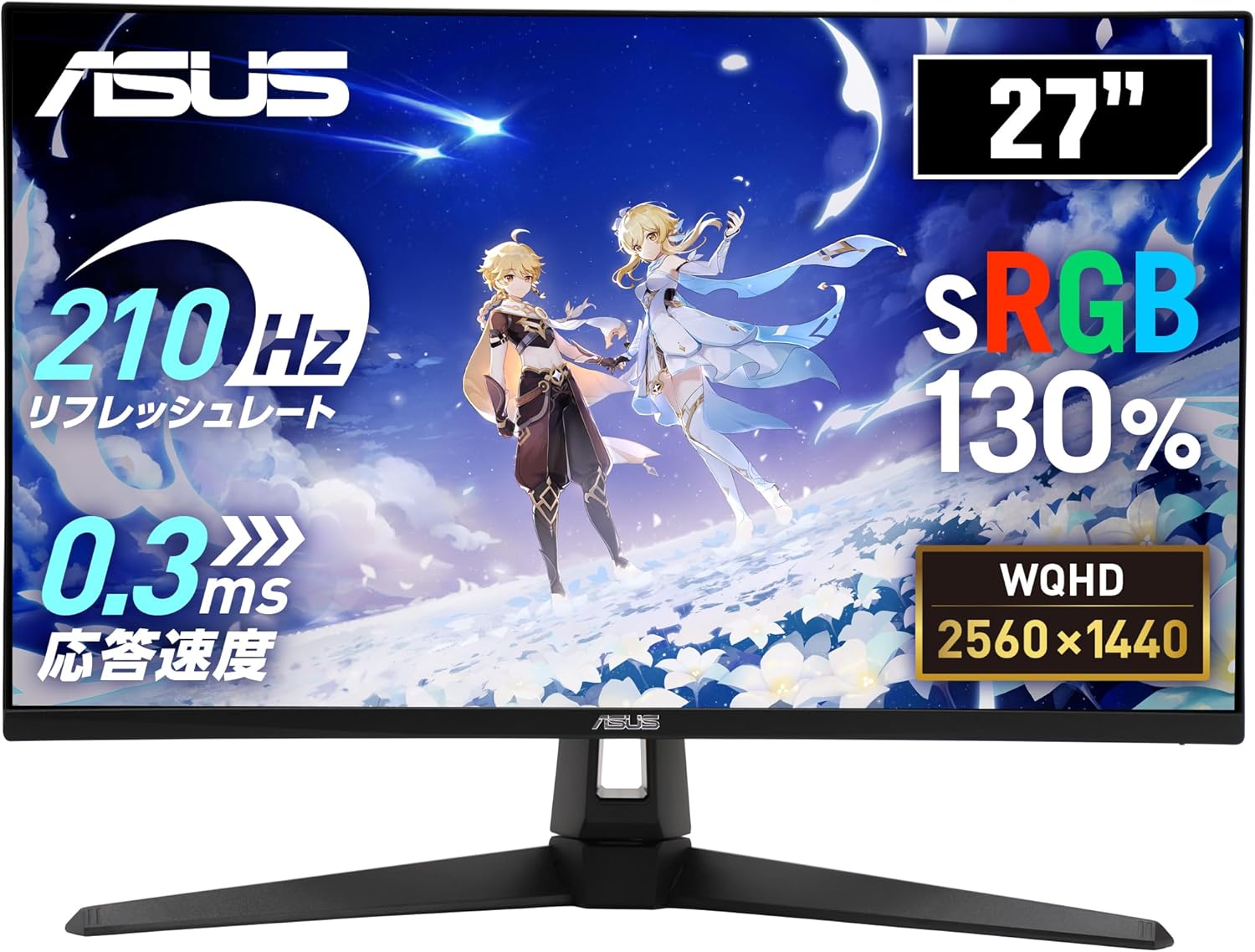
Figure 1: ASUS TUF Gaming VG27AQ5A Monitor Overview
2. Obsah balení
Ověřte, zda jsou v balení produktu přítomny všechny níže uvedené položky. Pokud některá položka chybí nebo je poškozena, ihned kontaktujte svého prodejce.
- Kabel DisplayPort
- Napájecí kabel
- Rychlý průvodce
- Záruční list
3. Nastavení
3.1 Sestavení stojanu monitoru
Pro připevnění stojanu k monitoru postupujte takto:
- Položte monitor displejem dolů na měkký, čistý povrch, abyste zabránili poškrábání.
- Align the stand base with the stand neck and secure it with the provided screw.
- Připevněte sestavený stojan k zadní straně monitoru, dokud nezacvakne na místo.
3.2 Připojení monitoru
Připojte monitor k počítači nebo jiným zařízením pomocí příslušných kabelů.
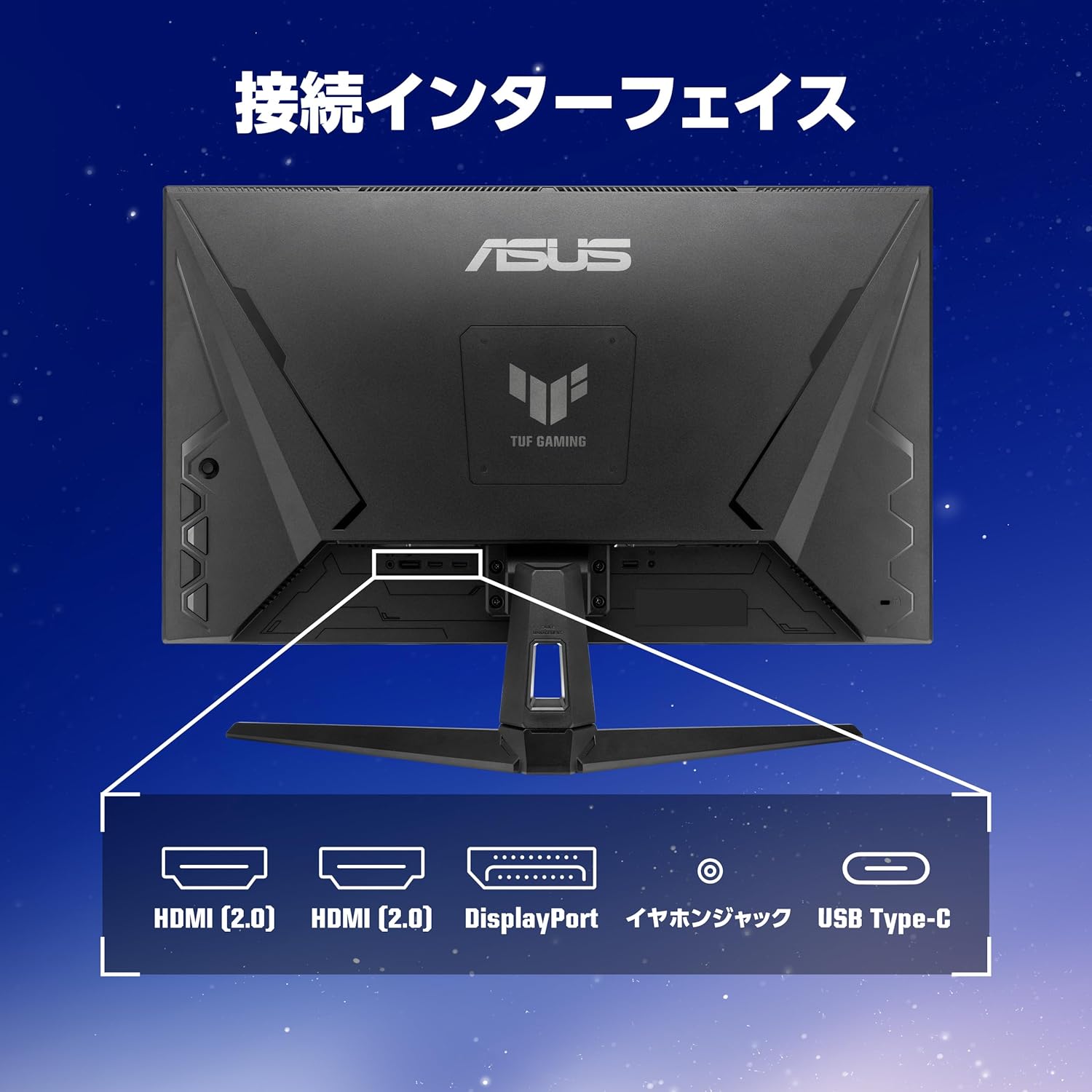
Figure 2: Monitor Connection Interfaces
- Připojení DisplayPort: Connect one end of the DisplayPort cable to the monitor's DisplayPort 1.4 input and the other end to your computer's DisplayPort output.
- Připojení HDMI: Connect one end of an HDMI cable to one of the monitor's HDMI (v2.0) inputs and the other end to your computer's HDMI output.
- Připojení USB Type-C: Connect a USB 3.2 Gen 1 Type-C cable for video signal (if supported by your device) and power delivery.
- Audio připojení: Connect headphones or external speakers to the 3.5mm stereo mini jack.
- Připojení napájení: Připojte napájecí kabel k napájecímu vstupu monitoru a poté do elektrické zásuvky.
4. Obsluha monitoru
4.1 Zapnutí/vypnutí
Stisknutím tlačítka napájení umístěného na monitoru jej zapnete nebo vypnete.
4.2 Nabídka na obrazovce (OSD)
Use the joystick and buttons on the back or bottom of the monitor to navigate the OSD menu and adjust settings.
Key Features and Settings:
- Refresh Rate (210Hz OC): This monitor supports a high refresh rate of up to 210Hz (overclocked) for smoother visuals, especially in fast-paced gaming.
- Rychlý IPS panel: Poskytuje široký viewing angles and excellent color reproduction.
- ELMB Sync (synchronizace s extrémně nízkým rozmazáním pohybu): Reduces motion blur and ghosting for clearer fast-moving images.
- Adaptive-Sync (VRR Technology): Synchronizes the monitor's refresh rate with the GPU's frame rate to eliminate screen tearing and stuttering.
- GameVisual: Offers various display modes optimized for different content types (e.g., Scenery, Racing, Cinema, RTS/RPG, FPS, sRGB, MOBA, User Mode).
- GamePlus: Provides in-game enhancements like crosshair overlays, timer, FPS counter, and display alignment tools.
- Posílení stínů: Enhances details in dark areas without overexposing bright areas.
- Centrum widgetů displeje: Software utility for easy adjustment of monitor settings via your PC.
- Redukce modrého světla: Filters out harmful blue light to protect your eyes during extended use.
- Trace Free Technology: Improves response time to eliminate ghosting and motion blur.
- GameFast Input Technology: Minimalizuje vstupní zpoždění pro citlivější herní zážitek.
- ASUS Power Sync: Manages power consumption efficiently.

Figure 3: Smooth Visuals with High Refresh Rate

Figure 4: Adaptive-Sync Technology

Figure 5: GameVisual Feature

Figure 6: Shadow Boost Levels

Figure 7: DisplayWidget Center Interface
4.3 Ergonomické úpravy
Stojan monitoru umožňuje nastavení náklonu pro optimalizaci viewzkušenosti.
- Náklon: Úhel obrazovky lze nastavit od +20° do -5°.

Figure 8: Tilt Adjustment Range
5. Údržba
5.1 Čištění monitoru
- Před čištěním monitor vždy odpojte.
- K jemnému otření obrazovky a vnějších povrchů použijte měkký hadřík, který nepouští vlákna.
- Na odolné skvrny lehceampen the cloth with water or a mild, non-abrasive cleaner specifically designed for monitors.
- Avoid using alcohol, ammonia, or abrasive cleaners, as they can damage the screen or casing.
5.2 Obecná péče
- Neumisťujte monitor na přímé sluneční světlo nebo do blízkosti zdrojů tepla.
- Zajistěte dostatečné větrání kolem monitoru, aby nedošlo k jeho přehřátí.
- Nepokládejte těžké předměty na monitor ani na jeho kabely.
- Chraňte monitor před nadměrným prachem a vlhkostí.
6. Řešení problémů
| Problém | Možná příčina | Řešení |
|---|---|---|
| Na obrazovce není žádný obraz | Odpojený napájecí kabel; Odpojený video kabel; Vybrán nesprávný vstupní zdroj. | Check power and video cable connections. Press the OSD menu button to select the correct input source. |
| Obraz je rozmazaný nebo zkreslený | Incorrect resolution; Video cable issues. | Set the display resolution to 2560x1440. Ensure the video cable is securely connected and not damaged. |
| Trhání nebo zasekávání obrazovky | Adaptive-Sync not enabled; Refresh rate mismatch. | Enable Adaptive-Sync in the monitor's OSD menu and your graphics card settings. Ensure your system's refresh rate is set to 210Hz (OC) or lower, matching the monitor's capabilities. |
| Z reproduktorů/sluchátek není slyšet žádný zvuk | Odpojený zvukový kabel; Příliš nízká hlasitost; Na počítači je vybrán nesprávný zvukový výstup. | Check audio cable connection. Adjust monitor and PC volume. Select the monitor as the default audio output device on your PC. |
7. Specifikace
| Funkce | Popis |
|---|---|
| Značka | ASUS |
| Číslo modelu | VG27AQ5A |
| Velikost obrazovky | 27 palců |
| Typ panelu | Téměř IPS |
| Rezoluce | QHD (2560 1440 x XNUMX XNUMX) |
| Poměr stran | 16:9 |
| Obnovovací frekvence | 210Hz (Overclocked) |
| Doba odezvy | 0.3ms GTG (minimum), 1ms GTG |
| Jas | 300 cd/m² |
| Kontrastní poměr | 1,300:1 (typický) |
| Viewúhel | 178° (H) / 178° (V) |
| Pixel Pitch | 0.233 mm |
| Konektivita | DisplayPort 1.4 x 1 (HBR2), HDMI (v2.0) x 2, USB 3.2 Gen 1 Type-C x 1 (Service Port), 3.5mm Stereo Mini Jack x 1 |
| Nastavení sklonu | +20° ~ -5° |
| Kompatibilita s montáží VESA | Rozměr 100 mm x 100 mm |
| Kensington Lock | Podporováno |
| Rozměry (ŠxVxH) | 61.50 x 45.50 x 21.40 cm (s podstavcem) |
| Hmotnost | Přibl. 5.0 kg |

Obrázek 9: Rozměry produktu
8. Záruka a podpora
8.1 Záruka na produkt
This product comes with a 3-year domestic warranty from the date of purchase.
8.2 ASUS Customer Support
For technical support or inquiries, please contact the ASUS Call Center:
- Bezplatné číslo: 0800-123-2787 (Available from landlines)
- Paid Number: 0570-783-886 (Charges apply for mobile phones, PHS, public phones, and calls from overseas)
- Provozní doba: 9:00 - 19:00, 365 days a year.
Additional information can be found on the official ASUS webmísto.


