1. Úvod
This manual provides detailed instructions for the installation, operation, and maintenance of your SOUNDKITS Single Din Stereo with a 7-inch Flip-Out Touchscreen. This unit integrates advanced features such as Wireless CarPlay, Android Auto, Bluetooth connectivity, and a high-definition backup camera to enhance your driving experience. Please read this manual thoroughly before use to ensure proper functionality and safety.

Image 1.1: SOUNDKITS Single Din Stereo with Flip-Out Touchscreen and included backup camera.
2. Co je v krabici
Před zahájením instalace ověřte, zda jsou všechny položky přítomny:
- Single Din CarPlay Touchscreen Unit
- Záložní kamera AHD
- Backup Camera Cable (19.6 ft)
- Kabelový svazek
- Uživatelská příručka (tento dokument)
3. Vlastnosti produktu
- Bezdrátové CarPlay a Android Auto: Seamless integration for hands-free calling, messaging, navigation, and music.
- 7-inch Motorized Flip-Up Touchscreen: HD 1024x600 IPS display for clear viewing, even in bright sunlight.
- Přehrávání multimédií: USB port and auxiliary port for external audio devices.
- Nabíjení typu C: 2.1A quick charging for compatible phones.
- Zadní AHDview Fotoaparát: Included camera with 1280*720 resolution, night vision, 170° viewing angle, and waterproof design.
- Připojení Bluetooth 5.3: Stable connection for hands-free calls and high-quality audio streaming.
- Rich RCA Outputs: 300W peak power, 4-channel RCA outputs, and 2 subwoofer outputs.
- 16pásmový ekvalizér: Customizable audio settings for various preferences.
- FM/AM rádio: 30 preset stations for your favorite broadcasts.
- Možnosti ovládání: IR remote and steering wheel control compatibility.
- Video výstup: Supports external headrest monitors.

Image 3.1: The 7-inch flip-out touchscreen displaying various app icons for navigation, music, and communication.
4. Nastavení a instalace
The SOUNDKITS Single Din Stereo is designed for universal fit in most retro vehicles, cars, SUVs, RVs, trucks, and vans with a standard single DIN dash opening. It features a universal ISO interface and wire color coding for simplified installation.
4.1 Schéma zapojení
Refer to the wiring diagram below for proper connections. Ensure all connections are secure to prevent malfunctions.
Image 4.1: Wiring diagram for the SOUNDKITS Single Din Stereo, detailing connections for power, speakers, and accessories.
4.2 Fyzická instalace
- Demontujte stávající autorádio z palubní desky.
- Connect the provided wiring harness to your vehicle's wiring. Match wire colors carefully.
- Connect the backup camera cable if installing the rearview fotoaparát.
- Slide the SOUNDKITS unit into the single DIN opening. Secure it using the appropriate mounting hardware (not always included, may require vehicle-specific brackets).
- Před kompletní montáží palubní desky otestujte všechny funkce.

Image 4.2: Visual comparison showing a car interior with a standard radio (left) and after installation of the SOUNDKITS Single Din Stereo (right).
5. Návod k obsluze
5.1 Power On/Off and Display Adjustment
- Stisknutím tlačítka napájení zapněte nebo vypněte jednotku.
- The 7-inch screen is motorized and can be adjusted for optimal viewing angle. Use the on-screen controls or physical buttons to tilt the display.

Image 5.1: The adjustable flip-out touchscreen mechanism of the SOUNDKITS Single Din Stereo.
5.2 Bezdrátové CarPlay a Android Auto
Connect your compatible smartphone wirelessly to access navigation, music, calls, and messages directly on the stereo's display.
- Ensure Bluetooth is enabled on your smartphone and the stereo.
- Pair your phone with the stereo via Bluetooth.
- Once paired, select the CarPlay or Android Auto icon on the stereo's screen. Your phone's interface will appear.
- Pro ovládání bez použití rukou používejte hlasové příkazy (Siri nebo Google Assistant).
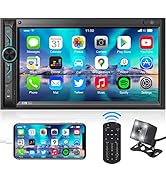
Image 5.2: A driver interacting with the stereo using voice commands for navigation and music playback.
5.3 Připojení Bluetooth
Pro obecné streamování audia přes Bluetooth a handsfree volání:
- Aktivujte Bluetooth v telefonu a stereo systému.
- Hledat available devices on your phone and select the stereo's name.
- Confirm pairing. You can now stream audio or make/receive calls.

Image 5.3: The stereo displaying a Bluetooth call screen, highlighting the Bluetooth 5.3 chip for stable connections.
5.4 Přehrávání multimédií
- USB: Insert a USB drive into the USB port to play audio or video files.
- Vstup AUX: Connect external audio devices using a 3.5mm auxiliary cable.
- Typ C: Use the Type-C port for charging compatible devices.
5.5 Provoz rádia
- Select the FM or AM tuner mode.
- Use the scan function to find stations or manually tune to a frequency.
- Save your favorite stations to the 30 available presets.
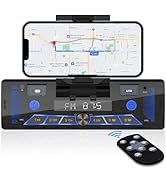
Image 5.4: The stereo's front panel highlighting USB, AUX, and Type-C inputs, along with radio frequency display.
6. Zadníview Funkce fotoaparátu
Součástí dodávky je zadní AHDview kamera poskytuje jasno view prostoru za vaším vozidlem, což pomáhá při parkování a couvání.
- When the vehicle is shifted into reverse, the stereo automatically displays the camera feed.
- The camera features HD 1280x720 resolution, night vision capabilities, and a wide 170-degree viewúhel.
- Ensure the camera is mounted securely and its cable is properly routed and connected to the stereo.

Image 6.1: The AHD rearview camera providing a clear view with parking guidelines behind a vehicle.
7. Nastavení zvuku
Customize your audio experience using the built-in equalizer and take advantage of the rich RCA outputs.
- 16pásmový ekvalizér: Access the equalizer settings on the touchscreen to adjust frequency bands for optimal sound. Preset EQ options (Pop, Classic, Rock, Jazz, Flat) are also available.
- RCA výstupy: The unit provides 4-channel RCA outputs for connecting external amplifiers and 2 dedicated subwoofer outputs for enhanced bass.
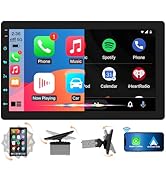
Image 7.1: Diagram illustrating the RCA output connections and the 16-band equalizer interface for audio customization.
8. Údržba
To ensure the longevity and optimal performance of your SOUNDKITS stereo, follow these maintenance guidelines:
- Čištění obrazovky: Dotykovou obrazovku jemně otírejte měkkým hadříkem, který nepouští vlákna. Nepoužívejte abrazivní čisticí prostředky ani rozpouštědla.
- Generální úklid: Udržujte jednotku bez prachu a nečistot. Na těžko dostupná místa použijte měkký kartáč nebo stlačený vzduch.
- Vyhněte se extrémním teplotám: Do not expose the unit to extreme heat or cold, as this can affect performance and lifespan.
- Zkontrolujte připojení: Pravidelně kontrolujte všechna kabelová připojení, abyste se ujistili, že jsou bezpečná a bez koroze.
9. Řešení problémů
If you encounter issues with your SOUNDKITS stereo, refer to the following common problems and solutions:
| Problém | Možná příčina | Řešení |
|---|---|---|
| Jednotka se nezapne. | Nesprávné zapojení, spálená pojistka, chybí napájení. | Check power connections (Battery+, ACC, GND). Inspect vehicle fuses. |
| Žádný zvuk. | Odpojené kabely reproduktorů, příliš nízká hlasitost, nesprávný zdroj zvuku. | Verify speaker wiring. Increase volume. Select correct audio input (Radio, USB, AUX, Bluetooth). |
| CarPlay/Android Auto se nepřipojuje. | Bluetooth not paired, phone not compatible, software glitch. | Ensure Bluetooth is on and paired. Restart phone and stereo. Check phone compatibility. |
| Nezobrazuje se couvací kamera. | Camera cable loose, reverse trigger wire not connected, faulty camera. | Check camera cable connection. Ensure reverse trigger wire is connected to vehicle's reverse light circuit. |
| Nastavení se vrátí na výchozí hodnoty. | Constant power (Battery+) wire not connected or intermittent. | Ensure the yellow 'Battery+' wire is connected to a constant 12V power source. |
| Špatná kvalita mikrofonu během hovorů. | Microphone obstruction, environmental noise. | Ensure nothing is blocking the microphone on the unit's face. Reduce cabin noise. |
10. Specifikace
| Funkce | Specifikace |
|---|---|
| Rozměry produktu | 7.4 x 7.2 x 2.3 palce (18.8 x 18.3 x 5.8 cm) |
| Hmotnost položky | 3 libry (1.36 kg) |
| Velikost displeje | 7 palců |
| Rozlišení displeje | HD 1024x600 IPS |
| Verze Bluetooth | 5.3 |
| Špičkový výstupní výkon | 300W |
| Audio výstupní kanály | 4.2 (4-channel RCA, 2 subwoofer outputs) |
| Ekvalizér | 16-pásmový |
| Nabíjecí port | Type-C (2.1A) |
| Podpora kódování videa | H.264, H.265/HEVC |
| Kompatibilní zařízení | Amplifier, Smartphone, Speaker, Subwoofer |
11. Záruka a podpora
SOUNDKITS is committed to providing reliable products and customer service. Please refer to the following information regarding support and warranty:
- Rychlá odezva: Customer inquiries receive a response within 24 hours.
- 90-Day Free Replacement or Refund: For any product issues within 90 days of purchase.
- 12-Month Responsibility: Coverage for product defects or malfunctions within 12 months.
- Lifetime Technical Guidance & Support: Ongoing assistance for product usage and troubleshooting.
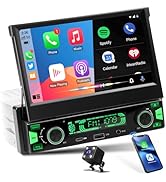
Image 11.1: Summary of SOUNDKITS customer support and warranty policies.
For further assistance, please contact SOUNDKITS customer service through the retailer's platform or the official brand webmísto.