Důležité bezpečnostní pokyny
Před použitím tohoto výrobku si prosím přečtěte a pochopte všechny bezpečnostní pokyny. Uschovejte si tento návod pro budoucí použití.
- Větrání: Zajistěte dostatečné větrání. Neblokujte žádné větrací otvory.
- Voda a vlhkost: Nevystavujte tento spotřebič dešti ani vlhkosti. Nepokládejte na něj předměty naplněné tekutinami, například vázy.
- Zdroje tepla: Neinstalujte v blízkosti zdrojů tepla, jako jsou radiátory, tepelné regulátory, kamna nebo jiná zařízení (včetně amplifikátory), které produkují teplo.
- Zdroje energie: Use only power supplies specified by the manufacturer. Ensure the power cord is protected from being walked on or pinched.
- Čištění: Čistěte pouze suchým hadříkem.
- Servis: Nepokoušejte se tento výrobek opravit sami. Veškerý servis svěřte kvalifikovanému servisnímu personálu.
Obsah balení
Ověřte, zda jsou v balení obsaženy všechny níže uvedené položky:
- Kuephom CD-X2A Boombox
- AC napájecí kabel
- Uživatelská příručka (tento dokument)
- Dálkové ovládání
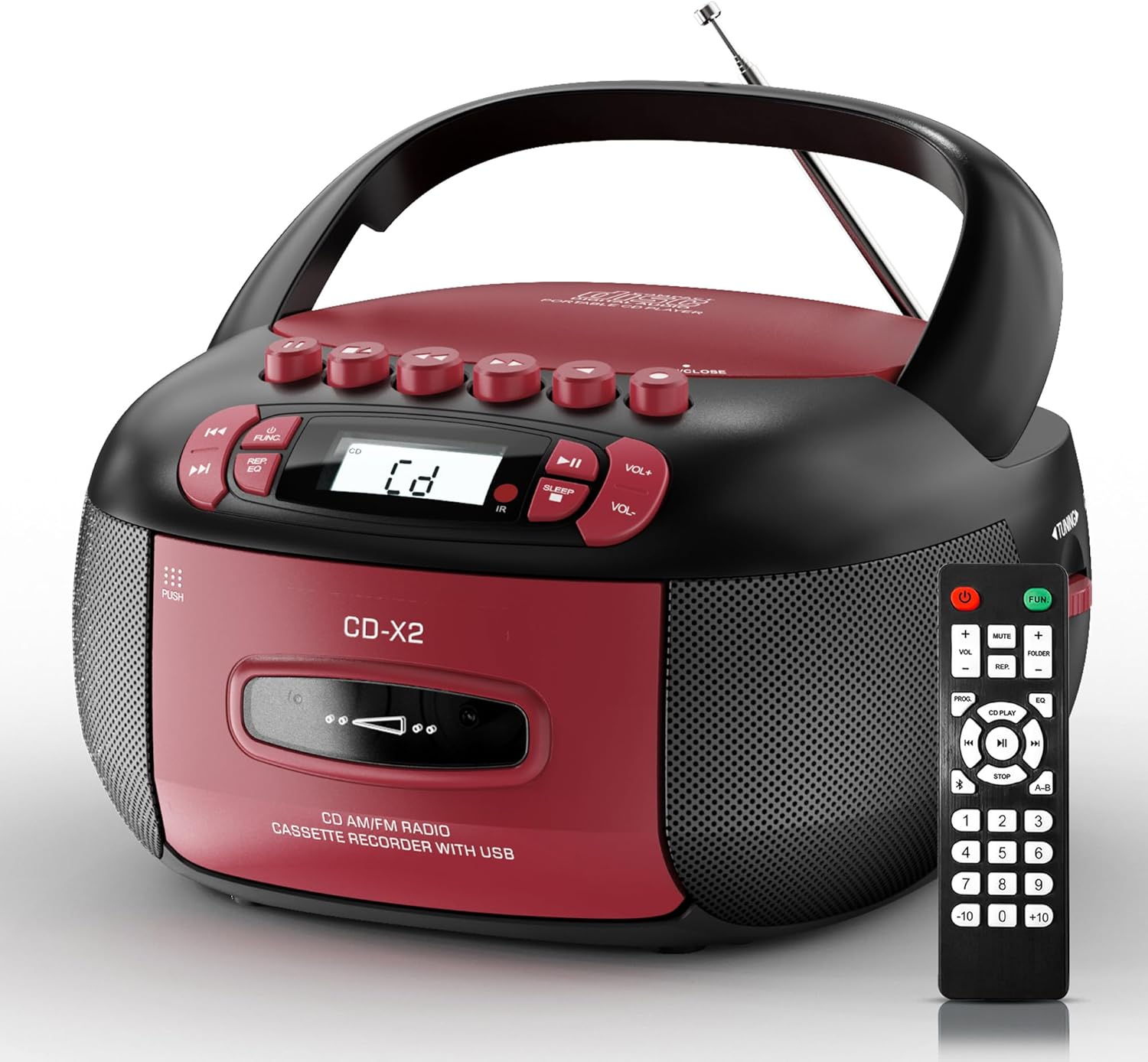
Image: The Kuephom CD-X2A Boombox with its included remote control, showcasing its compact design and red/black color scheme.
Konec produktuview
Familiarize yourself with the various components and controls of your Kuephom CD-X2A Boombox.
Ovládací prvky na předním panelu
- Tlačítko napájení/funkce: Press and hold to power on/off. Press to cycle through modes (CD, USB, Bluetooth, Radio, AUX, Tape).
- Tlačítka pro ovládání hlasitosti +/-: Upravte hlasitost přehrávání.
- Tlačítko Přehrát/Pozastavit: Start or pause playback for CD, USB, Bluetooth, or Tape.
- Tlačítko Stop: Zastavit přehrávání.
- Tlačítka Přeskočit/Hledat: Navigate between tracks on CD/USB or fast forward/rewind on tape.
- Tlačítko EQ: Vyberte předvolby ekvalizéru.
- Tlačítko časovače vypnutí: Nastavte časovač vypnutí.
Ovládací prvky na bočním panelu
- Knoflík ladění: Manually tune AM/FM radio stations.
- Sluchátkový jack: Připojte sluchátka pro soukromý poslech.
- Vstupní port AUX: Připojte externí audio zařízení.
- USB port: Insert USB drives for MP3/WMA playback.
Funkce horního panelu
- Přihrádka na CD: Top-loading compartment for CDs.
- Kazetový prostor: Front-loading compartment for cassette tapes.
- Teleskopická anténa: Pro lepší příjem rádia vysuňte.

Image: The boombox highlighting its multiple functions including CD/MP3, Bluetooth, Type I/II tape, USB, FM/AM Radios, Sleep timer, Remote, Phone jack, AUX, and Tape recording.

Obrázek: Detail views of the boombox's phone jack, top-loading CD player, telescopic antenna, and tape play/record buttons.
Nastavení
Napájení boomboxu
Napájení střídavým proudem
- Connect the supplied AC power cord to the AC IN jack on the back of the boombox.
- Zapojte druhý konec napájecího kabelu do standardní zásuvky (120 V ~ 60 Hz).
Napájení z baterie
- Open the battery compartment cover located on the bottom of the boombox.
- Vložte 6 baterie velikosti „C“ (nejsou součástí balení) a dbejte na správnou polaritu (+/-).
- Bezpečně zavřete kryt bateriového prostoru.
- When operating on battery power, disconnect the AC power cord.

Image: The boombox demonstrating both AC power connection and the use of 6 C-size batteries for portable operation.
Dálkové ovládání
- Insert 2 x 'AAA' batteries (not included) into the remote control, observing polarity.
- Point the remote control towards the boombox's IR sensor for optimal operation.

Image: An individual comfortably operating the boombox using the remote control from a distance.
Návod k obsluze
Obecný provoz
- Zapnutí/vypnutí: Press and hold the Power/Function button to turn the unit on or off.
- Výběr funkce: Press the Power/Function button repeatedly to switch between CD, USB, Bluetooth, Radio (AM/FM), AUX, and Tape modes.
Přehrávání CD
- Otevřete kryt přihrádky na CD.
- Place a CD (CD, CD-R, MP3, WMA compatible) onto the spindle with the label side facing up.
- Zavřete kryt prostoru pro CD.
- Press the Power/Function button to select 'CD' mode.
- Stisknutím tlačítka Přehrát/Pozastavit spustíte přehrávání.
- Use the Skip/Search buttons to navigate tracks.
- Press the Repeat button to repeat a single track, folder, or all tracks.
- Press the Program button to program a custom playback sequence.

Image: The boombox's display showing 'CD' mode, with icons indicating compatibility with CD, CD-R, CD-RW, WMA, and MP3 formats, along with single cycle, repeat folder, repeat all, random play, and play in order options.
Cassette Playback and Recording
- Press the 'OPEN/CLOSE' button on the cassette compartment to open it.
- Vložte kazetu.
- Zavřete přihrádku na kazetu.
- Press the Power/Function button to select 'TAPE' mode.
- Stisknutím tlačítka Přehrát spustíte přehrávání.
- Use the Fast Forward/Rewind buttons to navigate the tape.
- Záznam: In TAPE mode, select the desired source (CD, Bluetooth, USB, or AM/FM radio). Press the Record button to begin recording onto the cassette. The unit features an auto-stop function when the tape reaches its end.

Image: A hand inserting a cassette tape into the boombox's front-loading compartment, with controls for tape operation visible.
AM/FM rádio
- Press the Power/Function button to select 'RADIO' mode. Press again to switch between AM and FM bands.
- Extend the telescopic antenna for better FM reception. For AM, rotate the unit for best reception.
- Use the Tuning knob on the side to manually tune to your desired station. The frequency will be displayed on the screen.

Image: A man relaxing on a couch with the boombox, which displays various FM/AM radio frequencies, indicating good reception.
Připojení Bluetooth
- Press the Power/Function button to select 'BT' (Bluetooth) mode. The display will show 'BT' and flash, indicating it's in pairing mode.
- On your mobile device, enable Bluetooth and search for 'CD-X2A'.
- Select 'CD-X2A' to pair. Once paired, the 'BT' indicator will stop flashing.
- Nyní můžete bezdrátově streamovat zvuk ze svého zařízení do boomboxu.

Image: A woman in a living room wirelessly streaming audio from her smartphone to the boombox via Bluetooth 5.1, indicating a stable connection.
USB přehrávání
- Insert a USB flash drive into the USB port on the side of the boombox.
- Press the Power/Function button to select 'USB' mode.
- The boombox will automatically detect and play compatible MP3/WMA files.
- Přehrávání ovládejte pomocí tlačítek Přehrát/Pozastavit, Zastavit a Přeskočit/Hledat.
Vstup AUX
- Connect an external audio device (e.g., smartphone, MP3 player) to the AUX-in port using a 3.5mm audio cable (not included).
- Press the Power/Function button to select 'AUX' mode.
- Ovládejte přehrávání přímo z připojeného externího zařízení.
Časovač spánku
- While the unit is playing, press the Sleep Timer button.
- Repeatedly press the button to cycle through available sleep timer durations (e.g., 15, 30, 60, 90 minutes).
- Jednotka se po uplynutí zvoleného času automaticky vypne.

Image: A man sleeping in bed with the boombox on his nightstand, illustrating the sleep timer feature which allows the device to turn off automatically.
Údržba
- Čištění: Use a soft, dry cloth to clean the exterior of the boombox. Do not use abrasive cleaners or solvents.
- Péče o CD: S CD manipulujte za okraje. Znečištěná CD čistěte měkkým hadříkem, který nepouští vlákna, a otírejte je od středu směrem ven.
- Péče o kazetu: Keep cassette tapes away from direct sunlight and heat. Periodically clean the tape heads with a specialized cassette head cleaner.
- Skladování: When not in use for extended periods, disconnect the power cord and remove batteries. Store the unit in a cool, dry place.
Odstraňování problémů
Pokud narazíte na problémy, podívejte se do níže uvedené tabulky, kde najdete běžné problémy a jejich řešení.
| Problém | Možná příčina | Řešení |
|---|---|---|
| Žádná síla | Napájecí kabel není připojen; Baterie jsou vybité nebo nesprávně vložené. | Check AC connection; Replace or correctly insert batteries. |
| Žádný zvuk | Volume too low; Incorrect function mode selected; Headphones connected. | Increase volume; Select correct mode; Disconnect headphones. |
| CD přeskakuje nebo se nepřehrává | CD dirty or scratched; CD inserted incorrectly; Incompatible CD format. | Clean or replace CD; Insert CD correctly; Ensure CD is compatible (CD, CD-R, MP3, WMA). |
| Radio static/poor reception | Anténa není vysunutá/umístěná; Slabý signál. | Extend and adjust telescopic antenna; Try repositioning the unit. |
| Bluetooth není párování | Boombox not in pairing mode; Device Bluetooth off; Device too far. | Ensure boombox is in 'BT' mode and flashing; Enable Bluetooth on device; Move device closer. |
| Kazeta se nepřehrává/nenahrává | Tape inserted incorrectly; Tape heads dirty; Auto-stop engaged. | Insert tape correctly; Clean tape heads; Check tape end. |
Specifikace
| Funkce | Detail |
|---|---|
| Číslo modelu | CD-X2A |
| Rozměry produktu (D x Š x V) | 8.39 x 4.8 x 8.54 palce |
| Hmotnost položky | 3.45 libry |
| Zdroj napájení | AC 120V~60Hz or 6 x 'C' size batteries |
| Technologie připojení | Pomocný, Bluetooth, USB |
| Typ reproduktoru | Stereo (2W+2W output) |
| Podporované formáty disků | CD, CD-R, MP3, WMA |
| Supported Tape Types | Type I/II Cassette |
| Rozhlasové kapely | AM/FM |
| Speciální funkce | Tape Recording, Sleep Timer, Earphone Jack, Remote Control |
Záruka a podpora
Kuephom products are designed for reliability and performance. This product comes with a standard manufacturer's warranty against defects in materials and workmanship under normal use.
For warranty claims, technical assistance, or any questions regarding your Kuephom CD-X2A Boombox, please contact Kuephom customer support. Refer to the contact information provided with your purchase documentation or visit the official Kuephom webstránky pro podrobnosti o podpoře.
We are committed to providing lifetime service support and 7/24 customer assistance for our products.


