1. Konec produktuview
The Milwaukee M18 Bluetooth Jobsite Radio is designed for durability and high-quality audio performance in demanding work environments. It features dual 3.5-inch woofers and two high-range tweeters for balanced sound. Bluetooth 5.0 connectivity allows for wireless audio streaming up to 120 feet. The radio includes AM/FM capabilities with 18 programmable presets and customizable equalizer settings for bass and treble.
Power is supplied by any Milwaukee M18 battery or the included AC adapter, offering up to 13 hours of runtime at maximum volume with an M18 XC5.0 battery. Its robust design provides water, dust, and impact resistance. A USB-C 3.0A port is integrated for charging personal devices.
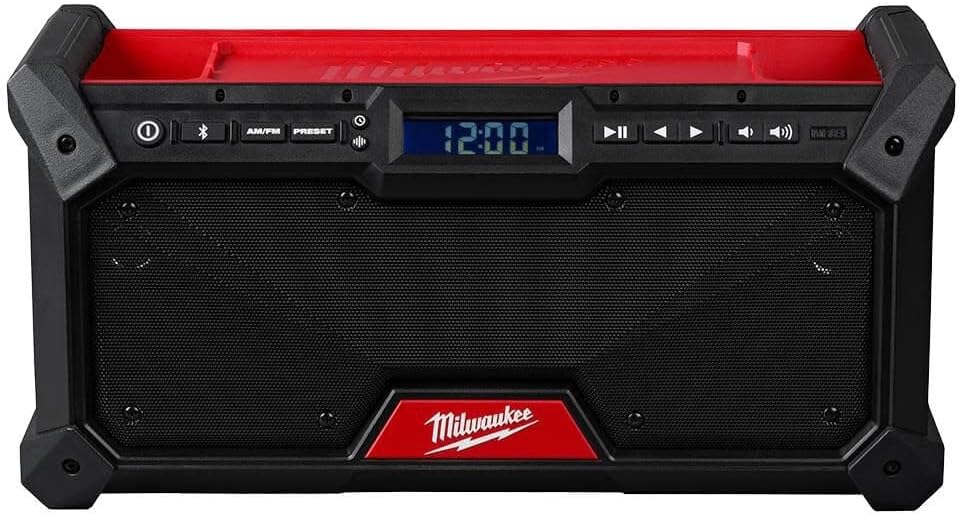
Přední view of the Milwaukee M18 Bluetooth Jobsite Radio, showcasing the dual speakers, central digital display, and control panel for power, Bluetooth, AM/FM, presets, playback, and volume adjustments.
2. Bezpečnostní pokyny
Pro zajištění bezpečného provozu a prevenci poškození dodržujte prosím následující bezpečnostní pokyny:
- Read all instructions thoroughly before operating the radio.
- Use only Milwaukee M18 batteries and chargers specified for this product.
- Nevystavujte rádio dešti nebo mokru.
- Nerozebírejte rádio. Veškerý servis svěřte kvalifikovanému servisnímu personálu.
- Ensure proper ventilation around the radio. Do not block any ventilation openings.
- Uchovávejte rádio mimo dosah zdrojů tepla, jako jsou radiátory, topná tělesa, kamna nebo jiná zařízení produkující teplo.
- Čistěte pouze suchým hadříkem.
3. Nastavení
3.1 Připojení zdroje napájení
- Using an M18 Battery: Open the battery compartment cover and insert a charged Milwaukee M18 battery until it clicks into place. Close the cover securely.
- Použití AC adaptéru: Connect the provided AC adapter to the radio's power input port and then plug the adapter into a standard electrical outlet.
3.2 Nastavení antény
For optimal AM/FM radio reception, extend the flexible antenna fully and adjust its position as needed.
4. Návod k obsluze
4.1 Zapnutí/vypnutí
Stiskněte tlačítko Moc button (marked with a circle and vertical line) located on the control panel to turn the radio on or off.
4.2 Mode Selection (AM/FM/Bluetooth)
Stiskněte tlačítko AM/FM button to cycle between AM and FM radio bands. Press the Bluetooth button (marked with the Bluetooth symbol) to activate Bluetooth mode.
4.3 Párování Bluetooth
- Stiskněte tlačítko Bluetooth button. The Bluetooth indicator on the display will flash, indicating pairing mode.
- On your mobile device, enable Bluetooth and search for available devices. Select "Milwaukee Radio" from the list.
- Once successfully paired, the Bluetooth indicator on the radio's display will glow solid.
4.4 Radio Tuning and Presets
- tuning: In AM or FM mode, use the Ladit (right arrow) and Naladit (left arrow) buttons to manually adjust the frequency.
- Ukládání předvoleb: Nalaďte požadovanou stanici. Stiskněte a podržte Přednastaveno button until the preset number flashes on the display. Use the Tune Up/Down buttons to select a preset number (1-18). Press the Přednastaveno button again to save the station.
- Vyvolání předvoleb: Krátce stiskněte Přednastaveno a poté použijte Tune Up/Down buttons to cycle through and select a saved preset station.
4.5 Ovládání hlasitosti
Adjust the audio output level using the Zvýšení hlasitosti (speaker icon with two waves) and Snížit hlasitost (speaker icon with one wave) buttons.
4.6 Nastavení ekvalizéru
Stiskněte tlačítko EQ button (if available, or refer to the display menu) to access and adjust bass and treble levels to your preference.
4.7 USB-C Device Charging
Connect a compatible personal electronic device to the USB-C 3.0A port on the radio to charge it. The radio must be powered on for charging functionality.
5. Údržba
5.1 Čištění
Otřete vnější povrch rádia měkkým hadříkemamp cloth. Do not use abrasive cleaners, solvents, or harsh chemicals, as these can damage the finish or internal components.
5.2 Skladování
When not in use, store the radio in a dry, protected area away from extreme temperatures. If storing for extended periods, remove the M18 battery.
6. Řešení problémů
- Bez napájení: Ensure the M18 battery is charged and properly inserted, or that the AC adapter is securely connected to both the radio and a working power outlet.
- Žádný zvuk: Check the volume level. Ensure the correct audio source (AM, FM, or Bluetooth) is selected.
- Špatný příjem rádia: Fully extend and adjust the antenna. Try repositioning the radio to a different location to improve signal strength.
- Problémy s připojením Bluetooth: Confirm the radio is in Bluetooth pairing mode (flashing indicator). Ensure Bluetooth is enabled on your device and it is within the 120 ft range. Try unpairing and re-pairing the device.
7. Specifikace
| Funkce | Detail |
|---|---|
| Značka | Milwaukee |
| Číslo modelu | 2952-20 |
| Rozměry produktu | 14 cm D x 6 cm Š x 6 cm V |
| Technologie připojení | Bluetooth 5.0 |
| Zdroj napájení | M18 Battery or AC Adapter |
| Podporovaná rádiová pásma | AM/FM |
| Speciální funkce | Dust Resistant, Portable, Built-In AM Antenna, USB-C 3.0A Charging |
| Maximální doba běhu | Up to 13 hours (with M18 XC5.0 battery at max volume) |
8. Záruka a podpora
For detailed warranty information, product registration, or technical support, please refer to the official Milwaukee website or contact Milwaukee customer service directly. Keep your purchase receipt for warranty claims.


