1. Úvod
The TECKNET WiFi Water Leak Detector is designed to provide early warning of water leaks and drips in your home or office. This smart sensor connects directly to your 2.4GHz WiFi network, sending instant notifications to your smartphone via the Tuya Smart App and activating a local 120dB audible alarm. Its advanced 6-point sensing technology helps protect your property from potential water damage.
2. Bezpečnostní informace
- Nevystavujte zařízení extrémním teplotám nebo přímému slunečnímu záření.
- Udržujte zařízení mimo dosah silných magnetických polí.
- Use only specified AAA batteries. Do not mix old and new batteries, or different types of batteries.
- Zlikvidujte baterie v souladu s místními předpisy.
- Nepokoušejte se zařízení sami rozebírat nebo opravovat. Požádejte o pomoc zákaznickou podporu.
- Ensure the device is placed on a flat, stable surface where water leaks are most likely to occur.
3. Obsah balení
- 1 x TECKNET WiFi Water Leak Detector (Model TK-WA161)
- 2 x AAA baterie
- 1 x Uživatelská příručka (tento dokument)
4. Konec produktuview
The TECKNET WiFi Water Leak Detector features a compact design with advanced sensing capabilities. It includes:
- 6-Point Precision Detection: Equipped with 2 top and 4 bottom probes for comprehensive water detection.
- 120dB Adjustable Siren: A loud local alarm with adjustable volume levels.
- WiFi připojení: Direct connection to 2.4GHz home WiFi, no hub required.
- Oznámení aplikací: Instant alerts to your smartphone via the Tuya Smart App.
- Dlouhá výdrž baterie: Up to 2 years on 2 AAA batteries with low battery alerts.
- IP67 Certified: Designed to withstand water exposure without damage.

Image: The TECKNET Water Leak Detector positioned to detect both dripping and leaking water, highlighting its dual detection capabilities.

Image: The TECKNET Water Leak Detector shown submerged in water, illustrating its IP67 water resistance rating, ensuring no damage after water exposure.
5. Pokyny k nastavení
5.1. Instalace baterie
- Najděte přihrádku na baterie na zadní straně zařízení.
- Use a small tool (like a flathead screwdriver or the provided tool if any) to gently pry open the battery cover.
- Vložte dvě baterie typu AAA a dbejte na správnou polaritu (+/-).
- Kryt baterie bezpečně zavřete, dokud nezacvakne na místo.

Image: A visual guide demonstrating the four steps for battery installation: inserting a tool to open, rotating to unlock, inserting AAA batteries, and closing the cover.
5.2. Stažení aplikace a párování zařízení
- Download the "Tuya Smart" app from the Apple App Store or Google Play Store.
- Zaregistrujte se nebo se přihlaste ke svému účtu Tuya Smart.
- Ujistěte se, že je váš smartphone připojen k síti WiFi s frekvencí 2.4 GHz. Zařízení nepodporuje WiFi s frekvencí 5 GHz.
- Open the app and tap the "+" icon to add a device.
- Select "Security & Video Surveillance" then "Water Leak Sensor (Wi-Fi)".
- Follow the in-app instructions for Bluetooth-assisted pairing. This typically involves pressing and holding the "TEST" button on the device until the indicator light flashes, then confirming in the app.
- Once successfully paired, you can name the device and assign it to a specific room in the app.
5.3. Umístění
Place the water leak detector in areas prone to water leaks or flooding. Common locations include:
- Pod kuchyňskými a koupelnovými dřezy
- Behind washing machines and dishwashers
- Near water heaters and sump pumps
- In basements, utility rooms, and crawl spaces
- Near air conditioning units or refrigerators with water lines
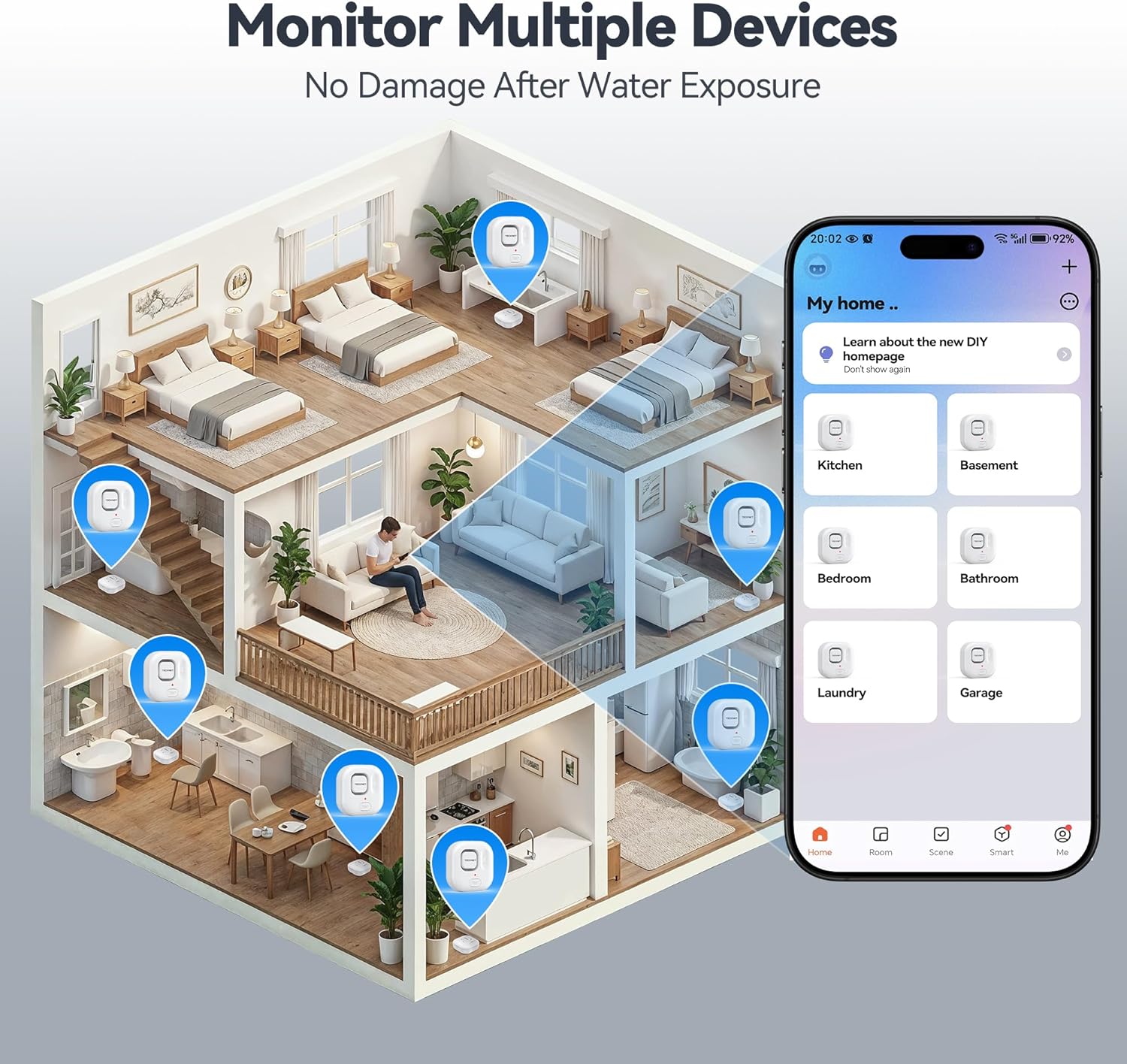
Image: An illustration depicting various locations within a house where TECKNET Water Leak Detectors can be strategically placed, such as kitchens, bathrooms, and basements, alongside the corresponding mobile app interface for monitoring.
6. Návod k obsluze
6.1. Leak Detection and Alerts
When the sensor detects water, it will immediately:
- Trigger the built-in 120dB audible alarm.
- Send an instant push notification to your smartphone via the Tuya Smart App.
To silence the alarm, you can press the "TEST" button on the device or disable it through the Tuya Smart App.
6.2. Nastavení hlasitosti alarmu
The alarm volume can be adjusted to 0dB (silent), 40dB, 80dB, or 120dB. This can be done either through the Tuya Smart App settings for the device or by repeatedly pressing the "TEST" button on the device to cycle through the volume levels.
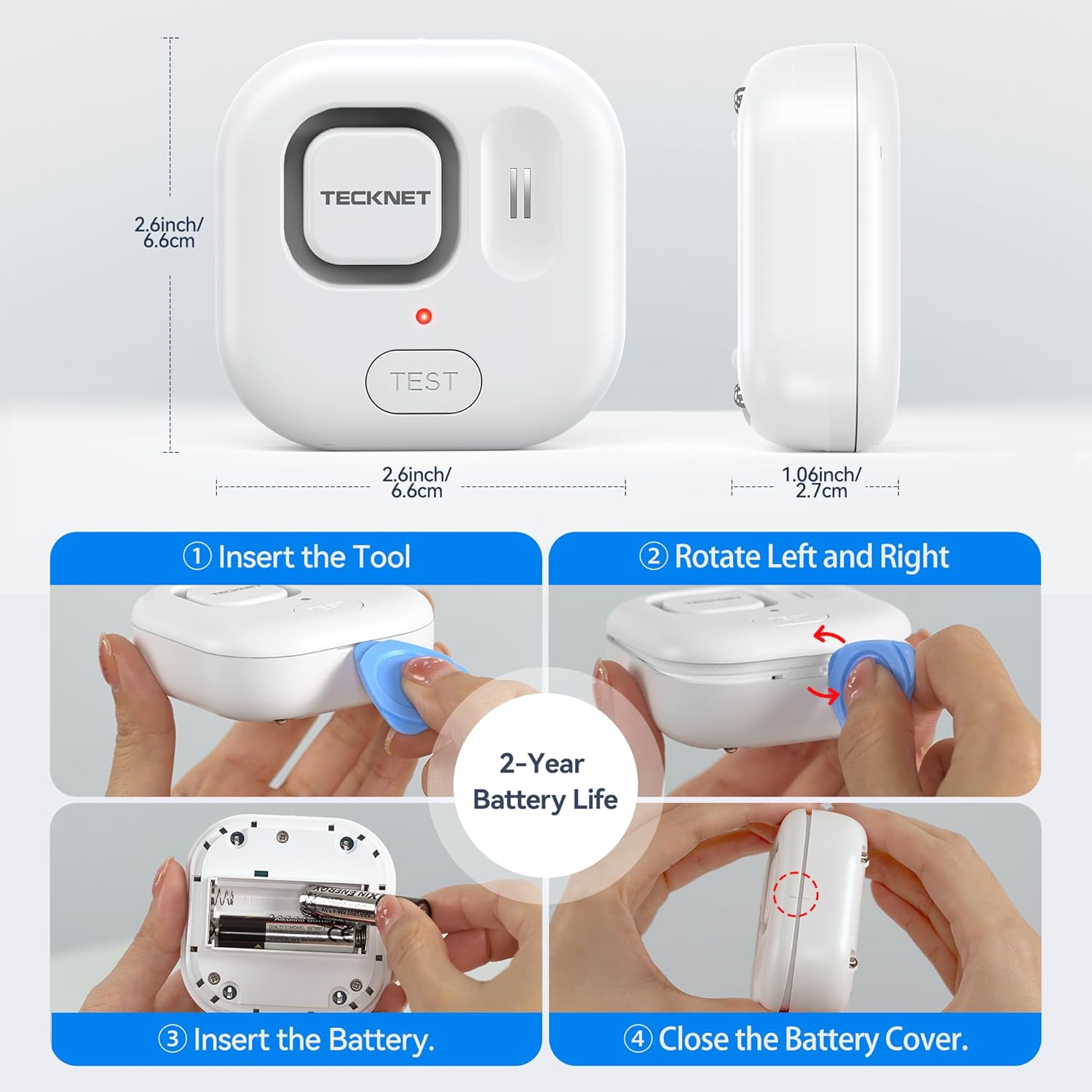
Image: A visual representation of the four adjustable alarm volume settings (0dB, 40dB, 80dB, 120dB) and how they might sound across different floors of a house.
6.3. Testování zařízení
It is recommended to test the device periodically to ensure proper functionality. To test:
- Place the sensor on a damp cloth or a small amount of water, ensuring the bottom probes make contact.
- The alarm should sound, and you should receive a notification on your smartphone.
- Dry the sensor thoroughly after testing.
7. Údržba
7.1. Výměna baterie
The device is powered by two AAA batteries, offering up to 2 years of battery life. The Tuya Smart App will send a notification when the battery level is low. Replace batteries as described in Section 5.1.
7.2. Čištění
Wipe the device with a soft, dry cloth. Do not use abrasive cleaners or immerse the device in water (beyond its intended function for leak detection) as this may damage internal components.
8. Řešení problémů
- Zařízení se nepřipojuje k Wi-Fi:
- Ujistěte se, že vaše WiFi síť je 2.4 GHz. Zařízení nepodporuje sítě 5 GHz.
- Check if your WiFi password is correct.
- Přesuňte zařízení blíže k routeru WiFi.
- Restartujte router a zkuste spárování znovu.
- Žádná oznámení aplikací:
- Check your phone's notification settings for the Tuya Smart App.
- Ensure the device is connected to WiFi and has sufficient battery.
- Ověřte, zda má váš telefon aktivní připojení k internetu.
- Alarm nezní:
- Zkontrolujte stav baterie a v případě nízkého nabití ji vyměňte.
- Ensure the alarm volume is not set to 0dB in the app or via the "TEST" button.
- Test the device with water to confirm sensor functionality.
- Falešné poplachy:
- Ensure the sensor probes are clean and dry.
- Relocate the device if it's in an area with high humidity or condensation that might trigger it.
9. Specifikace
| Číslo modelu | TK-WA161 |
| Konektivita | WiFi (2.4GHz only), Bluetooth (for setup) |
| Kompatibilita aplikací | Tuya Smart (Android & iOS) |
| Hlasitost alarmu | 120dB (adjustable: 0dB, 40dB, 80dB, 120dB) |
| Senzory | 6 probes (2 top, 4 bottom) |
| Zdroj napájení | 2 x AAA baterie |
| Životnost baterie | Až 2 let |
| Rozměry | 1 x 1 x 1 cm (approx. 2.6 x 2.6 x 1.06 inches); 109 g |
| Ochrana proti vniknutí | Certifikováno IP67 |
| Zahrnuté komponenty | WiFi Water Alarm, 2 AAA Batteries |
10. Záruka a podpora
TECKNET provides a 36-month warranty for this product upon registration. If you encounter any issues or have questions regarding your TECKNET WiFi Water Leak Detector, please contact our professional customer service team. Refer to the TECKNET official webkontaktní údaje naleznete na webových stránkách nebo v dokumentaci k nákupu.


