Zavedení
This manual provides detailed instructions for the installation, operation, and maintenance of your G.Skill GM3 ATX RGB PC Case. Please read this manual thoroughly before beginning assembly to ensure proper setup and optimal performance. This mid-tower PC case is designed for high-performance builds, offering extensive cooling support and versatile component compatibility.

Figure 1: G.Skill GM3 ATX RGB PC Case, showcasing its sleek black design and illuminated front RGB fans.
Průvodce nastavením
Follow these steps for the proper assembly and installation of components within your G.Skill GM3 PC case.
1. Vybalení a kontrola
Carefully remove the PC case from its packaging. Inspect for any signs of damage during transit. Ensure all accessories, including screws, standoffs, and cable ties, are present.
2. Removing Panels
To access the interior, remove the tempered glass side panel and the rear metal side panel. The tempered glass panel is typically secured with thumb screws at the corners. The metal side panel slides off after removing its rear screws.
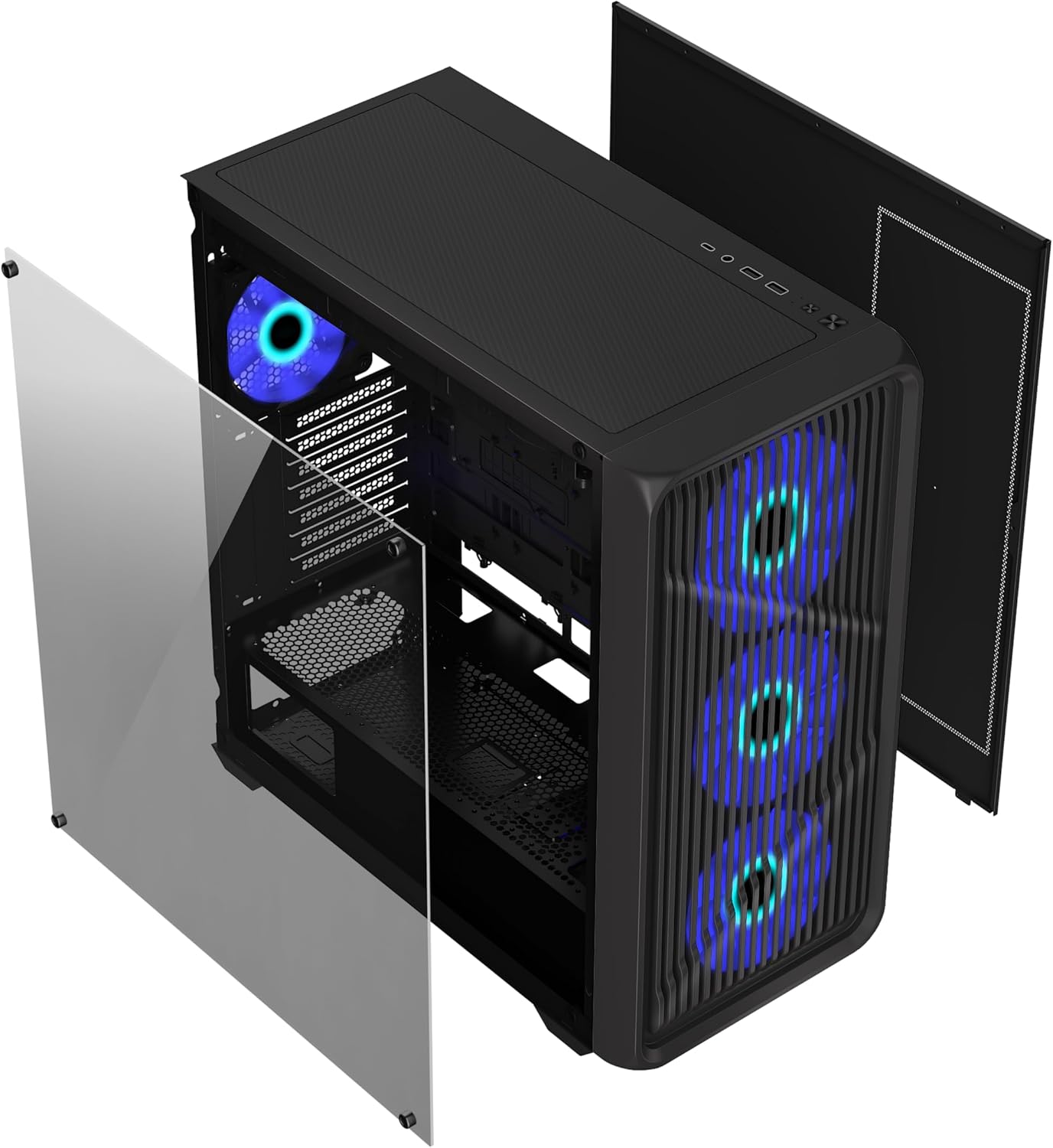
Obrázek 2: Rozložené view illustrating the removal of the tempered glass side panel and the front panel for component installation and maintenance.
3. Instalace základní desky
Install the appropriate standoffs for your ATX or Micro ATX motherboard. Carefully align your motherboard with the standoffs and the I/O shield opening, then secure it with screws.

Obrázek 3: Interiér view of the G.Skill GM3 case, showing the spacious layout for motherboard and component installation.
4. Instalace napájecího zdroje (PSU)
Mount your PSU into the dedicated shroud at the bottom rear of the case. Secure it with screws from the rear of the case.
5. Instalace úložného disku
The case supports two 3.5" HDDs and two 2.5" SSDs. Install 3.5" drives in the drive cage located under the PSU shroud. 2.5" SSDs can be mounted on dedicated trays behind the motherboard tray.
6. Instalace grafické karty (GPU)
Remove the necessary expansion slot covers. Insert your graphics card into the PCIe slot on your motherboard and secure it with the provided screws.
7. Cooling System Installation (Optional)
The GM3 case supports up to 12 fans and radiators up to 360mm on the front and top. Install additional fans or liquid cooling radiators as desired. Ensure proper airflow direction for optimal cooling.

Figure 4: Internal layout highlighting various fan mounting points for enhanced airflow and cooling configurations.
8. Správa kabelů
Pro vedení kabelů využijte výřezy pro vedení kabelů a úchyty za přihrádkou základní desky. Zlepší se tím proudění vzduchu a estetika.
9. Přední I/O připojení
Connect the front panel cables (USB 3.2 Gen1, USB 3.2 Gen2 Type-C, audio, power, reset, LED) to the corresponding headers on your motherboard. Refer to your motherboard manual for header locations.
Návod k obsluze
Jakmile jsou všechny komponenty nainstalovány a připojeny, můžete systém zapnout.
Zapnutí
Press the power button located on the front I/O panel. The RGB fans will illuminate, and your system should begin to boot.
Přední I / O porty
Přední panel poskytuje pohodlný přístup k:
- 2 x USB 3.2 Gen1 ports
- 1 x port USB 3.2 Gen2 Type-C
- 1 x 2-in-1 Audio Jack (Headphone/Microphone)
These ports allow for easy connection of peripherals, external storage, and audio devices.
Údržba
Pravidelná údržba pomáhá zajistit optimální výkon a dlouhou životnost vaší počítačové skříně.
Čištění prachového filtru
The G.Skill GM3 case features dust filters to prevent dust buildup inside your system. Regularly clean these filters to maintain optimal airflow and cooling efficiency.
- The front panel dust filter can be accessed by removing the front panel.
- The top panel typically has a magnetic dust filter that can be easily removed and cleaned.
- The PSU dust filter is located at the bottom of the case and slides out for cleaning.

Figure 5: Detached front panel and dust filter, demonstrating ease of access for cleaning and maintenance of the pre-installed RGB fans.
Generální úklid
Use a soft, dry cloth to wipe down the exterior surfaces of the case. For the tempered glass panel, use a glass cleaner and a microfiber cloth to avoid streaks.
Odstraňování problémů
Tato část se zabývá běžnými problémy, se kterými se můžete setkat.
Žádné napájení / Systém se nespustí
- Ujistěte se, že je napájecí zdroj (PSU) na zadní straně zapnutý.
- Verify all power cables (24-pin ATX, CPU, GPU) are securely connected to the motherboard and components.
- Zkontrolujte připojení tlačítka napájení na předním panelu k základní desce.
- Confirm the wall outlet is functional.
Ventilátory se netočí / RGB podsvícení se nerozsvítí
- Zkontrolujte připojení napájení ventilátoru k základní desce nebo řadiči ventilátoru.
- Verify RGB connections to the motherboard's RGB header or dedicated RGB controller.
- Ensure fan control software or BIOS settings are correctly configured.
Poor Airflow / Overheating
- Pravidelně čistěte všechny prachové filtry.
- Ensure fans are installed in the correct orientation for optimal airflow (intake/exhaust).
- Zkontrolujte, zda žádné kabely nebrání proudění vzduchu uvnitř skříně.
- Consider adding more fans or upgrading to a liquid cooling solution if temperatures remain high.
Specifikace
Detailed technical specifications for the G.Skill GM3 ATX RGB PC Case.
| Funkce | Specifikace |
|---|---|
| Značka | G.SKILL |
| Název modelu | GM3 |
| Číslo modelu položky | GC-AKGW5-GM3 |
| Typ pouzdra | Střední věž |
| Kompatibilita základní desky | ATX, Micro ATX |
| Rozměry (DxŠxV) | 16.34"H x 8.85"Š x 18.5"V (415 x 225 x 470 mm) |
| Materiál | Tvrzené sklo, ocel |
| Barva | Černý |
| Předinstalované ventilátory | 4 x RGB Fans (typically 3 front, 1 rear) |
| Maximální podpora ventilátorů | Až 12 ventilátorů |
| Podpora radiátorů | Up to 360mm (Front, Top), Rear, Motherboard Side |
| Přední I / O porty | 2 x USB 3.2 Gen1, 1 x USB 3.2 Gen2 Type-C, 1 x 2-in-1 Audio Jack |
| 3.5" pozice pro mechaniky | 2 |
| 2.5" pozice pro mechaniky | 2 |
| Rozšiřující sloty | 7 |
| Maximální délka GPU | 410 mm |
| Maximální výška chladiče CPU | 160 mm |
| Speciální funkce | Built-In Fan, Dust Filter, Tempered Glass Panel |
Záruka a podpora
For warranty information and technical support, please refer to the official G.SKILL webnebo se obraťte přímo na jejich zákaznický servis. Uschovejte si doklad o koupi pro případ reklamace.
Official G.SKILL Webmísto: www.gskill.com
For further assistance, you may also visit the G.SKILL Store on Amazon: G.SKILL Amazon Store


