1. Konec produktuview
The Huepar S100-BT is a versatile digital laser distance measure designed for accurate and efficient measurements. It features Bluetooth connectivity for seamless integration with the Huepar mobile application, an angle sensor for real-time tilt measurements, and multiple measurement modes including distance, area, volume, and Pythagorean calculations.

Figure 1: Huepar S100-BT Laser Distance Measure and its companion mobile application interface.
2. Co je v krabici
- 1 x Huepar S100-BT Laser Distance Meter
- 1 x řemínek na ruku
- 2 x Rechargeable 1200mAh NiMH Batteries
- 1 x nabíjecí kabel typu C
- 1 x Uživatelská příručka
- 1 x papírová krabice

Figure 2: All items included in the Huepar S100-BT package.
3. Nastavení
3.1 Instalace a nabíjení baterie
The device is powered by 2 rechargeable 1200mAh NiMH batteries (included). It can also be powered directly via a Type-C power cord. The device is compatible with AA batteries (not included) as an alternative power source.
- To install batteries, slide open the battery cover on the back of the device.
- Insert the 2 NiMH batteries, ensuring correct polarity (+/-).
- Pevně zavřete kryt baterie.
- To charge, connect the device using the provided Type-C charging cord. A charging indicator will be displayed.

Figure 3: The Huepar S100-BT supports rechargeable NiMH batteries, direct Type-C power, and AA batteries.
3.2 Zapnutí/vypnutí
- Zapnutí: Krátce stiskněte OPATŘENÍ button (triangle icon) to turn on the device.
- Vypnout: Dlouze stiskněte VYPNUTO button to turn off the device. The device will automatically shut down after 180 seconds of no operation to conserve power.
3.3 Referenční body
The device allows you to select from three reference points for measurements: front, middle (1/4 inch screw hole), or rear. The default reference point is the rear of the device.
- To change the reference point, long press the ADD/REFERENCE POINT button. The display will show an icon indicating the currently selected reference point.

Figure 4: Select the appropriate reference point for accurate measurements.
3.4 Výběr jednotky
The device supports 5 selectable units: 0.000m, 0.000ft, 0.000in (decimal), 0in (fraction), and 0'0"%.
- Pro přepínání mezi jednotkami dlouze stiskněte SUBTRACTION/UNIT SWITCH tlačítko.
3.5 Bluetooth and App Connection
The Huepar S100-BT features Bluetooth connectivity to pair with the Huepar APP for enhanced functionality.
- Download the Huepar APP from your phone's app store (available for free).
- Ujistěte se, že je na vašem smartphonu povoleno Bluetooth.
- Turn on the laser measuring tool.
- Open the Huepar APP and grant all necessary permissions (e.g., location access).
- Click "Add Device" within the app.
- Select your Huepar laser measuring tool from the list of available devices to connect.

Figure 5: Follow these steps to connect your device to the Huepar APP.
Video 1: Demonstrates the Bluetooth connection process and basic app functionality.
4. Návod k obsluze
4.1 Basic Measurement Modes
The Huepar S100-BT offers various measurement modes for different applications.
- Jednorázové měření: Krátce stiskněte OPATŘENÍ tlačítko pro provedení jednoho měření vzdálenosti.
- Průběžné měření: Dlouze stiskněte OPATŘENÍ button for 2-3 seconds to enter continuous measurement mode. The maximum, minimum, and current values will be displayed. Short press again to stop.
- Měření plochy: Stiskněte tlačítko LENGTH/AREA/VOLUME/PYTHAGOREAN button until the area icon appears. Take two consecutive distance measurements (length and width), and the device will automatically calculate and display the area.
- Měření objemu: Stiskněte tlačítko LENGTH/AREA/VOLUME/PYTHAGOREAN button until the volume icon appears. Take three consecutive distance measurements (length, width, and height), and the device will automatically calculate and display the volume.
- Pythagorejské měření: The device supports 4 Pythagorean measurement modes for indirect length calculations. Press the LENGTH/AREA/VOLUME/PYTHAGOREAN button until the desired Pythagorean icon appears. Follow the on-screen prompts to take the required measurements (e.g., hypotenuse and one side) to calculate the unknown length. For best accuracy, use a tripod for Pythagorean measurements.

Obrázek 6: Přesview of the multiple measurement modes available.
Video 2: Detailed instructions on how to use various measurement modes.
4.2 Angle Sensor
The built-in digital tilt angle sensor provides real-time angle measurements with an accuracy of ±1°. The X, Y angle measurement range is -90.0° to 90.0°.
- The X direction indicates forward and backward tilt.
- The Y direction indicates left and right tilt.
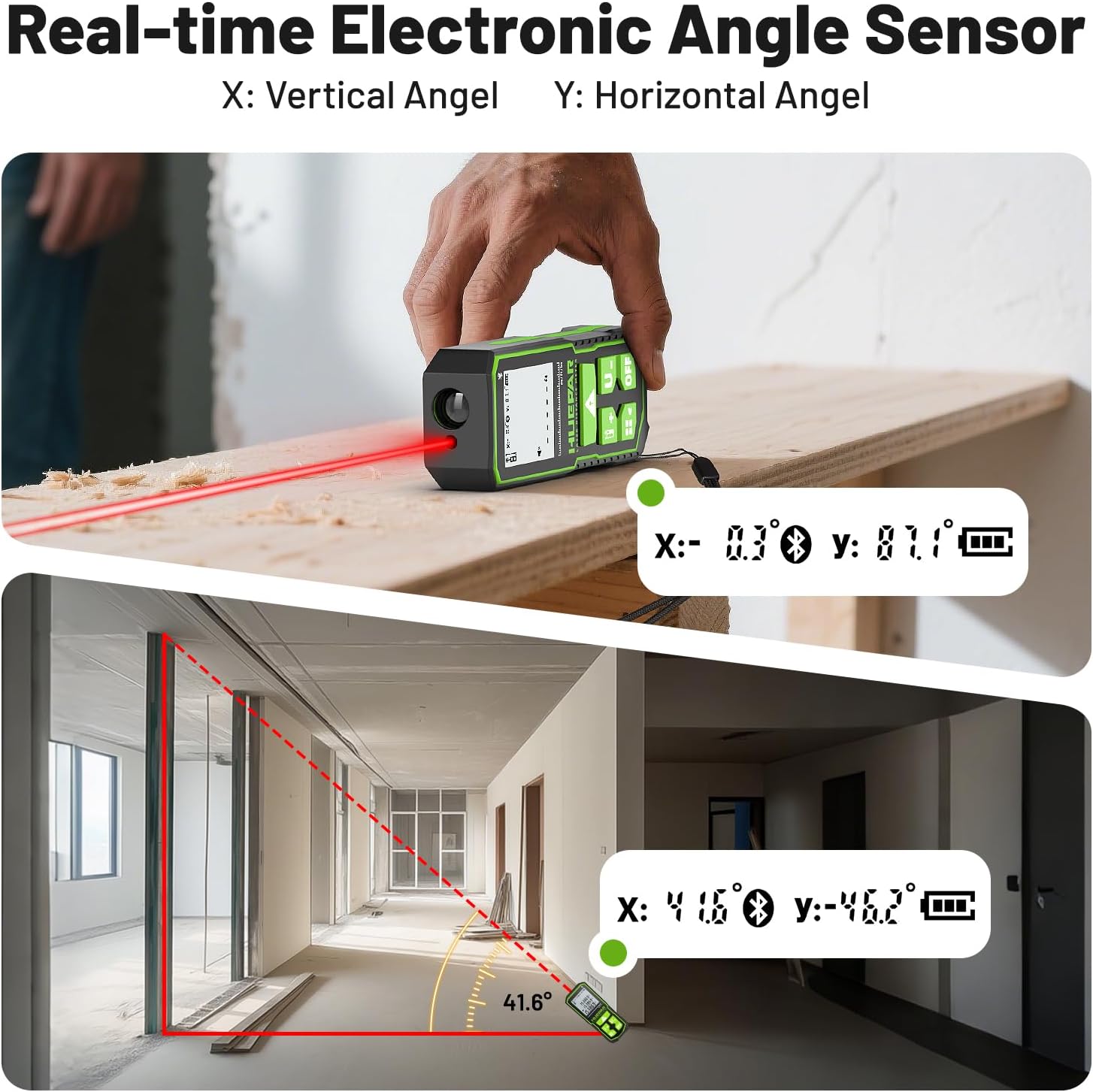
Figure 7: The device displays real-time X and Y angles for precise leveling and tilt measurements.
4.3 Sčítání a odčítání
The device supports addition and subtraction of measurements.
- To add a measurement, press the ADD/REFERENCE POINT button after taking a measurement. The display will show a "+" sign. Take the next measurement, and the sum will be displayed.
- To subtract a measurement, press the SUBTRACTION/UNIT SWITCH button after taking a measurement. The display will show a "-" sign. Take the next measurement, and the difference will be displayed.

Figure 8: Visual guide for using addition and subtraction functions.
4.4 Mute/Sound Mode
- Dlouze stiskněte LENGTH/AREA/VOLUME/PYTHAGOREAN button to turn the buzzer sound on or off. A speaker icon with a cross will appear on the display when muted.
4.5 Huepar APP Functions
The Huepar APP provides advanced features for managing your measurements:
- Ovládání v reálném čase: Switch measurement modes, select units, and set reference points directly from your phone.
- Záznam dat: Save unlimited measurement data and group it for better organization.
- Floor Plan Drafting: Create and edit floor plans directly within the app.
- Photo Marking: Take photos and mark measurement values directly on the images.
- Poznámky: Add notes to your measurements for detailed record-keeping.

Figure 9: The Huepar APP offers a user-friendly interface for beginners.
Video 3: Demonstrates how to use the Huepar APP for various measurement tasks.
5. Údržba
5.1 Odolná konstrukce
The Huepar S100-BT is designed for durability with an IP54 rating, making it waterproof and dustproof. Its portable size and scratch-proof TPE soft rubber housing provide a good grip and protection.
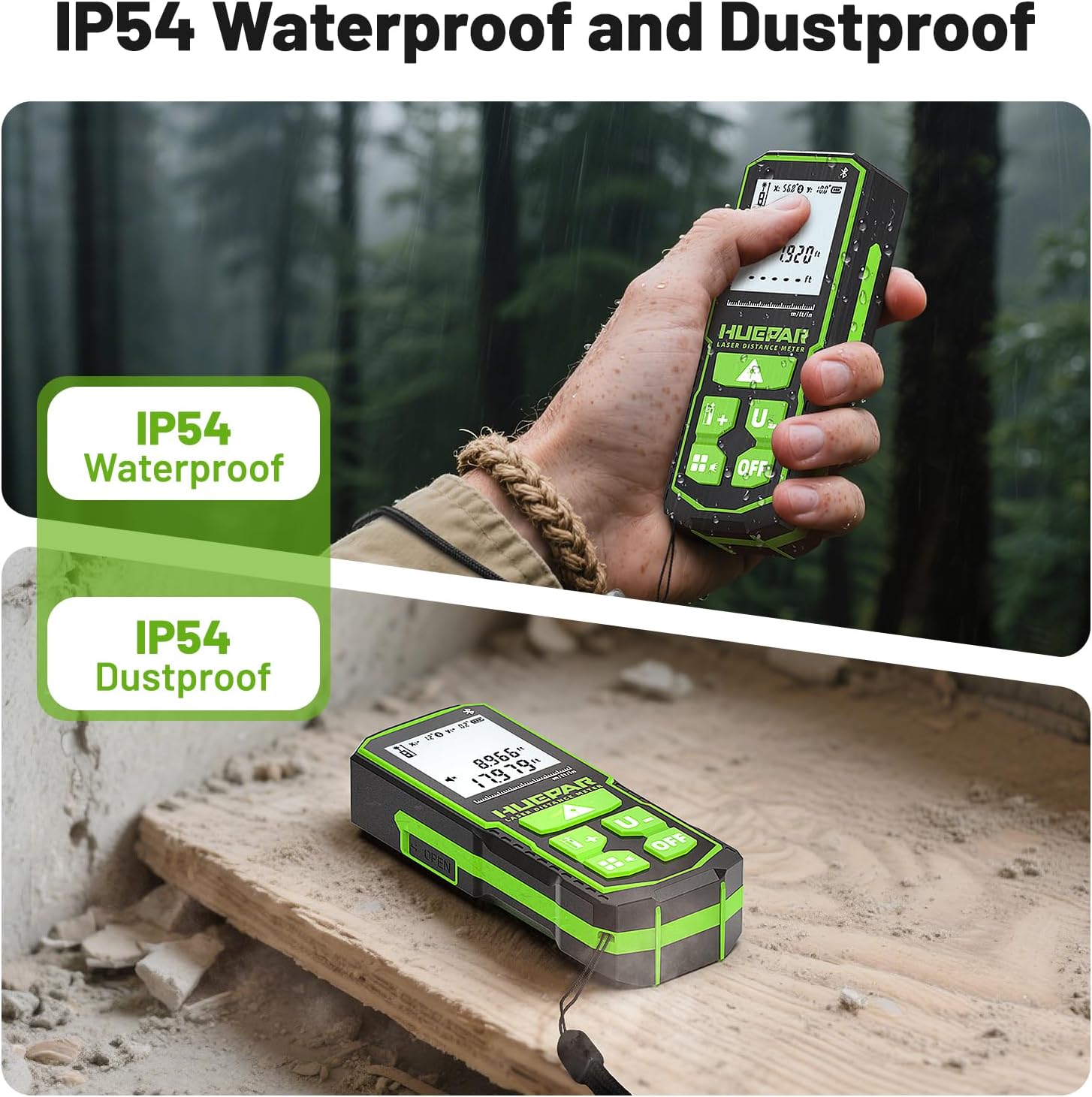
Figure 10: The device's IP54 rating ensures protection against water and dust.
5.2 Čištění a skladování
- Zařízení čistěte měkkým, damp tkanina. Nepoužívejte agresivní chemikálie nebo abrazivní čisticí prostředky.
- Přístroj skladujte na chladném a suchém místě mimo dosah přímého slunečního záření a extrémních teplot.
- Pokud baterie skladujete delší dobu, vyjměte je, abyste zabránili jejich vytečení.
6. Řešení problémů
6.1 Chybové kódy
The device may display error codes to indicate issues. Refer to the table below for common error codes and their solutions:
| Kód chyby | Příčina | Nápravné opatření |
|---|---|---|
| Chyba10 | Baterie je příliš slabá | Change batteries or charge the device |
| Chyba15 | Mimo dosah | Změřte cíl v dosahu |
| Chyba16 | Přijímaný signál je příliš slabý nebo doba měření příliš dlouhá | Use high reflectivity reflector |
| Chyba18 | Příliš vysoký jas pozadí | Use low reflectivity reflector |
| Chyba26 | Out of the device's digital display range | Switch units or measure within the digital display range |
6.2 Accuracy Check
To check the accuracy of the measuring tool:
- Select a permanently unchangeable measuring section (e.g., a wall) which is approximately 9.8 to 32ft (3 to 10m) long and for which you know the exact length.
- The measurement should be performed under favorable conditions, i.e., the measuring section should be indoors with weak backlighting and the target area of the measurement should be smooth and reflect well (e.g., a white-painted wall).
- Measure the distance 10 times in succession. The deviation of the individual measurements from the average value must not exceed ±0.12 in (±2 mm). Record the measurements in order to be able to compare the accuracy at a later date.
7. Specifikace
- Rozsah měření: 330 stop
- Přesnost: 1/16 palce
- Třída laseru: třída 2
- Typ laseru: 630-670nm, <1mW
- Angle Sensor Accuracy: ±1°
- jednotky: m, ft, in (decimal), in (fraction), %
- Moc: 2 x 1200mAh NiMH rechargeable batteries (included), Type-C charging, compatible with AA batteries (not included)
- Automatické vypnutí: 180s (no operation)
- IP hodnocení: IP54 (vodotěsný a prachotěsný)
- Materiál: Acrylonitrile Butadiene Styrene, TPE soft rubber housing
- Hmotnost položky: 0.705 unce (20 gramů)
- Číslo modelu položky: S100R-BT
8. Záruka a podpora
The Huepar S100-BT laser measuring tool comes with a 2-year quality assurance. Free repair or replacement is provided if the product is faulty.
Huepar is committed to providing best-in-class service to customers, including 24/7 service team support (response within 24 hours & solution within 48 hours) and lifetime technical support through worldwide maintenance centers.


