Zavedení
This manual provides detailed instructions for the setup, operation, maintenance, and troubleshooting of your VGN F1 Pro Max Wireless Gaming Mouse. Please read this manual thoroughly before using the product to ensure optimal performance and longevity.

Image: VGN F1 Pro Max Wireless Gaming Mouse, showcasing its ergonomic design and white finish.
Obsah balení
Ověřte, zda jsou v balení přítomny všechny položky:
- VGN F1 Pro Max Mouse
- USB Type-A Receiver
- Paracord style USB-C to USB-A Cable
- USB Extension Adapter
- Páska pro uchopení myši
- Uživatelská příručka (tento dokument)

Image: Contents of the VGN F1 Pro Max Mouse package, including the mouse, cables, receiver, and grip tape.
Konec produktuview
Familiarize yourself with the various components of your VGN F1 Pro Max mouse:

Image: Diagram illustrating the various buttons and features of the VGN F1 Pro Max mouse, including the LED indicator, scroll wheel, left/right/forward/backward buttons, DPI button, optical sensor, power switch, receiver storage slot, and feet.
- Tlačítka vlevo/vpravo: Standardní funkce klikání myší.
- Rolovací kolečko: Pro funkci rolování a kliknutí prostředním tlačítkem myši.
- Tlačítka vpřed/vzad: Side buttons for navigation, customizable via software.
- Tlačítko DPI: Located on the underside, used to cycle through DPI settings.
- Vypínač: On/Off switch on the underside.
- Optický senzor: PAW 3395 sensor for tracking movement.
- Úložný slot přijímače: Compartment on the underside to store the USB receiver.
- Port USB-C: Pro nabíjení a kabelové připojení.
Nastavení
1. Nabíjení myši
Before initial use, fully charge the mouse. Connect the USB-C end of the provided cable to the mouse and the USB-A end to a powered USB port on your computer or a USB charger. The LED indicator will show charging status.
- Oranžové světlo: Probíhá nabíjení.
- Zelené světlo: Battery level normal (fully charged or sufficient charge).
- Červené světlo: Battery low, recharge soon.
2. Bezdrátové připojení (2.4 GHz)
- Locate the USB Type-A receiver. It may be stored in the slot on the underside of the mouse.
- Plug the USB receiver into an available USB-A port on your computer. For optimal signal, use the included USB Extension Adapter to position the receiver closer to the mouse.
- Zapněte myš pomocí vypínače na spodní straně.
- Your computer should automatically detect the mouse.
3. Připojení kabelem
To use the mouse in wired mode, connect the USB-C end of the provided cable directly to the mouse and the USB-A end to your computer. The mouse will function immediately and charge simultaneously.
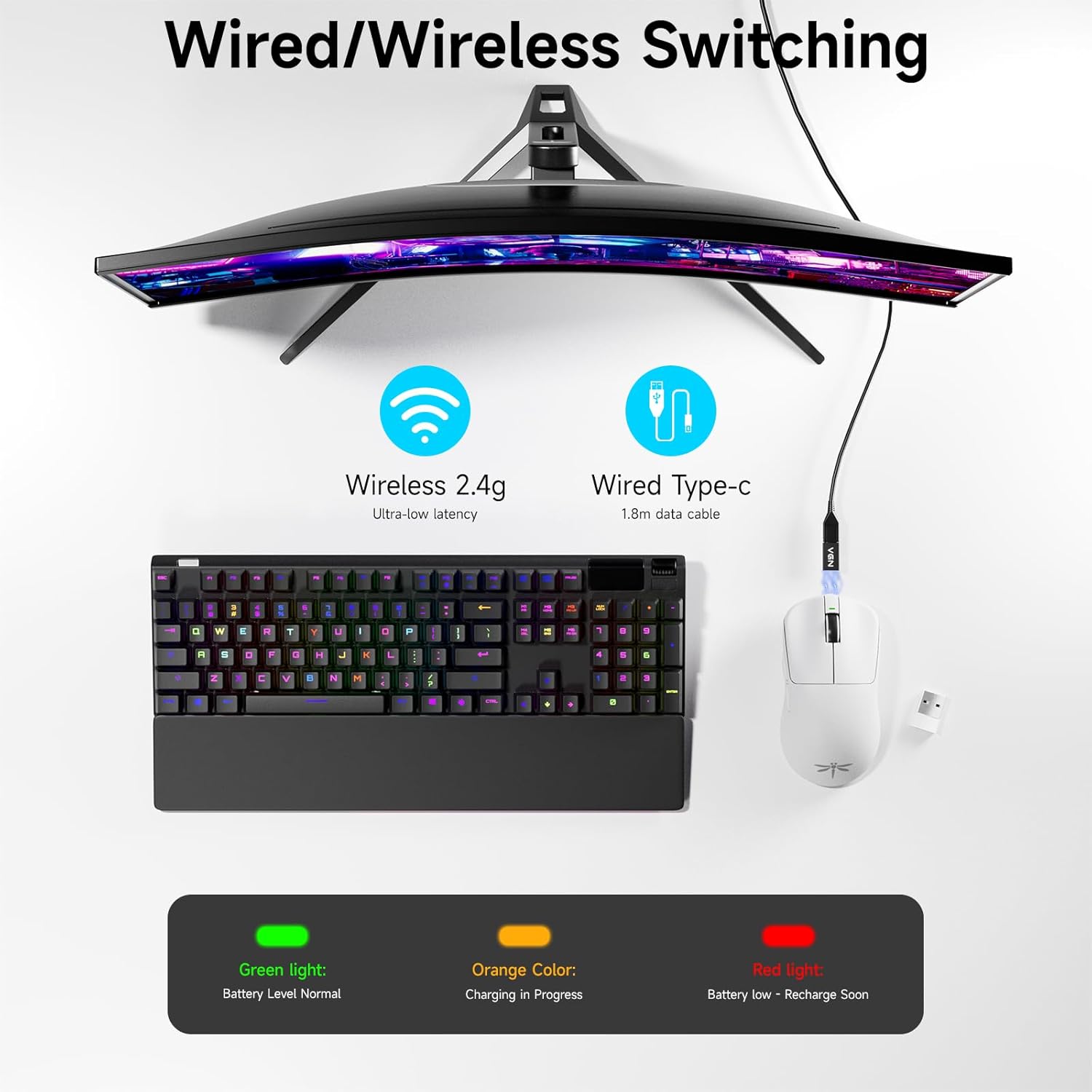
Image: Diagram showing the VGN F1 Pro Max mouse connected via 2.4GHz wireless with a dongle and via USB-C cable for wired mode, along with battery indicator lights.
4. Installing VGN HUB Driver (Optional for Customization)
For advanced customization of buttons, DPI settings, and polling rate, download and install the VGN HUB driver software from the official VGN website. This software allows you to remap buttons, create macros, and fine-tune performance settings.
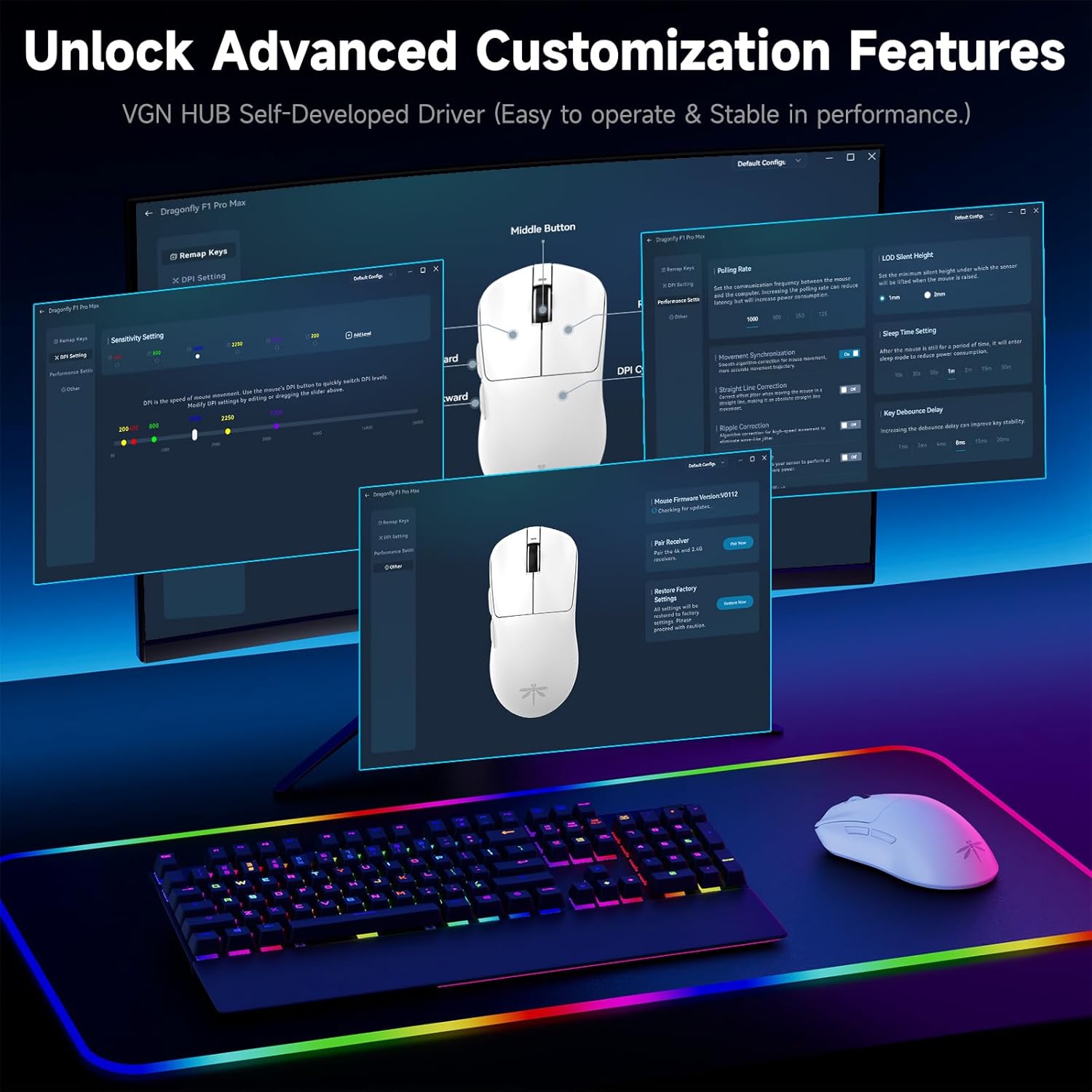
Image: Screenshot of the VGN HUB software interface, demonstrating options for button remapping, DPI settings, and performance adjustments.
5. Applying Mouse Grip Tape (Optional)
The package includes optional grip tape. You can apply this tape to the sides or buttons of the mouse for enhanced grip and comfort, according to your preference.
Návod k obsluze
Zapnutí/vypnutí
Use the physical switch on the underside of the mouse to turn it on or off. Turning off the mouse when not in use conserves battery life.
Úprava DPI
The mouse features an adjustable DPI range from 50 to 26,000. Press the DPI button on the underside of the mouse to cycle through preset DPI levels. The LED indicator may change color or flash to indicate the current DPI setting. Fine-tuning and custom DPI steps can be configured using the VGN HUB software.

Image: Illustration of the VGN F1 Pro Max mouse highlighting its adjustable DPI range from 50 to 26,000.
Míra hlasování
The mouse supports a polling rate of 1000Hz by default. An additional receiver (often included or available separately) may be required to achieve a 4000Hz polling rate. The polling rate can be adjusted via the VGN HUB software.
Programovatelná tlačítka
The VGN F1 Pro Max features 6 programmable buttons. These buttons can be customized using the VGN HUB software to assign specific functions, macros, or key bindings according to your preferences.
Indikátor stavu baterie
The LED indicator near the scroll wheel provides visual feedback on the battery status:
- Zelený: Normální úroveň nabití baterie.
- Pomerančový: Probíhá nabíjení.
- Červený: Low battery, requires recharging.
Automatic Sleep and Energy Saving
To conserve battery, the mouse will enter a light sleep mode after 1 minute of inactivity and a deep sleep mode after 5 minutes of inactivity. Moving the mouse or pressing any button will wake it up.
Údržba
Čištění myši
Regularly clean your mouse to maintain performance and hygiene. Use a soft, dry, lint-free cloth to wipe the surface. For stubborn dirt, slightly dampOtřete hadřík vodou nebo jemným čisticím roztokem. Nepoužívejte agresivní chemikálie ani abrazivní materiály.
Údržba senzoru
Ensure the optical sensor on the underside of the mouse remains clean and free of dust or debris. Use a cotton swab or compressed air to gently clean the sensor area if tracking issues occur.
Péče o baterie
To prolong battery life, avoid fully discharging the mouse frequently. Recharge the mouse when the red LED indicator appears. Store the mouse in a cool, dry place when not in use for extended periods.

Image: Illustration emphasizing the VGN F1 Pro Max mouse's 200-hour battery life, indicating long usage between charges.
Odstraňování problémů
Myš nereaguje
- Ujistěte se, že je myš zapnutá.
- Check battery level; recharge if necessary.
- For wireless connection, ensure the USB receiver is securely plugged into a working USB port and is within range. Try a different USB port.
- V případě kabelového připojení se ujistěte, že je kabel USB-C bezpečně připojen k myši i k počítači. Zkuste jiný port USB nebo kabel.
- Restartujte počítač.
Intermittent Connectivity or Lag
- Ensure the USB receiver is not obstructed and is close to the mouse. Use the USB Extension Adapter if needed.
- Avoid placing the receiver near other wireless devices or sources of electromagnetic interference (e.g., Wi-Fi routers, other wireless peripherals).
- Ujistěte se, že je myš plně nabitá.
DPI or Button Customization Issues
- Ensure the VGN HUB software is correctly installed and updated to the latest version.
- Verify that the mouse is connected to the computer when attempting to apply settings via the software.
- Save changes within the software after making adjustments.
Specifikace
| Značka | VGN |
| Číslo modelu | F1 Pro Max |
| Technologie připojení | Bezdrátové 2.4 GHz, kabelové USB-C |
| Technologie detekce pohybu | Optical (PAW 3395 Sensor) |
| Rozsah DPI | 50–16 000 DPI (nastavitelné) |
| IPS Tracking Speed | 650 IPS |
| Míra hlasování | 1000Hz (up to 4000Hz with additional receiver) |
| Tlačítka | 6 programovatelná tlačítka |
| Typ přepínače | Kailh Black Gold Mamba (100 Million Clicks) |
| Životnost baterie | Až 200 hodin |
| Hmotnost položky | 55 g (1.94 uncí) |
| Rozměry produktu | 4.8 x 2.5 x 0.1 palce |
| Kompatibilita | Windows, Mac, Linux, Chrome OS, PS/Xbox/Steam Deck |

Image: Close-up of a Kailh Black Gold Mamba switch, highlighting the durable components used in the mouse buttons.
Záruka a podpora
VGN provides comprehensive support for its products:
- Záruka: A 12-month warranty covers inherent product issues from the date of purchase.
- Technická podpora: Lifetime technical assistance is available for all VGN products.
- Služby zákazníkům: A 24/7 online support team is available to assist with any damage, malfunctions, or missing parts. Please contact VGN customer service for assistance.
For further assistance, please visit the official VGN webwebu nebo se přímo obraťte na jejich zákaznickou podporu.


