1. Úvod
The Phezer P15U Handheld Inkjet Printer is a versatile and portable device designed for efficient and precise marking on various surfaces. This intelligent printer operates with a powerful Cortex-A9 quad-core CPU and an independent system, eliminating the need for external applications, computers, or mobile phone connections. It is engineered for ease of use, allowing for direct input and editing via its 4.3-inch LCD touch screen.
This manual provides comprehensive instructions for the setup, operation, maintenance, and troubleshooting of your Phezer P15U Handheld Inkjet Printer, ensuring optimal performance and longevity.

Image 1.1: The Phezer P15U Handheld Inkjet Printer, including the PS127 ink cartridge and a protective carrying case. The printer features a large touchscreen display.
2. Obsah balení
Po otevření balení ověřte, zda jsou součástí balení všechny následující komponenty:
- 0.5-inch Printer x 1
- Suitcase x 1
- Baterie x 1
- US Charger x 1
- U Disk x 1
- PS127 Ink Cartridge x 1
- Stylus Pen x 1
- Positioning Plate x 1
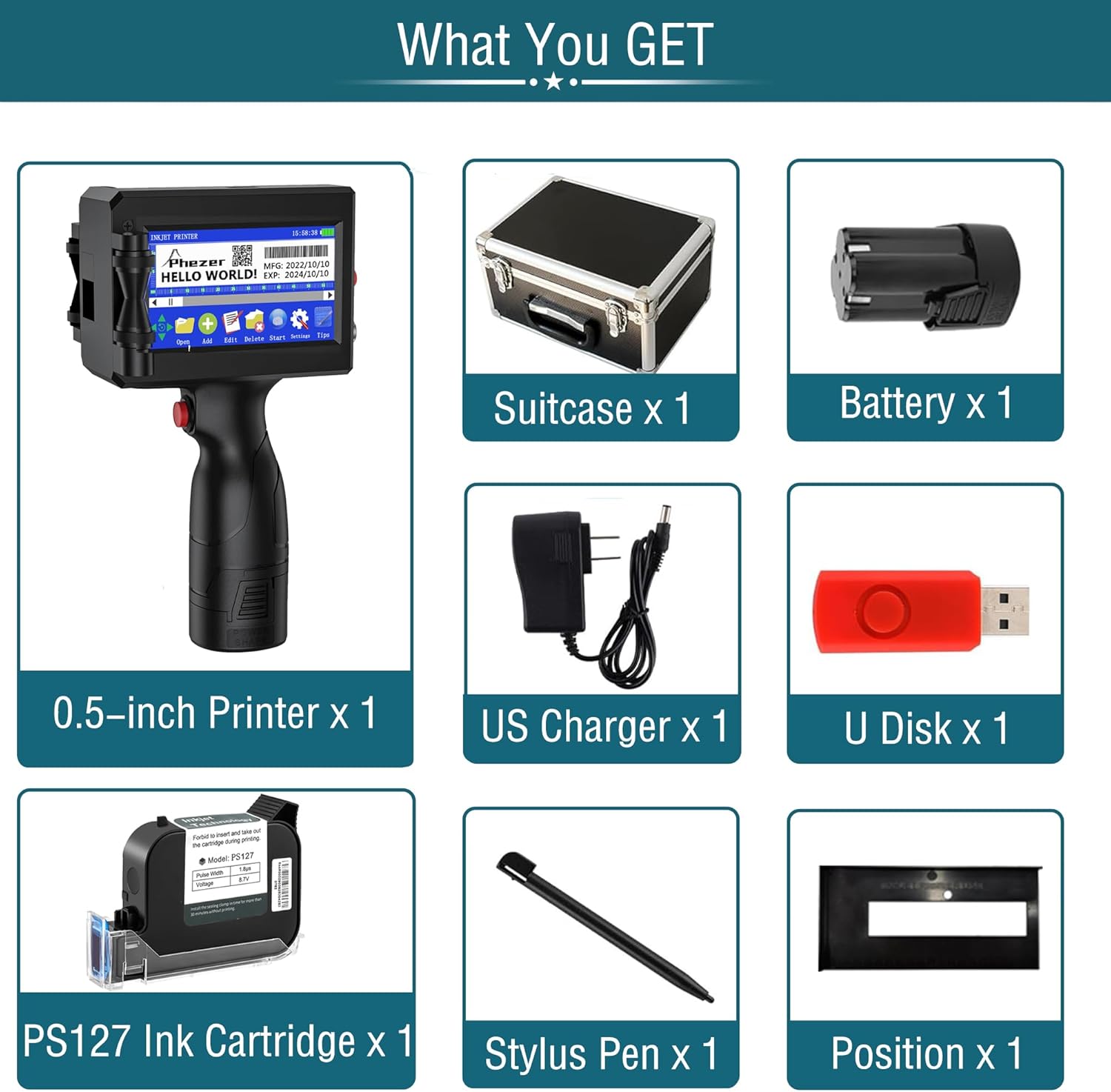
Image 2.1: A visual representation of all items included in the Phezer P15U Handheld Inkjet Printer package, neatly arranged.
3. Vlastnosti produktu
- No App or Computer Required: Operates independently with a powerful Cortex-A9 quad-core CPU and integrated system for stable performance.
- Lehký a pohodlný: Ergonomic design, weighing 1.54 lbs, with a built-in storage memory card and a rechargeable 2000mAH battery for single-handed operation and portability.
- Všestranný tisk: Supports printing of text, digital content, QR codes, barcodes, production dates, times, and logos.
- Wide Surface Compatibility: Suitable for printing on paper, boards, carton, stone, pipe, cable, metal, glass, plastic, cloth, and more.
- Podpora více jazyků: 25 languages available for input and editing.
- 360-Degree Printing: Capable of printing in any orientation with the aid of positioning plates.
- Adjustable Print Height: Print height can be adjusted from 2mm to 12.7mm, with unlimited length.
- Quick-Drying Ink Cartridge: Includes a 42ml black original high-definition quick-drying ink cartridge, designed to prevent ink leakage and nozzle clogging.
- Multiple Ink Colors: Ink colors available include Black, White, Yellow, Red, Blue, Green, Invisible, and UV.
- Vysoká přesnost: 600DPI printing resolution.
- Chytrá dotyková obrazovka: Sensitive screen for direct input and editing.
- Variable Data Support: Capable of handling variable data for sequential numbering or unique codes.

Obrázek 3.1: Overview of the Phezer P15U's core features, highlighting its sensitive touchscreen, quick-drying ink, Cortex-A9 CPU, direct editing capabilities, multi-language support, variable data support, 360-degree printing, anti-clogging nozzles, and long battery life.

Image 3.2: Illustration of the approximate printing capacity of the PS127 ink cartridge for different content types, such as characters, dates, logos, variable data, and QR codes.
4. Počáteční nastavení
4.1. Nabíjení baterie
Before first use, ensure the printer's battery is fully charged. Connect the US Charger to the printer and a power outlet. The charging indicator on the screen will show the charging status.
4.2. Installing the Ink Cartridge
- Open the cartridge compartment on the printer.
- Carefully insert the PS127 Ink Cartridge into the slot until it clicks into place.
- Přihrádku bezpečně uzavřete.
- Důležité: Do not insert or remove the ink cartridge during printing.
- Poznámka: Install the sealing clamp in time for more than 30 minutes without printing to prevent the ink from drying.
4.3. Screen Calibration
For optimal touch screen performance, calibrate the screen before initial use or if responsiveness issues occur:
- Shutdown the machine.
- Press and hold the center of the screen with the stylus pen, and turn on the machine at the same time to enter the calibration interface.
- Click the center of the cross-hair to calibrate the screen. Follow the on-screen prompts to complete the calibration.

Image 4.1: A step-by-step guide illustrating how to calibrate the printer's touchscreen for improved accuracy and responsiveness.
5. Návod k obsluze
5.1. Navigace v rozhraní
The printer features a user-friendly 4.3-inch LCD touch screen. Use the included stylus pen or your finger to navigate menus, input text, and select options. The main screen typically displays options for opening, adding, editing, deleting, starting prints, settings, and tips.
5.2. Creating and Editing Content
You can directly input and edit various content types on the screen:
- Text: Type in desired text messages.
- Numbers/Counters: Set up sequential numbering.
- Dates/Times: Automatically insert current date and time, or set specific formats.
- Čárové kódy/QR kódy: Generate and print standard barcodes or QR codes.
- Logos/Images: Import custom logos or images via the U Disk.
The printer supports 25 languages and offers built-in fonts for customization. You can adjust font size, width, rotation, and style (bold, italic) directly on the screen.

Image 5.1: The printer's interface displaying options for selecting from 25 supported languages and various built-in fonts, allowing for extensive customization of printed content.

Obrázek 5.2: Příkladamples of various print outputs, including text, QR codes, barcodes, sequential numbers, manufacturing dates, expiration dates, and product information tables, demonstrating the printer's versatility.
For more detailed instructions on specific content creation, refer to the "Tips" section on the printer's screen or visit the official Phezer webmísto: www.phezer.com.
Bývalýample of a QR code generated by the printer can be found here: http://qr61.cn/o8lrCM/qRCnntZ.
5.3. Proces tisku
- After creating or selecting your desired content, ensure the ink cartridge is properly installed and the printer is charged.
- Position the printer's nozzle close to the surface you wish to print on.
- Press the print trigger button.
- Smoothly swipe the printer across the surface in the direction of printing. Maintain a consistent speed and pressure for best results.
- The printer supports 360-degree all-round printing. For precise alignment, especially on smaller or irregular items, utilize the included positioning plate.

Image 5.3: Visual guide demonstrating how to effectively use the fixed positioning plate to achieve accurate and consistent prints on various objects, including small containers.
6. Údržba a péče
6.1. Ink Cartridge Maintenance Tips
Proper care of the ink cartridge is crucial for consistent print quality and to prevent issues like clogging or ink leakage:
- Před použitím: Shape the cartridge up and down (with the cover on) to ensure ink flow.
- Po každém použití: Put the protective cover back on the cartridge to prevent the ink from air-drying.
- Čisticí tryska: Clean the nozzle with alcohol for clear printing every time before use.
- If Printing is Unclear:
- Spray a small amount of alcohol onto a soft cloth.
- Block the cartridge nozzle with the cloth and gently shake it about 5 times.
- Wipe away any excess ink to ensure the nozzle is clean and dry.

Image 6.1: A visual guide detailing warm tips for maintaining the ink cartridge, including cleaning the nozzle with alcohol and proper storage.
6.2. General Printer Care
- Udržujte tiskárnu čistou a bez prachu. K čištění vnějšího povrchu používejte měkký, suchý hadřík.
- Store the printer in its suitcase when not in use to protect it from dust and physical damage.
- Nevystavujte tiskárnu extrémním teplotám nebo vlhkosti.
7. Řešení problémů
If you encounter issues with your Phezer P15U printer, refer to the following common problems and their solutions:
- Screen is insensitive or unresponsive:
- Vypněte tiskárnu.
- Press and hold the screen with the stylus pen, then turn on the printer.
- Start touchscreen calibration until the calibration screen appears.
- Tap the white buttons on the screen: Top Left -> Top Right -> Bottom Right -> Bottom Left -> Middle.
- Blurry printing, missing lines, or whitelines:
- The ink cartridge nozzle may be partially clogged or dry. Refer to Section 6.1 for cartridge cleaning instructions.
- Ensure you are swiping the printer smoothly and at a consistent speed.
- Verify the print height setting is appropriate for the surface.
- Tiskárna se nezapíná:
- Check if the battery is charged. Connect the charger and allow it to charge for some time.
- Ujistěte se, že je baterie správně vložena.
- Ink leakage:
- Ensure the ink cartridge is correctly seated and the compartment is closed.
- Always replace the protective cover on the cartridge when not in use.

Image 7.1: Important tips for addressing common issues such as unresponsive touchscreens and print quality problems, emphasizing proper cartridge handling.
8. Technické specifikace
| Funkce | Specifikace |
|---|---|
| Název modelu | P15 Inkjet Printer with PS127 Cartridge |
| Technologie tisku | Inkoustové |
| Tiskový výstup | Monochromatický |
| Maximální rychlost tisku (černobíle) | 40 (characters per second, estimated) |
| Technologie připojení | USB |
| Rozměry produktu | 1 cm H x 9 cm Š x 3 cm V (přibližně) |
| Hmotnost položky | 2.2 libry |
| Baterie | 1x 9V baterie (součástí balení) |
| Speciální funkce | Display Screen, Internal Memory, Lightweight, Portable, Touch Screen |
| Typ inkoustové kazety | PS127 (42ml, Quick-Drying) |
| Výška tisku | 2 mm - 12.7 mm |
9. Záruka a podpora
Phezer is committed to providing reliable coding solutions and a complete customer satisfactory experience. For professional service and after-sales support, please contact Phezer directly.
9.1. Contacting Support via Amazon
If you purchased your Phezer P15U printer through Amazon, you can contact the seller, "Phezer Coding and Marking Solution," directly through the Amazon platform:
- Přejděte na stránku produktu na Amazonu.
- Locate the "Sold by" section, usually near the buy box.
- Click on the seller's name, "Phezer Coding and Marking Solution."
- On the seller's page, look for an option like "Ask a question" to send a message.

Image 9.1: A visual guide illustrating the steps to contact Phezer's customer support through the Amazon platform.
9.2. Informace výrobce
Manufacturer: Phezer (Wuhan Phezer Technology Co., Ltd.)
Phezer products are designed to meet international standards, holding certifications such as CE, FCC, and RoHS.
10. Aplikace
The Phezer P15U Handheld Inkjet Printer is suitable for a wide range of applications across various industries due to its portability and versatility in printing on diverse materials and surfaces.
10.1. Common Use Cases
- Výrobní: Marking production dates, batch numbers, and expiration dates on products and packaging.
- logistika: Labeling boxes, crates, and shipping containers with addresses, tracking numbers, or handling instructions.
- Maloobchodní: Adding price codes, product information, or promotional messages to items.
- Food & Beverage: Printing dates on jars, bottles, and food packaging.
- Konstrukce: Marking pipes, cables, and building materials.
- DIY & Crafting: Personalizing items, creating custom labels, or adding designs to various materials.

Image 10.1: A collage demonstrating the wide range of applications for the Phezer P15U printer, including marking on food packaging, jars, plastic bags, and wooden planks.

Image 10.2: A display of different materials and products that can be printed on using the Phezer P15U, such as cables, boxes, metal cans, eggs, wood, plastic bottles, and tags.


