1. Úvod
This manual provides essential information for setting up, operating, and maintaining your ASUS ROG Strix G18 18-inch Gaming Laptop. Designed for high-performance gaming and demanding creative tasks, this laptop combines cutting-edge hardware with advanced cooling solutions to deliver a superior user experience.

Image: The ASUS ROG Strix G18 18-inch Gaming Laptop, showcasinjeho elegantní design a zářivý displej.
2. Konec produktuview
2.1. Klíčové součásti a funkce
- Procesor: Intel Ultra 9 275HX (24 Cores, up to 5.40 GHz)
- Grafika: NVIDIA GeForce RTX 5080 Laptop GPU with 16GB GDDR7
- Zobrazit: 18-inch ROG Nebula 2.5K (2560 x 1600) 240Hz IPS, Anti-glare, 100% DCI-P3, Pantone Validated, 500 nits brightness, Dolby Vision HDR support
- Paměť: 64 GB DDR5 RAM
- Skladování: 4 TB SSD
- Operační systém: Windows 11 Pro
- Konektivita: Wi-Fi 7 (802.11be), Bluetooth 5.4
- Klávesnice: Backlit Chiclet Keyboard 4-Zone RGB, N-key rollover, Overstroke technology, Copilot key
- Zvuk: Hi-Res Audio with Dolby Atmos, Two-Way AI Noise Cancellation
- Fotoaparát: 1080P FHD IR kamera pro Windows Hello
2.2. Physical Layout and Ports
The ASUS ROG Strix G18 features a comprehensive array of ports strategically placed for optimal connectivity and cable management.

Obrázek: Boční view of the ASUS ROG Strix G18, highlighting its various input/output ports.
- 3x USB 3.2 Gen 2 typu A (rychlost přenosu dat až 10 Gb/s)
- 2x Thunderbolt 5 (USB-C) with support for DisplayPort / power delivery / G-SYNC (data speed up to 120Gbps)
- 1x 3.5mm kombinovaný audio jack
- 1x HDMI 2.1
- 1x 2.5G Ethernet
3. Počáteční nastavení
3.1. Vybalení a kontrola
Carefully remove the laptop and all accessories from the packaging. Verify that all items listed in the 'What's in the Box' section are present and undamaged. Keep the original packaging for future transport or service needs.
3.2. Připojení napájení
Connect the power adapter to the laptop's power input port and then plug the power cord into a wall outlet. Ensure the connection is secure to begin charging the battery.
3.3. První spuštění a nastavení systému Windows
Press the power button to turn on your laptop. Follow the on-screen instructions to complete the initial Windows 11 Pro setup, including language selection, network connection, and user account creation. This process may take several minutes.
4. Návod k obsluze
4.1. Nastavení displeje
The 18-inch ROG Nebula display offers a 2.5K (2560 x 1600) resolution with a 240Hz refresh rate for smooth visuals. It supports 100% DCI-P3 color gamut, is Pantone Validated, and features Dolby Vision HDR for vibrant and accurate colors. Adjust display settings via Windows Display Settings or the NVIDIA Control Panel for optimal viewIng.
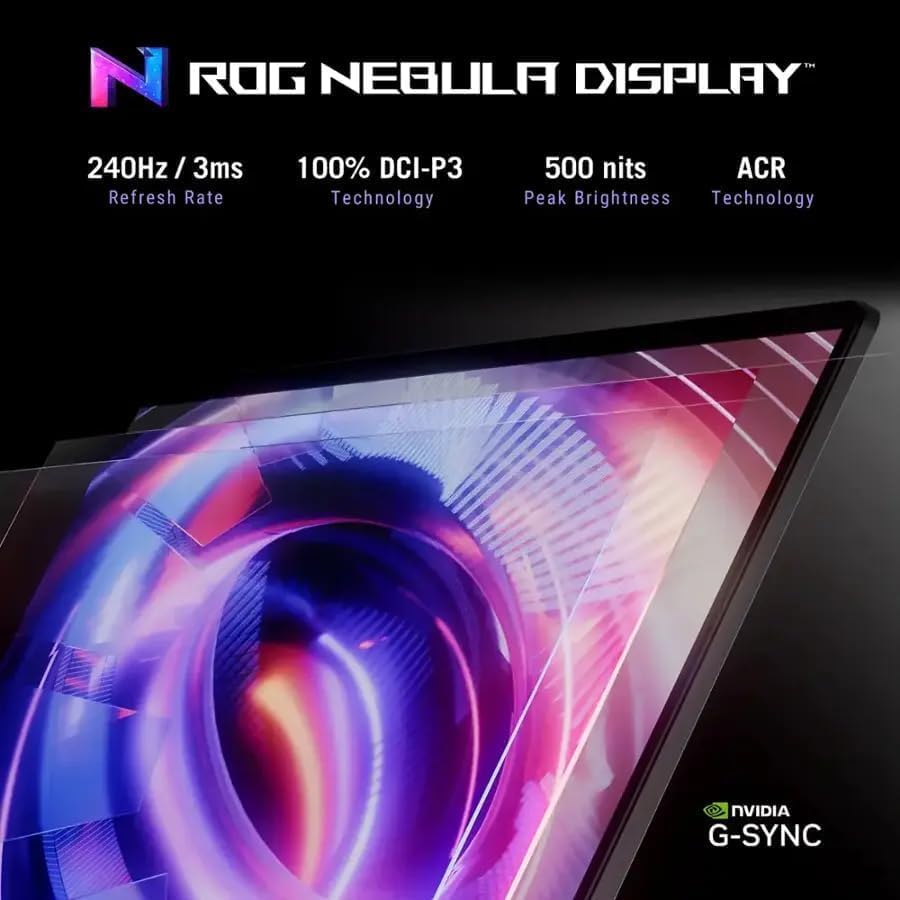
Image: Visual representation of the ROG Nebula Display's key features, including refresh rate, color accuracy, and brightness.
4.2. Klávesnice a touchpad
The laptop features a Backlit Chiclet Keyboard with 4-Zone RGB lighting, N-key rollover, and Overstroke technology for responsive and precise input. Customize RGB lighting effects using the ASUS Armoury Crate software. The integrated touchpad supports multi-touch gestures for intuitive navigation.

Image: Close-up of the ASUS ROG Strix G18 keyboard, showing the 4-Zone RGB backlighting and full layout.
4.3. Audiosystém
Experience immersive sound with Hi-Res Audio and Dolby Atmos. The Two-Way AI Noise Cancellation feature enhances communication clarity by filtering out background noise during calls or gaming sessions.
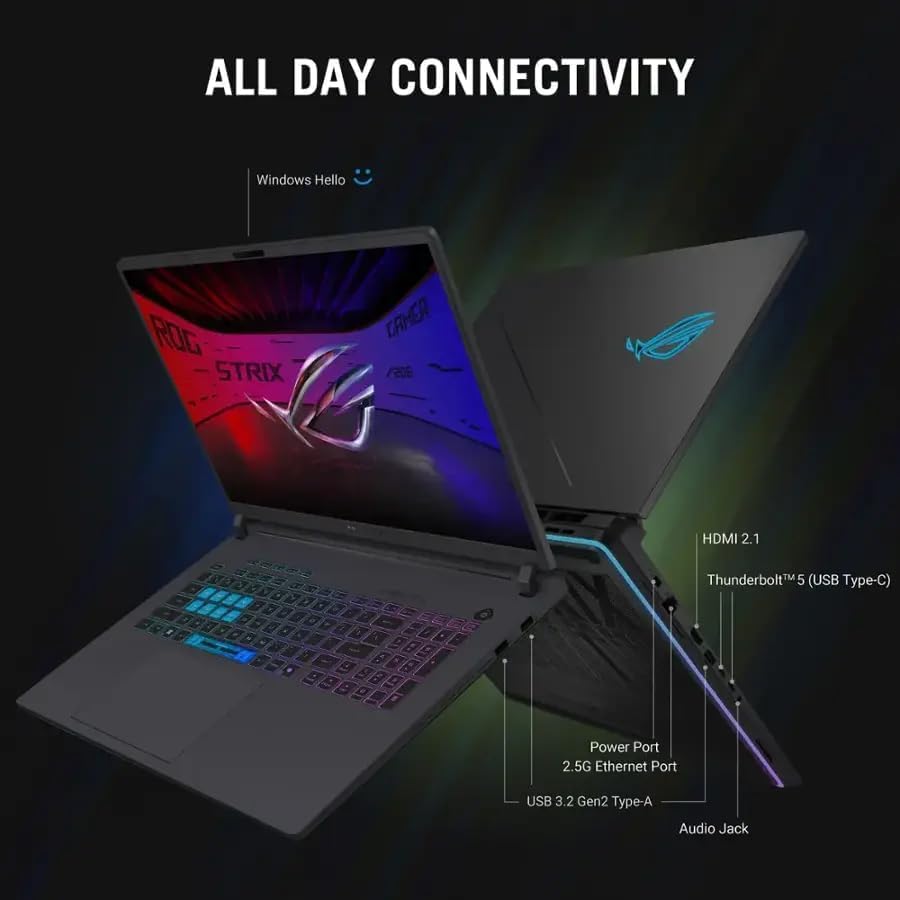
Image: Depiction of the laptop's audio capabilities, including Smart Amp Technology and Dolby Atmos.
4.4. Wireless and Wired Connectivity
Benefit from ultra-fast Wi-Fi 7 (802.11be) for seamless online gaming and streaming, alongside Bluetooth 5.4 for connecting wireless peripherals. The 2.5G Ethernet port provides a stable and high-speed wired network connection.

Obrázek: Overview of the laptop's advanced connectivity options, including Wi-Fi 7 and Thunderbolt 5.
5. Údržba
5.1. ROG Intelligent Cooling System
The advanced ROG Intelligent Cooling system ensures optimal performance by maintaining low temperatures during intensive use. It features an end-to-end vapor chamber, Tri-Fan technology, and Conductonaut Extreme liquid metal on the CPU.

Image: Diagram illustrating the ROG Intelligent Cooling system with its vapor chamber, Tri-Fan, and heatsink design.
5.2. Upgradability (Tool-less Access)
The ASUS ROG Strix G18 is designed for easy upgrades with its tool-less access design. This allows for simple access to the RAM and SSD components without requiring a screwdriver, facilitating future enhancements.
Video: A demonstration of the tool-less access design on an ASUS ROG gaming laptop, showing how to easily open the back panel for component upgrades.
6. Řešení problémů
6.1. Problémy s napájením
- Notebook se nezapíná: Ujistěte se, že je napájecí adaptér bezpečně připojen a baterie je dostatečně nabitá. Zkuste podržet tlačítko napájení po dobu 15–20 sekund, abyste provedli tvrdý reset.
- Baterie se nenabíjí: Zkontrolujte napájecí adaptér a kabel, zda nejsou poškozené. Zkuste jinou zásuvku.
6.2. Problémy se zobrazením
- Žádný displej/černá obrazovka: Connect an external monitor to check if the issue is with the laptop's display. Try restarting the laptop.
- Blikající nebo zkreslený obraz: Aktualizujte ovladače grafické karty. Upravte obnovovací frekvenci displeje v nastavení systému Windows.
6.3. Problémy s připojením
- Nelze se připojit k Wi-Fi: Restart your router and modem. Ensure Wi-Fi drivers are up to date. Try forgetting and reconnecting to the network.
- Zařízení Bluetooth se nespáruje: Ensure the device is in pairing mode and within range. Update Bluetooth drivers.
7. Specifikace
| Funkce | Detail |
|---|---|
| Značka | ASUS |
| Číslo modelu | G815LW-G18.U95080 |
| Série | Herní notebook ASUS ROG Strix G18 |
| Barva | Eclipse Grey |
| Operační systém | Windows 11 Pro |
| CPU | Intel Ultra 9 275HX processor (24 Cores, 36M Cache, up to 5.40 GHz) |
| Graphics Type | Věnováno |
| GPU | NVIDIA GeForce RTX 5080 |
| Grafická paměť RAM | 16 GB GDDR7 |
| Velikost displeje | 18 palců |
| Rezoluce | 2.5K (2560 x 1600, WQXGA) |
| Obnovovací frekvence | 240 Hz |
| Funkce displeje | IPS, Anti-glare, 100% DCI-P3, Pantone Validated, 500 nits, Dolby Vision HDR |
| Paměť | 64 GB DDR5 |
| Skladování | 4 TB SSD |
| USB porty | 3x USB 3.2 Gen 2 Type-A |
| Porty Thunderbolt | 2x Thunderbolt 5 (USB-C) |
| Video výstup | HDMI 2.1, DisplayPort (via Thunderbolt 5) |
| Audio Jack | 1x 3.5mm kombinovaný audio jack |
| Ethernet | 1x 2.5G Ethernet |
| Bezdrátový | Wi-Fi 7(802.11be), Bluetooth 5.4 |
| Funkce klávesnice | Backlit Chiclet Keyboard 4-Zone RGB, With Copilot key |
| Audio technologie | Hi-Res Audio with Dolby Atmos and Two-Way AI Noise Cancellation |
| Fotoaparát | 1080P FHD IR kamera pro Windows Hello |
| Rozměry (DxŠxV) | 15.71 x 11.73 x 0.93 palce |
| Hmotnost | 7.54 liber |
8. Záruka a podpora
Your ASUS ROG Strix G18 laptop comes with Windows 11 Pro and a lifetime license for Microsoft Office. Please ensure you do not install Office 365, as this may invalidate your lifetime Office license.
For technical assistance, warranty claims, or further support, please visit the official ASUS support webnebo kontaktujte jejich zákaznický servis. Pro rychlejší vyřízení mějte po ruce účtenku o koupi a sériové číslo produktu.


