1. Úvod
The ECOVACS DEEBOT T50 PRO OMNI Gen2 is an advanced robotic vacuum and mop cleaner designed to provide comprehensive floor cleaning. This manual provides essential information for setting up, operating, maintaining, and troubleshooting your device to ensure optimal performance and longevity.

Obrázek 1.1: The ECOVACS DEEBOT T50 PRO OMNI Gen2 robot and its accompanying OMNI Station.
2. Nastavení
2.1 Rozbalení a umístění
Carefully remove all components from the packaging. Ensure all protective films and packing materials are removed from the robot and the OMNI Station. Place the OMNI Station against a wall in an open area, ensuring there are no obstacles within 1.5 meters in front and 0.5 meters on either side.
2.2 Počáteční nabíjení
Umístěte DEEBOT na stanici OMNI. Ujistěte se, že nabíjecí kontakty jsou zarovnané. Robot se začne automaticky nabíjet. Před prvním použitím robota plně nabijte.
2.3 Instalace a párování aplikace
- Stáhněte si aplikaci ECOVACS HOME z obchodu s aplikacemi ve vašem zařízení.
- Vytvořte si účet nebo se přihlaste.
- Follow the in-app instructions to add your DEEBOT T50 PRO OMNI Gen2. This typically involves scanning a QR code on the robot and connecting to your home Wi-Fi network.
2.4 Počáteční mapování
After successful pairing, initiate a mapping run through the app. The robot will navigate your home to create a detailed map, which is crucial for efficient cleaning and advanced features. The dToF LiDAR module and AIVI 3D 3.0 OMNI-Approach technology enable precise and rapid mapping.

Obrázek 2.1: The DEEBOT utilizes TrueMapping 2.0 for quick and efficient home mapping.
2.5 Filling Water Tanks and Detergent
Fill the clean water tank on the OMNI Station with tap water. If desired, add the recommended ECOVACS detergent solution to the designated compartment. The OMNI Station features automatic detergent addition for convenience.
3. Obsluha robota DEEBOT
3.1 Režimy čištění
The DEEBOT T50 PRO OMNI Gen2 offers various cleaning modes accessible via the ECOVACS HOME app:
- Pouze vakuové: Pro odstraňování suchých nečistot.
- Pouze mop: Pro mokré čištění.
- Vysavač a mop: Současné vysávání a vytírání.
- Vacuum then Mop: Completes vacuuming first, then proceeds with mopping.
3.2 Edge Cleaning and Obstacle Avoidance
The TruEdge 2.0 technology allows the side brush to extend dynamically, reaching deep into corners and maintaining a 1mm proximity to edges for 100% coverage. The AIVI 3D 3.0 OMNI-Approach with 3D structured light and RGB camera enables real-time recognition and identification of obstacles, using their contours for precise edge cleaning and avoidance.

Obrázek 3.1: TruEdge 2.0 ensures thorough cleaning along walls and in corners.

Obrázek 3.2: AIVI 3D 3.0 technology allows the robot to recognize and avoid obstacles effectively.
3.3 Suction Power and ZeroTangle 2.0
With 21,000 Pa of suction power, the DEEBOT effectively removes dirt and debris. The ZeroTangle 2.0 technology, featuring triple V-shaped structures, actively collects, lifts, and untangles hair, ensuring a 0% tangle rate even with long hair.

Obrázek 3.3: Powerful suction and tangle-free brush system for efficient cleaning.
3.4 Systém vytírání
The OZMO TURBO 2.0 mopping system features two high-speed rotating pads (180 rotations/min) to remove stubborn stains. The automatic mop lifting function raises the pads by up to 9mm when detecting carpets, preventing them from getting wet.

Obrázek 3.4: The mopping system effectively removes stains and protects carpets.
3.5 Smart Control and Monitoring
Control your DEEBOT using the ECOVACS HOME app, YIKO voice assistant, Google Home, or Amazon Alexa. The app allows for customized cleaning schedules, zone cleaning, and real-time video monitoring via the robot's 960P camera, ensuring privacy protection.

Obrázek 3.5: Multiple control options for convenient operation.
4. Údržba
4.1 OMNI Station Functions
The OMNI Station provides comprehensive self-maintenance:
- Automatické vyprazdňování prachu: The robot's dustbin is automatically emptied into a sealed bag in the station.
- Hot Air Drying (45°C): Mop pads are dried with 45°C hot air to prevent odors and mildew.
- Automatic Detergent Addition: The station automatically adds the correct amount of detergent to the clean water.
- Hot Water Mop Washing (75°C): Mop pads are washed with 75°C hot water to dissolve dirt and stains.
- Automatic Base Cleaning: Bidirectional scrapers clean the bottom of the station, ensuring it remains clean.
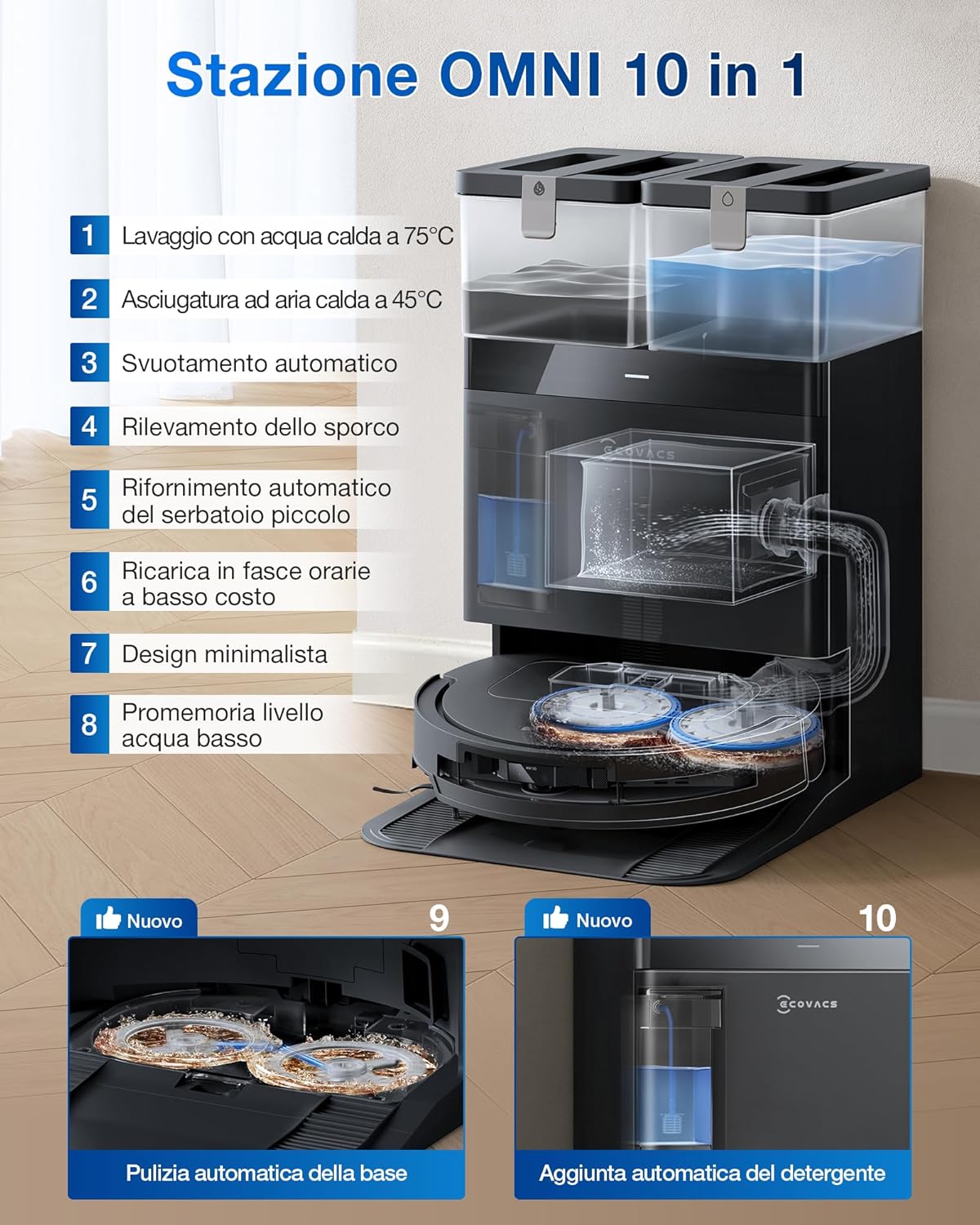
Obrázek 4.1: The OMNI Station handles most maintenance tasks automatically.
4.2 Regular Cleaning of Robot Components
- Popelnice a filtr: Regularly empty the robot's internal dustbin (if not using auto-empty) and clean the filter.
- Hlavní kartáč a boční kartáče: Remove and clean the main brush and side brushes to remove tangled hair and debris. The ZeroTangle 2.0 design minimizes tangles, but periodic checks are recommended.
- Senzory: Wipe all sensors (cliff sensors, anti-collision sensors, charging contacts) with a dry cloth to ensure proper function.
- Mopové podložky: Replace mop pads when they show signs of wear or are no longer effectively cleaned by the station.
4.3 Údržba stanice OMNI
- Vyprázdněte nádrž na špinavou vodu: Regularly empty the dirty water tank and rinse it.
- Doplnění nádrže na čistou vodu: Ensure the clean water tank is filled.
- Přihrádka na prací prostředek: Check and refill the detergent compartment as needed. A single refill can last up to 90 days.
- Prachový sáček: Replace the dust bag in the auto-empty station when full.
5. Řešení problémů
If you encounter issues with your DEEBOT, refer to the following common solutions. For more detailed troubleshooting, consult the ECOVACS HOME app or the official ECOVACS support webmísto.
- Robot se nenabíjí: Ensure the robot is correctly docked on the OMNI Station and the charging contacts are clean. Check if the power cable is securely connected to the station and the wall outlet.
- Robot se zasekl nebo není schopen navigovat: Clear any obstacles from the robot's path. Clean the driving wheels and sensors. Ensure the mapping process was completed successfully. The ultra-slim 81mm design helps it clean under low furniture, but very tight spaces may still pose a challenge.
- Špatný čisticí výkon: Check if the dustbin is full, the filter is clogged, or the brushes are tangled. Ensure mop pads are clean and properly attached. Verify water tanks are filled and detergent is present.
- OMNI Station issues (e.g., water leakage): Ensure all tanks are correctly seated and sealed. Check for any blockages in the water lines or drainage system.
- Problémy s připojením aplikace: Ensure your Wi-Fi network is stable and the robot is within range. Restart the robot and your router. Re-pair the device if necessary.

Obrázek 5.1: The 81mm ultra-slim body allows cleaning in hard-to-reach areas.
6. Specifikace
| Funkce | Specifikace |
|---|---|
| Značka | ECOVACS |
| Název modelu | DEEBOT T50 PRO OMNI Gen2 |
| Barva | Černý |
| Rozměry produktu | 35 x 47.7 x 53.3 cm |
| Hmotnost položky | 15.8 kg |
| svtage | 220 voltů |
| Speciální funkce | Edge Cleaning, Self-cleaning Brush Roll, Cordless, AIVI 3D 3.0, TruEdge 2.0, ZeroTangle 2.0, OMNI Station, YIKO Voice Assistant |
| Doporučené povrchy | Víceplošné |
| Sací výkon | 21,000 Pa |
7. Záruka a podpora
7.1 Informace o záruce
Podrobné informace o záruce naleznete v záruční kartě, která je součástí balení produktu, nebo na oficiálních webových stránkách ECOVACS. webZáruční podmínky se mohou lišit v závislosti na regionu.
7.2 Zákaznická podpora
If you require further assistance or have questions not covered in this manual, please contact ECOVACS customer support through the ECOVACS HOME app or their official webmísto. Můžete také navštívit Obchod ECOVACS na Amazonu pro další zdroje.