1. Úvod
This manual provides detailed instructions for the setup, operation, and maintenance of your ASUS ROG Strix XG32UCWG 32-inch 4K OLED Gaming Monitor. The XG32UCWG features a TrueBlack Glossy WOLED panel, offering sharp visuals and a versatile dual-mode function for seamless switching between 4K at 165Hz and FHD at 330Hz. It incorporates the Neo Proximity Sensor within the ASUS OLED Care Pro suite to prevent panel burn-in by automatically transitioning to a black screen when the user is away. The monitor is designed with a compact stand to optimize desktop space and provides extensive connectivity options, including DisplayPort 1.4 (DSC), HDMI 2.1, and USB-C with 15-watt Power Delivery.
2. Obsah balení
Ověřte, zda jsou v balení produktu přítomny všechny níže uvedené položky. Pokud některá položka chybí nebo je poškozena, kontaktujte prodejce.
- XG32UCWG Gaming OLED monitor
- DisplayPort kabel
- Utěrka z mikrovlákna
- Napájecí adaptér
- Napájecí kabel
- Quick release stand
- Průvodce rychlým startem
- ROG pouzdro
- Nálepka ROG
- USB 3.2 kabel
- Montážní sada VESA
- Záruční list
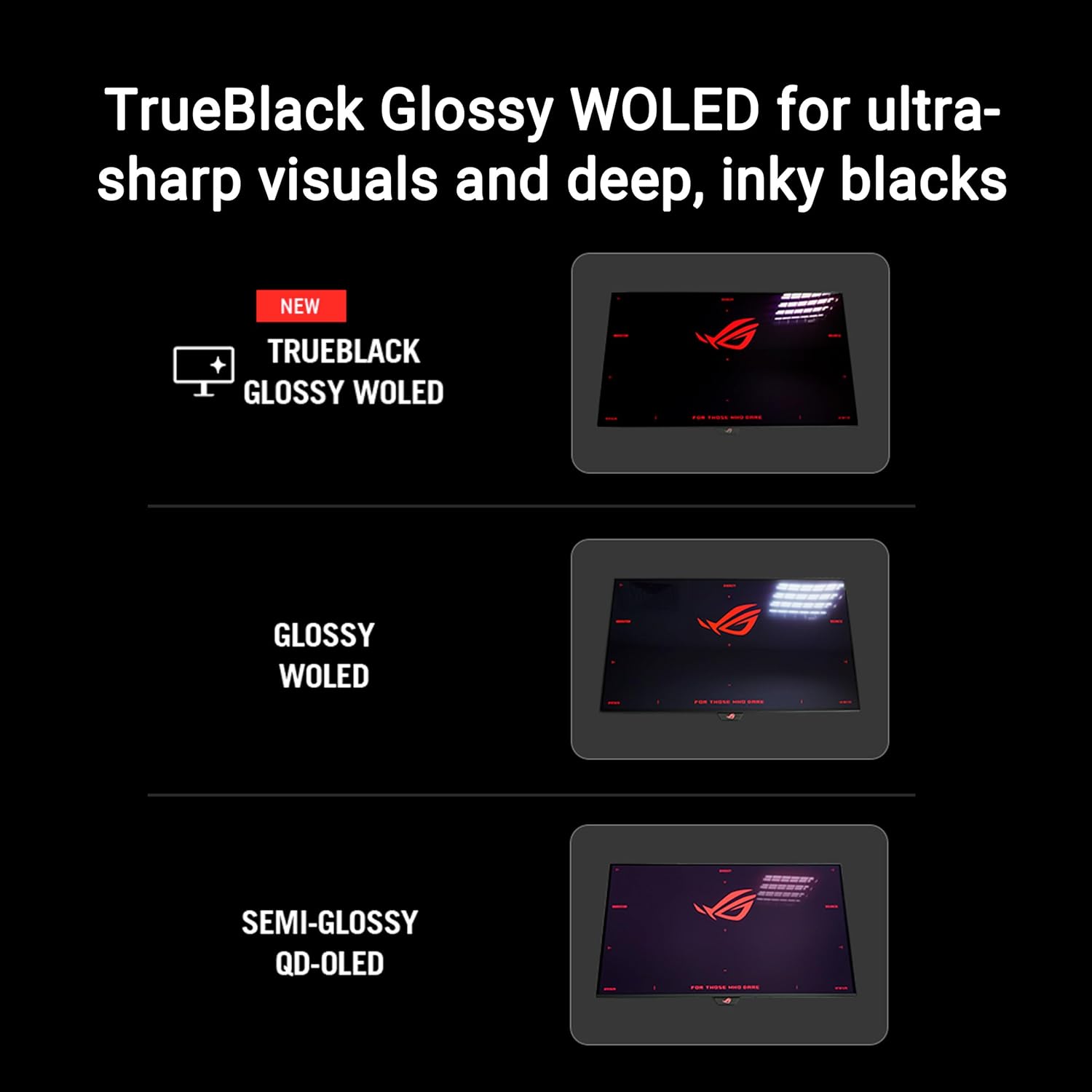
Image: Contents of the ASUS ROG Strix XG32UCWG monitor box, showing the monitor, DisplayPort cable, USB 3.2 cable, microfiber cloth, VESA mount kit, ROG pouch, ROG sticker, quick start guide, warranty card, and power cord with adapter.
3. Nastavení a montáž
3.1 Připevnění stojanu
Carefully remove the monitor from its packaging. Attach the quick release stand base to the monitor panel. Ensure it clicks securely into place. The stand offers ergonomic adjustments for height, swivel, and tilt.

Image: The monitor stand is shown with indicators for height adjustment (0-80mm), swivel (-15° to +15°), and tilt (-5° to +20°). The stand occupies 45% less desktop space compared to previous designs.
3.2 VESA Wall Mount (Optional)
If you prefer to wall-mount your monitor, use the provided VESA mount kit. Follow the instructions included with your VESA mount for proper installation. Ensure the VESA mount is compatible with the monitor's specifications.
4. Konektivita
The ASUS ROG Strix XG32UCWG monitor offers a variety of input and output ports for connecting to your devices.
- DisplayPort 1.4 (DSC): Pro vstup videa s vysokým rozlišením a vysokou obnovovací frekvencí.
- HDMI 2.1: Supports 4K resolution at high refresh rates, ideal for gaming consoles.
- USB-C (with 15W Power Delivery): Provides video input, data transfer, and power delivery for compatible devices.
- USB porty: 3.2 Pro připojení periferií, jako jsou klávesnice, myši nebo externí úložiště.

Image: The back of the monitor displays the arrangement of connectivity ports, including DisplayPort 1.4 (DSC), HDMI 2.1, and USB-C with 15W Power Delivery.
5. Obsluha monitoru
5.1 Dual Mode Functionality
The monitor supports a versatile dual-mode feature, allowing you to switch between two distinct display settings:
- 4K (3840 x 2160) at 165Hz: Ideal for high-resolution gaming and detailed content creation.
- FHD (1920 x 1080) at 330Hz: Provides ultra-smooth motion for competitive gaming where higher frame rates are critical.
Use the monitor's OSD (On-Screen Display) menu or the DisplayWidget Center software to switch between these modes.
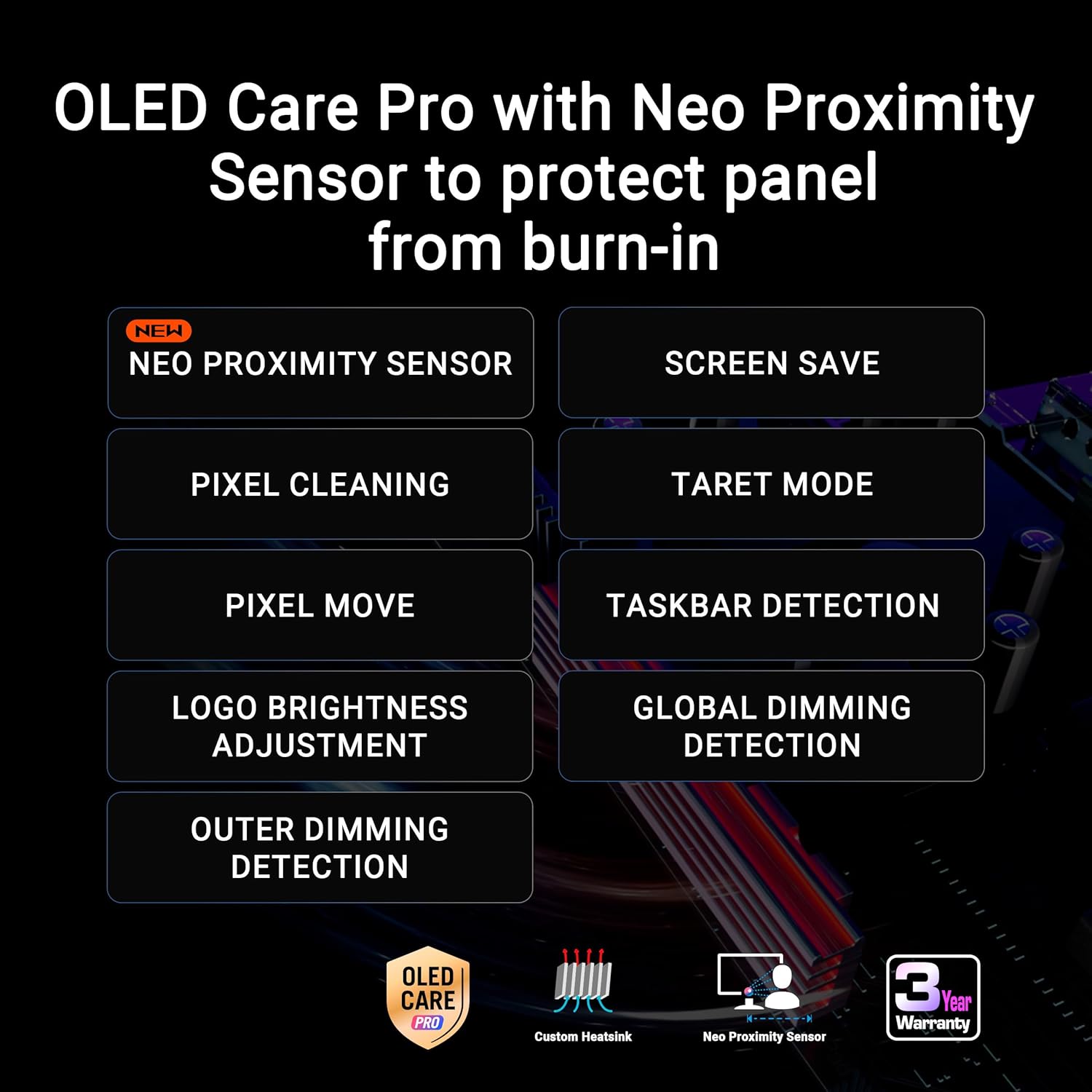
Image: A visual representation of the monitor's dual-mode capability, highlighting the 4K 165Hz and FHD 330Hz options, accessible via a hotkey.
5.2 ASUS OLED Care Pro
ASUS OLED Care Pro is a suite of features designed to protect the OLED panel and prevent burn-in. Key features include:
- Neo senzor přiblížení: Automaticky detekuje, kdy je uživatel nepřítomný, a přepne na černou obrazovku, aby se snížilo riziko vypálení obrazu.
- Čištění pixelů: A maintenance function that refreshes the pixels.
- Uložit obrazovku: Activates a screen saver to prevent static images from remaining on the screen for extended periods.
- Přesun pixelů: Slightly shifts the image to prevent static pixel usage.
- Nastavení jasu loga: Reduces the brightness of static logos to minimize burn-in risk.
- Detekce na hlavním panelu: Automatically dims the taskbar area to protect against burn-in.
- Globální detekce stmívání: Adjusts overall screen brightness based on content.
- Cílový režim: Allows specific areas of the screen to be highlighted or dimmed.
These features can be configured via the DisplayWidget Center software or the monitor's OSD menu.

Obrázek: Overview of ASUS OLED Care Pro features, emphasizing the Neo Proximity Sensor and other burn-in prevention technologies.
5.3 Centrum DisplayWidget
The DisplayWidget Center is a software utility that allows you to easily access and adjust monitor settings using your mouse. This includes OLED Care Pro functions, color settings, game visuals, and other display parameters.
5.4 Asistent s umělou inteligencí
The new AI Assistant provides enhanced gaming experiences with features such as:
- Dynamic Crosshair: An on-screen crosshair that adapts to game environments.
- Dynamic Shadow Boost: Enhances visibility in dark areas without overexposing bright regions.
- AI Visual Functions: Optimizes visual settings based on game content.
6. Funkce displeje
6.1 TrueBlack Glossy WOLED Panel
The monitor features an exclusive TrueBlack Glossy WOLED panel, which provides a zero-haze surface for exceptionally sharp imagery and deep, inky blacks. This technology enhances contrast and color vibrancy.

Image: A visual comparison demonstrating the deep blacks and sharp visuals achieved with the TrueBlack Glossy WOLED panel.
6.2 HDR Performance
The XG32UCWG is VESA DisplayHDR 400 True Black compliant, offering outstanding HDR performance. It supports a 99% DCI-P3 gamut and true 10-bit color with a Delta E < 2 color difference, making it suitable for professional photo and video editing in addition to gaming.
6.3 G-SYNC Compatible
This monitor is G-SYNC Compatible, ensuring a smooth, tear-free gaming experience by synchronizing the display's refresh rate with the GPU's frame rate.
7. Údržba a péče
To ensure the longevity and optimal performance of your OLED monitor, regular maintenance and proper care are essential. Utilize the ASUS OLED Care Pro features as described in Section 5.2.
- Čištění: Use the provided microfiber cloth to gently wipe the screen. For stubborn smudges, slightly dampen the cloth with distilled water. Avoid harsh chemicals or abrasive materials.
- Burn-in Prevention: Always enable OLED Care Pro features. Avoid displaying static images for extended periods. Utilize screen savers and power-saving modes when not actively using the monitor.
- Větrání: Zajistěte dostatečné proudění vzduchu kolem monitoru, aby nedošlo k přehřátí.
8. Řešení problémů
If you encounter issues with your monitor, refer to the following basic troubleshooting steps:
- Bez napájení: Ensure the power cord is securely connected to both the monitor and a working power outlet. Check the power adapter.
- Bez signálu: Verify that the video cable (DisplayPort, HDMI, or USB-C) is correctly connected to both the monitor and your computer/device. Ensure the correct input source is selected on the monitor's OSD menu.
- Blikající/zkreslený obraz: Check cable connections. Update your graphics card drivers. Try a different video cable.
- Burn-in Concerns: Ensure all ASUS OLED Care Pro features are enabled and functioning correctly.
- Problémy se softwarem: If using DisplayWidget Center, ensure it is the latest version. Reinstall if necessary.
V případě pokročilejšího řešení problémů nebo přetrvávajících problémů se obraťte na podporu ASUS. webnebo kontaktujte zákaznický servis.
9. Specifikace
| Funkce | Specifikace |
|---|---|
| Značka | ASUS |
| Série | XG32UCWG |
| Číslo modelu položky | XG32UCWG |
| Velikost stálé obrazovky | 32 palce |
| Rozlišení obrazovky | 3840 x 2160 pixelů (4K UHD) |
| Maximální rozlišení obrazovky | 3840 x 2160 pixelů |
| Poměr stran | 16:9 |
| Popis povrchu obrazovky | Glossy (TrueBlack Glossy WOLED) |
| Duální režim | 4K@165Hz, FHD@330Hz |
| Doba odezvy | 0.03 ms (GtG) |
| Technologie adaptivní synchronizace | Kompatibilní s G-SYNC |
| Konektivita | DisplayPort 1.4 (DSC), HDMI 2.1, USB-C (15W PD), USB 3.0 Ports |
| Hmotnost položky | 16.1 libry |
| Rozměry produktu (DxŠxV) | 10.8 x 28.1 x 22.8 palce |
| Barva | ČERNÝ |
10. Záruka a podpora
The ASUS ROG Strix XG32UCWG monitor comes with a 3-year warranty. For warranty claims, technical support, or service inquiries, please visit the official ASUS support website or contact your local ASUS customer service center. Keep your purchase receipt and warranty card for reference.


