1. Úvod
This manual provides detailed instructions for the safe and efficient operation of your OWON ADS824A 4-Channel 200 MHz Digital Oscilloscope. Please read this manual thoroughly before using the device to ensure proper functionality and to prevent damage. Keep this manual accessible for future reference.
2. Bezpečnostní informace
Observe the following safety precautions to prevent injury and avoid damage to the instrument or any connected products.
- Zdroj napájení: Používejte pouze určený napájecí adaptér.
- Základy: Ensure the instrument is properly grounded to prevent electric shock.
- Větrání: Do not block ventilation openings. Operate in a well-ventilated area.
- Prostředí: Avoid operating in wet, damp, or explosive atmospheres. Keep away from strong electromagnetic fields.
- Čištění: Před čištěním odpojte napájení. Použijte měkký, suchý hadřík. Nepoužívejte tekuté ani aerosolové čisticí prostředky.
- Servis: Refer all servicing to qualified service personnel. Do not attempt to repair the instrument yourself.
3. Konec produktuview
3.1 Klíčové vlastnosti
- Ultra-High Precision: 12-bit vertical resolution (4096 levels) with 500 μV sensitivity for detailed signal analysis, ideal for low-noise power supplies and weak signal capture.
- Rychlá obnovovací frekvence vlny: 700,000 wfms/s for capturing rare events and rapid signal disturbances, crucial for CAN/LIN bus diagnostics and fast digital signals.
- Multifunkčnost 5 v 1: Integrates a 12-bit oscilloscope, protocol analyzer (UART/I2C/SPI/CAN/LIN), 6-digit frequency counter, 4-digit voltmeter, and FFT spectrum analyzer. Includes 43 automatic measurements and hardware bus decoding.
- 7-inch Multi-Touch Screen: 1024x600 HD touchscreen for intuitive operation, supporting mouse, keyboard, Wi-Fi, network printers, and external cameras.
- Rozsáhlá konektivita: Equipped with LAN, USB, HDMI, and Type-C ports. Features an integrated web server for remote control via a browser, supporting wireless modules and network equipment.
- Hloubka paměti: 50 Mpts memory for extended waveform capture.
3.2 Součásti předního panelu
The front panel of the ADS824A features the multi-touch display, input channels, and various control buttons.
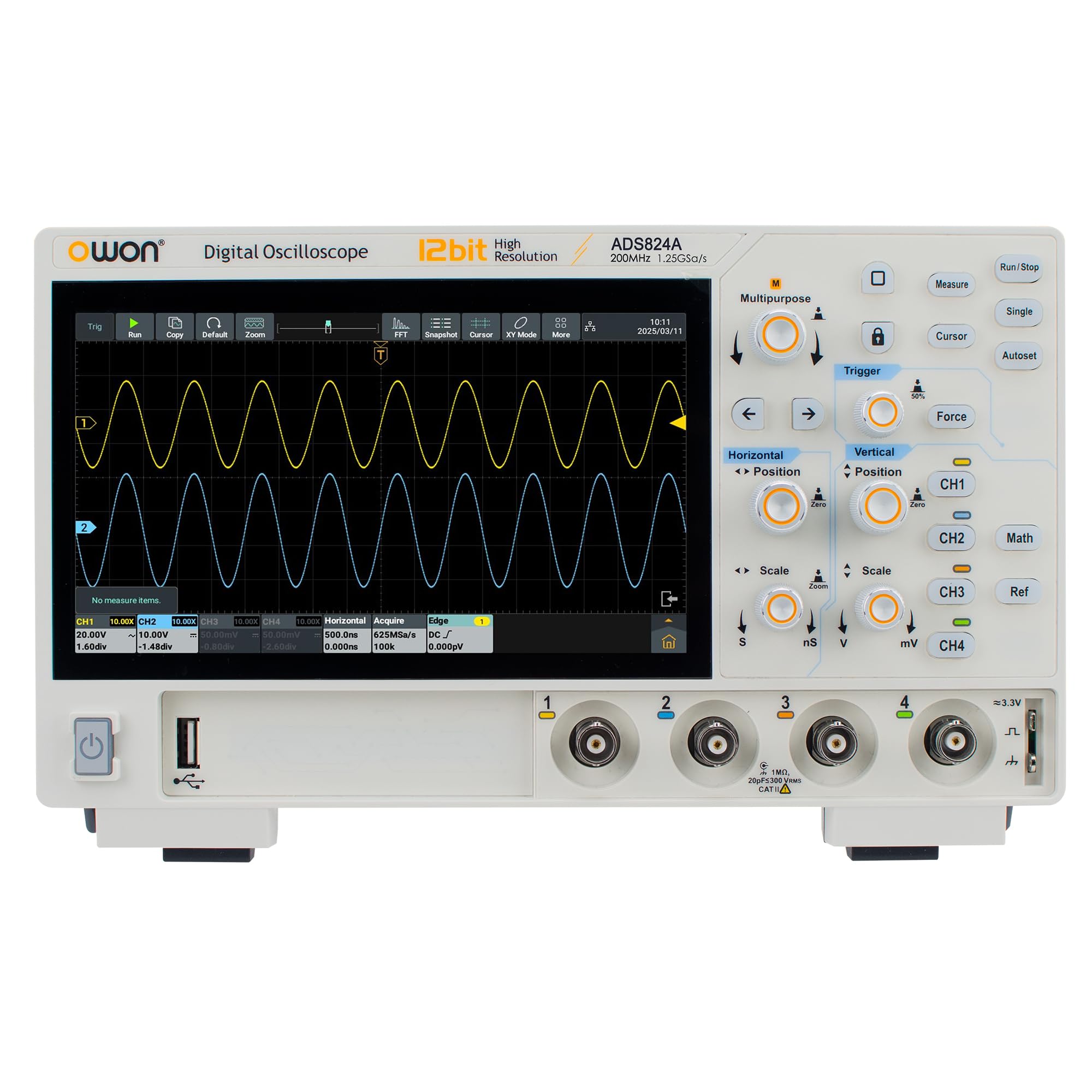
Obrázek 1: Přední strana view of the OWON ADS824A Digital Oscilloscope. The 7-inch multi-touch screen is central, flanked by input connectors and control buttons.
Detailed descriptions of each component are provided below:
- Zobrazit: 7-inch 1024x600 HD multi-touch screen for waveform display and menu navigation.
- Channel Inputs (CH1-CH4): BNC connectors for connecting probes to measure signals.
- Vertikální ovládací prvky: Buttons and knobs for adjusting vertical scale (Volts/Div) and position for each channel.
- Horizontální ovládací prvky: Buttons and knobs for adjusting horizontal scale (Sec/Div) and position.
- Ovládání spouště: Buttons for setting trigger mode, level, and source.
- Funkční tlačítka: Dedicated buttons for common functions such as Auto Setup, Run/Stop, Measure, Cursor, Acquire, etc.
- Ovládací prvky navigace: Directional buttons and a rotary knob for menu navigation and parameter adjustment.
3.3 Připojení zadního panelu
The rear panel provides various connectivity options for power, data transfer, and external display.
- Příkon: Connector for the AC power adapter.
- Hostitelský port USB: Pro připojení USB paměťových zařízení, myši nebo klávesnice.
- Port USB Type-C: For data transfer and device communication.
- LAN port: Ethernet connection for network access and remote control.
- HDMI výstup: For connecting to an external monitor or display.
- Zemnící terminál: Pro bezpečnostní uzemnění.
4. Nastavení
4.1 Vybalení a kontrola
Upon receiving your ADS824A oscilloscope, carefully inspect the packaging for any signs of damage. Open the package and verify that all standard accessories are present:
- OWON ADS824A Digital Oscilloscope
- Napájecí adaptér
- USB kabel
- Passive Probes (4 units)
- Rychlý průvodce
- Kalibrační certifikát
Pokud některé položky chybí nebo jsou poškozené, ihned kontaktujte svého prodejce.
4.2 Zapnutí zařízení
- Connect the power adapter to the power input port on the rear panel of the oscilloscope.
- Zapojte napájecí adaptér do vhodné zásuvky střídavého proudu.
- Press the power button located on the front panel to turn on the oscilloscope. The boot screen will appear, followed by the main waveform display.
4.3 Kompenzace sondy
Before taking measurements, it is recommended to compensate the probes to ensure accurate readings.
- Connect a probe to Channel 1 (CH1) input.
- Connect the probe tip to the probe compensation output (usually a square wave test signal) on the front panel.
- Adjust the compensation trimmer on the probe until a flat-top square wave is displayed on the screen.
- Repeat for all other probes and channels as needed.
5. Návod k obsluze
5.1 Základní měření průběhů
- Connect the compensated probe to the desired input channel (e.g., CH1).
- Connect the probe tip to the signal source you wish to measure.
- Stiskněte tlačítko Automatické nastavení button. The oscilloscope will automatically adjust vertical, horizontal, and trigger settings to display a stable waveform.
- Upravte Volty/Div knob to change the vertical scale and the Sek./Div knob to change the horizontal time base for optimal waveform viewIng.
- Použijte Spouštěcí úroveň knob to stabilize the waveform if needed.
5.2 Using the Multi-Touch Screen
The 7-inch multi-touch screen allows for intuitive control similar to a smartphone.
- Klepněte na: Select menu items, buttons, or parameters.
- Táhnout: Move waveforms, cursors, or menu windows.
- Přiblížení/zvětšení prsty: Adjust vertical or horizontal scale by pinching or spreading two fingers on the waveform display.
- Výpad: Navigate through menus or scroll lists.
5.3 Pokročilé funkce
The ADS824A offers a range of advanced measurement and analysis capabilities:
- Automatická měření: Stiskněte tlačítko Opatření button to access 43 automatic measurements (e.g., Vpp, Vrms, Frequency, Period, Rise Time).
- Protocol Analysis: Utilize the integrated protocol analyzer for UART, I2C, SPI, CAN, and LIN bus decoding. Access this function via the main menu.
- FFT spektrální analýza: Perform Fast Fourier Transform (FFT) to analyze the frequency components of a signal. Select FFT from the Math menu.
- Úložiště dat: Save waveforms, setups, and screenshots to internal memory or a connected USB drive.
- Dálkové ovládání: Connect the oscilloscope to a network via LAN or Wi-Fi (with optional module) and access the integrated web server from a browser for remote operation.
6. Údržba
6.1 Čištění přístroje
To maintain the performance and appearance of your oscilloscope:
- Před čištěním vždy odpojte napájecí kabel.
- K čištění vnějších povrchů používejte měkký, suchý hadřík.
- For the display, use a soft, lint-free cloth specifically designed for screens. Avoid abrasive cleaners.
- Do not use liquid or spray cleaners directly on the instrument.
6.2 aktualizací firmwaru
Periodically check the OWON official website for firmware updates. Firmware updates can provide new features, performance improvements, and bug fixes. Follow the instructions provided with the firmware update package carefully.
7. Řešení problémů
| Problém | Možná příčina | Řešení |
|---|---|---|
| Žádná síla | Power cord not connected; power adapter faulty; power outlet issue. | Check power cord connection; test power adapter; verify power outlet functionality. |
| Nezobrazuje se žádný průběh | Probe not connected; signal source off; vertical/horizontal scale incorrect; trigger not set. | Connect probe; ensure signal source is active; press Automatické nastavení; adjust scales; check trigger settings. |
| Nestabilní průběh | Incorrect trigger level or mode; noisy signal. | Adjust trigger level; change trigger mode (e.g., Edge, Video); use averaging acquisition mode. |
| Dotykový displej nereaguje | Temporary software glitch; screen calibration issue. | Restart the oscilloscope; perform screen calibration (refer to advanced settings in the full manual). |
If the problem persists after attempting these solutions, contact OWON technical support or your local dealer.
8. Specifikace
| Parametr | Hodnota |
|---|---|
| Model | ADS824A |
| Šířka pásma | 200 MHz |
| Kanály | 4 |
| Vertikální rozlišení | 12-bit (4096 levels) |
| Waveform Refresh Rate | 700,000 XNUMX wfms/s |
| Hloubka paměti | 50 Mpt |
| Zobrazit | 7-inch HD Multi-Touch (1024x600) |
| Multifunkčnost | Oscilloscope, Protocol Analyzer, Frequency Counter, Voltmeter, FFT Analyzer |
| Konektivita | LAN, USB Host, USB Type-C, HDMI, Wi-Fi (optional) |
| Rozměry produktu (D x Š x V) | 31.3 x 21.3 x 13.6 cm |
| Hmotnost položky | 1.5 kg |
| Vyhovující specifikace | CE, RoHS |
9. Záruka a podpora
OWON products are designed and manufactured to the highest quality standards. This product is covered by a standard manufacturer's warranty against defects in materials and workmanship. Please refer to the warranty card included with your product or visit the official OWON webpodrobné záruční podmínky naleznete na webu.
For technical support, service, or inquiries, please contact your local OWON distributor or visit the OWON official support website. When contacting support, please have your product model number (ADS824A) and serial number ready.
OWON Official Webmísto: www.owon.com


