1. Úvod
Thank you for choosing the JENNOV HS4007 Outdoor WiFi Security Camera. This manual provides essential information for the proper installation, operation, and maintenance of your device. Please read it thoroughly before use and retain it for future reference.

Image 1.1: JENNOV HS4007 Outdoor WiFi Security Camera
The JENNOV HS4007 is an outdoor WiFi security camera designed for comprehensive surveillance. It features a durable, weather-resistant casing and offers advanced functionalities for home and business security.
2. Obsah balení
Ověřte, zda jsou všechny níže uvedené položky součástí balení. Pokud některé položky chybí nebo jsou poškozené, kontaktujte zákaznickou podporu.

Obrázek 2.1: Obsah balení
This image displays the JENNOV WiFi camera, power adapter, mounting screws, and user manual included in the package.
- JENNOV WiFi Camera
- 5V1A napájecí adaptér
- Montážní šrouby
- Uživatelská příručka
- Polohovací nálepka
- Výstražná nálepka
3. Nastavení
3.1 Stažení a instalace aplikace
To use the camera, you need to download the AJCloud app on your smartphone or tablet.
- Scan the QR code provided in the package or search for "AJCloud" in your device's app store.
- Download and install the AJCloud app.
- Vytvořte si účet nebo se přihlaste, pokud jej již máte.

Image 3.1: AJCloud App Download
This image shows QR codes for downloading the AJCloud app from the App Store and Google Play, along with the app icons.
Odkazy ke stažení: AJCloud for iOS, AJCloud for Android
3.2 Instalace kamery
The camera is designed for wall mounting. Ensure the installation location has a stable WiFi signal and a power outlet.
- Use the positioning sticker to mark the drill holes on the desired surface.
- Vyvrtejte otvory a vložte do nich hmoždinky.
- Secure the camera bracket to the wall using the provided screws.
- Připevněte kameru k držáku.
- Connect the camera to the power adapter.
3.3 Počáteční konfigurace
Follow the in-app instructions to connect your camera to your WiFi network. The camera supports both 2.4GHz and 5GHz WiFi bands.
- Open the AJCloud app and tap the '+' icon to add a new device.
- Select your camera model and follow the on-screen prompts.
- Ensure your smartphone is connected to the same WiFi network you intend to connect the camera to.
- The app will guide you through the process of scanning a QR code with the camera or connecting via Bluetooth.
4. Návod k obsluze
4.1 Pan/Tilt and Auto-Tracking
The camera features Pan/Tilt functionality, allowing for a wide surveillance area. It can rotate horizontally 0-355 degrees and vertically 0-90 degrees.

Image 4.1: 360-Degree Pan and 90-Degree Tilt
This image illustrates the camera's ability to pan horizontally and tilt vertically, covering a wide area, with a smartphone displaying the live feed.
The auto-tracking feature enables the camera to automatically follow detected movement within its field of view. When an intruder is detected, the camera will track their movement and trigger an alarm.
4.2 Režimy nočního vidění
Kamera nabízí tři režimy nočního vidění pro optimální viditelnost za zhoršených světelných podmínek:
- Chytré noční vidění: Automatically switches between infrared and color night vision based on detected motion and lighting conditions.
- Barevné noční vidění: Utilizes built-in white LED lights to provide full-color video even in complete darkness.
- Infračervené noční vidění: Uses infrared lights for clear black-and-white video in dark environments.
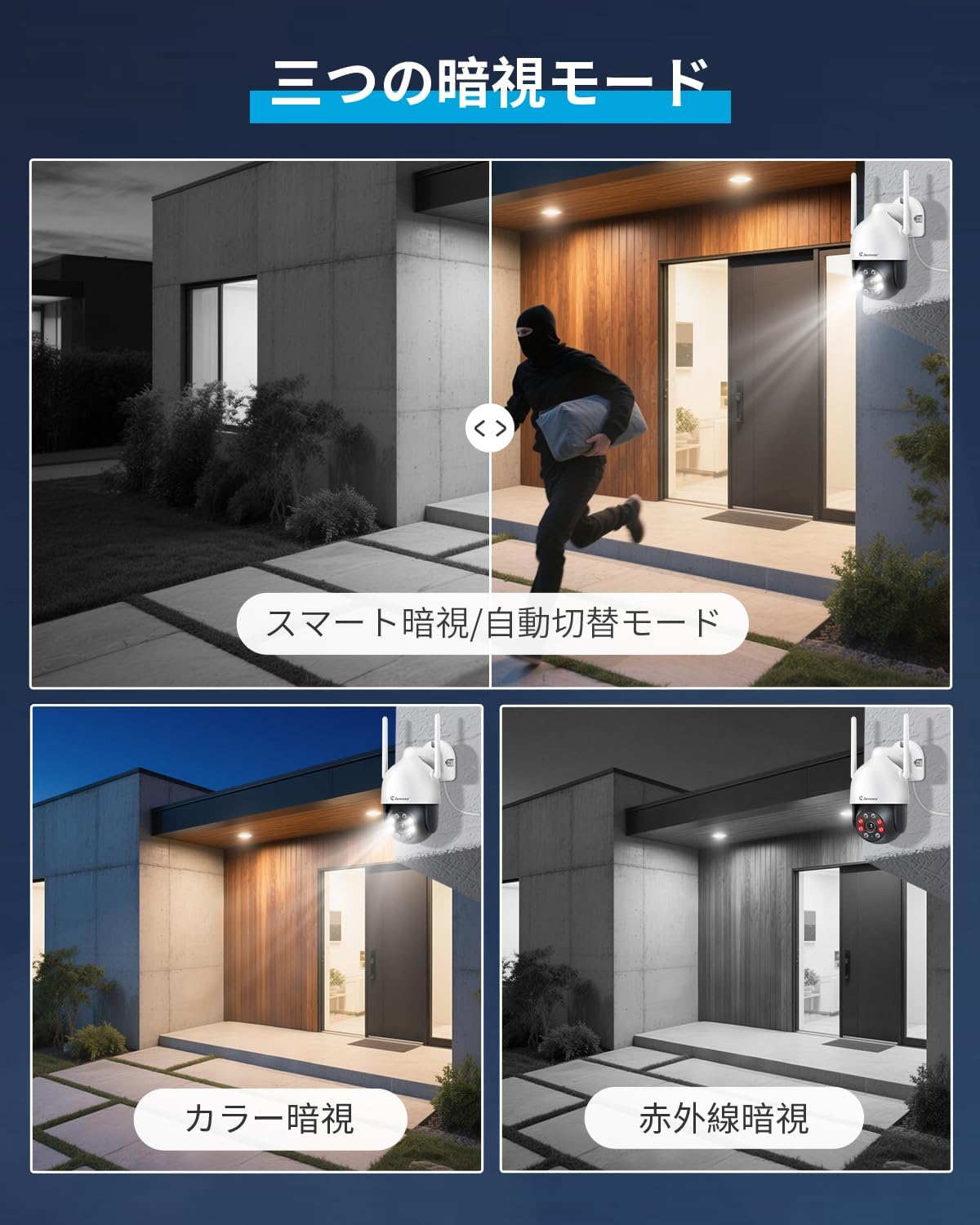
Image 4.2: Night Vision Modes
This image demonstrates the three available night vision modes: Smart Night Vision (automatic), Color Night Vision (using floodlights), and Infrared Night Vision (black and white).
4.3 Obousměrný zvuk
The camera is equipped with a microphone and speaker, enabling two-way communication. You can speak through the camera using the AJCloud app and hear audio from the camera's location.
Image 4.3: Two-Way Audio Communication
This image illustrates the two-way audio feature, showing a user speaking into their phone and a person at the camera's location hearing the message.
4.4 Detekce pohybu a alarmy
The camera features advanced motion detection. When motion is detected, the camera can:
- Send alert notifications to your smartphone.
- Trigger a sound alarm from the camera.
- Activate its built-in floodlight to deter intruders.

Image 4.4: Human Motion Detection and Alarm Notification
This image shows the camera detecting a person, triggering a floodlight and sound alarm, and sending a notification to the AJCloud app.
You can customize motion detection areas and schedules within the app to minimize false alarms.
4.5 Možnosti nahrávání
The camera supports 24-hour continuous recording and offers two storage methods:
- Paměťová karta Micro SD: Supports up to 64GB Micro SD cards (not included). When the card is full, older footage bude automaticky přepsáno.
- Cloudové úložiště: An optional paid subscription service for secure cloud backup of your recordings. This ensures footage is safe even if the camera is stolen or damaged.

Image 4.5: 24-Hour Recording with SD Card and Cloud Options
This image illustrates the camera's 24-hour recording capability, highlighting both TF card (Micro SD) and cloud storage options, with a smartphone displaying the app interface.
Recorded videos can be played back at up to 4x speed, saving time when reviewing footage.
5. Connectivity & App Features
5.1 Multi-Device Monitoring
The JENNOV HS4007 camera can be monitored from multiple devices simultaneously, including smartphones, tablets, and computers. You can share camera access with family members, allowing up to 4 devices to view the same feed concurrently. A single smartphone can manage up to 64 cameras.

Image 5.1: Simultaneous Monitoring on Multiple Devices
Tento obrázek ukazuje přenos z kamery viewed on a laptop, tablet, and smartphone simultaneously, demonstrating multi-device compatibility.
5.2 RTSP Support
The camera supports the open RTSP protocol, allowing integration with third-party surveillance software like Blue Iris or iSpy for advanced monitoring capabilities. Note that PC software is for monitoring only; camera settings cannot be adjusted via PC software.
5.3 Integrace s Alexou
The JENNOV HS4007 is compatible with Amazon Alexa. You can use voice commands to view the camera feed on compatible Alexa-enabled devices (e.g., Echo Show).

Image 5.2: Alexa Voice Control
This image shows a person using an Alexa-enabled device to view the camera feed with a voice command.
To enable Alexa integration:
- Otevřete aplikaci Amazon Alexa.
- Navigate to the Skills & Games section and search for "AJCloud".
- Enable the AJCloud skill and link your AJCloud account.
- Discover devices. Once detected, you can assign the camera to a group (e.g., "Office") for easy control.
6. Údržba
- Čištění: Pravidelně čistěte objektiv fotoaparátu měkkým, suchým hadříkem, abyste zajistili ostrý obraz. Nepoužívejte agresivní chemikálie.
- Aktualizace firmwaru: Check the AJCloud app periodically for firmware updates. Keeping your camera's firmware updated ensures optimal performance and security.
- Napájení: Ujistěte se, že napájecí adaptér a kabel nejsou poškozené.
- Ochrana proti počasí: While the camera is IP66 waterproof, ensure it is installed in a location that minimizes direct exposure to extreme weather conditions for extended durability.

Image 6.1: IP66 Outdoor Waterproof Rating
This image highlights the camera's IP66 waterproof rating, showing it functioning in various weather conditions like rain and snow, and its operating temperature range from -20°C to 50°C.
7. Řešení problémů
- Kamera se nepřipojuje k Wi-Fi:
- Ensure your WiFi password is correct.
- Verify the camera is within range of your WiFi router.
- Check if your router is operating on 2.4GHz or 5GHz, and ensure the camera is configured for the correct band.
- Restart your router and the camera. - Špatná kvalita obrazu:
- Clean the camera lens.
- Ujistěte se, že před objektivem nejsou žádné překážky.
- Check your internet connection speed. - Detekce pohybu nefunguje:
- Verify motion detection is enabled in the app.
- Adjust the sensitivity settings.
- Ensure the detection area is correctly configured. - Žádný zvuk nebo špatná kvalita zvuku:
- Zkontrolujte nastavení mikrofonu a reproduktorů v aplikaci.
- Ensure there are no obstructions blocking the microphone or speaker. - SD karta nenahrává:
- Ujistěte se, že je SD karta správně vložena.
- Format the SD card via the app (this will erase all data).
- Check if the SD card is damaged or full.
8. Specifikace
| Funkce | Specifikace |
|---|---|
| Typ montáže | Držák na zeď |
| Rozlišení záznamu videa | 1440p |
| Barva | Bílá a černá |
| Počet položek | 1 |
| Zahrnuté komponenty | 5V1A Power Adapter, Camera Body, Mounting Screws, User Manual |
| Počet kanálů | 1 |
| Technologie bezdrátové komunikace | Wi-Fi (2.4GHz & 5GHz compatible) |
| Form Factor | Kupole |
| Pole View | 80 stupňů |
| Typ instalace | Zašroubovat |
| Rozsah nočního vidění | 30 metrů |
| Materiál | Plast |
| Rozměry produktu (DxŠxV) | 17 x 14 x 10 cm |
| Úroveň odolnosti proti vodě | Vodotěsný (IP66) |
| Číslo modelu produktu | HS4007 |
| Hmotnost produktu | 570 g |
| Doporučená použití | Baby Monitor, Pet Monitor, Indoor Security, Outdoor Security |
| Kompatibilní zařízení | Chytrý telefon, tablet, stolní počítač, notebook |
| Zdroj napájení | Elektrický kabel |
| Protokol připojení | Wi-Fi |
| Typ ovladače | iOS, Android |

Image 8.1: Camera Dimensions
Tento obrázek poskytuje detailní view of the camera's dimensions, including height, width, and depth.
9. Záruka a podpora
JENNOV is committed to providing reliable outdoor security cameras. This product comes with a one-year warranty from the date of purchase and lifetime customer support.
If you have any questions or encounter issues with your product, please contact us with your order number and model number at:
E-mail: jnwjp@jennov.com (24-hour response)
Support Hours: Monday - Friday, 10:00 - 13:00, 14:30 - 19:00 (excluding Saturdays, Sundays, and public holidays)


