1. Úvod
This manual provides detailed instructions for the BEITONG KP40 Elite Wireless Gaming Controller. Designed for multi-platform compatibility, the KP40 offers advanced features for an enhanced gaming experience across various devices.
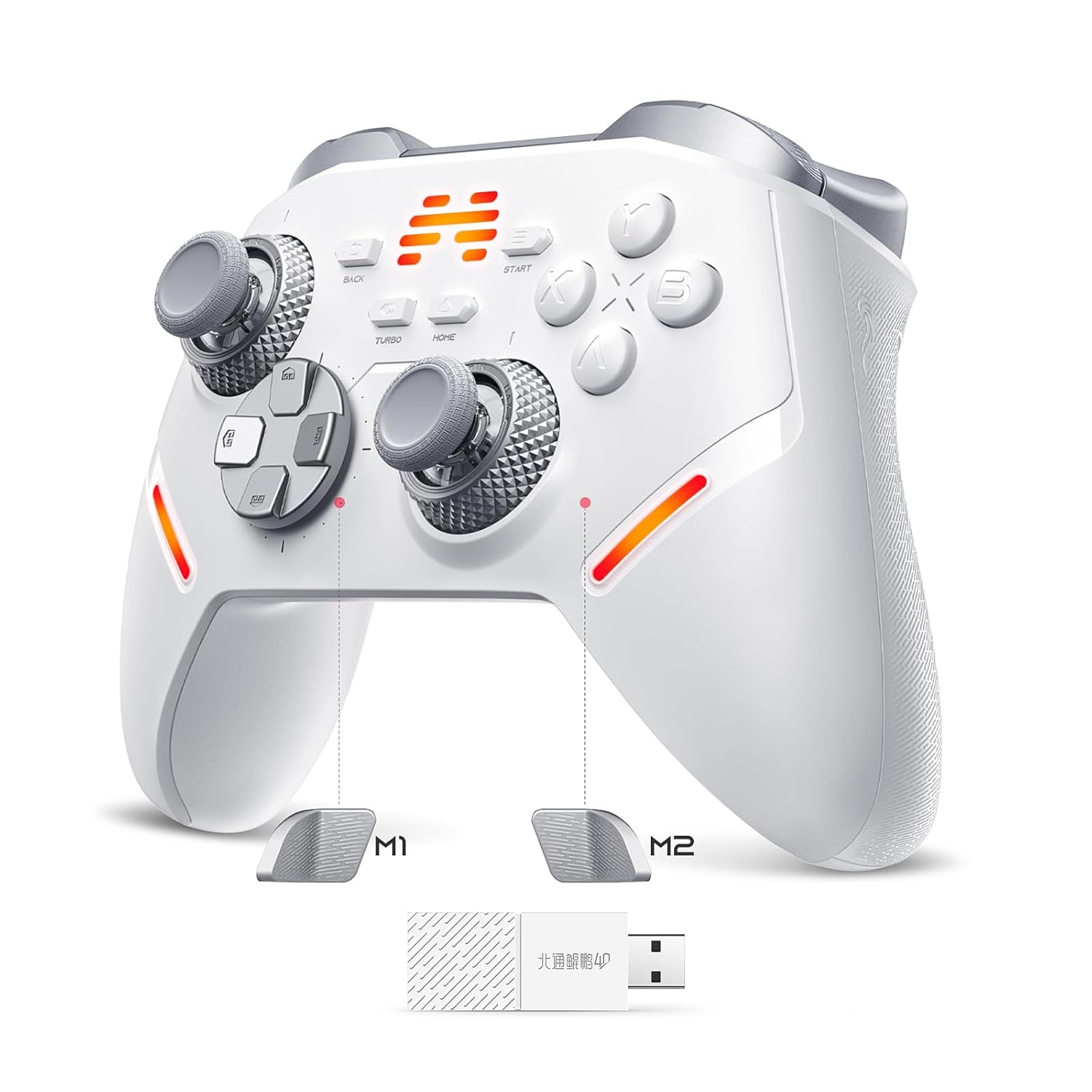
Image 1.1: The BEITONG KP40 Elite Wireless Gaming Controller, showcasinjeho ergonomický design a rozložení tlačítek.
2. Klíčové vlastnosti
- Universal Multi-Platform Compatibility: Supports PC/Windows, Switch/OLED/Lite, Steam Deck, Android, iOS, and TV platforms.
- Duální režimy připojení: Advanced 2.4G wireless with 1ms latency for PC/Windows/TV/Android, and stable Bluetooth for Switch, Steam Deck, and mobile devices.
- Precision Adjustable TMR Joysticks: Features 30-90gf stepless damping adjustment and 5400+ resolution for responsive control.
- Upgraded TMR Triggers: Dual-mode triggers with 2mm light touch for rapid-fire and 8mm linear analog for pressure-sensitive games. Instant mode switching via rear trigger locks.
- Competitive-Grade 1000Hz Polling Rate: Dual-mode (wired/wireless) 1000Hz polling rate ensures 1ms latency within a 10-meter range.
- Optical Button Switches: ABXY optical micro switches are 70% faster than traditional switches, offering frictionless actuation and 10M+ press durability.
- Advanced 6-Axis Gyro Motion: Integrated gyroscope provides precise motion controls for PC/Switch/Android gaming.
- Customizable Macro Control: Three programmable macro keys (M1/M2/Turbo) for remapping buttons or joystick functions.
- Immersive AI Vibration: Self-developed AI vibration algorithm identifies and replicates in-game feedback, combined with authentic Xbox motor technology.
- Comprehensive Customization Software: BEITONG Gamepad Assistant (available at beitongfun) allows fine-tuning of joystick dead zones, turbo speeds, vibration intensity, RGB lighting, and button mappings.

Obrázek 2.1: Konecview of the BEITONG KP40's advanced features, including multi-platform support and customizable elements.
3. Průvodce nastavením
3.1 Obsah balení
Ověřte, zda váš balíček obsahuje následující položky:
- BEITONG KP40 Elite Wireless Gaming Controller
- USB Wireless Adapter (Dongle)
- Nabíjecí kabel USB-C
- Návod k použití (tento dokument)
- Baterie AAA (1, součástí balení)
3.2 Zapnutí/vypnutí
To power on the controller, locate the power switch on the back of the device and slide it to the 'ON' position. To power off, slide the switch to 'OFF'.
3.3 Režimy připojení
The KP40 controller supports multiple connection methods:
- 2.4G Wireless (via USB Adapter): Ideal for PC, Windows, Android TV, and other devices with a USB port. Insert the USB wireless adapter into an available USB port on your device. The controller should automatically connect.
- Bluetooth: For Switch, Steam Deck, Android, and iOS devices. Ensure Bluetooth is enabled on your device. On the controller, switch to the Bluetooth mode (refer to the switch on the back). Press and hold the pairing button (usually a small button near the charging port or indicated in the manual) until the indicator lights flash rapidly. Select 'BEITONG KP40' from your device's Bluetooth settings to pair.
- Kabelové připojení: Connect the controller directly to your PC or compatible device using the provided USB-C cable. This mode offers the lowest latency and also charges the controller.
Video 3.1: An official product video demonstrating the BEITONG KP40 Wireless Gaming Controller's features and connectivity options.
4. Obsluha regulátoru
4.1 TMR Joysticks and Triggers
The KP40 features adjustable TMR joysticks and triggers for personalized control:
- Joystick Damping: The joysticks offer 30-90gf stepless damping adjustment. Rotate the ring at the base of the joystick to increase or decrease resistance. A lighter setting provides more flexibility, while a heavier setting offers more precise aiming.
- Režimy spouštění: The triggers can be switched between two modes using the physical switches on the underside of the controller. The 2mm light touch mode is suitable for rapid-fire actions in shooting games, while the 8mm linear analog mode provides pressure-sensitive input for racing games and throttle control.

Obrázek 4.1: Detailní view of the TMR Damped Adjustable Rocker, highlighting the damping adjustment mechanism for joysticks.
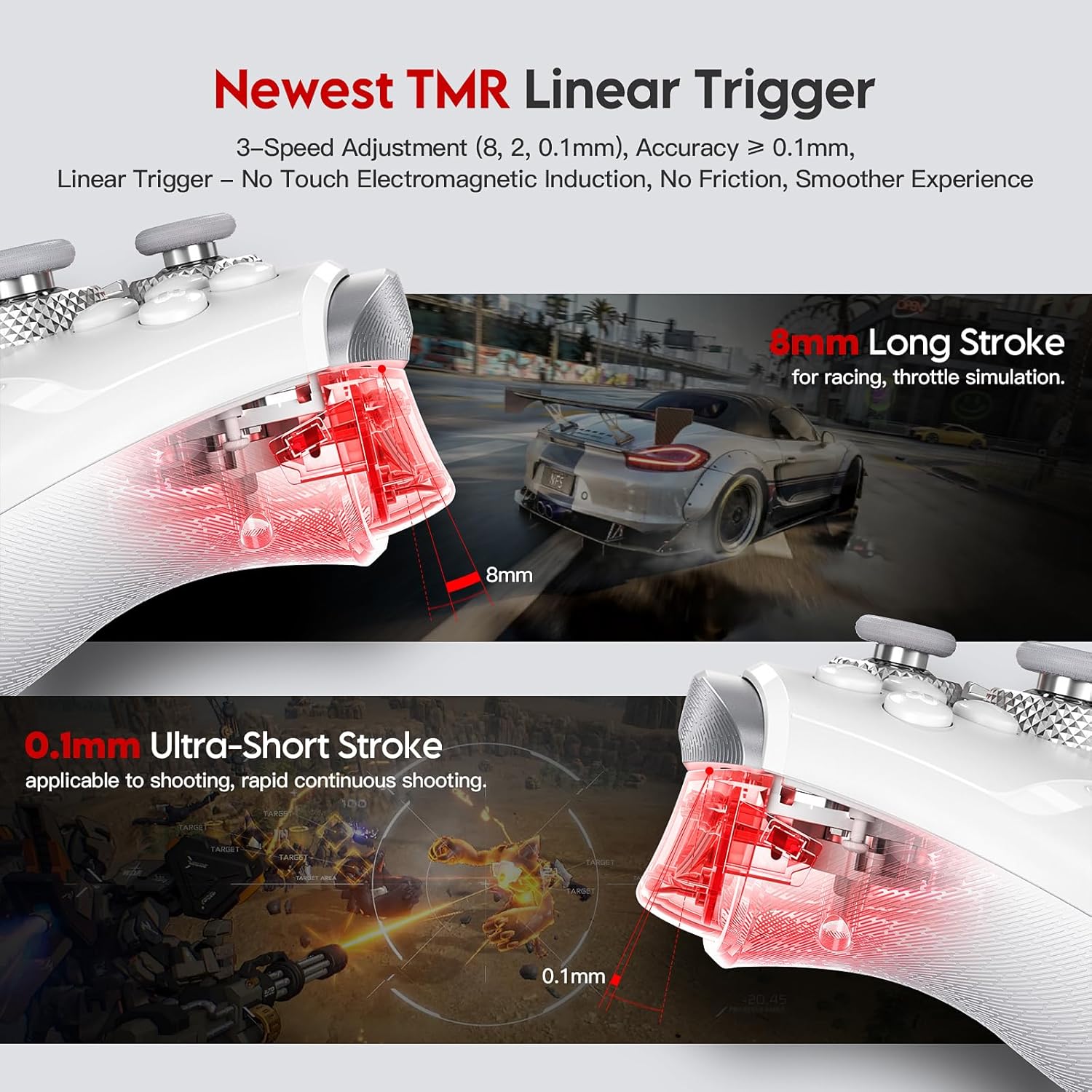
Image 4.2: Illustration of the TMR Linear Trigger, showing the 8mm long stroke for racing and 0.1mm ultra-short stroke for rapid shooting.
4.2 Optical Buttons and D-Pad
The ABXY buttons utilize optical micro switches for faster response. The 10-direction hybrid D-pad ensures accurate input.

Image 4.3: Close-up of the optical keypad and omni-directional D-pad, emphasizing their precise and fast actuation.
4.3 Macro Keys (M1/M2/Turbo)
The controller includes three customizable macro keys (M1, M2, and Turbo) located on the underside and front of the controller. These can be remapped to any button or joystick function to execute complex combos or rapid-fire sequences. Refer to the BEITONG Gamepad Assistant software for detailed macro programming instructions.
4.4 Motion Controls and AI Vibration
The integrated 6-axis gyroscope provides precise motion controls for compatible games on PC, Switch, and Android. The AI vibration system, powered by an Xbox motor, intelligently adapts to in-game events, providing realistic haptic feedback.
4.5 Software pro přizpůsobení
For advanced customization, download the BEITONG Gamepad Assistant from the official BEITONG website (beitongfun, SUPPORT section). This software allows you to fine-tune various aspects of your controller, including:
- Joystick dead zones and curves
- Turbo speeds
- Úrovně vibrací
- RGB světelné efekty
- Přemapování tlačítek
- Creating personalized profiles for different games

Image 4.4: The BEITONG Gamepad Assistant interface, demonstrating the extensive customization options available for the controller.
5. Údržba
5.1 Čištění
Regularly clean your controller with a soft, dry cloth. Avoid using harsh chemicals or abrasive materials that could damage the surface or internal components. For stubborn dirt, lightly dampa hadřík s vodou.
5.2 Péče o baterii
Chcete -li prodloužit životnost baterie:
- Charge the controller fully before first use.
- Vyhněte se častému úplnému vybíjení baterie.
- Pokud regulátor delší dobu nepoužíváte, skladujte jej na chladném a suchém místě.
- Používejte pouze dodaný nabíjecí kabel nebo certifikovaný kabel USB-C.
6. Řešení problémů
6.1 Řídicí jednotka se nepřipojuje
- Zkontrolujte napájení: Ujistěte se, že je ovladač zapnutý a má dostatečně nabitou baterii.
- Režim ověření: Confirm the controller is set to the correct connection mode (2.4G, Bluetooth, or Wired) for your device.
- Opravit: For wireless connections, try re-pairing the controller with your device.
- USB adaptér: If using 2.4G wireless, ensure the USB adapter is securely plugged into your device. Try a different USB port.
- Rušení: Přesuňte se dále od jiných bezdrátových zařízení, která mohou způsobovat rušení.
6.2 Buttons/Joysticks Unresponsive
- Restartovat: Power off and then on the controller.
- Kalibrace softwaru: Use the BEITONG Gamepad Assistant to check and calibrate joystick and button inputs.
- Aktualizace firmware: Check the BEITONG webwebové stránky, kde najdete veškeré dostupné aktualizace firmwaru pro váš ovladač.
6.3 Vibrace nefungují
- Zkontrolujte nastavení hry: Ensure vibration is enabled in your game's settings.
- Nastavení ovladače: Use the BEITONG Gamepad Assistant to verify vibration intensity settings.
7. Specifikace
| Funkce | Detail |
|---|---|
| Číslo modelu | 40 KP |
| Konektivita | Bezdrátové 2.4G, Bluetooth, Kabelové (USB-C) |
| Míra hlasování | 1000 Hz (kabelové/bezdrátové) |
| Joysticky | TMR with 30-90gf damping, 5400+ resolution |
| Spouštěče | TMR Linear, Dual-mode (2mm light touch, 8mm linear analog) |
| Tlačítka | ABXY Optical Micro Switches (10M+ durability) |
| D-Pad | 10-direction Hybrid |
| Pohybový senzor | Gyroskop osy 6 |
| Vibrace | AI Vibration Algorithm, Xbox Motor Technology |
| Makro klávesy | M1, M2, Turbo (Customizable) |
| Hmotnost | 1.01 libry |
| Baterie | Vyžaduje 1 AAA baterie (součástí balení) |
8. Záruka a podpora
For warranty information, technical support, or further assistance, please visit the official BEITONG webmísto na beitongfun.com and navigate to the SUPPORT section. You may also contact BEITONG customer service directly through the contact information provided on their webmísto.


