1. Úvod
This manual provides detailed instructions for the proper use and maintenance of your havit OWS915 Open Ear Headphones. Please read this manual thoroughly before using the product to ensure optimal performance and longevity. Keep this manual for future reference.
2. Obsah balení
Ověřte, zda jsou v balení obsaženy všechny níže uvedené položky:
- havit OWS915 Open Ear Headphones (Left and Right earbuds)
- Nabíjecí pouzdro
- USB nabíjecí kabel
- Uživatelská příručka

Image: Contents of the havit OWS915 package, showing the earbuds, charging case, USB cable, and user manual.
3. Konec produktuview
The havit OWS915 headphones feature an open-ear design for comfort and situational awareness. Each earbud is lightweight (7.9 grams) and equipped with a flexible TPU ear hook for a secure fit. The charging case provides extended battery life.
Klíčové komponenty:
- Sluchátka: Levá a pravá, s integrovanými háčky na uši a dotykovými ovládacími plochami.
- Nabíjecí pouzdro: Houses and charges the earbuds, with a USB-C charging port.
- LED indikátory: On earbuds and charging case for status updates.
- Mikrofony: Four built-in microphones with ENC technology for clear calls.
- Řečníci: 14.2mm dynamické měniče pro audio výstup.

Image: The havit OWS915 Open Ear Headphones and their charging case.

Obrázek: Explodoval view of the havit OWS915 earbud and charging case, detailing internal components and features.
4. Nastavení
4.1. Nabíjení sluchátek
Before first use, fully charge the headphones and charging case. Place the earbuds into the charging case. Connect the USB charging cable to the USB-C port on the case and to a power source. The LED indicator on the case will show charging status.
A full charge of the case takes approximately 2.5 hours. The earbuds provide up to 8.5 hours of playtime at 60% volume on a single charge, with the charging case extending total playtime to 64 hours.
Video: Demonstration of how to use the HAVIT LIFE app with wireless earbuds, including a visual of the charging indicator on the case.
4.2. Párování Bluetooth
To pair your havit OWS915 headphones with your device:
- Otevřete nabíjecí pouzdro. Sluchátka se automaticky přepnou do režimu párování.
- Na svém zařízení (chytrém telefonu, tabletu atd.) povolte Bluetooth.
- Hledat "HAVIT OWS915" in the list of available Bluetooth devices.
- Select "HAVIT OWS915" to connect. A voice prompt will confirm successful pairing.
Sluchátka se po vyjmutí z pouzdra automaticky znovu připojí k poslednímu spárovanému zařízení, pokud je na zařízení povoleno Bluetooth.

Image: A diagram illustrating the Bluetooth 5.4 chip, emphasizing stable and easy pairing with various operating systems.
5. Pokyny k nošení
Pro zajištění pohodlného a bezpečného uchycení postupujte takto:
- Identifikujte levé (L) a pravé (R) sluchátko.
- Gently hook the earbud over your ear, positioning the speaker part towards your ear canal.
- Adjust the ear hook and earbud until it rests comfortably and securely on your ear. The flexible TPU material allows for slight adjustments.

Image: A visual guide demonstrating the correct method for wearing the havit OWS915 headphones.
6. Ovládání sluchátek
6.1. Stiskněte Ovládací prvky
The havit OWS915 headphones feature intuitive touch controls on each earbud:
- Přehrát/pozastavit: Dvakrát klepněte na kterékoli ze sluchátek.
- Předchozí skladba: Touch and hold the left earbud for 1 second.
- Další skladba: Touch and hold the right earbud for 1 second.
- Přijmout/ukončit hovor: Dvakrát klepněte na kterékoli ze sluchátek.
- Odmítnout hovor: Touch and hold either earbud for 1 second.
- Hlasový asistent: Tap the left earbud thrice.
- Herní režim/Hudební režim: Tap the right earbud thrice.

Image: A visual representation of the touch control functions on the havit OWS915 earbuds.
6.2. HAVIT LIFE App
Enhance your listening experience by customizing settings via the HAVIT LIFE App:
- Nastavení ekvalizéru: Nastavení zvuku profilepodle vašich preferencí.
- Customize Touch Settings: Personalize earbud touch controls.
- Headphone Battery Display: Sledujte stav baterie.
- Herní režim: Optimize audio for gaming with reduced latency.
- Změnit název zařízení: Rename your headphones for easy identification.
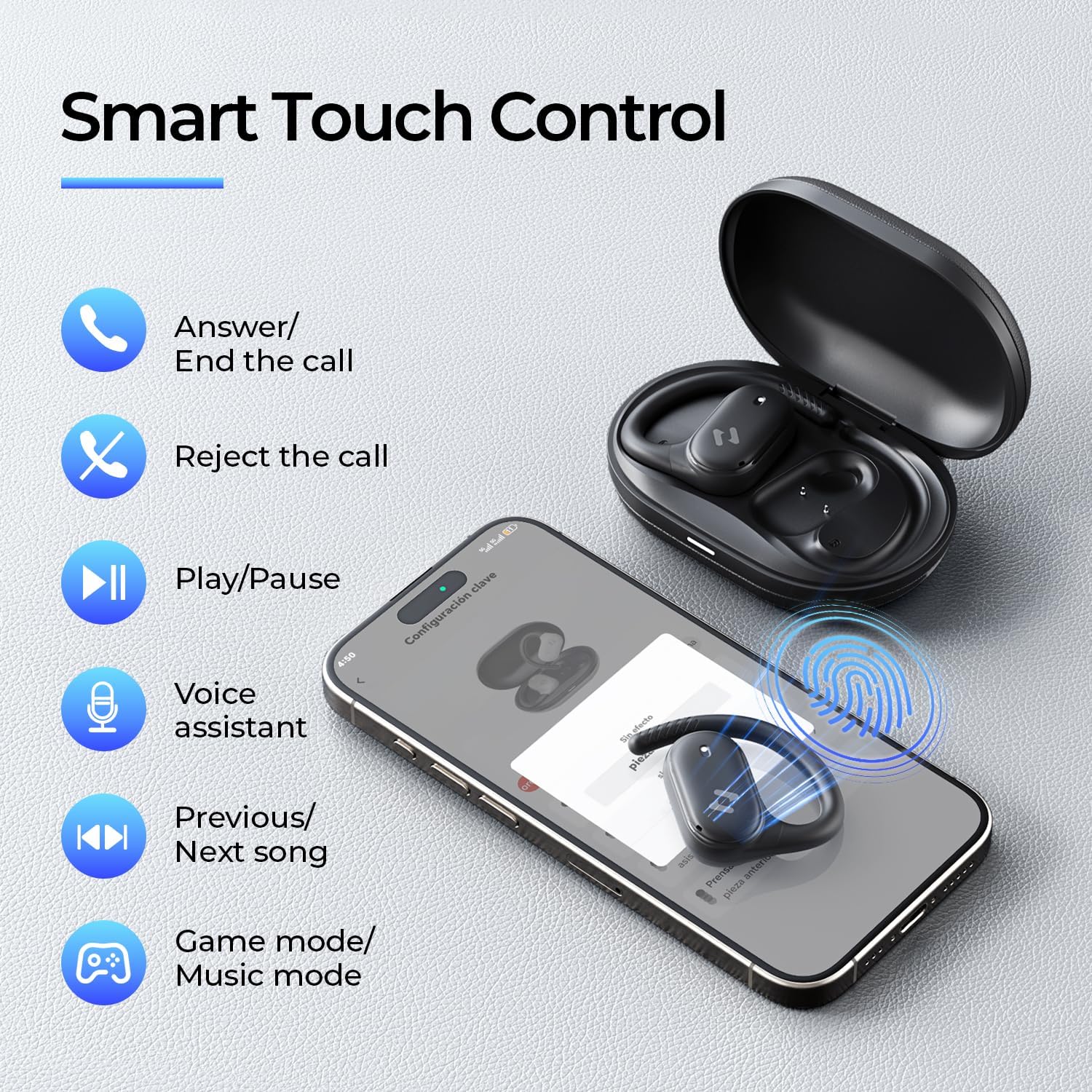
Image: Screenshots of the HAVIT LIFE App demonstrating various customization options.
Video: A guide on how to download, connect to, and customize settings within the HAVIT LIFE App.
7. Údržba
Pro zachování výkonu a vzhledu vašich sluchátek:
- Čištění: K čištění sluchátek a nabíjecího pouzdra používejte měkký, suchý hadřík. Nepoužívejte agresivní chemikálie ani abrazivní materiály.
- Skladování: Pokud sluchátka nepoužíváte, uchovávejte je v nabíjecím pouzdře, abyste je chránili před prachem a poškozením.
- Péče o baterie: Charge the headphones regularly, even if not in frequent use, to prolong battery life. Avoid extreme temperatures.
- Voděodolnost: The headphones are IPX5 waterproof, meaning they are resistant to sweat and splashes. Do not submerge them in water. Ensure they are dry before placing them back in the charging case.

Image: The havit OWS915 headphones demonstrating their IPX5 water resistance.
8. Řešení problémů
If you encounter issues with your havit OWS915 headphones, refer to the following common solutions:
| Problém | Řešení |
|---|---|
| Nelze spárovat se zařízením | Ensure Bluetooth is enabled on your device. Make sure the earbuds are charged and in pairing mode. Try restarting your device and the headphones. |
| Žádný zvuk nebo nízká hlasitost | Check the volume level on both your device and the headphones. Ensure the headphones are properly connected. Clean any debris from the speaker grilles. |
| Sluchátka se nenabíjejí | Ensure the charging cable is securely connected to both the case and the power source. Check if the charging contacts on the earbuds and case are clean. Try a different charging cable or power adapter. |
| Připojení nestabilní | Ensure your device is within the Bluetooth range (10 meters). Avoid obstacles between the headphones and your device. Disconnect and re-pair the headphones. |
| HAVIT LIFE App connection fails | Ensure you have the latest version of the HAVIT LIFE App installed. Check your device's internet connection. Restart the app and your headphones. |
9. Specifikace
| Funkce | Detail |
|---|---|
| Název modelu | OWS915 |
| Verze Bluetooth | 5.4 |
| Dosah Bluetooth | 10 metrů |
| Výdrž baterie (sluchátka) | 8.5 hodin (60% objem) |
| Celková doba přehrávání (s pouzdrem) | 64 hodiny |
| Nabíjecí pouzdro Baterie | 1000 XNUMX mAh |
| Doba nabíjení pouzdra | 2.5 hodiny |
| Velikost zvukového ovladače | 14.2 milimetrů |
| Úroveň odolnosti proti vodě | IPX5 (vodotěsný) |
| Hmotnost položky (sluchátka) | 7.9 gramů (každý) |
| Materiál | PC + ABS + TPU |
| Kontrolní metoda | Aplikace, dotyk |
| Kontrola hluku | Žádné (Funkce ENC pro hovory) |
| Frekvenční odezva | 20 kHz |
| Citlivost | 118 dB |
| Impedance | 32 ohmů |
10. Záruka a podpora
Your havit OWS915 Open Ear Headphones come with a standard manufacturer's warranty. Please refer to the warranty card included in your package for specific terms and conditions. For technical support or customer service inquiries, please contact havit customer support through their official webwebu nebo kontaktních informací uvedených v záruční dokumentaci.
11. Důležité bezpečnostní informace
- Ochrana sluchu: To protect your hearing, avoid listening at high volume levels for extended periods.
- Environmentální povědomí: The open-ear design allows you to hear your surroundings. However, always exercise caution when using headphones in situations requiring full attention, such as driving or cycling.
- Děti: Keep the headphones and accessories out of reach of children under three years of age to prevent choking hazards.
- Nabíjení: Use only the provided charging cable and a certified power adapter. Do not attempt to charge the device if it is wet.
- Demontáž: Nepokoušejte se rozebírat ani upravovat sluchátka ani nabíjecí pouzdro, mohlo by dojít ke zrušení záruky a poškození.


