1. Úvod
This manual provides essential instructions for setting up, operating, and maintaining your realme 14x 5G Smartphone. Please read this manual thoroughly before using your device to ensure proper function and safety.
The realme 14x 5G is designed with advanced features including a 120Hz display, a 6000mAh battery, an 80MP AI camera, and a MediaTek Dimensity 6300 5G processor, all protected by ArmorShell and IP69 water and dust resistance.
2. Obsah balení
Ověřte, zda váš balíček obsahuje následující položky:
- Chytrý telefon Realme 14x 5G
- USB kabel
- Stručný průvodce (může se lišit v závislosti na regionu)
- Bezpečnostní informace (mohou se lišit v závislosti na regionu)

Image: realme 14x 5G Smartphone, Crystal Black variant, showcasing its front and rear design with key features like IP69 rating and 6000mAh battery.
3. Zařízení skončiloview
Seznamte se s fyzickými součástmi vašeho smartphonu realme 14x 5G.
3.1. Fyzikální komponenty
- Přední kamera: Nachází se v horní střední části displeje.
- Zobrazit: 6.67-inch screen with 120Hz refresh rate.
- Tlačítka hlasitosti: Typically on the left side for adjusting audio levels.
- Vypínač: Usually on the right side, used for power on/off and screen lock/unlock.
- Port USB-C: Nachází se ve spodní části pro nabíjení a přenos dat.
- Reproduktor: Nachází se ve spodní části.
- Mikrofon: Nachází se ve spodní části.
- Zásuvka na SIM kartu: Location may vary, typically on the side.
- Zadní kamery: Multiple lenses located on the back, including the 80MP AI camera.
4. Nastavení
4.1. Počáteční zapnutí
- Stiskněte a podržte Tlačítko napájení until the realme logo appears.
- Postupujte podle pokynů na obrazovce a vyberte jazyk, region a připojte se k síti Wi-Fi.
- Přihlaste se pomocí svého účtu Google nebo si vytvořte nový.
4.2. Vložení SIM karty
- Vyhledejte držák SIM karty na boku zařízení.
- Vložte nástroj pro vysunutí SIM karty (pokud je součástí dodávky) do malého otvoru vedle zásobníku a jemně zatlačte, dokud zásobník nevyskočí.
- Vložte kartu (karty) Nano-SIM do slotu zlatými kontakty dolů.
- Opatrně vložte zásobník zpět do telefonu.
4.3. Nabíjení baterie
Connect the provided USB cable to the phone's USB-C port and the other end to a compatible power adapter. For optimal charging speed, use a 45W fast charger.

Image: Visual representation of the 6000mAh battery and 45W fast charging capability, highlighting extended usage times for various applications.
5. Návod k obsluze
5.1. Zobrazení a navigace
The 6.67-inch display features a 120Hz refresh rate for smooth scrolling and responsiveness. It also includes 10 visual protection modes to reduce eye strain. Navigate using touch gestures or on-screen buttons as configured during setup.
5.2. Obsluha kamery
The realme 14x 5G is equipped with an 80MP AI-enhanced rear camera system and a front camera. To access the camera, tap the Camera icon on your home screen or app drawer.
- Režim fotografie: Klepnutím na tlačítko spouště pořídíte statické snímky.
- Režim videa: Switch to video mode to record footage.
- Vylepšení umělé inteligence: The AI camera automatically optimizes settings for various scenes, preserving fine details in complex environments.
5.3. Správa baterií
The 6000mAh battery provides extended usage. With 45W fast charging, you can quickly replenish power. Optimize battery life by managing background apps and screen brightness.

Image: Graphic illustrating the extended battery life of the realme 14x 5G, showing usage times for calls, YouTube, Instagram, and other applications on a single charge.
5.4. Výkon a konektivita
Powered by the MediaTek Dimensity 6300 5G chipset, the device offers efficient performance. It supports 5G connectivity for faster data speeds where available, along with Bluetooth and Wi-Fi for wireless connections.

Image: Diagram illustrating the MediaTek Dimensity 6300 5G chipset, highlighting its 6nm advanced process, 8-cores, and performance enhancements.
5.5. AI Smart Signal Adjustment
The device features AI Smart Signal Adjustment to enhance signal reliability, even in areas with poor network coverage such as underground parking garages. This technology aims to improve call connection rates and app download speeds.
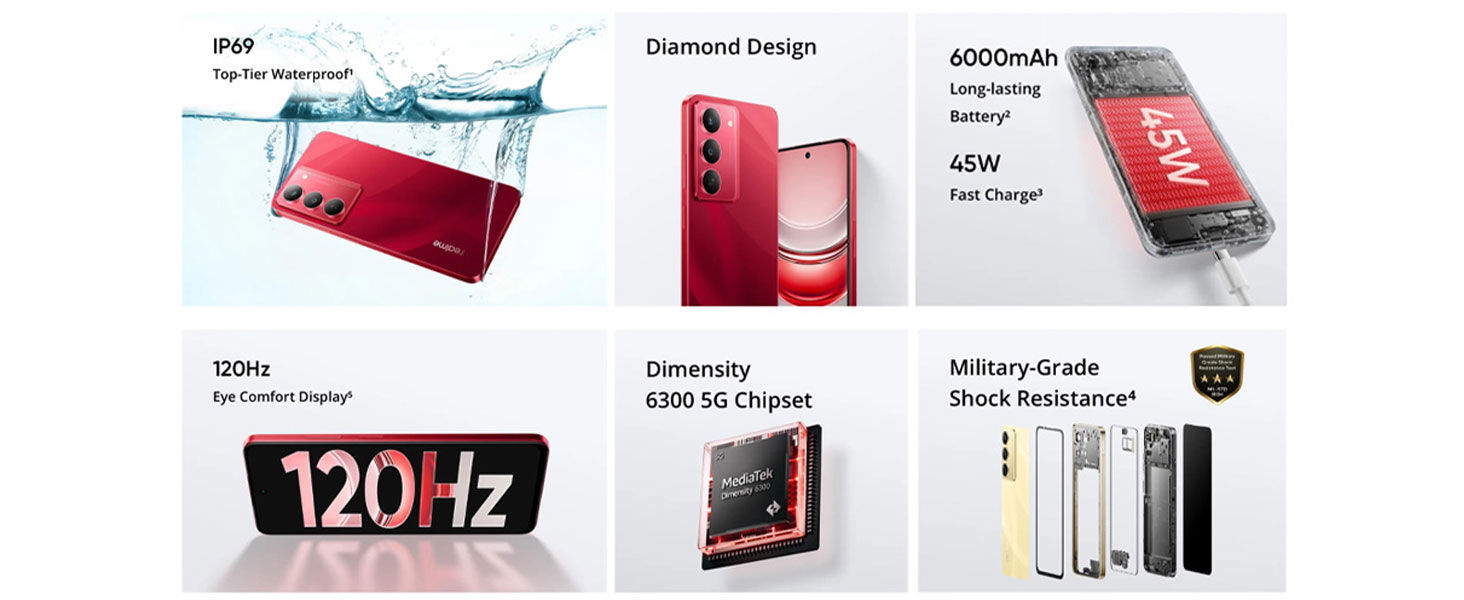
Image: A smartphone displaying a game, with text indicating improvements in call connection, app download speed, Instagram lag rate, and Snapchat lag rate due to AI Smart Signal Adjustment.
5.6. Paměť a úložiště
The device comes with 8GB of RAM and 128GB of internal storage. This configuration supports smooth multitasking and ampprostor pro aplikace a média.

Image: Graphic depicting 8GB Dynamic RAM and 128GB Massive Storage, illustrating the device's memory capabilities.
6. Vlastnosti trvanlivosti
The realme 14x 5G is built with enhanced durability features to withstand daily use.
6.1. Military-Grade Shock Resistance
Equipped with ArmorShell protection, the device has passed military-grade impact resistance tests, providing robust fall protection.

Image: A smartphone being held over stairs, with an emblem indicating MIL-STD-810H military-grade shock resistance, demonstrating its drop-proof design.
6.2. IP69 Water and Dust Resistance
The device features an IP69 rating, indicating high resistance to dust ingress and protection against close-range high-pressure, high-temperature spray downs. This provides protection against water splashes and dust exposure.

Image: A realme 14x 5G smartphone submerged in water, illustrating its IP69 water and dust resistance.
6.3. Extreme Environment Adaptation
The phone is designed for stable operation even in challenging conditions, including features like SonicWave Water Ejection and tested performance at temperatures up to 85°C.
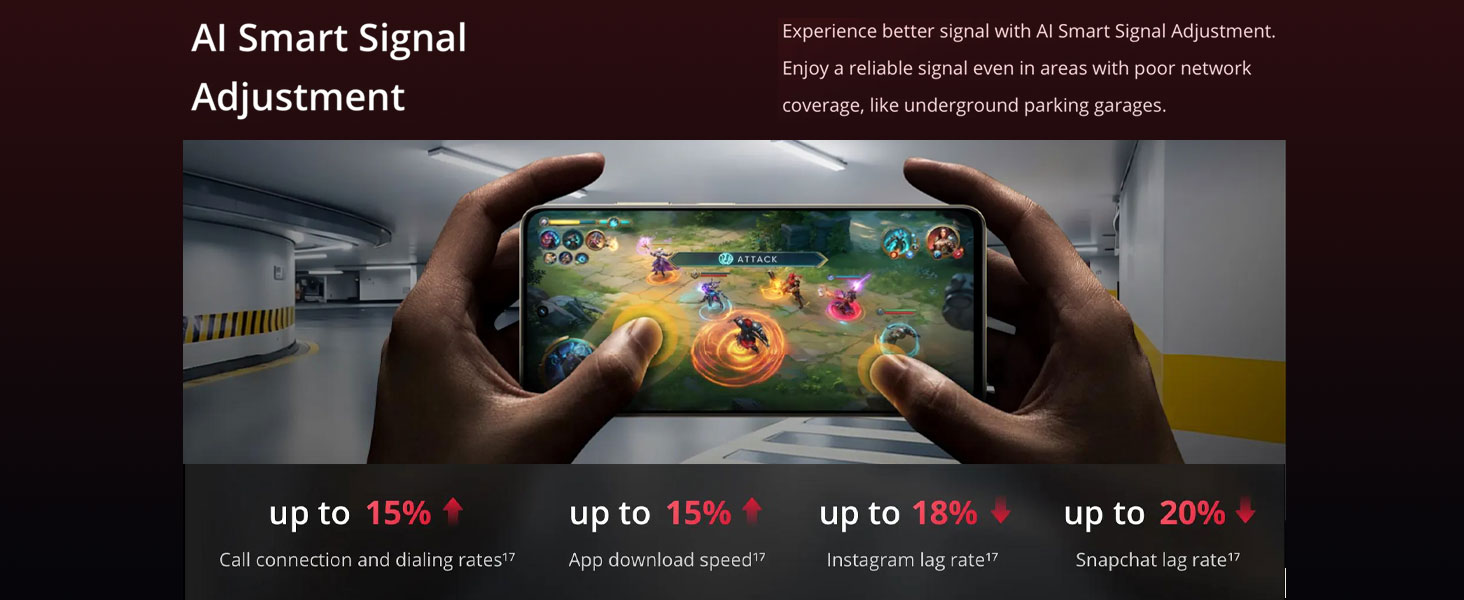
Image: A graphic showing the phone's resistance to water and high temperatures, with text "85°C Hot Water Spill? No Problem" and "Showering with Your Phone? No Stress".
7. Údržba
- Čištění: K čištění obrazovky a těla přístroje používejte měkký hadřík, který nepouští vlákna. Nepoužívejte abrazivní materiály ani agresivní chemikálie.
- Aktualizace softwaru: Pravidelně kontrolujte a instalujte aktualizace systému, abyste zajistili optimální výkon a zabezpečení.
- Péče o baterie: To prolong battery life, avoid extreme temperatures and do not let the battery drain completely frequently.
- Správa úložiště: Pravidelně odstraňujte nepotřebné filea aplikace pro udržení dostatečného úložného prostoru a rychlosti zařízení.
8. Řešení problémů
| Problém | Možné řešení |
|---|---|
| Zařízení se nezapne | Ujistěte se, že je baterie nabitá. Připojte zařízení k nabíječce alespoň na 10 minut a poté jej zkuste znovu zapnout. |
| Obrazovka nereaguje | Perform a force restart by holding the Power button and Volume Down button simultaneously for about 10-15 seconds. |
| Slabý signál sítě | Check SIM card insertion. Move to an area with better network coverage. Enable AI Smart Signal Adjustment in settings for improved signal in challenging areas. |
| Baterie se rychle vybíjí | Snižte jas obrazovky, zavřete nepoužívané aplikace, deaktivujte nepotřebné procesy na pozadí a omezte lokalizační služby. |
| Aplikace padá nebo zamrzávají | Clear app cache, update the app, or reinstall it. Ensure sufficient free storage space. |
9. Specifikace
| Funkce | Detail |
|---|---|
| Číslo modelu | RMX3940 |
| Operační systém | Android 14 |
| Procesor | MediaTek Dimensity 6300 5G Octa-Core, 2.4 GHz |
| BERAN | 8 GB |
| Interní úložiště | 128 GB |
| Zobrazit | 6.67-inch, 720 x 1600 Resolution, 120Hz Refresh Rate |
| Zadní kamera | 80MP AI fotoaparát |
| Přední kamera | Ano |
| Kapacita baterie | 6000 XNUMX mAh |
| Nabíjení | 45W Fast Charging (compatible charger required) |
| Konektivita | 5G, Wi-Fi, Bluetooth, USB |
| Odolnost vůči vodě a prachu | IP69 |
| Odolnost proti otřesům | Military-Grade (ArmorShell Protection) |
| Rozměry (DxŠxV) | 16.57 x 7.62 x 0.79 cm |
| Hmotnost | 100 g |
| Audio Jack | Žádný konektor pro sluchátka |
| Co je v krabici | USB kabel |
10. Záruka a podpora
Your realme 14x 5G Smartphone comes with a standard manufacturer's warranty. Please refer to the warranty card included in your package for specific terms and conditions, including coverage duration and service procedures.
For technical support, service inquiries, or to find authorized service centers, please visit the official realme support website or contact their customer service helpline. Contact details can typically be found on the realme official webwebu nebo v dokumentaci dodané se zařízením.
Výrobce: Padget Electronics Pvt Ltd
Země původu: Indie


