Zavedení
This manual provides comprehensive instructions for the Soundking SPD 100 Electronic Percussion Octapad. It covers product features, setup, operation, maintenance, troubleshooting, and technical specifications to ensure optimal use of the device. Please read this manual thoroughly before operating the unit.
Konec produktuview a funkce
The Soundking SPD 100 is an electronic percussion pad designed for drummers and musicians. It offers a wide array of sounds and functionalities in a compact format.

Obrázek: Úhlový view of the Soundking SPD 100 Electronic Percussion Octapad, showing its eight pads and control panel.
Klíčové vlastnosti:
- 408 Sounds: Access a wide range of drum and percussion instrument sounds, including General MIDI (GM) sounds, suitable for various musical styles.
- 30 Preset Kits + 20 User Kits: Store and customize your preferred drum configurations with easy access to both user-defined and factory preset kits.
- Reverb efekty: Utilize 6 reverb presets to adjust the sound's ambiance, suitable for different acoustic environments.
- Sekvencer: Record and edit rhythms with a single-track sequencer, capable of storing up to 1000 notes, ideal for creating custom patterns.
- Adjustable Metronome: Practice timing and improve rhythm with a metronome featuring tempo adjustments from 30 to 250 BPM.
- Výukové režimy: Enhance learning with 10 snare, rhythm, and drum exercises designed for practice.
- MIDI vstup a výstup: Integrate with other MIDI devices for expanded sound options and control capabilities.
- Uživatelsky přívětivý displej: A large 320 x 240 TFT screen provides clear and intuitive access to settings and functions.
Pokyny pro nastavení
Follow these steps to set up your Soundking SPD 100 Electronic Percussion Octapad:
- Rozbalení: Carefully remove all components from the packaging. Verify that all items listed in the product contents are present.
- Umístění: Place the SPD 100 on a stable, flat surface or mount it securely on a compatible stand. Ensure adequate space for playing and accessing controls.
- Připojení napájení: Connect the included power adapter to the DC IN jack on the unit and then to a suitable power outlet.
- Zvukový výstup: Connect the AUDIO OUT jacks to an amplifier, mixer, or headphones using appropriate cables.
- Připojení pedálu: If using external pedals (e.g., kick drum, hi-hat), connect them to the designated PEDAL input jacks.
- MIDI připojení (volitelné): If integrating with other MIDI devices, connect MIDI IN/OUT ports as required.
- Zapnutí: Press the POWER button to turn on the unit. The display should illuminate.

Image: The Soundking SPD 100 Octapad mounted on a stand, accompanied by its carrying bag and two foot pedals, illustrating a typical setup.
Návod k obsluze
1. Zapnutí/vypnutí
- Chcete -li zapnout, stiskněte MOC tlačítko.
- Chcete-li vypnout, stiskněte a podržte tlačítko MOC tlačítko, dokud se jednotka nevypne.
2. Sound Selection and Kit Management
- Selecting Kits: Použijte KIT buttons or navigation controls to browse through the 30 preset kits and 20 user kits.
- Assigning Sounds: In Kit Edit mode, select a pad and use the sound selection controls to assign a desired instrument sound from the 408 available sounds.
- Saving User Kits: After customizing a kit, use the ULOŽIT function to store it in one of the 20 user kit slots.
3. Efekty dozvuku
- Přístup k EFEKTY nabídku na displeji.
- Select from the 6 available reverb presets to add spatial effects to your sound. Adjust parameters as needed.
4. Sekvencer
- Vstupte SEKVENCER režimu.
- Použijte ZÁZNAM tlačítko pro spuštění nahrávání vašeho vystoupení.
- Použijte HRÁT button to listen to your recorded sequence.
- Edit recorded notes and patterns as desired within the 1000-note capacity.
5. Metronomy
- Aktivujte METRONOM funkce.
- Adjust the tempo using the dedicated controls or navigation buttons, ranging from 30 to 250 BPM.
6. Výukové režimy
- Vybrat REŽIM VÝUKY z hlavní nabídky.
- Choose from 10 exercises focusing on snare, rhythm, and general drumming techniques to improve your skills.
7. MIDI konektivita
- Connect the SPD 100 to external MIDI devices (e.g., computers, sound modules) using standard MIDI cables.
- Configure MIDI settings (channels, clock sync) in the system menu for proper communication.

Obrázek: Přední strana view of the Soundking SPD 100 Electronic Percussion Octapad, highlighting the eight playing pads and the control panel with its display and buttons.
Údržba
- Čištění: Use a soft, dry cloth to wipe the surface of the unit. For stubborn dirt, a slightly damp Lze použít hadřík a poté suchý hadřík. Nepoužívejte abrazivní čisticí prostředky ani rozpouštědla.
- Skladování: When not in use, store the SPD 100 in a cool, dry place away from direct sunlight and extreme temperatures. If transporting, use a protective case.
- Moc: Disconnect the power adapter when the unit is not in use for extended periods.
Odstraňování problémů
| Problém | Možná příčina | Řešení |
|---|---|---|
| Žádný zvukový výstup. |
|
|
| Pads are unresponsive or trigger inconsistently. |
|
|
| MIDI communication issues. |
|
|
Specifikace
| Název modelu | SPD 100 |
| Výrobce | SOUND KING |
| Rozměry produktu (D x Š x V) | 67 x 32 x 7 cm (26.4 x 12.6 x 2.8 palce) |
| Hmotnost produktu | 4 kg (8.8 lb) |
| Barva | Černý |
| Počet zvuků | 408 |
| Přednastavené sady | 30 |
| Uživatelské sady | 20 |
| Reverb efekty | 6 předvoleb |
| Sequencer Capacity | 1000 notes (single track) |
| Rozsah tempa metronomu | 30 - 8 250 úderů za minutu |
| Výukové režimy | 10 exercises |
| Zobrazit | 320 x 240 TFT |
| Konektivita | MIDI In/Out, Audio Out, Pedal Input |
Záruka a podpora
Informace o záruce a technickou podporu naleznete v dokumentaci dodané s vaším nákupem nebo se obraťte přímo na prodejce/výrobce. Uschovejte si doklad o koupi pro případné reklamace.
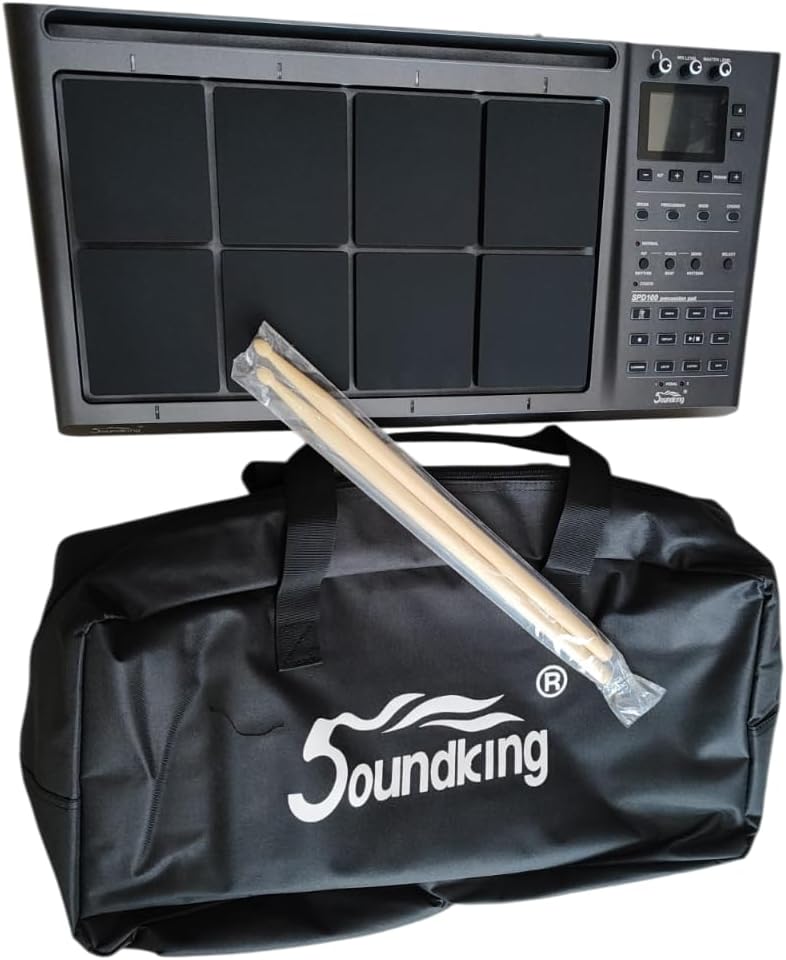
Image: The Soundking SPD 100 Octapad shown with its branded carrying bag and a pair of drumsticks, representing the complete package.


