Zavedení
Děkujeme, že jste si vybrali Blackview W50PRO Smartwatch. This manual provides essential information for setting up, operating, and maintaining your device. Please read it carefully to ensure optimal performance and a safe user experience. Keep this manual for future reference.
Obsah balení
Ověřte, zda jsou v balení přítomny všechny položky:
- Černýview W50PRO Smartwatch
- Silikonový pásek
- Replacement Nylon Braided Strap
- Magnetický nabíjecí kabel
- Uživatelská příručka (tento dokument)

Obrázek: Obsah balení a rozměry produktu.
Konec produktuview
Černýview W50PRO Smartwatch features a 1.45-inch HD touchscreen display, function buttons, a powerful flashlight, and a comfortable silicone strap. Its robust design is suitable for various activities.

Obrázek: Černáview W50PRO Smartwatch with its key features labeled.
Nastavení
1. Nabíjení zařízení
Před prvním použitím chytré hodinky plně nabijte. Připojte magnetický nabíjecí kabel k nabíjecím bodům na zadní straně hodinek a zapojte USB konec do napájecího adaptéru (není součástí balení) nebo do USB portu počítače. Hodinky zobrazí indikátor nabíjení.
- Plné nabití obvykle trvá přibližně 3 hodiny.
- The 960mAh battery provides up to 30 days of typical use and 100 days of standby time.

Image: Battery capacity and charging information.
2. Instalace aplikace
Stáhněte a nainstalujte „Da Fit“ application on your smartphone. You can find it in the App Store (iOS) or Google Play Store (Android).
3. Device Pairing and Bluetooth Calls
To connect your smartwatch and enable Bluetooth calling:
- Download the Da Fit app from your phone's app store.
- Povolte na svém smartphonu Bluetooth.
- Open the Da Fit app and add your device.
- Confirm the pairing request on your phone and watch.
- Grant necessary notification permissions within the Da Fit app for calls and messages.
- Po spárování můžete volat a přijímat hovory přímo z hodinek.

Image: Connection and calling setup guide.
Návod k obsluze
1. Základní navigace
- Dotyková obrazovka: Přejetím prstem doleva/doprava, nahoru/dolů můžete procházet nabídky a přistupovat k funkcím. Klepnutím vyberete.
- Funkční tlačítka: Use the physical buttons on the side of the watch for quick access to specific functions or to return to the home screen.
2. Flashlight and Compass
The W50PRO includes a built-in flashlight and compass for outdoor activities.
- Svítilna: Activate the flashlight feature from the watch's menu. It offers fixed and intermittent modes for various situations.
- Kompas: Access the compass feature from the watch's menu for accurate directional guidance.
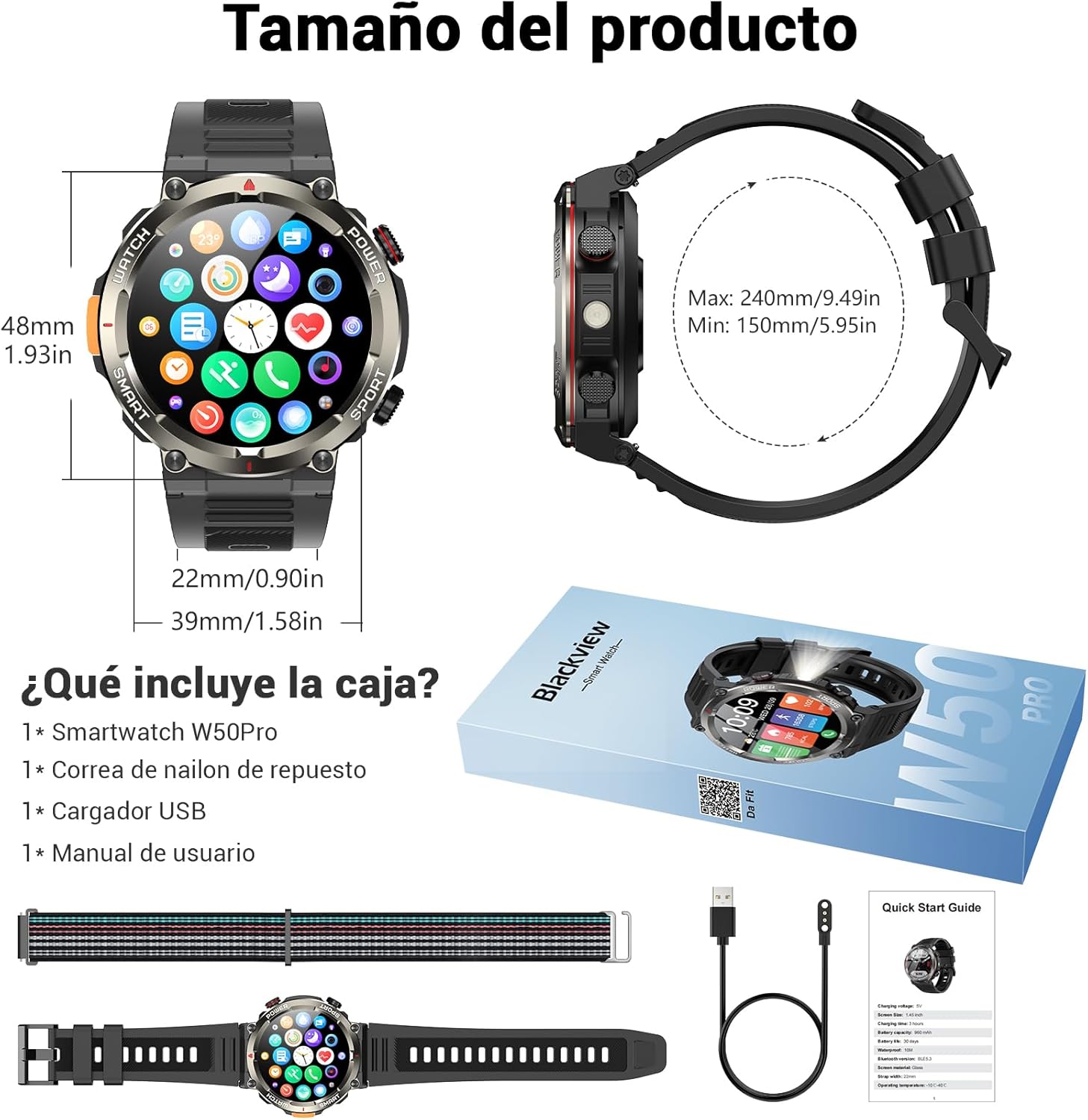
Image: Compass feature for outdoor navigation.

Image: Powerful LED flashlight in action.
3. Volání a oznámení přes Bluetooth
Once paired with your smartphone, the W50PRO allows you to manage calls and notifications directly from your wrist.
- Volání/Přijímání hovorů: Use the integrated speaker and microphone to make or answer calls.
- Oznámení: Receive real-time alerts for text messages, emails, and social media apps.
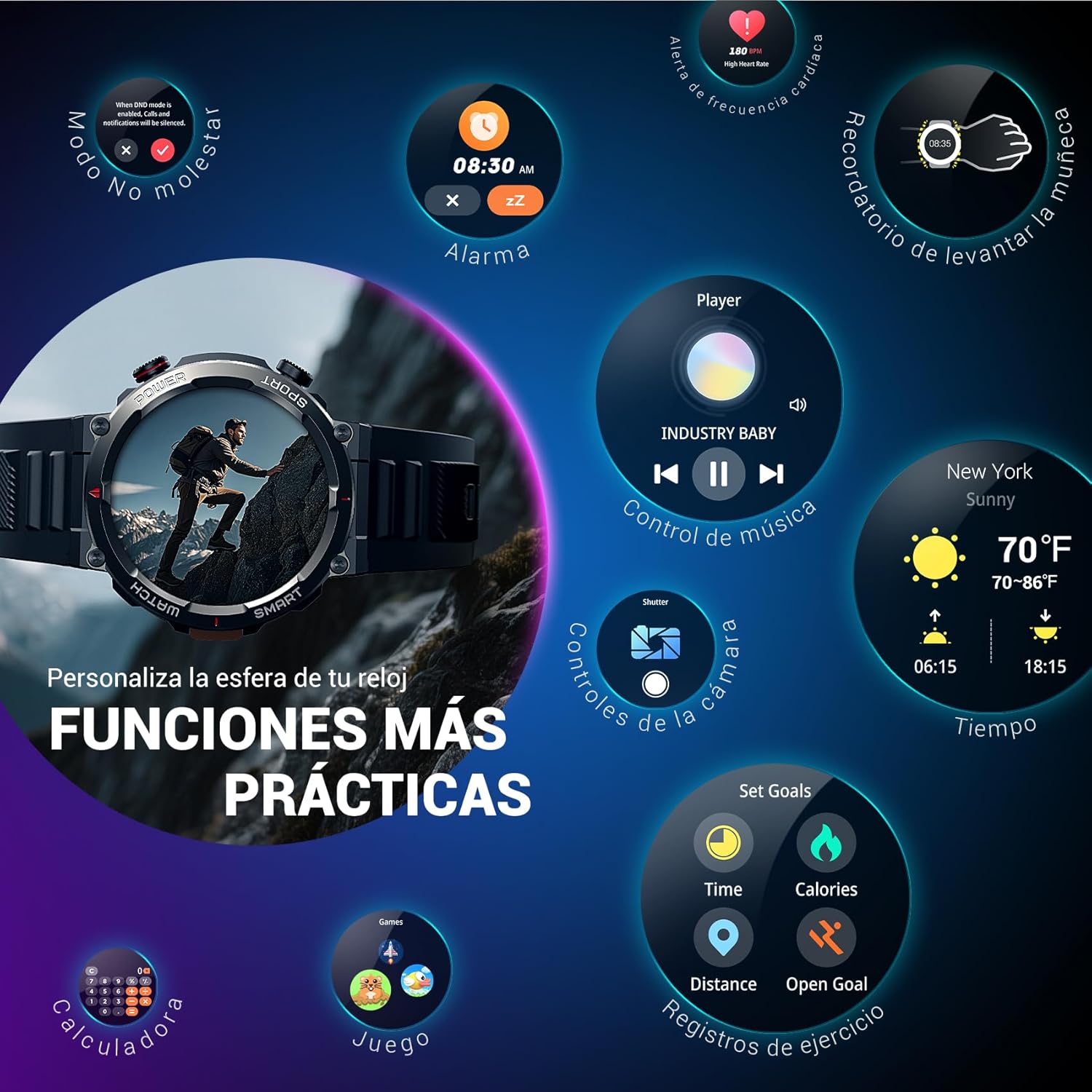
Image: Bluetooth calling and notification features.
4. Monitorování zdraví
The smartwatch is equipped with high-precision sensors to monitor various health indicators:
- Srdeční frekvence: Monitorování tepové frekvence v reálném čase.
- Kyslík v krvi (SpO2): Sledujte hladinu kyslíku v krvi.
- Monitor spánku: Tracks sleep quality and patterns.
- Úrovně stresu: Poskytuje vhled do vaší úrovně stresu.
All health data synchronizes with the Da Fit app for detailed analysis and trend tracking.

Image: Real-time health monitoring features.
5. Sportovní režimy
The W50PRO offers over 100 integrated sports modes, including running, cycling, climbing, rope skipping, football, and basketball. It accurately records exercise time, distance, steps, calorie consumption, and heart rate changes, providing clear and intuitive performance data. Detailed data can be viewed v aplikaci Da Fit.

Obrázek: Overview of 100+ sports modes.
6. Přizpůsobení ciferníků
The Da Fit app provides a wide selection of watch faces to suit various styles. You can also upload personal photos as wallpaper and adjust text color and widget layout to create a unique watch interface.

Image: Customizable watch faces.
7. Další praktické funkce
Černýview W50PRO includes additional features for daily convenience:
- Předpověď počasí
- Ovládání hudby
- Dálkové ovládání fotoaparátu
- Alarmy
- Sedavý připomenutí
- Připomenutí pití vody
- Stopky
- Odpočítávací časovač
- Najít telefon
- Kalkulačka
- Hry
- Nastavení jasu

Image: Multiple smart functions available on the smartwatch.
Údržba
1. Čištění
Pravidelně čistěte chytré hodinky a řemínek, abyste předešli podráždění pokožky a zachovali funkčnost zařízení. Používejte měkký,amp hadřík na otření obrazovky a casing. For the strap, follow the manufacturer's cleaning recommendations based on the material (silicone or nylon).
2. Voděodolnost
Černýview W50PRO Smartwatch features an IP68 water resistance rating. This means it is protected against dust ingress and can withstand immersion in water up to 1.5 meters for up to 30 minutes. It is suitable for daily use, such as hand washing or light rain. Avoid using it in hot water, saunas, or during diving, as steam and high pressure can compromise the seals.

Image: Durability features including IP68 water resistance.
3. Péče o baterie
Chcete -li prodloužit životnost baterie:
- Vyhněte se extrémním teplotám.
- Nenechávejte baterii často úplně vybít.
- Charge the device using the provided magnetic charging cable.
Odstraňování problémů
Pokud narazíte na problémy s vaším Blackview W50PRO Smartwatch, try the following:
- Zařízení se nezapne: Ujistěte se, že jsou hodinky plně nabité.
- Nelze spárovat s telefonem: Check if Bluetooth is enabled on both devices. Restart both the watch and phone. Ensure the Da Fit app has necessary permissions.
- Nepřesné zdravotní údaje: Ujistěte se, že máte hodinky pevně nasazené na zápěstí. Pravidelně čistěte senzory.
- Neobdržená oznámení: Verify that notification permissions are granted in the Da Fit app and your phone's settings. Ensure the app is running in the background.
- Krátká výdrž baterie: Reduce screen brightness, disable unnecessary features, and limit frequent heart rate monitoring.
For persistent issues, refer to the Da Fit app's help section or contact customer support.
Specifikace
| Funkce | Specifikace |
|---|---|
| Značka | Černýview |
| Model | W50PRO |
| Velikost displeje | 1.45 palců |
| Typ zobrazení | LCD |
| Rezoluce | 360 x 360 pixelů |
| Kapacita baterie | 960 XNUMX mAh |
| Typická životnost baterie | Až 30 dní |
| Pohotovostní doba | Až 100 dní |
| Doba nabíjení | Přibl. 3 hodin |
| Konektivita | Bluetooth |
| Vstup lidského rozhraní | Buttons, Microphone |
| Voděodolnost | IP68 |
| Kompatibilní modely telefonů | iOS a Android |
| Rozměry produktu | 8.8 x 2.2 x 18.1 cm |
| Hmotnost produktu | 136 g |
Záruka a podpora
Informace o záruce a technickou podporu naleznete v dokumentaci dodané s vaším nákupem nebo navštivte oficiální webové stránky Blackview webUschovejte si doklad o koupi pro případ reklamace.


