1. Úvod
This manual provides essential information for the proper use and maintenance of your HOTWAV R9 Pro Rugged Tablet. Please read it thoroughly before operating the device to ensure optimal performance and longevity.

Obrázek: Přední a zadní strana view of the HOTWAV R9 Pro Rugged Tablet, highlighting its robust design and 11-inch display.
2. Co je v krabici
Ověřte, zda jsou v balení přítomny všechny položky:
- 1x odolný tablet HOTWAV R9 Pro
- 1x Manuál (tento dokument)
- 1x Balící krabice
- 1x Explosion-proof Film
- 1x USB Type-C kabel
- 1x OTG Cable
3. Konec produktuview a klíčové vlastnosti
3.1. Rugged Design and Durability
The HOTWAV R9 Pro is engineered for extreme environments, featuring IP68/IP69K waterproof and dustproof ratings, and MIL-STD-810H certification for shock resistance. Its construction includes a double-shot TPU+PC+glass fiber back cover for enhanced protection.

Image: Visual representation of the tablet's ruggedness, showing it submerged in water, covered in dust, and surviving a drop, alongside its LED camping light in use.
3.2. Baterie a nabíjení
Equipped with a large 20080mAh battery, the R9 Pro offers extended usage times. It supports 20W fast charging to quickly replenish power.

Image: Diagram illustrating the 20080mAh battery capacity and 20W fast charging capability of the tablet.
3.3. Displej
The tablet features an 11-inch FHD+ display with a resolution of 1200x1920 pixels and 450cd/m² brightness. It is protected by Corning Glass 3 and supports glove touch functionality, making it suitable for outdoor use.

Image: The tablet's 11-inch display showing various applications, alongside icons indicating FHD+ resolution, 60Hz refresh rate, and dual SIM support.
3.4. Výkon a úložiště
Powered by an Octa-Core Unisoc T606 processor, the R9 Pro includes 20GB RAM (6GB physical + 14GB virtual) and 256GB internal storage. Storage can be expanded up to 2TB using a T-flash card.

Image: A visual representation of the Unisoc T606 octa-core chipset, detailing 20GB RAM and 256GB ROM with 2TB expandable memory.
3.5. Kamerový systém
The tablet features a 64MP rear camera with PDAF and f/1.8 aperture, and a 16MP front camera for photography and video calls.

Obrázek: Přamples of photos taken with the 64MP rear camera and the 16MP front camera, demonstrating their capabilities.
3.6 Integrovaný Campsvětlo
A unique 6W camping light with 350 lumens and 246 LEDs is integrated into the tablet, providing illumination for various outdoor activities or emergencies.
4. Nastavení
4.1. Nabíjení tabletu
Before first use, fully charge the tablet using the provided USB Type-C cable and a compatible 20W power adapter (not included). Connect the cable to the tablet's USB-C port and the adapter to a power outlet. The charging indicator will show the charging status.
4.2. Installing SIM and T-flash Cards
The tablet supports dual SIM cards and a T-flash (microSD) card for expandable storage.
- Na boku tabletu vyhledejte slot pro SIM/SD kartu.
- K otevření zásuvky použijte dodaný nástroj pro vysunutí SIM karty.
- Carefully place your Nano-SIM cards and/or T-flash card into the designated slots. Ensure correct orientation.
- Jemně zatlačte zásobník zpět do tabletu, dokud nezacvakne na místo.
4.3. Zapnutí/vypnutí
- Zapnutí: Stiskněte a podržte tlačítko napájení, dokud se nezobrazí logo HOTWAV.
- Vypnutí: Stiskněte a podržte tlačítko Napájení, dokud se nezobrazí nabídka možností napájení, poté vyberte „Vypnout“.
- Restartovat: Stiskněte a podržte tlačítko Napájení, dokud se nezobrazí nabídka možností napájení, a poté vyberte „Restartovat“.
5. Návod k obsluze
5.1. Operační systém Android 14
The HOTWAV R9 Pro runs on Android 14, offering a user-friendly interface and access to a wide range of applications via the Google Play Store.
5.2. Navigace
Navigate the tablet using touch gestures:
- Klepněte na: Vyberte položku.
- Výpad: Procházení obrazovek nebo seznamů.
- Štípání: Přiblížení nebo oddálení obrázků a web stránky.
- Dlouhé stisknutí: Přístup k kontextovým nabídkám nebo přesun ikon.
5.3. Glove Touch Mode
The display supports glove touch, allowing you to operate the tablet while wearing gloves. This feature is automatically enabled.
5.4. Odemknutí obličejem
For convenient and secure unlocking, set up Face Unlock:
- Přejít na Nastavení > Zabezpečení a soukromí > Odemknutí obličejem.
- Registrujte svůj obličej podle pokynů na obrazovce.
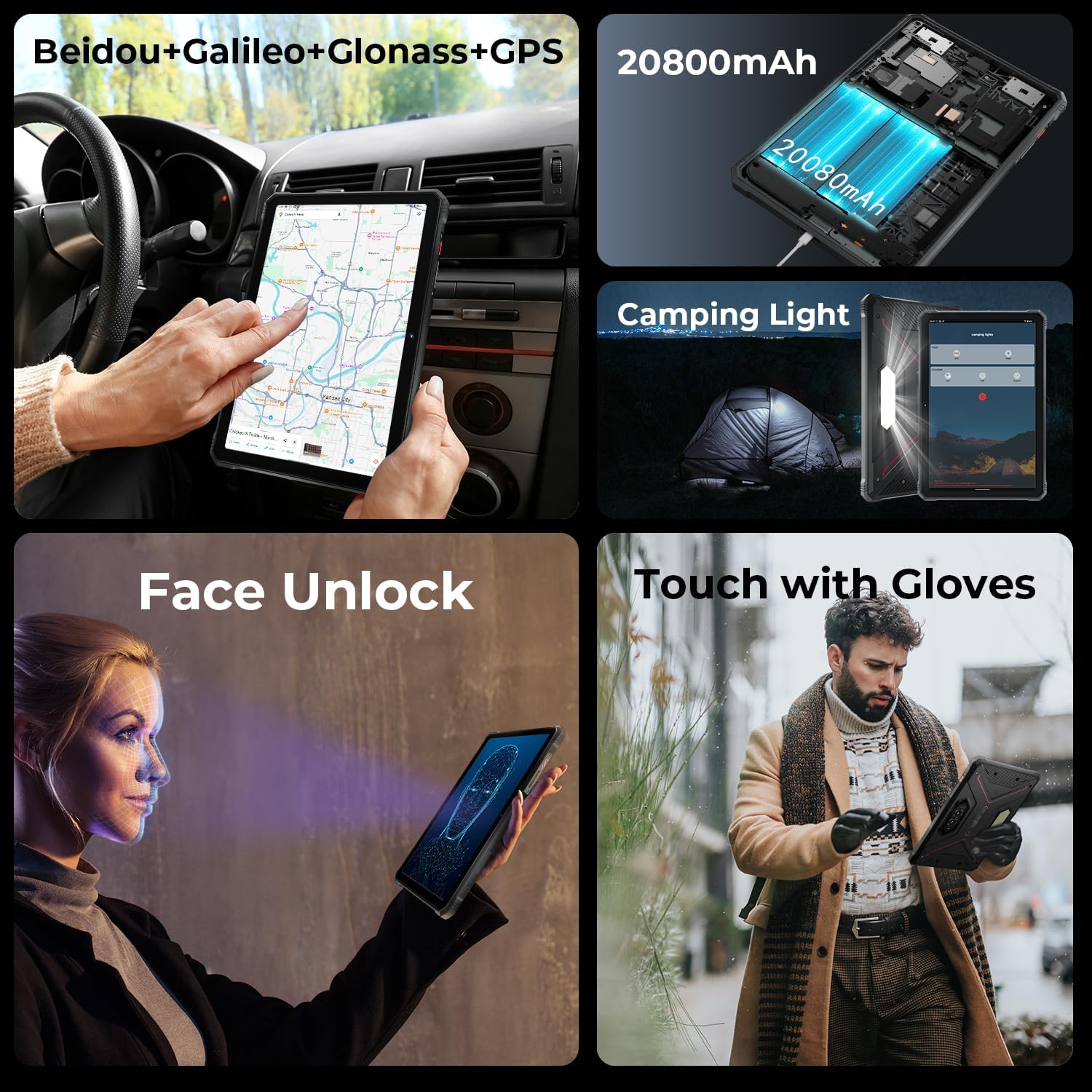
Image: A collage showing the tablet's GPS navigation, camping light in action, face unlock in progress, and a user operating the tablet with gloves.
5.5. Funkce dvou SIM karet
The tablet supports two SIM cards, allowing you to manage two different phone numbers or network providers simultaneously. You can configure preferred SIM for calls, messages, and data in Nastavení > Síť a internet > SIM karty.
6. Použití fotoaparátu
The HOTWAV R9 Pro is equipped with a 64MP rear camera and a 16MP front camera.
- Otevření fotoaparátu: Tap the Camera icon on the home screen or app drawer.
- Přepínání kamer: Klepnutím na ikonu přepínače fotoaparátu přepínáte mezi předním a zadním fotoaparátem.
- Fotit: Klepnutím na tlačítko spouště pořídíte snímek.
- Záznam videa: Přepněte do režimu videa a klepnutím na tlačítko nahrávání spusťte/zastavte nahrávání.
- Nastavení fotoaparátu: Access various settings like resolution, flash, and modes from within the camera app.
7. CampFunkce osvětlení
The integrated 6W camping light provides powerful illumination.
- Aktivace světla: camping light can typically be activated via a dedicated button (if present) or through a quick settings toggle in the notification panel.
- Adjusting Brightness/Modes: Some models may offer adjustable brightness levels or different lighting modes. Refer to the on-screen controls once the light is activated.
8. Konektivita
- Wi-Fi: Připojení k bezdrátovým sítím přes Nastavení > Síť a internet > Internet.
- Bluetooth: Spárování s Bluetooth zařízeními (sluchátka, reproduktory) přes Nastavení > Připojená zařízení > Předvolby připojení > Bluetooth.
- GPS: The tablet supports Beidou, Galileo, Glonass, and GPS for accurate location services. Ensure location services are enabled in Nastavení > Umístění.
9. Údržba
- Čištění: Použijte měkký, damp cloth to clean the tablet's surface. Avoid harsh chemicals or abrasive materials.
- Vystavení vodě: While waterproof, ensure all ports are securely closed before exposing the tablet to water. After water exposure, dry the tablet thoroughly, especially the charging port, before charging.
- Teplota: Avoid exposing the tablet to extreme temperatures (hot or cold) for prolonged periods.
- Skladování: Pokud tabletu delší dobu nepoužíváte, skladujte ji na chladném a suchém místě.
10. Řešení problémů
| Problém | Možné řešení |
|---|---|
| Tablet se nezapne. | Ujistěte se, že je baterie nabitá. Připojte ji k nabíječce alespoň na 30 minut. Pokud stále nereaguje, proveďte vynucený restart podržením tlačítka napájení po dobu 10–15 sekund. |
| Pomalý výkon. | Close unused applications. Clear cache regularly. Consider uninstalling unnecessary apps. Restart the tablet. |
| Problémy s připojením k Wi-Fi. | Vypněte a zapněte Wi-Fi. Restartujte router. Zapomeňte na síť a znovu se připojte. |
| Baterie se rychle vybíjí. | Reduce screen brightness. Close background apps. Disable unused features like GPS, Bluetooth, or Wi-Fi when not needed. Check battery usage in settings to identify power-hungry apps. |
| Fotoaparát nefunguje. | Ensure the camera app has necessary permissions. Restart the tablet. Clear the camera app's cache and data in Nastavení > Aplikace. |
11. Specifikace
| Funkce | Detail |
|---|---|
| Model | R9 Pro |
| Operační systém | Android 14 |
| Velikost displeje | 11 palce |
| Rozlišení obrazovky | 1200 1920 x XNUMX XNUMX pixelů (FHD+) |
| Procesor | Osmijádrový Unisoc T606 (1.6 GHz) |
| Grafický koprocesor | Mali G57 MP1@650MHz |
| BERAN | 20 GB (6 GB fyzické + 14 GB virtuální) |
| Interní úložiště | 256 GB |
| Rozšiřitelné úložiště | Up to 2TB (T-flash card) |
| Zadní kamera | 64MP (PDAF, f/1.8 aperture) |
| Přední kamera | 16 MP |
| Kapacita baterie | 20080 XNUMX mAh |
| Nabíjení | Rychlé nabíjení 20W |
| Drsnost | IP68/IP69K vodotěsný a prachotěsný, MIL-STD-810H |
| Konektivita | Dual SIM, Wi-Fi, Bluetooth, GPS (Beidou, Galileo, Glonass) |
| Campsvětlo | 6W (350 lumens, 246 LEDs) |
| Rozměry (DxŠxV) | 10.61 x 0.7 x 7.16 palce |
| Hmotnost | 2.35 libry |
12. Záruka a podpora
HOTWAV offers comprehensive after-sales service for the R9 Pro Rugged Tablet:
- Zásady vrácení: 30-day no-reason return.
- Záruka: 2letá bezplatná záruka.
- Technická podpora: Doživotní technická podpora.
- Online služba: 24/7 online zákaznický servis.
For support, please contact HOTWAV customer service through their official channels or visit their webmísto.


