1. Úvod
Welcome to the user manual for your new Hbada P2 Ergonomic Office Chair. This chair is meticulously designed to provide superior comfort and support, adapting to the natural curve of your spine. It features advanced adjustability for various components, ensuring an optimal sitting experience for long hours of work, gaming, or relaxation. Please read this manual carefully to understand the chair's features, proper assembly, operation, and maintenance to ensure its longevity and your comfort.
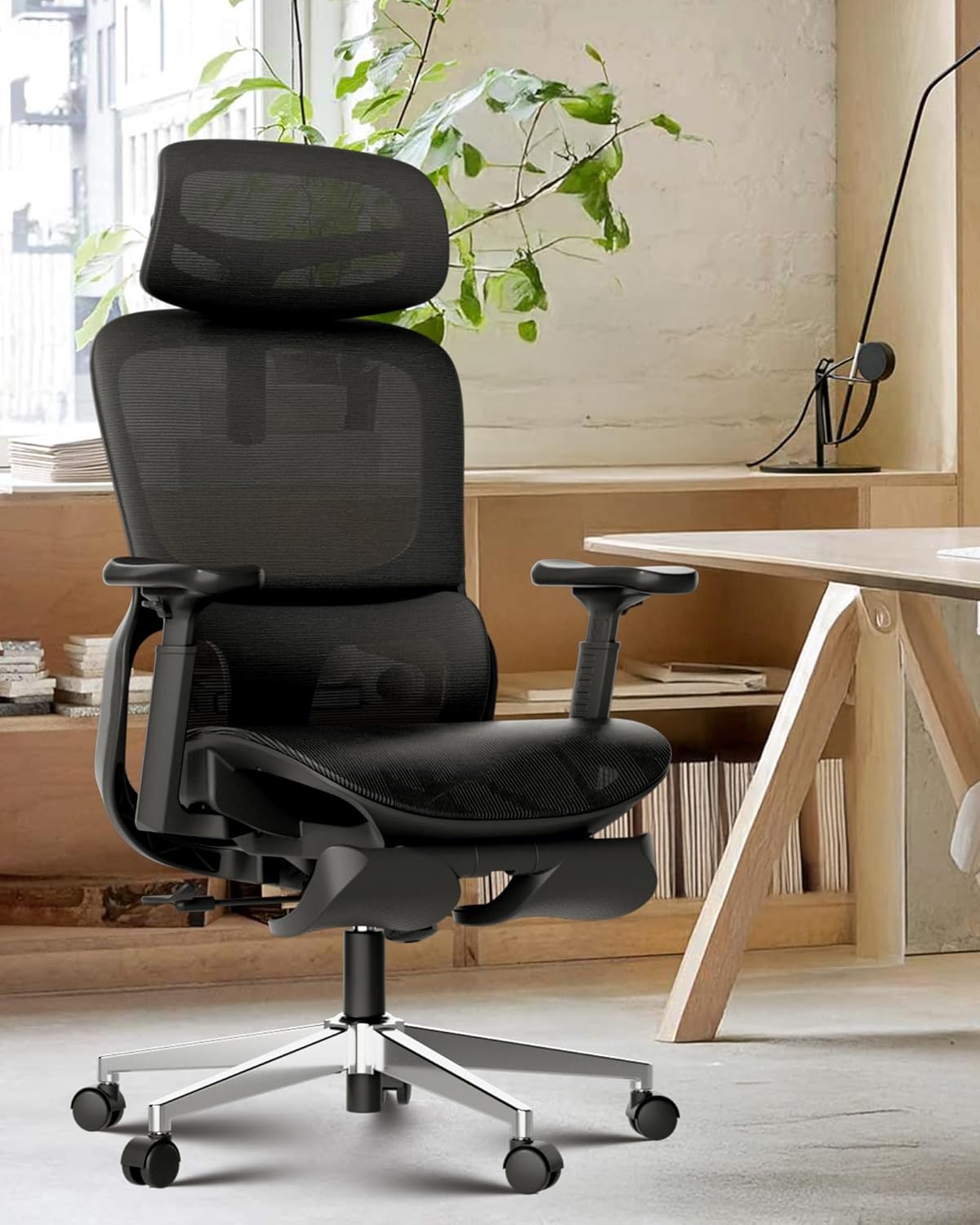
Figure 1: The Hbada P2 Ergonomic Office Chair, designed for comfort and versatility.
2. Klíčové vlastnosti
The Hbada P2 chair is equipped with several advanced features to enhance your ergonomic experience:
2.1. Ergonomický design
The chair's overall design follows the natural curve of the human spine, promoting healthy posture. It integrates fully adjustable components to cater to individual body types and preferences, providing a balanced blend of support and comfort.
2.2. 3D Lumbar Support
The P2 office chair features a breathable mesh back with a dual-back design. Its 3D lumbar support is fully adjustable in height, depth, and width, allowing it to move dynamically with your body. This ensures optimal spinal alignment and provides customized support, suitable for users between 5'4" and 6'2".
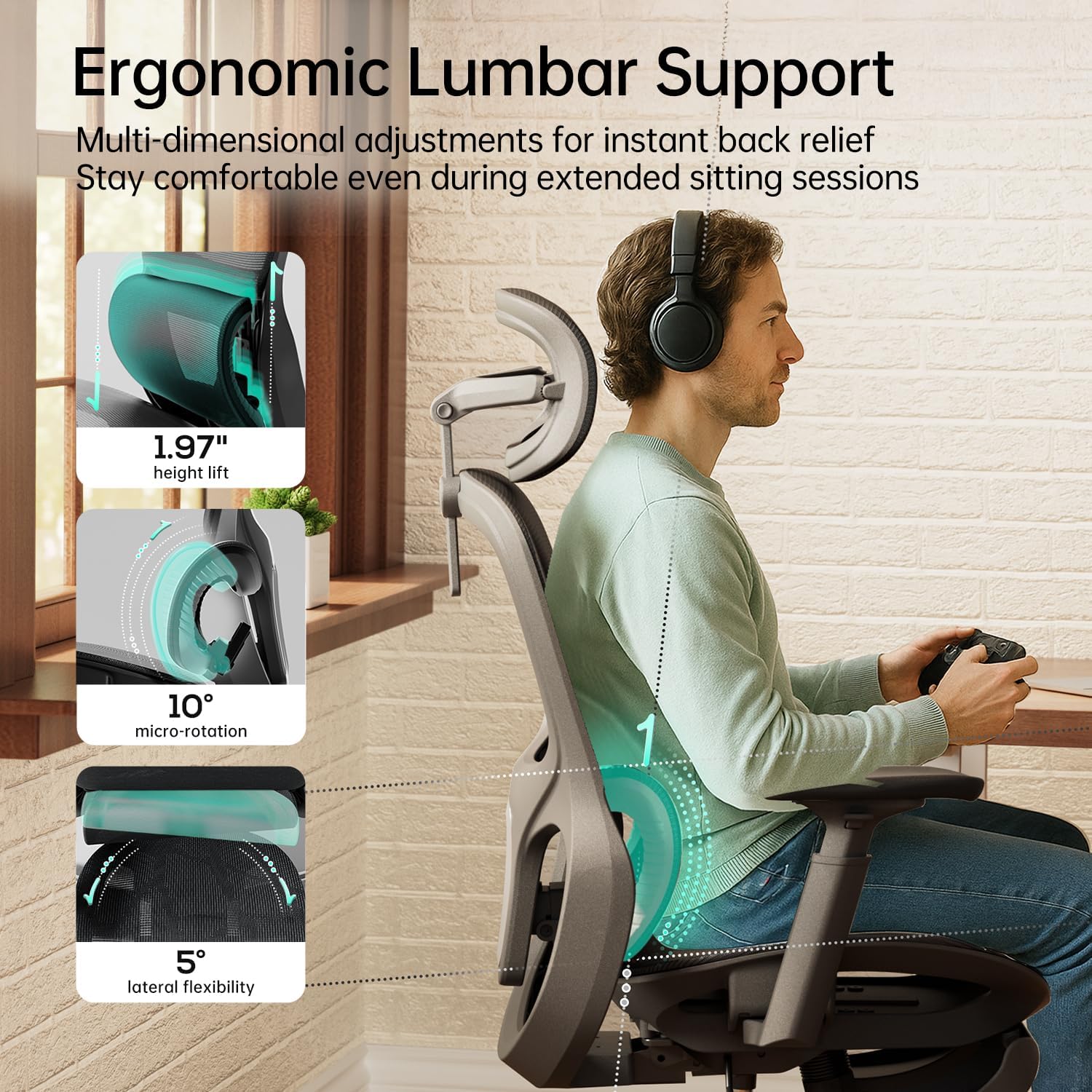
Obrázek 2: Detailní view of the multi-dimensional adjustable lumbar support.

Figure 3: The lumbar support offers 4-level height adjustment and adaptive rotation.
2.3. 360° 3D Adjustable Armrests
The ergonomic armrests offer extensive adjustability, including 7.5 cm (2.95 inches) height adjustment, 4.2 cm (1.65 inches) forward/backward movement, and 360° rotation. This allows users to find the perfect position to alleviate elbow and shoulder strain. The soft, skin-friendly material ensures comfort during prolonged use.

Figure 4: The armrests provide wide-range motion and flexible elbow support.

Figure 5: Flexible 3D armrests adapt to your ideal angle for various activities.
2.4. 3D Adjustable Headrest
The headrest offers dual-axis rotation and extended vertical travel (up to 5.12 inches height adjustment, 180° neck pillow surface rotation, and 40° neck pillow frame rotation). This allows for precise neck support, adapting to your posture and contours.
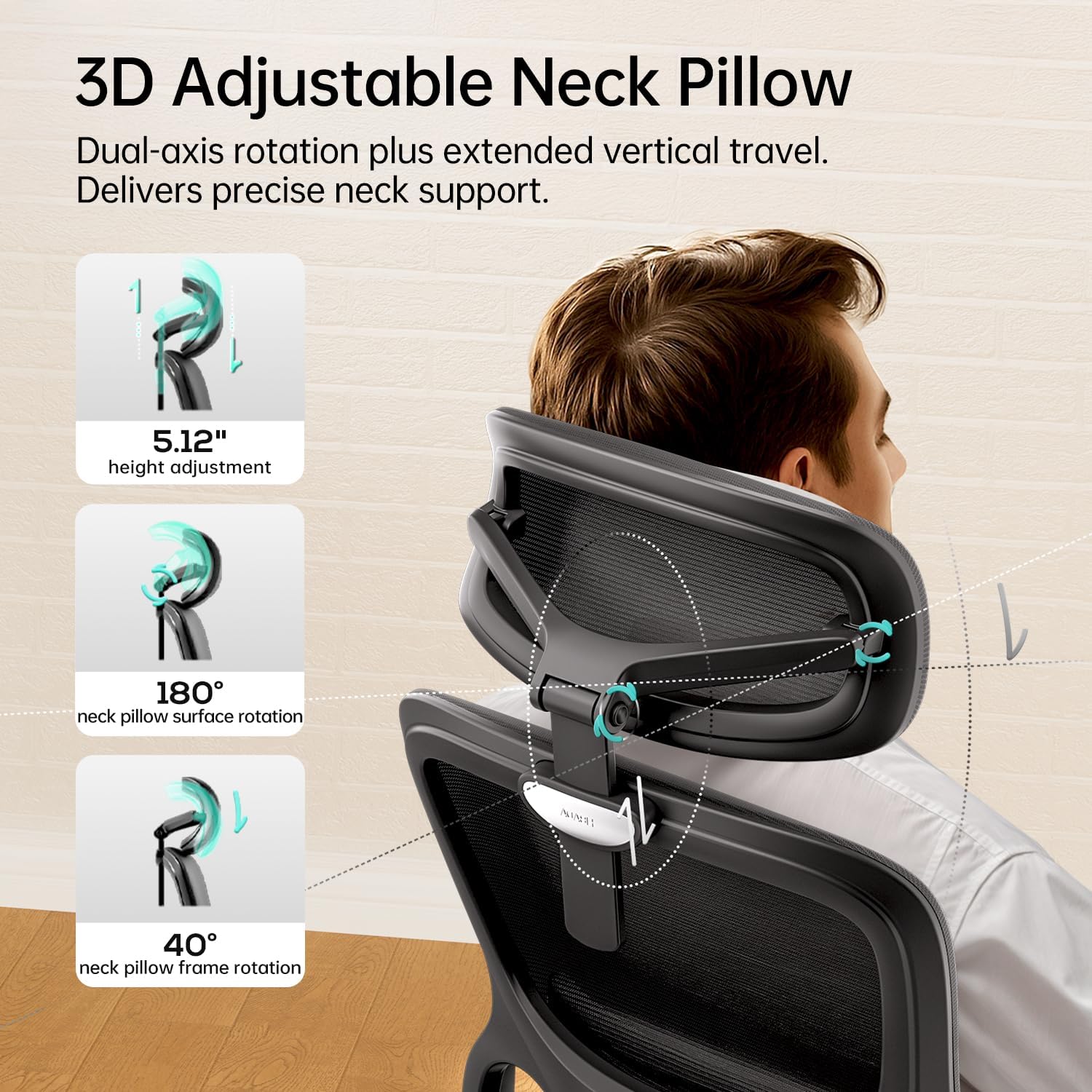
Figure 6: The 3D adjustable neck pillow provides comprehensive support.

Figure 7: Advanced neck support adapts to your posture and contours.
2.5. Multi-angle Reclining & Footrest
The chair features a 135° stepless tilt function with a 3-position locking mechanism, allowing you to customize angles for different activities: 105° for optimal office posture, 120° for immersive gaming, and 135° for relaxed leisure mode. An included footrest provides additional comfort for breaks.

Figure 8: The multi-angle reclining feature with 3-position locking mechanism.

Figure 9: Three-level reclining backrest for optimal comfort in various activities.
2.6. Breathable & Comfortable Materials
The chair is constructed with high-resilience, breathable mesh fabric to prevent sweating during extended sitting. The cushion utilizes premium elastic material that resists flattening, featuring a micro-perforated design for continuous comfort even after 8 hours of work.

Figure 10: Premium mesh fabric ensures breathability and support.

Figure 11: High-rebound mesh cushion reduces pressure on hips and thighs.
3. Nastavení a montáž
Your Hbada P2 Ergonomic Office Chair is designed for straightforward assembly. Please follow the steps below carefully. It is recommended to assemble the chair on a soft, clean surface to prevent scratches.
- Rozbalte komponenty: Carefully remove all parts from the packaging and lay them out. Verify that all components listed in the included assembly guide are present.
- Připevnění koleček k základně: Insert the five casters (wheels) into the holes at the end of each leg of the chair base. Push firmly until they click into place.
- Vložte plynový zvedák: Vložte plynový zvedací válec do středového otvoru sestavené základny židle.
- Sestavení mechanismu sedadla: Připevněte mechanismus sedadla ke spodní straně sedáku pomocí dodaných šroubů. Ujistěte se, že přední část mechanismu je zarovnána s přední částí sedadla.
- Připevnění sedadla k plynovému zvedáku: Opatrně umístěte sestavené sedadlo na plynový zvedací válec a ujistěte se, že je bezpečně usazeno.
- Připevnění opěradla: Connect the backrest to the seat mechanism using the designated screws. Tighten all screws securely.
- Instalace loketních opěrek: Attach the armrests to the sides of the seat using the provided screws.
- Připevnění opěrky hlavy: Slide the headrest into the top of the backrest until it is securely in place.
- Závěrečná kontrola: Once assembled, check all connections to ensure they are tight and secure. Test all adjustment functions.
4. Obsluha a seřízení
To maximize your comfort and ergonomic benefits, familiarize yourself with the various adjustment features of your Hbada P2 chair:
4.1. Nastavení výšky sedadla
Locate the lever on the right side, beneath the seat. To raise the seat, lift the lever while taking your weight off the chair. To lower the seat, lift the lever while remaining seated. Release the lever at your desired height.
4.2. Tilt and Recline Adjustment
The same lever used for seat height also controls the tilt function. Pull the lever outwards to unlock the tilt mechanism, allowing the chair to recline. Push the lever inwards to lock the chair in an upright position or at a desired recline angle (105°, 120°, or 135°).
4.3. Nastavení napětí náklonu
The round knob located under the front of the seat controls the tilt tension. Turn it clockwise to increase tension (making it harder to recline) or counter-clockwise to decrease tension (making it easier to recline).
4.4. Nastavení bederní opěrky
The 3D lumbar support can be adjusted in multiple ways. Use the side levers or knobs (refer to your specific model's diagram) to adjust its height, depth, and width to perfectly support your lower back.
4.5. Nastavení loketní opěrky
The armrests offer three-dimensional adjustments:
- Výška: Press the button on the side of each armrest and slide it up or down.
- Dopředu Dozadu: Posuňte loketní opěrku dopředu nebo dozadu.
- Otáčení: Rotate the armrest pad left or right (360°).
4.6. Nastavení opěrky hlavy
The headrest can be adjusted for height and angle. Grasp the headrest and move it up or down to your preferred height. It also features dual-axis rotation for precise neck support.
4.7. Ovládání opěrky nohou
To use the footrest, pull it out from beneath the seat. You can then extend and adjust its position for comfortable leg support when reclining.
5. Údržba a péče
Regular maintenance will help preserve the appearance and functionality of your Hbada P2 chair:
- Čisticí síťovina: For general cleaning, use a soft brush or vacuum cleaner to remove dust and debris. For spills, gently blot with a clean, damp hadříkem a jemným mýdlovým roztokem. Nepoužívejte agresivní chemikálie ani abrazivní čisticí prostředky.
- Čištění rámu a základny: Plastové a kovové části otřete měkkým hadříkemamp hadříkem. Ihned osušte, aby se zabránilo vzniku skvrn od vody.
- Údržba koleček: Periodically check casters for tangled hair or debris and clean as needed to ensure smooth movement.
- Kontrola hardwaru: Every few months, inspect all screws and bolts to ensure they are tight. Re-tighten if necessary to maintain stability and safety.
- Vyhněte se přímému slunečnímu záření: Prolonged exposure to direct sunlight can cause fading or degradation of materials. Position your chair away from direct sunlight when possible.
6. Řešení problémů
If you encounter any issues with your Hbada P2 chair, refer to the common problems and solutions below:
| Problém | Možná příčina | Řešení |
|---|---|---|
| Židle se nezvedá ani nespouště | Porucha plynového zvedáku nebo není zasunutá páka. | Ujistěte se, že je páka pro nastavení výšky zcela zajištěna. Pokud problém přetrvává, může být nutné vyměnit plynový zvedák. Kontaktujte zákaznický servis. |
| Židle se kývá nebo je nestabilní | Uvolněné šrouby nebo nerovná podlaha. | Zkontrolujte a utáhněte všechny montážní šrouby. Ujistěte se, že židle stojí na rovném a plochém povrchu. |
| Kolečka se neotáčejí hladce | Nečistoty zachycené v kolečkách nebo poškozená kolečka. | Turn the chair over and remove any hair or debris from the casters. If damaged, casters may need replacement. |
| Opěradlo se nedá sklopit ani zablokovat | Tilt mechanism locked or tension too high. | Ensure the tilt lever is unlocked. Adjust the tilt tension knob counter-clockwise to reduce tension. |
7. Specifikace
Detailed technical specifications for the Hbada P2 Ergonomic Office Chair:
| Atribut | Detail |
|---|---|
| Značka | Hbada |
| Model | P2 |
| Barva | Černý |
| Styl | Classic With Footrest |
| Rozměry produktu (D x Š x V) | 29.33"H x 12.99"Š x 20.86"V |
| Hmotnost položky | 32.6 libry |
| Bederní podpora | 3D Adjustable (Height, Depth, Width) |
| Područky | 3D Adjustable (Height, Forward/Backward, 360° Rotation) |
| Opěrka hlavy | 3D Adjustable (Height, Dual-axis Rotation) |
| Funkce naklonění | 135° Stepless Tilt with 3-position Lock |
| Kolečka | Silent, Multi-surface Adaptive |
| Plynový výtah | SGS-certified Grade 4 |
| Certifikace | U.S. BIFMA Standards (Tested over 10,000 cycles) |

Figure 12: Premium components ensure safety and long-lasting reliability.
8. Záruka a zákaznická podpora
Hbada is committed to providing high-quality products and excellent customer service. Your Hbada P2 Ergonomic Office Chair comes with the following:
- Dvouletá záruka bez starostí: Covers manufacturing defects and major component failures under normal use.
- 30denní bezplatné vrácení: Pokud nejste s nákupem spokojeni, můžete jej do 30 dnů vrátit a obdržíte plnou náhradu.
- 15-Day Price Match Guarantee: Ensures you get the best price within 15 days of purchase.
- Přátelský zákaznický servis: Our dedicated support team is available to assist you with any questions, concerns, or issues you may have.
Pro podporu se prosím obraťte na kontaktní informace uvedené při nákupu nebo navštivte oficiální webové stránky Hbada. webmísto. Můžete také navštívit Hbada Store on Amazon pro více informací.