Zavedení
The truefree DS1 Open-Ear Headphones are designed to provide a comfortable and immersive audio experience while keeping you aware of your surroundings. Featuring an open-ear design, these wireless earbuds are ideal for all-day wear, sports, and daily activities. They come equipped with advanced audio technology, clear call capabilities, and long-lasting battery life.
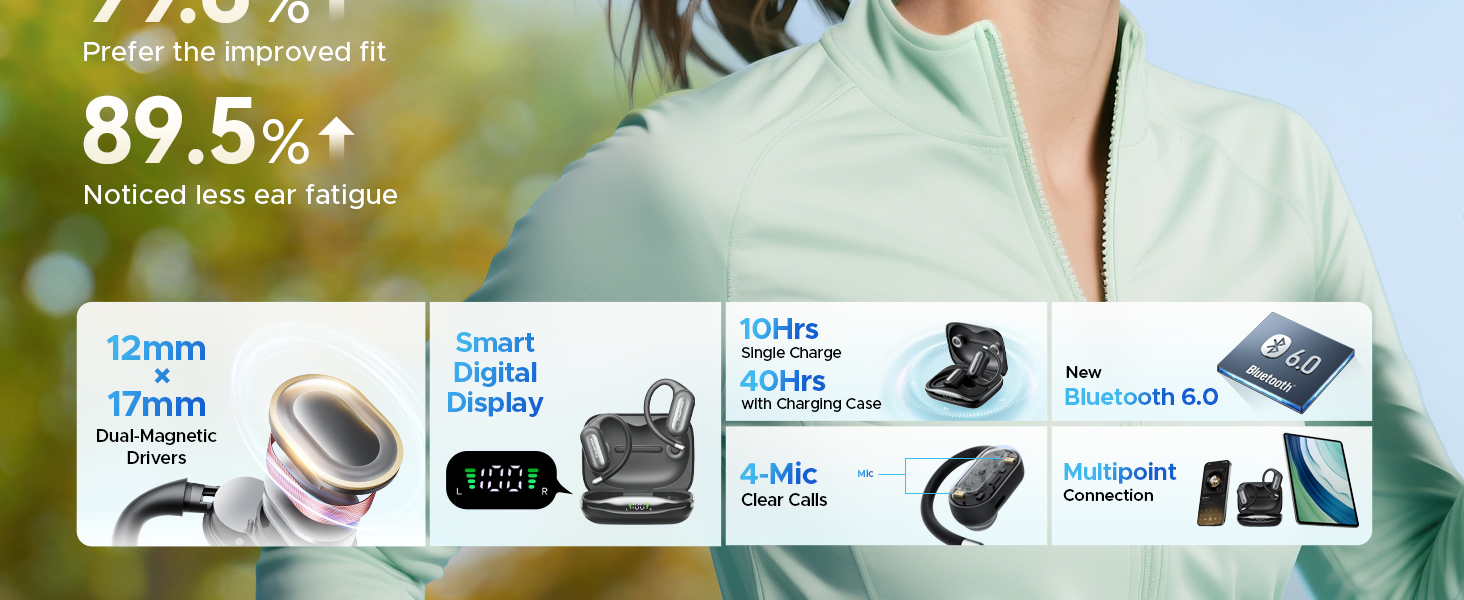
The open-ear design allows you to stay connected to your audio while remaining aware of your environment, enhancing safety during outdoor activities.
Co je v krabici
Ověřte, zda jsou v balení přítomny všechny položky:
- Truefree Earfit DS1 Wireless Earbuds (2)
- Bezdrátové nabíjecí pouzdro (1)
- Nabíjecí kabel USB-C (1)
- Silicone Eartips (2 pairs)
- Anti-lost Strap (1)
- Uživatelský manuál (1)

A visual representation of the Truefree DS1 package contents, ensuring all components are included.
Konec produktuview
Familiarize yourself with the components of your truefree DS1 headphones and charging case.
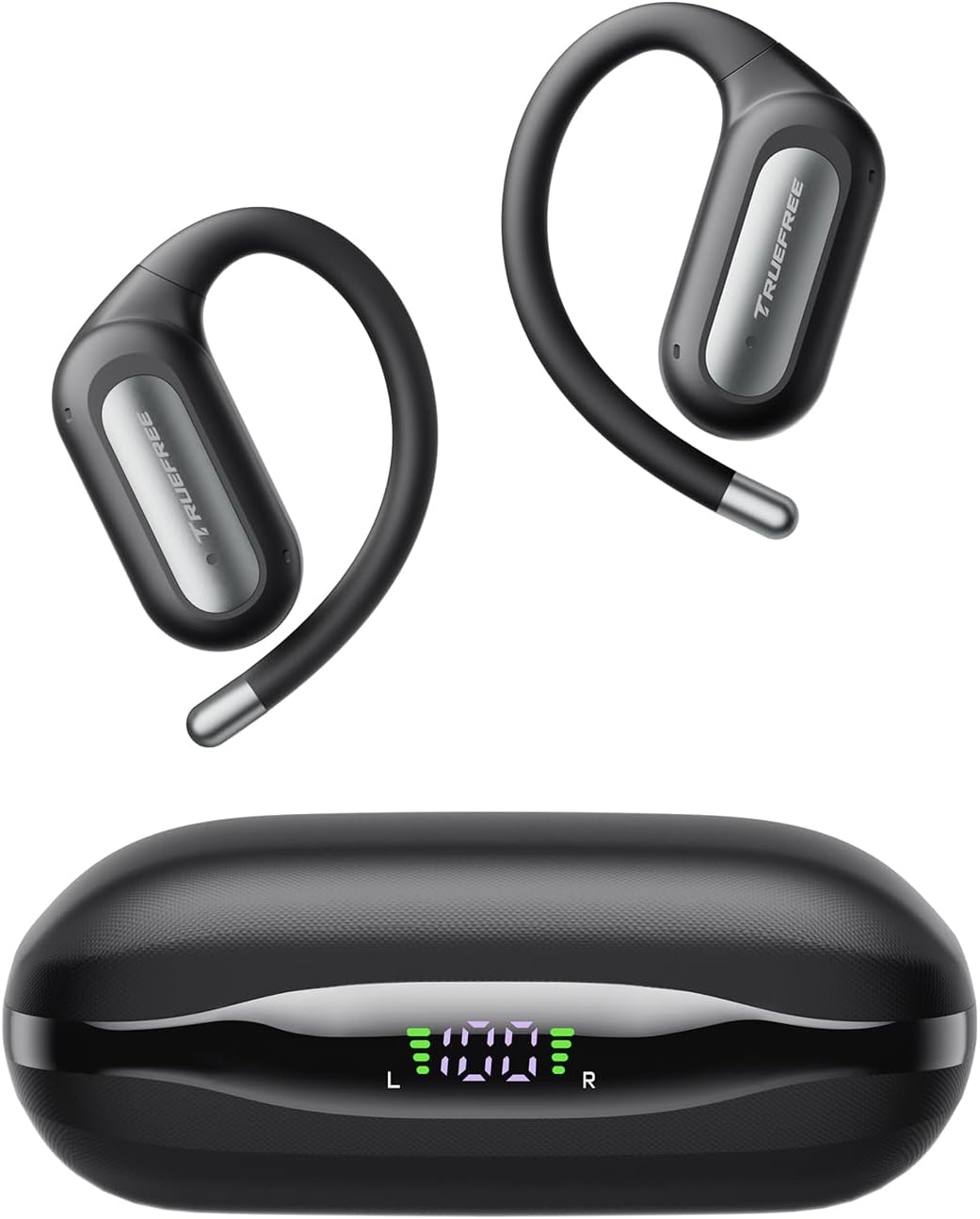
The truefree DS1 earbuds and their compact charging case, featuring an LED display for battery status.
Nastavení
1. Nabíjení sluchátek a pouzdra
Before first use, fully charge the charging case and earbuds. The case features an LED display to indicate battery levels.
- Připojte nabíjecí kabel USB-C k nabíjecímu portu na pouzdře a ke zdroji napájení.
- The LED display on the case will show the charging progress.
- Vložte sluchátka do nabíjecího pouzdra. Sluchátka se začnou automaticky nabíjet.
- A 10-minute quick charge provides 2 hours of playback. A full charge offers up to 10 hours of playtime per earbud, with a total of 40 hours using the charging case.

The charging case's LED display clearly indicates the power levels of both the case and individual earbuds.
2. Párování Bluetooth
The truefree DS1 uses Bluetooth 6.0 for stable and fast connectivity.
- Otevřete nabíjecí pouzdro. Sluchátka se automaticky přepnou do režimu párování.
- Na svém zařízení (chytrém telefonu, tabletu atd.) povolte Bluetooth.
- Hledat "Truefree EarFit DS1" in the list of available Bluetooth devices and select it to connect.
- Po připojení uslyšíte zvukové potvrzení.

Bluetooth 6.0 ensures a stable and efficient wireless connection for your audio experience.
3. Vícebodové připojení
The DS1 supports connecting to two devices simultaneously, allowing seamless switching between them.
- Pair the earbuds with your first device as described above.
- Vypněte Bluetooth na prvním zařízení. Sluchátka se znovu přepnou do režimu párování.
- Spárujte sluchátka s druhým zařízením.
- Znovu povolte Bluetooth na prvním zařízení. Sluchátka by se měla automaticky připojit k oběma zařízením.
- Nyní můžete přepínat přehrávání zvuku mezi dvěma připojenými zařízeními bez nutnosti opětovného párování.

Multipoint connection allows for effortless switching between your phone and laptop, or other paired devices.
4. Jak nosit
For optimal comfort and sound, ensure the earbuds are worn correctly.
- Gently place the earbuds over your ears, ensuring the ear hook sits securely behind your ear.
- Twist the earbud slightly to follow the contour of your ear for a snug and comfortable fit.
- The flexible titanium memory wire hooks are designed to be comfortable even for glasses wearers.

Proper wearing ensures both comfort and secure placement of the earbuds during use.
Návod k obsluze
1. Stiskněte Ovládací prvky
The truefree DS1 earbuds feature intuitive touch controls for managing audio and calls.
- Objem - (l): Jedno klepnutí na levé sluchátko.
- Objem + (R): Jedno klepnutí na pravé sluchátko.
- Play/Pause (L/R): Dvakrát klepněte na jedno ze sluchátek.
- Předchozí píseň (L): Klepněte a podržte levé sluchátko na 1.5 sekundy.
- Další píseň (R): Klepněte a podržte pravé sluchátko po dobu 1.5 sekund.
- Answer/End Call (L/R): Dvakrát klepněte na jedno ze sluchátek.
- Reject Call (L/R): Klepněte a podržte jedno sluchátko po dobu 1.5 sekund.
- Activate Voice Assistant (R): Trojité poklepání na pravé sluchátko.

A comprehensive guide to the touch controls for music playback, call management, and voice assistant activation.
2. App Control and Sound Customization
Download the Truefree App to unlock advanced features and personalize your audio experience.
- Hledat "TRUEFREE" in your device's app store (Google Play Store or Apple App Store).
- Install and open the app, then connect your DS1 headphones.
- V rámci aplikace můžete:
- Adjust EQ presets and personalize sound effects.
- Access 9 sound modes optimized for different music genres.
- Fine-tune audio settings to match your preferences.
- Manage headphone functions and customize touch controls.

The Truefree App provides extensive control over your audio settings, including EQ and sound modes.
3. Volání funkcí
The DS1 features a 4-mic array and wind-reduction technology for clear calls.
- Each earbud includes dual microphones for enhanced voice pickup.
- Wind-reduction technology minimizes ambient noise by up to 80%, ensuring your voice is clear even in outdoor environments.
- Directional audio design further enhances call clarity.

The 4-mic array system ensures crystal-clear voice transmission during calls, even in noisy conditions.
4. Spatial Audio and Bass Enhancement
Experience immersive sound with the DS1's advanced audio features.
- Powered by oversized 12 x 17mm dual-magnet drivers and dynamic EQ tuning.
- Delivers rich bass and true 360° spatial audio for a multi-dimensional sound field.
- Interchangeable acoustic conduits reduce sound leakage by up to 98.9%, maintaining privacy and immersion.

The large dual-magnetic drivers and spatial audio technology provide powerful bass and an immersive listening experience.
5. Herní režim (ultra nízká latence)
For an optimized gaming experience, the DS1 offers ultra-low latency.
- Activate gaming mode via the Truefree App for a latency as low as 0.06 seconds.
- This minimizes audio delay, ensuring synchronized sound with on-screen action during gaming.

The ultra-low latency gaming mode provides a competitive edge by ensuring audio and visuals are perfectly synchronized.
Údržba
1. Čištění
Pravidelné čištění pomáhá udržovat výkon a životnost vašich sluchátek.
- K otření sluchátek a nabíjecího pouzdra použijte měkký, suchý hadřík, který nepouští vlákna.
- Pro odolnou špínu lehceamphadřík vodou. Nepoužívejte agresivní chemikálie ani abrazivní materiály.
- Ujistěte se, že nabíjecí kontakty na sluchátkách i pouzdře jsou čisté a suché.
2. Voděodolnost (IPX5)
The truefree DS1 earbuds are IPX5-rated, offering protection against sweat and splashes.
- IPX5 rating means the earbuds can withstand a sustained, low-pressure water jet spray.
- They are suitable for workouts and light rain.
- Důležité: Do not submerge the earbuds in water. The charging case is not water-resistant.
- Před vložením sluchátek zpět do nabíjecího pouzdra se ujistěte, že jsou zcela suchá, abyste předešli jejich poškození.

The IPX5 water resistance makes the DS1 suitable for active use, protecting against sweat and splashes.
3. Skladování
Store your headphones in a cool, dry place when not in use.
- Sluchátka vždy uchovávejte v nabíjecím pouzdře, aby byla chráněna a zůstávala nabitá.
- Vyhněte se extrémním teplotám a přímému slunečnímu záření.
- Utilize the included anti-lost strap for added security during sports or active use.

The anti-lost strap provides extra security, preventing accidental drops during vigorous activities.
Odstraňování problémů
| Problém | Možná příčina / řešení |
|---|---|
| Earbuds not turning on/charging. |
|
| Nelze spárovat se zařízením. |
|
| Žádný zvuk nebo nízká hlasitost. |
|
| Kvalita hovoru je špatná. |
|
| Problémy s vícebodovým připojením. |
|
Specifikace
| Značka | truefree |
| Název modelu | Truefree EarFit DS1 |
| Umístění uší | Otevřete ucho |
| Form Factor | Otevřete ucho |
| Technologie připojení | Bezdrátové připojení (Bluetooth 6.0) |
| Impedance | 16 Ohmy |
| Frekvenční odezva | 20 kHz |
| Kontrola hluku | Žádné (otevřené provedení) |
| Mikrofony | 4-mic array with wind-reduction technology |
| Voděodolnost | IPX5-Rated |
| Výdrž baterie (sluchátka) | Až 10 hodin na jedno nabití |
| Celková doba přehrávání (s pouzdrem) | Až 40 hodin |
| Rychlé nabíjení | 10 minut nabíjení pro 2 hodin přehrávání |
| Rozměry produktu | 0.79 x 0.59 x 0.31 cm; 150 g (earbuds and case) |
| Výrobce | truefree |
| Země původu | Čína |
Záruka a podpora
For warranty information and customer support, please refer to the official truefree website or contact their customer service directly. Details are typically provided in the packaging or on the manufacturer's webmísto.
Výrobce: truefree
ASIN: B0F52VVMYJ
Model: Truefree EarFit DS1
Pro další pomoc prosím navštivte truefree Store on Amazon.


