1. Úvod
Thank you for choosing the Altera Homestep Walking Pad. This manual provides essential information for the safe and efficient use of your new walking pad. Please read all instructions carefully before operation and retain this manual for future reference.
2. Bezpečnostní pokyny
To reduce the risk of serious injury, read all important precautions and instructions in this manual and on your walking pad before use.
- Always place the walking pad on a level, stable surface.
- Během provozu držte děti a domácí zvířata v dostatečné vzdálenosti od chůzičky.
- Zajistěte dostatečný volný prostor kolem pěší plochy (alespoň 0.6 metru na všech stranách).
- Nepoužívejte chůzicí podložku, pokud vážíte více než 90 kg (198 liber).
- Noste vhodnou sportovní obuv.
- Always attach the safety key clip to your clothing before starting the walking pad.
- Pokud se cítíte mdlo, točí se vám hlava nebo pociťujete bolest, okamžitě přestaňte cvičit.
- Odpojte podložku na chůzi ze zásuvky, pokud ji nepoužíváte, nebo před čištěním/údržbou.
- Nepoužívejte chůzicí podložku, pokud má poškozený kabel nebo zástrčku, nebo pokud nefunguje správně.
3. Obsah balení
- Altera Homestep Walking Pad
- Dálkové ovládání
- Napájecí kabel
- Uživatelská příručka (tento dokument)
4. Konec produktuview
Familiarize yourself with the main components and features of your Altera Homestep Walking Pad.

Image 4.1: The Altera Homestep Walking Pad shown with its remote control.

Obrázek 4.2: Detailní view of the LED display and remote control buttons. The display shows Time, Speed, Distance, and Calories. The remote has buttons for Speed Control (+/-), Mode (M), Start/Hold, and Stop.

Image 4.3: Diagram illustrating remote control functions: '+' to increase speed, 'M' to change mode, '-' to reduce speed, 'START/HOLD' to start/continue, and 'STOP' to pause.

Obrázek 4.4: View of the walking pad's underside, highlighting anti-slip leveling feet, transport wheels, and the manual power switch.

Image 4.5: Diagram showing the multi-layered running belt construction, including wear-resistant surface, noise reduction, impact absorption, and high-resistance support layers.
5. Nastavení
- Rozbalit: Opatrně vyjměte pochůzku a všechny součásti z obalu.
- Umístění: Place the walking pad on a flat, stable, and non-slip surface. Ensure there is sufficient space around the unit for safe operation.
- Připojení napájení: Connect the power cable to the walking pad and then to a grounded electrical outlet.
- Bezpečnostní klíč: Locate the safety key. This key must be in place for the walking pad to operate. Attach the clip of the safety key to your clothing before starting.
- Zapnutí: Flip the manual power switch (refer to Image 4.4) to the 'ON' position. The LED display should illuminate.
6. Návod k obsluze
6.1 Používání dálkového ovladače
The walking pad is controlled via the included remote control. Ensure the remote has working batteries.
- Start/Hold: Press the "START/HOLD" button to begin or resume your workout. The walking pad will start at a low speed.
- Stop: Press the "STOP" button to pause or end your workout.
- Nastavení rychlosti: Use the "+" button to increase speed and the "-" button to decrease speed. The speed range is 1 km/h to 6 km/h.
- Výběr režimu: Press the "M" button to cycle through different display modes (Time, Speed, Distance, Calories).
6.2 LED displej
The integrated LED display provides real-time feedback on your workout progress (refer to Image 4.2).
- ČAS: Zobrazuje dobu trvání vašeho tréninku.
- RYCHLOST: Shows your current walking speed in km/h.
- DIST: Indicates the distance you have walked.
- CAL: Odhaduje spálené kalorie během tréninku.
6.3 Nastavitelný sklon
The Altera Homestep Walking Pad features two manual incline positions to vary your workout intensity.
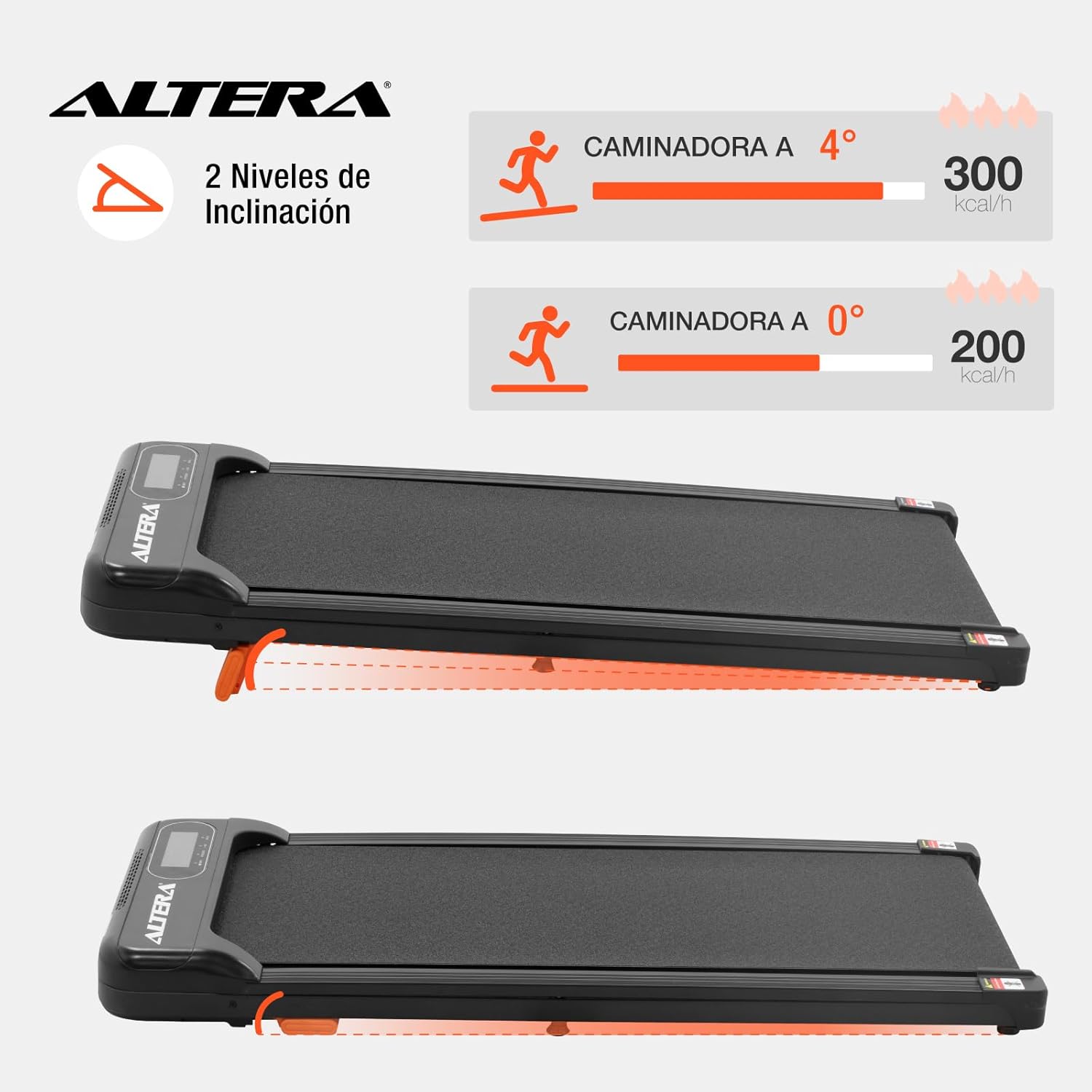
Image 6.1: Illustration of the two incline levels: 0 degrees (flat) and 4 degrees (inclined), showing estimated calorie burn difference.
To adjust the incline:
- Ensure the walking pad is turned off and unplugged.
- Carefully lift the front of the walking pad.
- Deploy or retract the small orange support feet located at the front underside of the unit to select your desired incline level.
- Ensure the support feet are securely locked in place before resuming use.
6.4 Přeprava a skladování
The walking pad is designed for easy storage and portability.
- To move the unit, ensure it is powered off and unplugged.
- Lift the front end slightly to engage the transport wheels (refer to Image 4.4).
- Roll the walking pad to your desired storage location. Its compact design allows it to fit in small spaces.
7. Údržba
Pravidelná údržba zajistí dlouhou životnost a optimální výkon vaší pojízdné podložky.
- Čištění: Otřete pochozí podložku reklamouamp Po každém použití otřete hadříkem. Nepoužívejte abrazivní čisticí prostředky ani rozpouštědla.
- Pásové mazání: The walking belt may require lubrication periodically. Refer to the manufacturer's guidelines for specific lubrication instructions and recommended lubricants.
- Napnutí řemene: Check the walking belt tension regularly. If the belt slips or feels loose, it may need adjustment. Consult a qualified technician if you are unsure how to adjust it.
- Skladování: Store the walking pad in a dry, cool place away from direct sunlight and moisture.
8. Řešení problémů
| Problém | Možná příčina | Řešení |
|---|---|---|
| Chůzicí podložka se nespustí. |
|
|
| Řemen prokluzuje nebo váhá. |
|
|
| Dálkové ovládání nereaguje. |
|
|
9. Specifikace

Image 9.1: Technical specifications table and dimensional diagram of the Altera Homestep Walking Pad.
| Funkce | Detail |
|---|---|
| Číslo modelu | CAM-HOM-02 |
| Výkon motoru | 1.5 HP |
| Rozsah rychlosti | 1 - 6 km/h |
| Maximální hmotnost uživatele | 90 kg (198 lb) |
| Úrovně sklonu | 2 (manual, up to 4 degrees) |
| Rozměry běžeckého pásu | Rozměr 95 cm x 36 cm |
| Rozměry produktu (D x Š x V) | 110 x 46 x 10 cm |
| Hmotnost produktu | 17 kg |
| Materiál | Kov, Plast |
| Vlastnosti | Bluetooth, Portable, LED Display, Anti-slip belt, Transport wheels |
| Zdroj napájení | Electric Cord (110V) |
10. Záruka a podpora
For warranty information or technical support, please refer to the contact details provided with your purchase or visit the official Altera webUschovejte si doklad o koupi pro případ reklamace.


