1. Úvod
This manual provides detailed instructions for the setup, operation, maintenance, and troubleshooting of your NIMO Mini PC Desktop, Model DNB1. Please read this manual thoroughly before using the device to ensure proper functionality and to maximize your user experience. Keep this manual for future reference.

Image 1.1: The NIMO Mini PC Desktop DNB1, a compact and powerful computing device.
2. Co je v krabici
Carefully unpack your NIMO Mini PC Desktop and verify that all items listed below are included:
- NIMO Mini PC Desktop (DNB1)
- Uživatelská příručka (tento dokument)
- Montážní konzola
- Napájecí adaptér

Image 2.1: Contents of the NIMO Mini PC Desktop packaging, including the Mini PC, user manual, VESA mount, and power adapter.
3. Konec produktuview
The NIMO Mini PC Desktop DNB1 is designed for versatility and performance. Familiarize yourself with its various ports and features.
3.1. Front and Rear Panel Interfaces

Obrázek 3.1: Detailní view of the NIMO Mini PC Desktop DNB1's interfaces, including USB, HDMI, LAN, Type-C, and power ports.
- Port DC-IN: Připojuje se k napájecímu adaptéru.
- Porty USB 3.2 typu A (x3): For connecting peripherals such as keyboards, mice, and external storage devices.
- Porty HDMI 2.0 (x2): For connecting to displays, supporting up to 4K resolution.
- LAN port (gigabitový ethernet): Pro kabelové síťové připojení.
- Zvukový port: Pro připojení sluchátek nebo externích reproduktorů.
- Type-C Port (Multifunction): Supports data transfer and display output.
- Čtečka SD karet: Pro čtení a zápis na paměťové karty SD.
- Vypínač: Pro zapnutí nebo vypnutí zařízení.
- Resetovací tlačítko: Restartování zařízení.
4. Průvodce nastavením
Follow these steps to set up your NIMO Mini PC Desktop.
4.1. Počáteční připojení
- Připojení periferií: Connect your keyboard, mouse, and any other USB devices to the available USB 3.2 ports.
- Připojení displeje(ů): Connect your monitor(s) to the HDMI 2.0 ports. The Mini PC supports up to three 4K displays simultaneously.
- Připojení k síti (volitelné): For a wired internet connection, connect an Ethernet cable to the LAN port. For wireless, ensure your WiFi network is available during initial setup.
- Připojte napájení: Plug the power adapter into the DC-IN port on the Mini PC, then plug the adapter into a power outlet.
4.2. Instalace držáku VESA
The included VESA mount allows you to attach the Mini PC to the back of a compatible monitor or to a wall, saving desk space.
- Attach the VESA bracket to the back of your monitor using the provided screws. Ensure the monitor has VESA mounting holes (typically 75x75mm or 100x100mm).
- Slide the NIMO Mini PC Desktop onto the mounted bracket until it clicks securely into place.
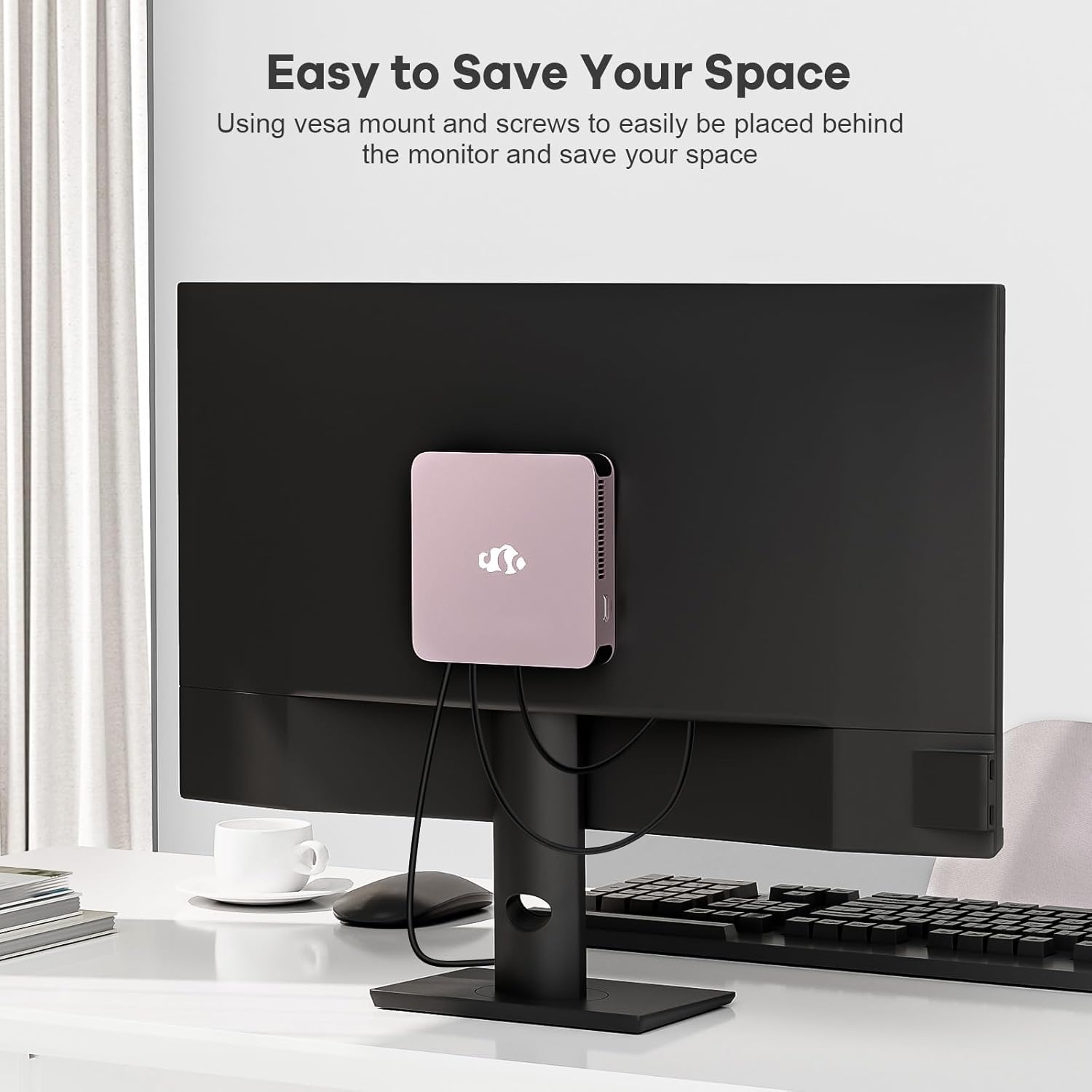
Image 4.1: The NIMO Mini PC Desktop DNB1 mounted on the back of a monitor using the VESA bracket, demonstrating space-saving placement.
5. Návod k obsluze
5.1. Zapnutí/vypnutí
- Zapnutí: Press the Power Button once. The power indicator light will illuminate.
- Vypnutí: From the operating system, select 'Shut Down'. Alternatively, press and hold the Power Button for 5-7 seconds to force a shutdown (use only when necessary).
5.2. Počáteční spuštění a nastavení systému Windows 11
Upon first power-on, the system will guide you through the Windows 11 setup process. Follow the on-screen prompts to configure language, region, network, and user accounts.
5.3. Připojení k sítím
- Kabelové připojení: If an Ethernet cable is connected to the LAN port, the system will automatically detect and connect to the wired network.
- Bezdrátové připojení (WiFi 6): Access the network settings in Windows 11, select your desired WiFi network, and enter the password.
- Bluetooth Connection (Bluetooth 5.2): Enable Bluetooth in Windows 11 settings, search for devices, and pair with your Bluetooth peripherals.
5.4. Using Multiple Displays
The NIMO Mini PC supports up to three 4K displays. Connect your monitors to the available HDMI and Type-C ports. Windows 11 display settings allow you to extend, duplicate, or show only on one display.

Image 5.1: The NIMO Mini PC Desktop DNB1 supporting a triple monitor 4K display setup, enhancing productivity and multimedia experiences.
6. Údržba
Správná údržba zajistí dlouhou životnost a optimální výkon vašeho Mini PC.
- Čištění: K čištění vnější strany Mini PC použijte měkký, suchý hadřík. Pro odstranění prachu z větracích otvorů použijte stlačený vzduch. Nepoužívejte tekuté čisticí prostředky přímo na zařízení.
- Větrání: Ensure the ventilation openings are not blocked to prevent overheating. Operate the device in a well-ventilated area.
- Aktualizace softwaru: Regularly update your Windows operating system and drivers to maintain security and performance.
- Záloha dat: Pravidelně zálohujte důležitá data na externí disk nebo cloudové úložiště.
7. Řešení problémů
Tato část se zabývá běžnými problémy, se kterými se můžete setkat.
7.1. Bez napájení
- Ujistěte se, že je napájecí adaptér bezpečně připojen k Mini PC i k funkční zásuvce.
- Ověřte funkčnost elektrické zásuvky zapojením jiného zařízení.
- Zkontrolujte napájecí adaptér, zda nevykazuje viditelné poškození.
7.2. Žádný výstup na displej
- Confirm that the monitor is powered on and set to the correct input source (HDMI, Type-C).
- Check that the HDMI or Type-C cable is securely connected to both the Mini PC and the monitor.
- Zkuste jiný kabel displeje nebo monitor, pokud je k dispozici.
7.3. Žádné připojení k internetu
- Kabelové: Ensure the Ethernet cable is properly connected and your router/modem is working.
- Bezdrátový: Check WiFi settings in Windows 11, ensure WiFi is enabled, and you are connected to the correct network with the correct password. Restart your router/modem if necessary.
7.4. Periferie nereagují
- Zkuste připojit periferní zařízení k jinému USB portu.
- Ujistěte se, že jsou ovladače periferního zařízení nainstalovány a aktuální.
- Test the peripheral on another computer if possible.
8. Specifikace
Detailed technical specifications for the NIMO Mini PC Desktop DNB1.
| Funkce | Specifikace |
|---|---|
| Model | DNB1 |
| Procesor | Intel 12th Gen N100 (up to 3.4 GHz) |
| Jádra/Vlákna | 4 jader / 4 vláken |
| Grafika | Grafika Intel UHD |
| BERAN | 16 GB DDR5 |
| Skladování | 512 GB PCIe SSD |
| Maximální rozlišení obrazovky | 3840x2160 pixelů (4K) |
| Zobrazení výstupu | 2x HDMI 2.0, 1x Type-C (supports triple display) |
| USB porty | 3x USB 3.2 Type-A, 1x USB Type-C |
| Síť | Gigabit Ethernet (LAN), WiFi 6 |
| Bluetooth | Bluetooth 5.2 |
| Operační systém | Windows 11 |
| Hmotnost položky | 1.76 libry |
| Zdroj napájení | DC |

Image 8.1: Summary of key features including Intel 12th Gen N100 processor, 4K Ultra HD support, Bluetooth 5.2, LPDDR5, WiFi 6, and PCIe SSD.
9. Záruka a podpora
NIMO is committed to providing excellent customer service and product reliability.
- Zásady vrácení: You may request a return or exchange within 90 days of purchase.
- Technická podpora: The NIMO Mini PC Desktop comes with 2 years of technical support. If you encounter any issues, please contact our dedicated customer support team for assistance.
For support, please refer to the contact information provided with your purchase or visit the official NIMO webmísto.


