Zavedení
The ATOMSTACK A24 Pro Series Laser Engraver is a high-speed, unibody laser cutting and engraving machine designed for precision work on various materials including wood, metal, acrylic, and glass. Featuring a powerful 24W diode laser, it offers efficient engraving and cutting capabilities for both hobbyists and professionals. This manual provides essential information for the safe and effective operation, maintenance, and troubleshooting of your ATOMSTACK A24 Pro laser engraver.
Bezpečnostní opatření
Operating a laser engraver requires strict adherence to safety guidelines to prevent injury and damage. Always read and understand all safety instructions before operating the device.
- Ochrana očí: Always wear the provided UV-filtering eye protection goggles during operation. Never look directly at the laser beam.
- Větrání: Zajistěte dostatečné větrání pracovního prostoru, aby se rozptýlily výpary a kouř vznikající během gravírování a řezání.
- Požární bezpečnost: Keep a fire extinguisher nearby. Do not leave the machine unattended during operation, especially when working with flammable materials.
- Materiálová kompatibilita: Only engrave or cut materials specified as safe for laser processing. Avoid materials that produce toxic fumes or are highly reflective.
- Nouzové zastavení: Familiarize yourself with the emergency stop switch and its location for immediate shutdown in case of an emergency.
- Fyzická bezpečnost: The machine is equipped with 4-way limit switches and a tilt detector with a 15-degree alarm to prevent collisions and ensure stable operation. Keep hands and loose clothing clear of moving parts.

Image: The ATOMSTACK A24 Pro highlighting its comprehensive safety features, including position movement protection, 4-way limit switches, a safety key lock, and UV-filtering eye protection goggles. These features are crucial for safe operation.
Nastavení
The ATOMSTACK A24 Pro features a unibody design, making setup quick and straightforward. It is largely pre-assembled, requiring minimal effort to get started.
Rozbalení a úvodní kontrola
- Carefully remove the laser engraver and all components from the packaging.
- Inspect the machine for any signs of damage during transit. If any damage is found, contact customer support immediately.
- Verify that all listed components are present according to the packing list.

Image: The ATOMSTACK A24 Pro being removed from its packaging, demonstrating its "Installation-free" design, meaning it's ready to use right out of the box with no complex assembly required.
Připojení zařízení
- Place the engraver on a stable, level surface in a well-ventilated area.
- Connect the power adapter to the engraver and plug it into a suitable power outlet.
- Connect the laser module to the crossbar if not already attached.
- For computer control, connect the engraver to your computer via the provided USB cable. Alternatively, use Wi-Fi or a TF card for offline operation.
Instalace softwaru
- Download and install the ATOMSTACK App from your device's app store (available for Android and iOS).
- For desktop use, install compatible engraving software such as LaserGRBL or LightBurn on your Windows or MacOS computer.
- Follow the on-screen instructions within the software to connect to your ATOMSTACK A24 Pro via Wi-Fi or USB.
Návod k obsluze
The ATOMSTACK A24 Pro is designed for user-friendly operation, allowing for precise engraving and cutting.
Příprava materiálu
- Place your chosen material (e.g., wood, acrylic, metal) flat on the engraving bed.
- Ensure the material is securely positioned to prevent movement during operation.
Nastavení zaostření
Achieve perfect focus in three simple steps:
- Loosen the screw on the laser module.
- Slide the laser slider until it touches the focusing block (provided accessory).
- Tighten the screw and remove the focusing block.

Image: A visual guide demonstrating the three-step process for easy laser focus adjustment on the ATOMSTACK A24 Pro, ensuring optimal engraving results.
Engraving/Cutting Process
- Open your chosen software (ATOMSTACK App, LaserGRBL, LightBurn).
- Import or create your design. The machine supports various file formats including NC, BMP, JPG, PNG, and DXF.
- Use the cross-laser positioning feature for precise target alignment and horizontal adjustments.
- Adjust engraving parameters (power, speed, passes) based on the material and desired outcome. The 24W diode laser can cut through 12mm wood and 10mm black acrylic in a single pass.
- Initiate the engraving or cutting process. Monitor the operation closely.
- The machine features an automatic power failure recovery system, allowing it to resume engraving from the exact paused point, saving material and time.

Image: Illustration of the ATOMSTACK A24 Pro's powerful 24W diode laser output, demonstrating its ability to cut through 15mm basswood and 10mm black acrylic in a single pass, highlighting its efficiency.

Image: A comparison graphic illustrating the ATOMSTACK A24 Pro's engraving speed of 600mm/s, significantly faster than other models, leading to higher productivity and a better engraving experience.

Obrázek: Detailní záběr view of the ATOMSTACK A24 Pro's laser module, emphasizing its 0.06*0.08mm ultra-fine compressed spot for precise engraving, compared to larger spot sizes of other machines.
Údržba
Regular maintenance ensures the longevity and optimal performance of your ATOMSTACK A24 Pro.
- Čištění objektivu: Periodically clean the laser lens with a soft, lint-free cloth and lens cleaning solution to maintain laser clarity and power.
- Mazání: Apply a small amount of lubricant to the linear guide rails to ensure smooth movement of the laser module.
- Napnutí řemene: Check and adjust the belt tension as needed to maintain engraving accuracy.
- Generální úklid: Keep the engraving area and the machine's exterior clean from dust and debris.
Odstraňování problémů
This section addresses common issues you might encounter with your ATOMSTACK A24 Pro.
| Problém | Možná příčina | Řešení |
|---|---|---|
| Laser nefunguje nebo má slabý výkon | Incorrect focus; dirty lens; low power setting; laser module issue. | Adjust focus; clean the lens; increase power setting in software; contact support if module is faulty. |
| Engraving is inaccurate or distorted | Loose belts; material shifting; unstable surface; software calibration issue. | Check and tighten belts; secure material; place on a stable surface; recalibrate in software. |
| Zařízení se nepřipojuje k počítači/aplikaci | Incorrect cable; Wi-Fi issue; driver not installed; software conflict. | Ensure correct USB cable; check Wi-Fi connection; install necessary drivers; restart software/computer. |
| Emergency alarm triggered | Tilt detected; limit switch activated; abnormal movement. | Check machine stability; ensure no obstructions; reset the machine. |
Specifikace
- Značka: ATOMSTACK
- Model: A24 PRO
- Výstupní výkon laseru: 24000 miliwattů (24 W)
- Rychlost gravírování: Až 600 mm / s
- Velikost bodu: 0.06*0.08mm (Ultra-fine compressed spot)
- Materiál: Rám z hliníkové slitiny
- Rozměry produktu: 21.26 x 21.65 x 4.72 palce
- Hmotnost položky: 19.36 libry
- Konektivita: Wi-Fi, USB, TF card
- Podporovaný OS: Windows, MacOS, Android, iOS
- Podporováno File Formáty: NC, BMP, JPG, PNG, DXF
- Bezpečnostní funkce: 4-way limit switches, UV-filtering eye protection, tilt detector, safety lock.
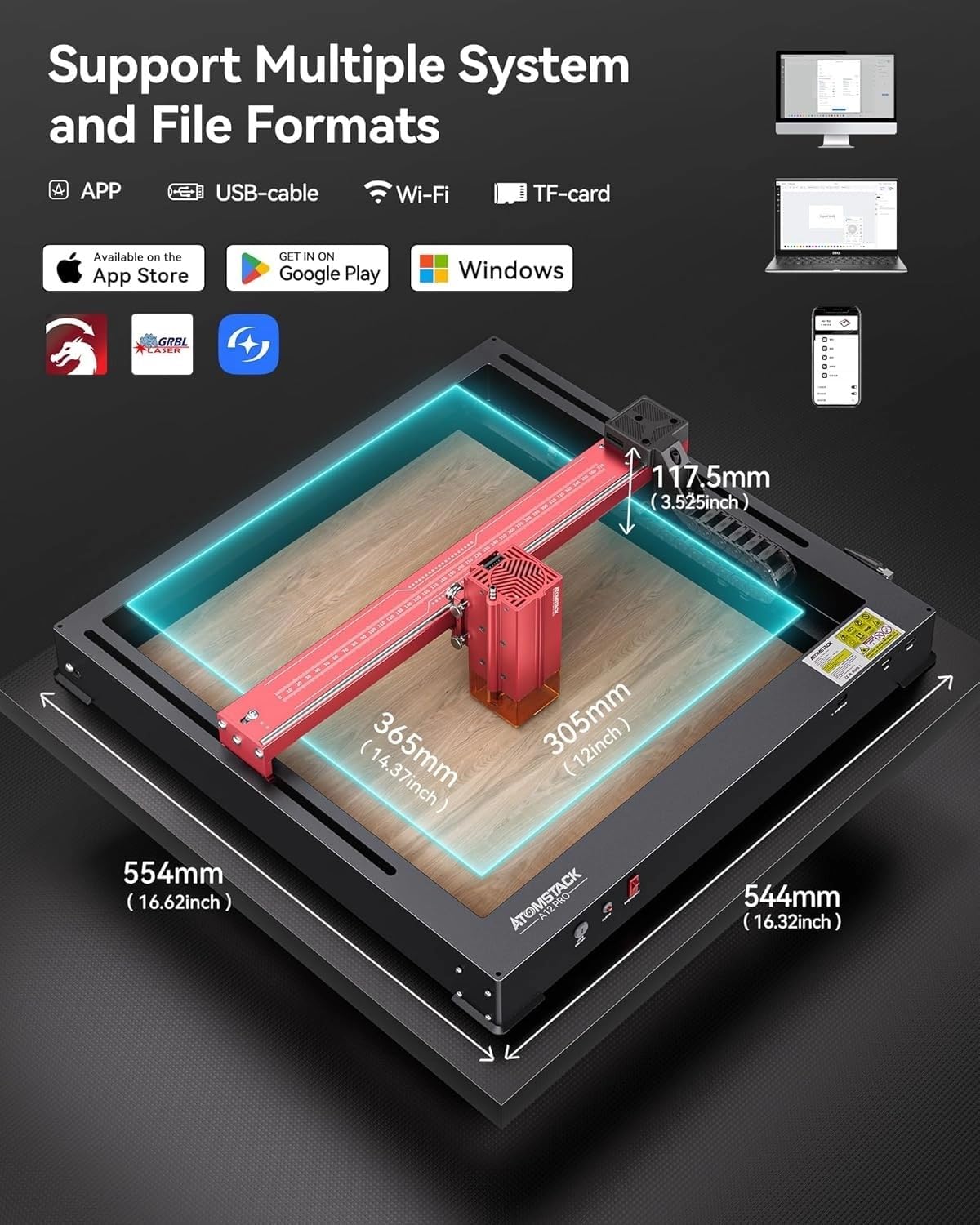
Image: A diagram illustrating the physical dimensions of the ATOMSTACK A24 Pro and its compatibility with multiple systems and file formats, including APP, USB-cable, Wi-Fi, and TF-card connectivity.
Záruka a podpora
ATOMSTACK stands behind its products with comprehensive support.
- Záruka: The ATOMSTACK A24 Pro comes with a 1-year warranty.
- Technická podpora: Lifetime technical support is available. A professional customer service team is ready to assist with any problems or concerns.
- Náhradní díly: Replacement parts are available if needed.
For assistance, please refer to the contact information provided in your product packaging or visit the official ATOMSTACK webmísto.