1. Úvod
This manual provides detailed instructions for the installation, operation, and maintenance of your GIGABYTE GA-B760M D3HP WIFI6 motherboard. Designed for optimal performance and reliability, this motherboard supports Intel Core 14th, 13th, and 12th generation CPUs and features DDR5 memory support, PCIe 4.0 M.2 connectors, and Wi-Fi 6 connectivity. Please read this manual thoroughly before beginning installation to ensure proper setup and to maximize the lifespan of your product.
2. Klíčové vlastnosti
- Podpora CPU: Compatible with Intel Core 14th, 13th, and 12th generation processors.
- Návrh napájení: Features a 4+1+1 phase hybrid digital VRM solution for stable power delivery.
- Paměť: Supports Dual Channel DDR5 memory with 4 DIMM slots and XMP memory module support.
- Skladování: Equipped with 2 PCIe 4.0 x4 M.2 connectors for high-speed storage.
- Networking: Includes GbE LAN and Wi-Fi 6 802.11ax for fast and reliable network connectivity.
3. Nastavení a instalace
Before installing the motherboard, ensure your system is powered off and disconnected from the power source. Handle the motherboard by its edges to avoid static discharge.
3.1 Rozložení základní desky
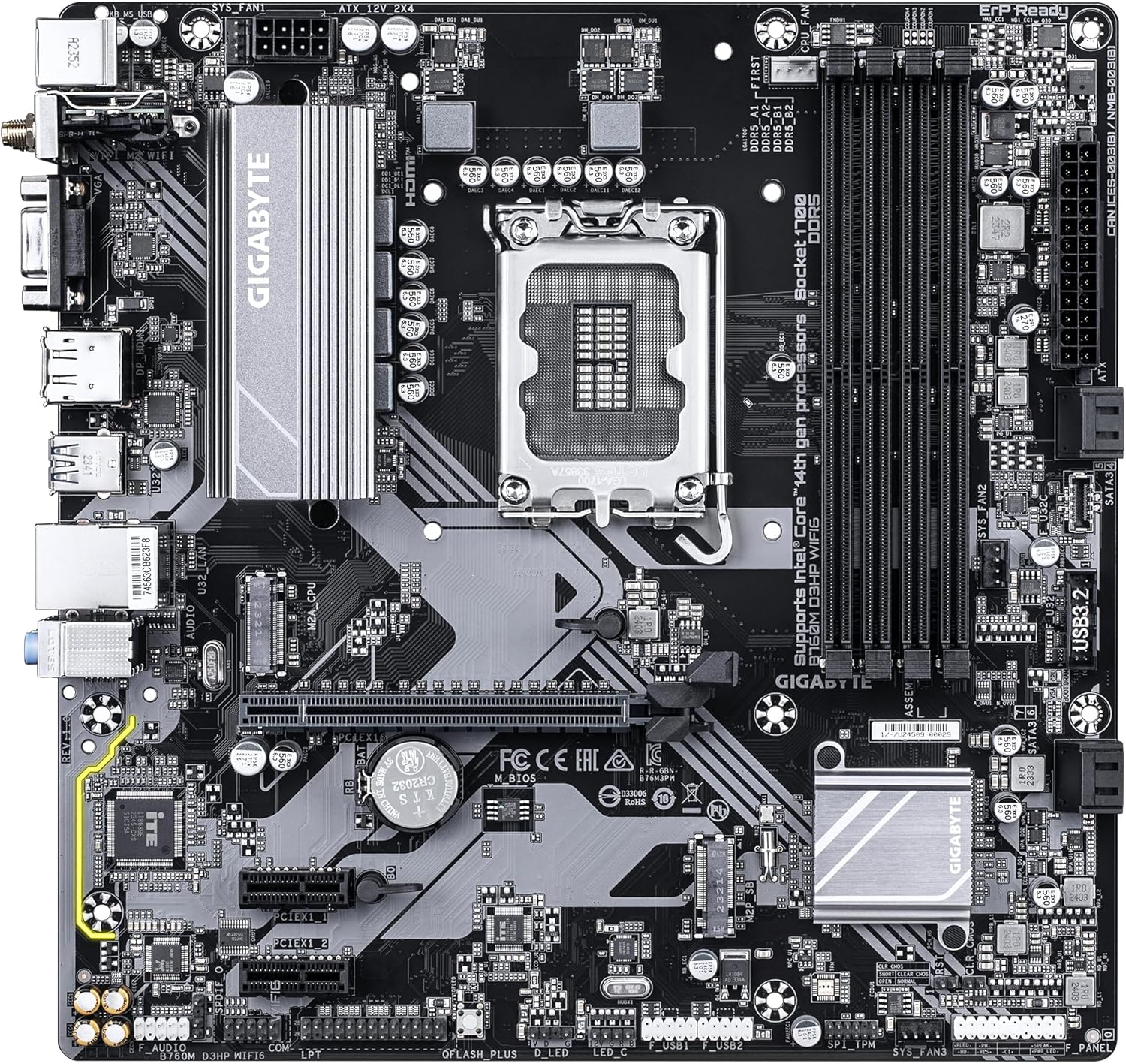
Familiarize yourself with the layout of the motherboard components before proceeding with installation.

Obrázek 1: Shora dolů view of the GIGABYTE GA-B760M D3HP WIFI6 motherboard, showing the CPU socket, DIMM slots, PCIe slots, and various headers.
Obrázek 2: Úhlové view of the GIGABYTE GA-B760M D3HP WIFI6 motherboard, highlighting the heatsinks and overall component placement.
3.2 Instalace CPU
- Najděte na základní desce patici procesoru LGA 1700.
- Otevřete páčku patice procesoru a zvedněte nosnou desku.
- Opatrně zarovnejte procesor s paticí a ujistěte se, že trojúhelníková značka na procesoru odpovídá značce na patici. Nevkládejte procesor do patice silou.
- Spusťte nosnou desku dolů a zajistěte ji pákou.
- Naneste teplovodivou pastu na procesor a nainstalujte chladič procesoru podle pokynů výrobce.
3.3 Instalace paměti (RAM)
- Locate the four DDR5 DIMM slots.
- Otevřete klipy na obou koncích slotu DIMM.
- Zarovnejte zářez na paměťovém modulu DDR5 s výstupkem ve slotu DIMM.
- Paměťový modul pevně zasuňte do slotu, dokud nezacvaknou klipsy. Ujistěte se, že jsou oba klipsy zavřené.
- For dual-channel configuration, refer to the motherboard's specific manual for recommended slot pairing.
3.4 Instalace úložných zařízení (disky M.2 SSD a disky SATA)
- M.2 SSD: Locate the M.2 connectors. Remove the M.2 screw/standoff. Insert the M.2 SSD into the slot at a 30-degree angle. Push down the SSD and secure it with the screw/standoff.
- SATA disky: Připojte datové kabely SATA z úložných jednotek (HDD/SSD) k portům SATA na základní desce. Připojte napájecí kabely ze zdroje napájení k jednotkám.
3.5 Připojení napájení
- Připojte 24pinový hlavní napájecí konektor ATX ze zdroje k odpovídajícímu portu na základní desce.
- Connect the 8-pin ATX 12V CPU power connector to the port near the CPU socket.
3.6 Připojení předního panelu a periferních zařízení
Connect your case's front panel connectors (power button, reset button, USB ports, audio jacks, LED indicators) to the corresponding headers on the motherboard. Refer to the motherboard's detailed manual for exact pin layouts.

Obrázek 3: Rear I/O panel of the GIGABYTE GA-B760M D3HP WIFI6 motherboard, showing USB ports, display outputs, audio jacks, Ethernet, and Wi-Fi antenna connectors.
4. Návod k obsluze
4.1 Nastavení systému BIOS
Upon first boot, you may need to enter the BIOS (Basic Input/Output System) to configure settings such as boot order, date/time, and enable specific features. To enter BIOS, press the DEL key repeatedly during startup. The GIGABYTE UEFI BIOS provides an intuitive graphical interface for configuration.
4.2 Instalace ovladače
After installing your operating system, install the necessary drivers for the motherboard's components (chipset, audio, LAN, Wi-Fi, etc.). These drivers are typically provided on a support DVD or can be downloaded from the official GIGABYTE webstránky pro váš konkrétní model základní desky.
5. Údržba
- Čištění: Pravidelně čistěte prach ze základní desky a ventilátorů skříně stlačeným vzduchem. Před čištěním se ujistěte, že je systém vypnutý a odpojený od sítě.
- Aktualizace BIOSu: Pravidelně kontrolujte GIGABYTE website for BIOS updates. BIOS updates can improve system stability, compatibility, and performance. Follow the instructions provided by GIGABYTE carefully when updating the BIOS.
- Aktualizace ovladačů: Udržujte ovladače aktualizované, abyste zajistili optimální výkon a kompatibilitu s novým softwarem a hardwarem.
6. Řešení problémů
- Bez napájení:
- Zkontrolujte všechna napájecí připojení (24pinový ATX, 8pinový CPU).
- Ujistěte se, že je zapnutý napájecí zdroj.
- Otestujte napájecí zdroj pomocí jiného systému nebo testeru napájecích zdrojů.
- Bez displeje:
- Ensure the monitor is connected to the graphics card (or integrated graphics port if no discrete GPU is used).
- Znovu vložte grafickou kartu a paměťové moduly.
- Zkuste bootovat pouze s jednou RAM pamětí.
- Nestabilita/pády systému:
- Zkontrolujte teploty CPU a GPU.
- Ujistěte se, že všechny komponenty jsou správně usazeny.
- Spusťte diagnostické nástroje paměti a zkontrolujte chyby paměti RAM.
- Aktualizujte BIOS a ovladače.
- Problémy s připojením k síti:
- For wired LAN, check the Ethernet cable and router connection.
- For Wi-Fi, ensure antennas are securely attached and drivers are installed.
- Verify network settings in the operating system.
7. Specifikace
| Funkce | Detail |
|---|---|
| Značka | GIGABYTE |
| Název modelu | B760M D3HP WIFI6 |
| Zásuvka CPU | LGA 1700 |
| Kompatibilní procesory | Intel Core 14th Gen, Intel Core 13th Gen, Intel Core 12th Gen |
| Typ čipové sady | Intel B760 |
| Technologie paměti RAM | DDR5 |
| Rychlost paměti | 5600 MHz |
| Kompatibilní zařízení | Personal Computer, Desktop Computer |
| Platforma | Windows 10, Windows 11 |
| Rozměry produktu | 9.61 x 9.61 x 1.38 palce |
| Hmotnost položky | 2.2 libry |
8. Záruka a podpora
Informace o záruce a technickou podporu získáte na oficiálních stránkách společnosti GIGABYTE. website or contact GIGABYTE customer service. Keep your proof of purchase for warranty claims.
Oficiální GIGABYTE Webmísto: www.gigabyte.com