1. Úvod
This manual provides essential information for the installation, operation, and maintenance of your FSP VITA GM 650W ATX 3.1 PC Power Supply. Please read this manual thoroughly before installation to ensure proper and safe usage of the product. The FSP VITA GM 650W is designed to deliver stable and efficient power to your computer system, adhering to the ATX 3.1 and PCIe Gen 5.1 specifications.
2. Bezpečnostní informace
Vždy dodržujte následující bezpečnostní opatření, abyste předešli zranění nebo poškození zařízení:
- Neotevírejte napájecí jednotku. Vysoká hlasitosttages are present inside, and opening the casing voids the warranty and poses a risk of electric shock.
- Nainstalujte napájecí zdroj v dobře větraném prostoru, mimo dosah zdrojů tepla, přímého slunečního záření a vlhkosti.
- Ensure the power supply is correctly installed and secured in your PC case.
- Use only the modular cables provided with the power supply. Using incompatible cables can cause damage.
- Připojte napájecí zdroj k uzemněné elektrické zásuvce.
- Disconnect the AC power cord from the wall outlet before installing or removing the power supply or any other components.
- Avoid placing heavy objects on the power supply or its cables.
- If the power supply is damaged or malfunctioning, discontinue use immediately and contact FSP support.
3. Obsah balení
Ověřte, zda jsou v balení přítomny všechny položky:
- FSP VITA GM 650W ATX 3.1 PC Power Supply
- Modular Cable Set (Motherboard, CPU, PCIe, SATA, Peripheral)
- AC napájecí kabel
- Montážní šrouby
- Uživatelská příručka (tento dokument)
4. Konec produktuview
The FSP VITA GM 650W is a high-efficiency power supply designed for modern PC systems. It features:
- Shoda s ATX 3.1: Designed to meet the latest Intel Power Design Guide ATX 3.1 specifications, ensuring compatibility with future hardware.
- Podpora PCIe Gen 5.1: Ready for next-generation graphics cards.
- 80 PLUS Gold Certification: Achieves high efficiency, reducing power dissipation, heat, and noise.
- Synchronous Rectifier LLC Resonance Converter Topology: Reduces switching loss and enhances efficiency.
- +5V & 3.3V DC to DC Circuit Design: Improves efficiency and stabilizes output voltage.
- 105°C Japanese Bulk Capacitor: Ensures reliability and extended lifespan.

Obrázek 4.1: Přední strana view of the FSP VITA GM 650W Power Supply, showcasinjeho kompaktní design a mřížka ventilátoru.
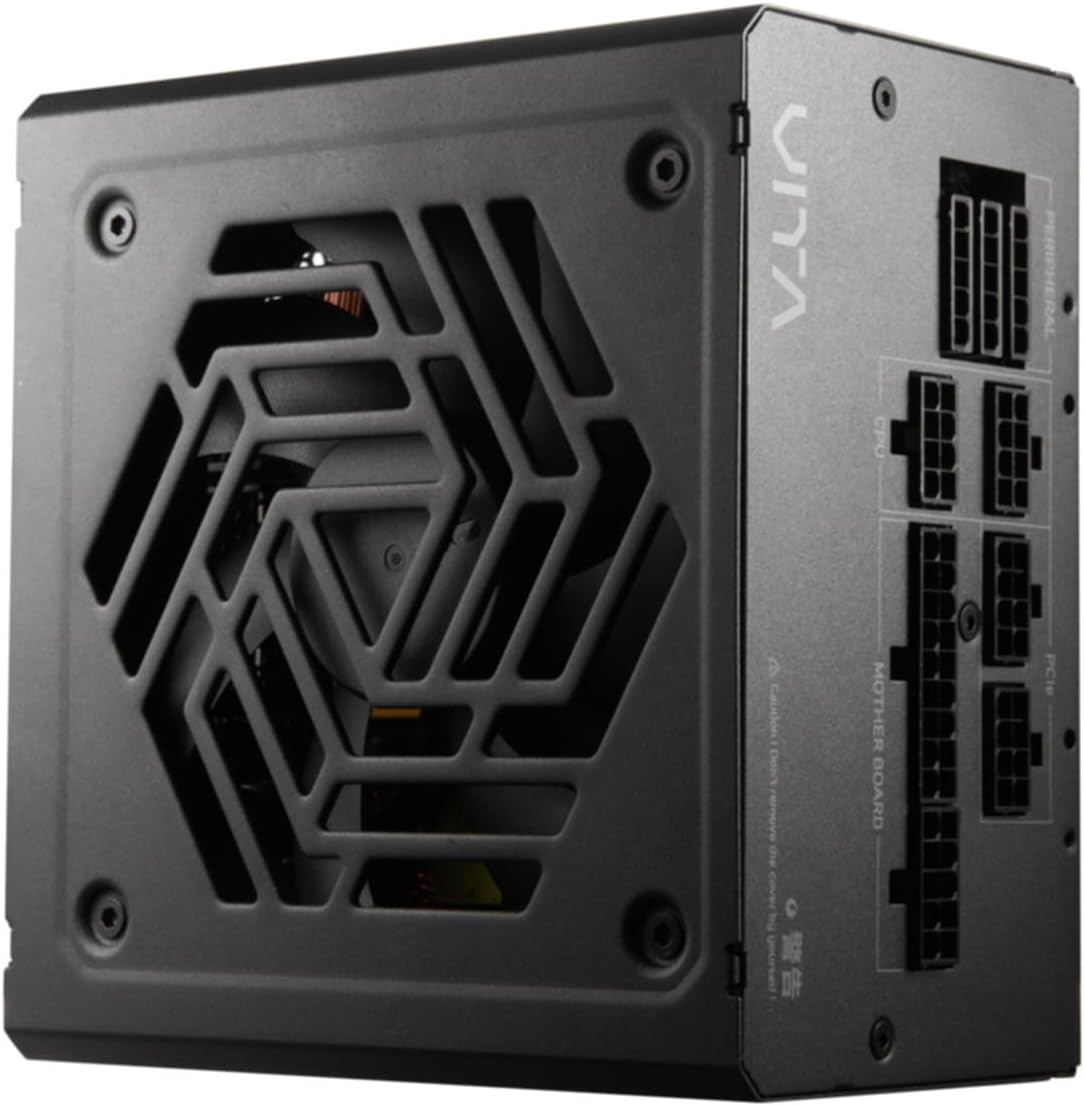
Obrázek 4.2: Shora dolů view of the FSP VITA GM 650W Power Supply, highlighting the fan and ventilation design.

Obrázek 4.3: Strana view of the FSP VITA GM 650W Power Supply, showing the FSP branding and VITA model name.
5. Nastavení a instalace
Follow these steps to install your FSP VITA GM 650W power supply:
- Příprava:
- Vypněte počítač a odpojte napájecí kabel ze zásuvky.
- Otevřete skříň počítače.
- Pokud vyměňujete stávající napájecí zdroj, odpojte od něj všechny kabely a vyjměte jej ze skříně.
- Montáž zdroje:
- Carefully place the FSP VITA GM 650W into the power supply bay of your PC case.
- Zarovnejte otvory pro šrouby na zdroji s otvory na skříni.
- Zajistěte napájecí zdroj pomocí dodaných montážních šroubů.
- Připojení modulárních kabelů:
The FSP VITA GM 650W is a modular power supply. Connect only the cables required for your system components.

Figure 5.1: Modular cable connection panel. Ensure cables are firmly seated.
- Napájení základní desky: Připojte 24kolíkový kabel ATX k základní desce.
- Výkon CPU: Connect the 4+4-pin or 8-pin EPS/ATX12V cable(s) to the CPU power connector(s) on your motherboard.
- Napájení PCIe: Connect the 6+2-pin PCIe cables to your graphics card(s).
- Napájení SATA: Connect SATA power cables to SSDs, HDDs, and optical drives.
- Periferní napájení: Connect 4-pin Molex cables to other peripherals as needed.
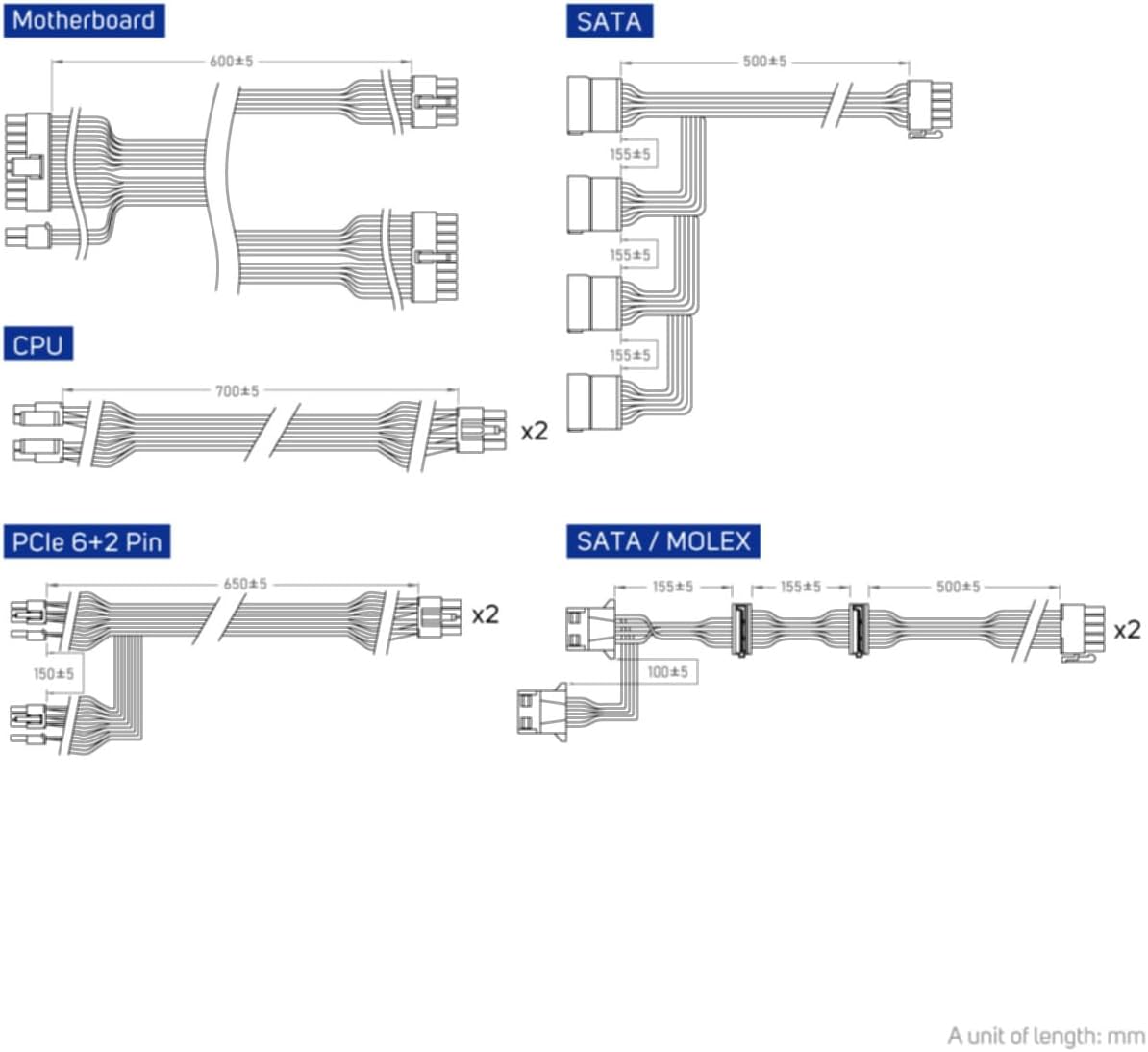
Figure 5.2: Diagram illustrating the various modular cables included and their approximate lengths (in mm).
- Závěrečné kontroly:
- Ensure all cables are securely connected and routed to avoid obstructing airflow.
- Zavřete skříň počítače.
- Připojte napájecí kabel ke zdroji napájení a poté do uzemněné zásuvky.
6. Návod k obsluze
After installation, you can power on your system:
- Ensure the power switch on the back of the power supply is in the "ON" (I) position.
- Stiskněte tlačítko napájení na skříni počítače.
- The power supply will provide stable power to your components.

Obrázek 6.1: Zadní view of the power supply, showing the AC power input and the main power switch.
Bridge Time Importance: The FSP VITA GM 650W adheres to the recommended ATX 3.1 bridge time values. This feature ensures the power supply can maintain a stable output voltage for a critical duration after a power interruption, preventing system instability or damage during sudden power fluctuations or outages.
7. Údržba
Pro zajištění optimálního výkonu a dlouhé životnosti vašeho napájecího zdroje:
- Čištění prachu: Pravidelně čistěte prach z mřížky ventilátoru a větracích otvorů napájecího zdroje pomocí stlačeného vzduchu. Před čištěním se ujistěte, že je systém vypnutý a odpojený od sítě.
- Správa kabelů: Maintain good cable management inside your PC case to ensure proper airflow and prevent overheating.
- Podmínky prostředí: Provozujte napájecí zdroj v doporučených teplotních a vlhkostních rozmezích.
8. Řešení problémů
If you encounter issues with your FSP VITA GM 650W power supply, refer to the following common problems and solutions:
| Problém | Možná příčina | Řešení |
|---|---|---|
| Systém se nezapne. |
|
|
| Systém se zapne, ale okamžitě se vypne. |
|
|
| Neobvyklé zvuky ze zdroje napájení. |
|
|
If the problem persists after trying these solutions, please contact FSP customer support for further assistance.
9. Specifikace
| Funkce | Detail |
|---|---|
| Číslo modelu | 790980 |
| Značka | FSP |
| Wattage | 650W |
| Verze ATX | 3.1 |
| Certifikace účinnosti | 80 PLUS Gold |
| Hmotnost položky | 2.72 kilogramů (5.98 liber) |
| Výrobce | FSP |
| Datum první dostupnosti | 15. srpna 2024 |
10. Záruka a podpora
For warranty information, technical support, or service inquiries, please refer to the official FSP webnebo se obraťte na jejich zákaznický servis. Uschovejte si doklad o koupi pro případ reklamace.
Oficiální FSP Webmísto: www.fsp-group.com
11. Recyklace a likvidace
Please dispose of this product responsibly. Electronic waste should not be disposed of with household waste. Contact your local authorities or recycling center for information on proper disposal methods for electronic components.


