1. Úvod
Thank you for choosing the JXJHOVV Digital Alarm Clock D058. This manual provides detailed instructions for setting up, operating, and maintaining your new alarm clock. Please read this manual thoroughly before use to ensure proper functionality and to maximize your product experience.

Image 1.1: The JXJHOVV Digital Alarm Clock D058 displaying time, with a smartphone connected for charging.
2. Obsah balení
Prosím, ověřte, zda jsou v balení přítomny všechny položky:
- JXJHOVV Digital Alarm Clock D058
- Napájecí kabel USB
- Návod k použití
- Odnímatelná základna
Note: A power adapter (USB wall charger) is not included and must be supplied by the user.
3. Konec produktuview
The JXJHOVV Digital Alarm Clock D058 features a large 6.7-inch LED mirror display, dual alarms, adjustable brightness and volume, and convenient USB/Type-C charging ports. It is designed for versatile placement, functioning as both a tabletop and wall-mounted clock.

Image 3.1: Key features of the JXJHOVV Digital Alarm Clock D058.
Vlastnosti displeje:
- 6.7-inch LED Mirror Display: Provides clear time visibility and can be used as a makeup mirror.
- 4stupňové nastavení jasu: Customize display intensity.
- Automatic Night Mode: Dims display automatically from 18:00 to 06:00.
- 12/24hodinový formát: Switch between standard and military time.

Image 3.2: The 6.7-inch mirror display surface of the alarm clock.
4. Nastavení
4.1 Připojení napájení
- Connect the provided USB power cable to the DC 5V input port on the back of the alarm clock.
- Plug the other end of the USB cable into a compatible USB power adapter (not included) and then into a wall outlet.
- Displej se rozsvítí, což znamená, že hodiny jsou zapnuté.
4.2 Memory Battery Installation
The clock uses a CR2032 button cell battery (included) for time memory retention during power outages. This battery does not power the display.
- Najděte přihrádku na baterie na zadní straně hodin.
- Otevřete kryt přihrádky.
- Vložte baterii CR2032 kladným pólem (+) nahoru.
- Bezpečně zavřete kryt bateriového prostoru.
4.3 Možnosti umístění
The clock can be used on a tabletop or mounted on a wall.
- Stolní deska: Attach the detachable base to the bottom of the clock for stable placement on any flat surface.
- Montáž na stěnu: Use the hanging hole on the back of the clock to mount it on a wall (mounting hardware not included).
5. Návod k obsluze
5.1 Nastavení času
- Press and hold the 'TIME SET' button (or similar button, refer to physical product for exact label) for 3 seconds to enter time setting mode. The hour digits will flash.
- Pro nastavení hodiny použijte tlačítka „+“ nebo „-“.
- Press 'TIME SET' again to confirm the hour and move to minute setting. The minute digits will flash.
- Use the '+' or '-' buttons to adjust the minute.
- Press 'TIME SET' a third time to confirm the minutes and exit time setting mode.
5.2 12/24hodinový formát
While in normal time display mode, press the 'TIME SET' button briefly to switch between 12-hour (with AM/PM indicator) and 24-hour formats.
5.3 Brightness Adjustment & Night Mode
Hodiny nabízejí 4 úrovní jasu displeje.

Image 5.1: Brightness levels and automatic night mode feature.
- Ruční nastavení: In normal time display mode, press the 'BRIGHTNESS' button (or similar) repeatedly to cycle through the 4 brightness levels (e.g., 100%, 75%, 50%, 25%, 0%).
- Noční režim: To activate or deactivate night mode, press and hold the 'BRIGHTNESS' button for 3 seconds. When active, the display will automatically dim to the lowest brightness level between 18:00 and 06:00.
5.4 Nastavení alarmů (duální alarmy)
Hodiny podporují dva nezávislé budíky (Budík 1 a Budík 2).

Image 5.2: The 5 distinct alarm modes available.
- Press the 'ALARM 1' button (or 'ALARM 2' for the second alarm). The alarm hour digits will flash.
- Use the '+' or '-' buttons to adjust the alarm hour.
- Press 'ALARM 1' (or 'ALARM 2') again to confirm the hour and move to minute setting. The alarm minute digits will flash.
- Use the '+' or '-' buttons to adjust the alarm minute.
- Press 'ALARM 1' (or 'ALARM 2') again to confirm the minutes and enter alarm mode selection.
- Use the '+' or '-' buttons to select one of the 5 alarm modes:
- 1-5 (Monday-Friday)
- 1-6 (Monday-Saturday)
- 1-7 (Every day)
- 6-7 (Saturday-Sunday)
- 1-1 (One day alarm)
- Press 'ALARM 1' (or 'ALARM 2') one last time to confirm the alarm mode and activate the alarm. An alarm icon will appear on the display.
5.5 Funkce odložení
When an alarm sounds, press the 'SNOOZE' button (often a large button on top) to temporarily silence the alarm for 9 minutes. The alarm will sound again after 9 minutes. To turn off the snooze and stop the alarm completely, press any other button.
5.6 Nastavení hlasitosti
The alarm volume can be set to two levels.

Image 5.3: Two levels of adjustable alarm volume.
While an alarm is sounding, or in alarm setting mode, press the 'VOLUME' button (or '+' button during alarm setting) to switch between the two volume levels (e.g., 67dB and 97dB).
5.7 Dual USB Charging Ports
The clock is equipped with two USB ports (one USB-A and one USB-C) for charging external devices.
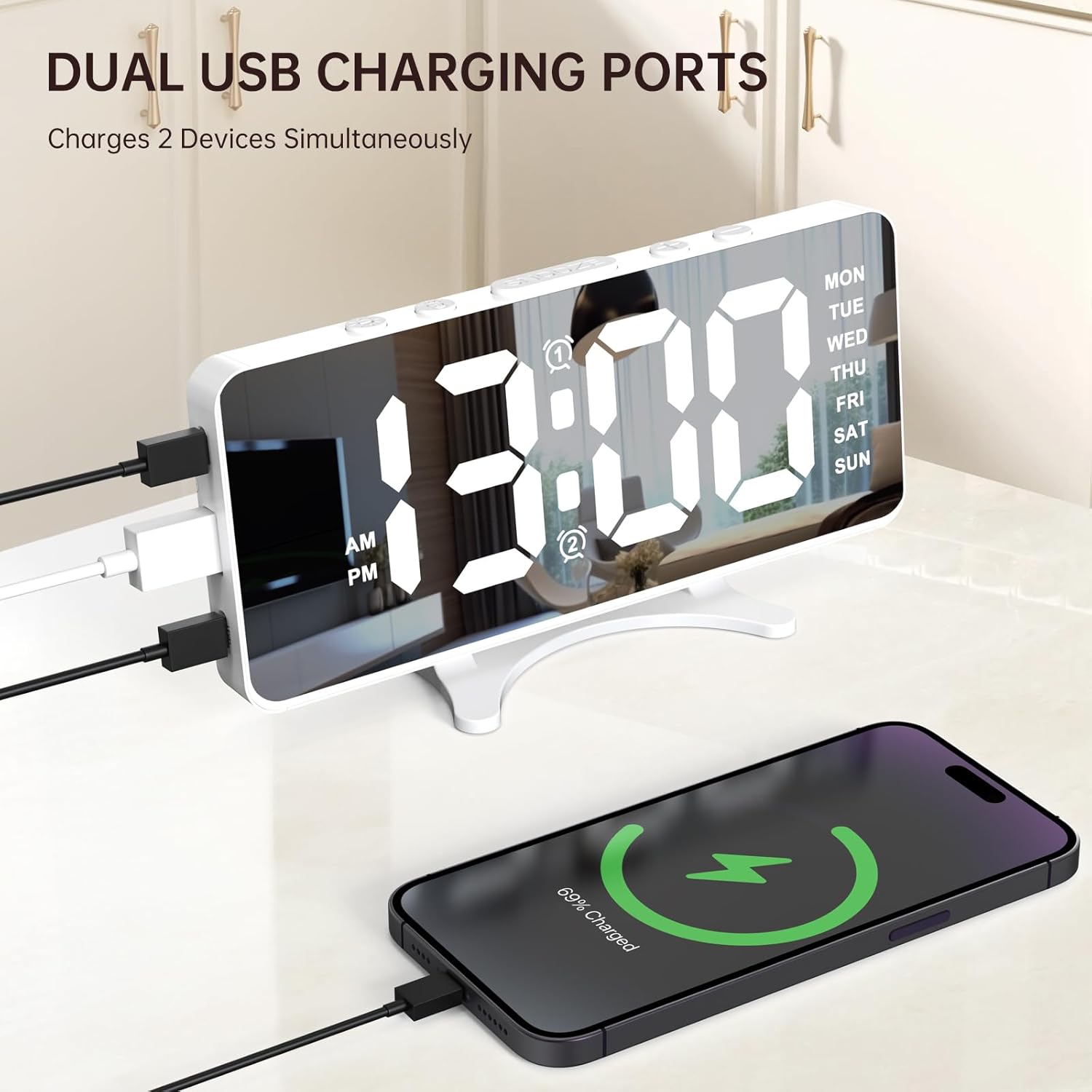
Image 5.4: Dual USB charging ports in use.
- Connect your device's charging cable to one of the USB ports on the side of the alarm clock.
- Ensure the alarm clock is connected to a power source for the charging ports to function.
- These ports are for charging only and do not transfer data.
6. Údržba
To ensure the longevity and optimal performance of your JXJHOVV Digital Alarm Clock D058, follow these maintenance guidelines:
- Čištění: Use a soft, dry cloth to wipe the display and body of the clock. Avoid abrasive cleaners or solvents, as they may damage the surface.
- Odstranění prachu: Regularly dust the clock to prevent accumulation, especially around buttons and ports.
- Vyhněte se tekutinám: Keep the clock away from water and other liquids. Do not immerse it in water.
- Teplota a vlhkost: Store and operate the clock in a dry environment at room temperature. Avoid extreme temperatures or high humidity.
7. Řešení problémů
If you encounter issues with your alarm clock, please refer to the following common problems and solutions:
| Problém | Možná příčina | Řešení |
|---|---|---|
| Zobrazení hodin je vypnuté. | Žádné připojení k napájení. | Ensure the USB power cable is securely connected to the clock and a working power adapter/outlet. |
| Čas/nastavení se resetují po výpadku napájenítage. | CR2032 memory battery is not installed or depleted. | Install a fresh CR2032 battery or replace the existing one. |
| Alarm se nespustí. | Budík není aktivovaný nebo je nesprávně nastavený. | Verify alarm settings (time, mode) and ensure the alarm icon is displayed. Check volume level. |
| Cannot adjust time/alarm. | Buttons unresponsive or incorrect mode. | Ensure you are pressing and holding the correct button to enter setting mode. Try unplugging and replugging the power. |
| Nabíjecí porty USB nefungují. | Hodiny nejsou napájené nebo je problém s kabelem. | Confirm the clock is powered. Try a different USB cable or device to rule out cable/device issues. |
8. Specifikace
- Značka: JXJHOVV
- Číslo modelu: D058
- Typ displeje: LED
- Velikost displeje: 6.7 palců
- Rozměry produktu: 6.7 cm Š x 3.35 cm V
- Zdroj napájení: Elektrický s kabelem (DC 5V)
- Battery for Memory: CR2032 (součástí balení)
- Technologie připojení: USB (USB-A and Type-C charging ports)
- Materiál: Plast
- Hmotnost položky: 6.4 unce (0.18 kilogramů)
- Typ montáže: Tabletop / Wall Mount
- Speciální vlastnosti: Large Display, Dual Alarms, 4-Level Brightness, Night Mode, 2-Level Volume, Dual USB Charging Ports
9. Záruka a podpora
The JXJHOVV Digital Alarm Clock D058 comes with a Doživotní záruka. For any product inquiries, technical support, or warranty claims, please contact JXJHOVV customer service through the retailer's platform or visit the official JXJHOVV store online.
We are committed to providing high-quality products and excellent customer service. Your satisfaction is our priority.