1. Důležité bezpečnostní pokyny
Před použitím tohoto běžeckého pásu si prosím pečlivě přečtěte všechny pokyny. Uschovejte si tento návod pro budoucí použití.
- Běžecký pás vždy umístěte na rovný a stabilní povrch.
- Zajistěte dostatečný volný prostor kolem běžeckého pásu (alespoň 2 metry za ním a 0.6 metru po každé straně).
- Během provozu udržujte děti a domácí zvířata mimo běžecký pás.
- Noste vhodnou sportovní obuv a oblečení.
- Nepoužívejte běžecký pás, pokud má poškozený kabel nebo zástrčku, nebo pokud nefunguje správně.
- Maximální nosnost uživatele: 130 kg.
- Always use the safety key. Attach it to your clothing before starting your workout.
2. Konec produktuview
The TOPUTURE 2-in-1 Treadmill is designed for both walking and light running, offering a versatile fitness solution for home or office use. It features a powerful yet quiet motor, manual incline adjustment, and smart app connectivity.

Image: Two individuals demonstrating the TOPUTURE 2-in-1 Treadmill in use, highlighting its dual functionality for walking while working and running.
3. Nastavení a montáž
This TOPUTURE 2-in-1 Treadmill features a space-saving design that requires minimal assembly. It is ready for use almost immediately out of the box.
3.1 Vybalení
- Opatrně vyjměte běžecký pás z obalu.
- Check all components against the packing list to ensure everything is present.
3.2 Umístění
- Umístěte běžecký pás na pevný a rovný povrch.
- Ujistěte se, že je napájecí kabel snadno přístupný a není zablokovaný.
3.3 Ruční nastavení sklonu
The treadmill offers manual incline settings to increase workout intensity. The original incline is 2°, and can be adjusted to 4.7° (9% incline rate).
- Locate the incline adjustment bolts at the rear of the treadmill.
- Pull out the bolt and turn the slope block to the desired position.
- Insert the bolt into the upper hole to secure the incline.

Image: A visual guide illustrating the two-step process for manually adjusting the treadmill's incline.
4. Návod k obsluze
Your treadmill can be controlled via its LED display, remote control, or a smart application.
4.1 Zapnutí/vypnutí
- Připojte napájecí kabel do vhodné zásuvky.
- Flip the main power switch located on the treadmill base to the 'ON' position.
- To turn off, flip the main power switch to 'OFF' and unplug the unit.
4.2 Using the LED Display and Remote Control
The multi-functional LED display shows real-time data including speed, distance, time, and calories burned. The remote control allows for easy adjustment of speed and modes.

Image: The treadmill's clear LED display provides real-time workout metrics, complemented by a convenient remote control for adjustments.
- Start/Stop: Press the 'Start' button on the display or remote to begin. Press 'Stop' to pause or end your workout.
- Nastavení rychlosti: Use the '+' and '-' buttons on the remote or display to increase or decrease speed (1-10 km/h).
- programy: Select from 12 preset programs for varied workout routines.
- Dočasné pozastavení: Use the 'Pause' button to temporarily stop your workout without losing data.
4.3 Připojení chytrých aplikací
Connect your treadmill to fitness apps like 'FITSHOW' via Bluetooth (Bluetooth name: TP3) for enhanced training courses and data tracking.
- Ujistěte se, že je na vašem mobilním zařízení povoleno Bluetooth.
- Open the 'FITSHOW' app (or compatible app) and search for 'TP3'.
- Pair your device with the treadmill.
- Follow the app's instructions to access various training courses and monitor your progress.

Image: The treadmill connects to fitness apps, allowing users to engage with virtual training courses and track their performance.
5. Údržba
Pravidelná údržba zajistí dlouhou životnost a optimální výkon vašeho běžeckého pásu.
5.1 Čištění
- Před čištěním odpojte běžecký pás ze zásuvky.
- Wipe down the display and exterior surfaces with a damp tkanina. Vyhněte se abrazivním čisticím prostředkům.
- Regularly vacuum under the treadmill to prevent dust buildup.
5.2 Mazání řemenu
The running belt requires periodic lubrication to reduce friction and extend its lifespan. Use silicone-based treadmill lubricant.
- Zvedněte okraj běžeckého pásu.
- Apply a small amount of lubricant to the center of the deck, underneath the belt.
- Běžecký pás nechte několik minut běžet nízkou rychlostí, aby se mazivo rovnoměrně rozprostřelo.
- Refer to the lubricant manufacturer's instructions for frequency, typically every 3-6 months depending on usage.
5.3 Nastavení pásu
Pokud se běžecký pás posouvá na jednu stranu nebo prokluzuje, může být nutné jej seřídit.
- Consult the detailed instructions in the full product manual for specific belt tension and alignment procedures.
6. Řešení problémů
If you encounter issues with your treadmill, refer to the following common problems and solutions.
| Problém | Možná příčina | Řešení |
|---|---|---|
| Běžecký pás se nezapne. | Power cord not plugged in, main switch off, safety key not in place. | Check power connection, ensure main switch is ON, insert safety key. |
| Běžecký pás prokluzuje. | Příliš volný řemen, nedostatečné mazání. | Adjust belt tension (refer to full manual), lubricate the belt. |
| Neobvyklý hluk během provozu. | Loose parts, belt friction, motor issue. | Check for loose bolts, lubricate belt, contact customer support if motor noise persists. |
| Selhání připojení aplikace. | Bluetooth off, app not updated, incorrect pairing. | Ensure Bluetooth is on, update app, re-pair with 'TP3'. |
If the problem persists after attempting these solutions, please contact TOPUTURE customer support.
7. Specifikace
| Funkce | Specifikace |
|---|---|
| Značka | TOPUTURE |
| Výkon motoru | 2.5 HP (Peak 3.0 HP) |
| Rozsah rychlosti | 1 - 10 km/h |
| Naklonit | Manual (0%, 5%, 10% equivalent to 2° and 4.7°/9%) |
| Běžící povrch | 1000 x 400 mm (přibližně 39.4 x 15.7 palce) |
| Maximální hmotnost uživatele | 130 kg (cca 286 lb) |
| Úroveň hluku | < 45 dB |
| Rozměry produktu | 120.8 x 52.6 x 12.5 cm (přibližně 47.6 x 20.7 x 4.9 palce) |
| Hmotnost produktu | 21.69 kg (cca 47.8 lb) |
| Konektivita | Bluetooth (TP3) for APP control |
| Programy | 12 přednastavených programů |
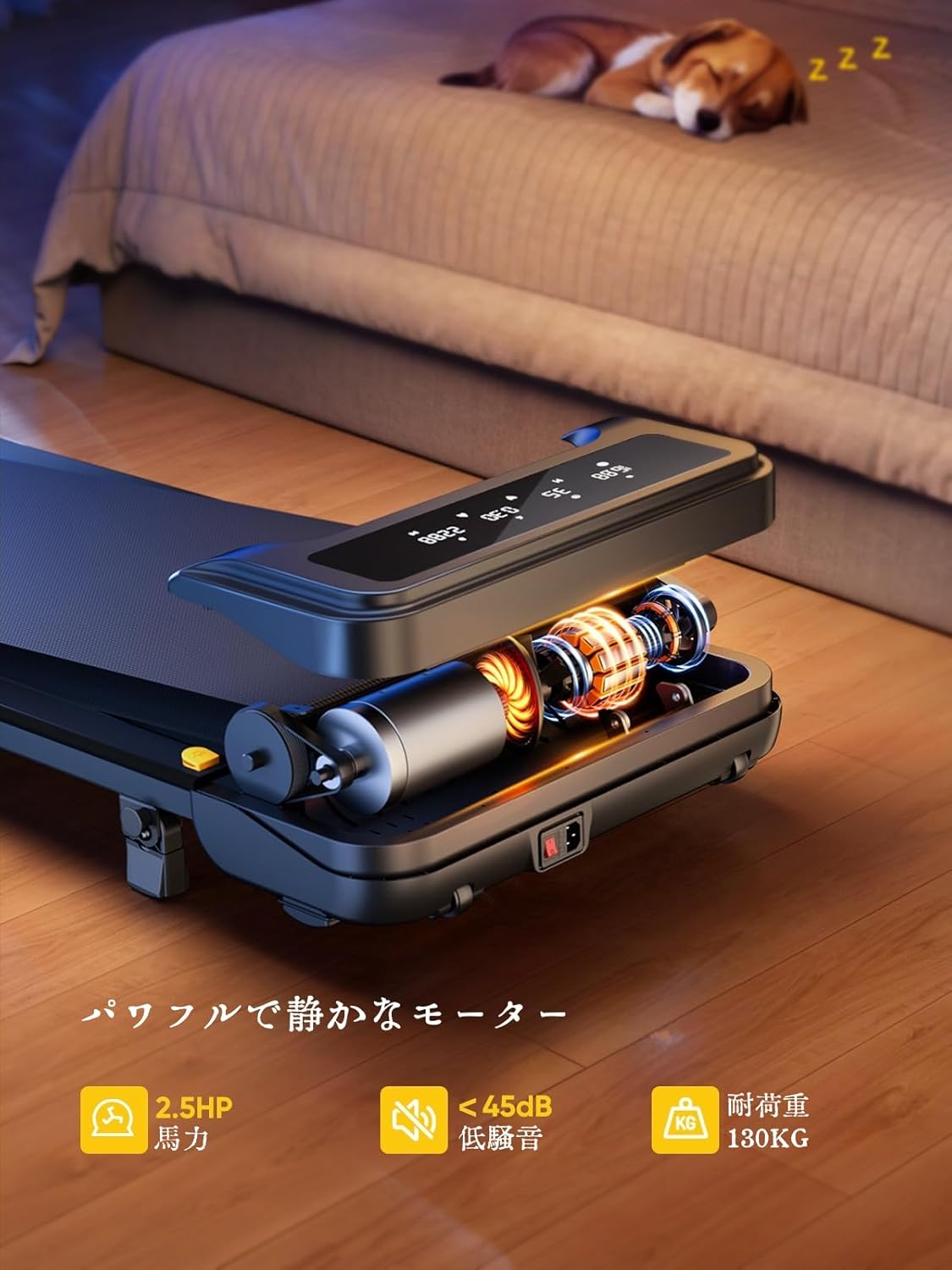
Image: The treadmill features a powerful 2.5 HP motor, operates quietly below 45dB, and supports users up to 130 kg.

Image: The compact design of the treadmill, highlighting its running surface dimensions for space efficiency.
8. Skladování a přenositelnost
The TOPUTURE 2-in-1 Treadmill is designed for easy storage and portability, making it ideal for small spaces.
- The treadmill is lightweight (18.5 kg / 40.7 lbs) and features built-in wheels for effortless movement.
- It can be stored upright or flat under a bed or sofa when not in use, saving valuable space.
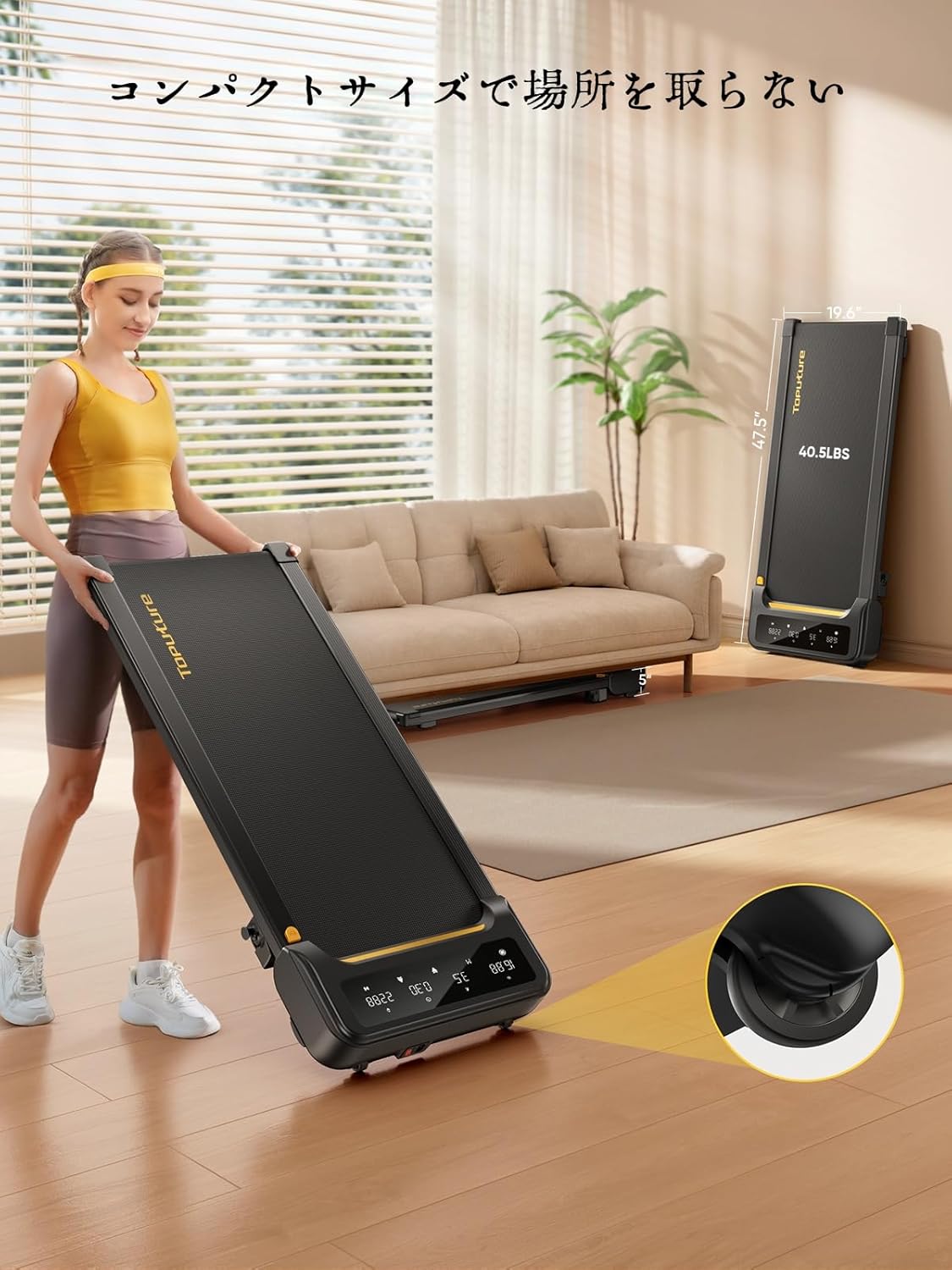
Image: A woman demonstrates the ease of moving the treadmill, highlighting its portability with integrated wheels.
9. Záruka a podpora
TOPUTURE provides a warranty for this product. Please refer to your purchase documentation for specific warranty terms and conditions.
9.1 Zákaznická podpora
For any questions, technical assistance, or warranty claims, please contact TOPUTURE customer support through the retailer where you purchased the product or visit the official TOPUTURE webmísto.
- Online podpora: Visit the TOPUTURE brand store on Amazon or the official webstránky s nejčastějšími dotazy a kontaktními informacemi.
- E-mailová podpora: E-mailovou adresu zákaznického servisu naleznete na obalu produktu nebo v záručním listu.


