1. Konec produktuview
This CAMECHO car stereo is designed for Suzuki Swift models from 2011 to 2017. It features a 9-inch IPS touchscreen, runs on Android 13, and includes 6GB RAM and 128GB ROM. Key functionalities include wireless Carplay and Android Auto, GPS navigation, Bluetooth 5.0, FM/RDS radio, DSP sound processing, Mirror Link, and split-screen capability. A reversing camera and external microphone are included for enhanced functionality.

Image: Key features including Android 13, 6GB RAM + 128GB ROM, 8-Core Processor, and 2.5D IPS Screen.
2. Obsah balení
Ověřte, zda jsou v balení přítomny všechny níže uvedené položky:
- 1 x Car Stereo (with frame)
- 1 x Rádiová anténa
- 1x GPS anténa
- 1 x RCA kabel
- 2 x USB kabely
- 1 x Reversing Camera (with cable)
- 1 x Uživatelská příručka
- Instalační nástroj
- Externí mikrofon
- Accessories (brackets, etc.)

Image: Product dimensions, rear panel connections, and included accessories list.
3. Instalační příručka
Doporučuje se odborná instalace. Před zahájením instalace se ujistěte, že je vozidlo odpojeno od napájení. Správné zapojení naleznete ve schématu zapojení.
3.1 Zapojení kabeláže
- Napájecí kabel: Connect the main power harness to the vehicle's wiring. Ensure correct positive, negative, and ACC (accessory) connections.
- RCA kabely: Připojení pro audio výstup (např. externí amplifier) and video input/output.
- USB kabely: Connect the provided USB cables for external USB devices or charging.
- GPS anténa: Namontujte anténu GPS na místo s volným view oblohy, obvykle na palubní desce nebo pod čelním sklem.
- Anténa rádia: Připojte anténu rádia vozidla k jednotce.
- Couvací kamera: Connect the reversing camera cable to the designated input. Ensure the trigger wire is connected to the vehicle's reverse light circuit.
- Externí mikrofon: Plug in the external microphone for clearer hands-free calls.
- Ovládání na volantu: Connect the steering wheel control wires according to your vehicle's wiring diagram. Configuration may be required in the unit's settings.
3.2 Montáž jednotky
Secure the car stereo unit into the dashboard opening using the provided brackets and screws. Ensure a snug fit and proper alignment with the vehicle's interior.
4. Základní obsluha
4.1 Zapnutí/vypnutí
The unit will power on automatically when the vehicle's ignition is turned to the ACC or ON position. To power off, turn off the vehicle's ignition.
4.2 Rozhraní dotykové obrazovky
Navigate the system using the 9-inch IPS touchscreen. Tap icons to open applications, swipe to scroll, and use pinch-to-zoom gestures where supported.
4.3 Ovládání hlasitosti
Adjust the volume using the on-screen controls or the vehicle's steering wheel controls, if configured.
5. Klíčové vlastnosti
5.1 Bezdrátové Carplay a Android Auto
Connect your compatible smartphone wirelessly to access navigation, music, messages, and more directly on the car stereo display. After initial pairing, the connection will be automatic.
- Ujistěte se, že je na vašem smartphonu povoleno Bluetooth a Wi-Fi.
- On the car stereo, open the Carplay or Android Auto application.
- Postupujte podle pokynů na obrazovce a spárujte zařízení.
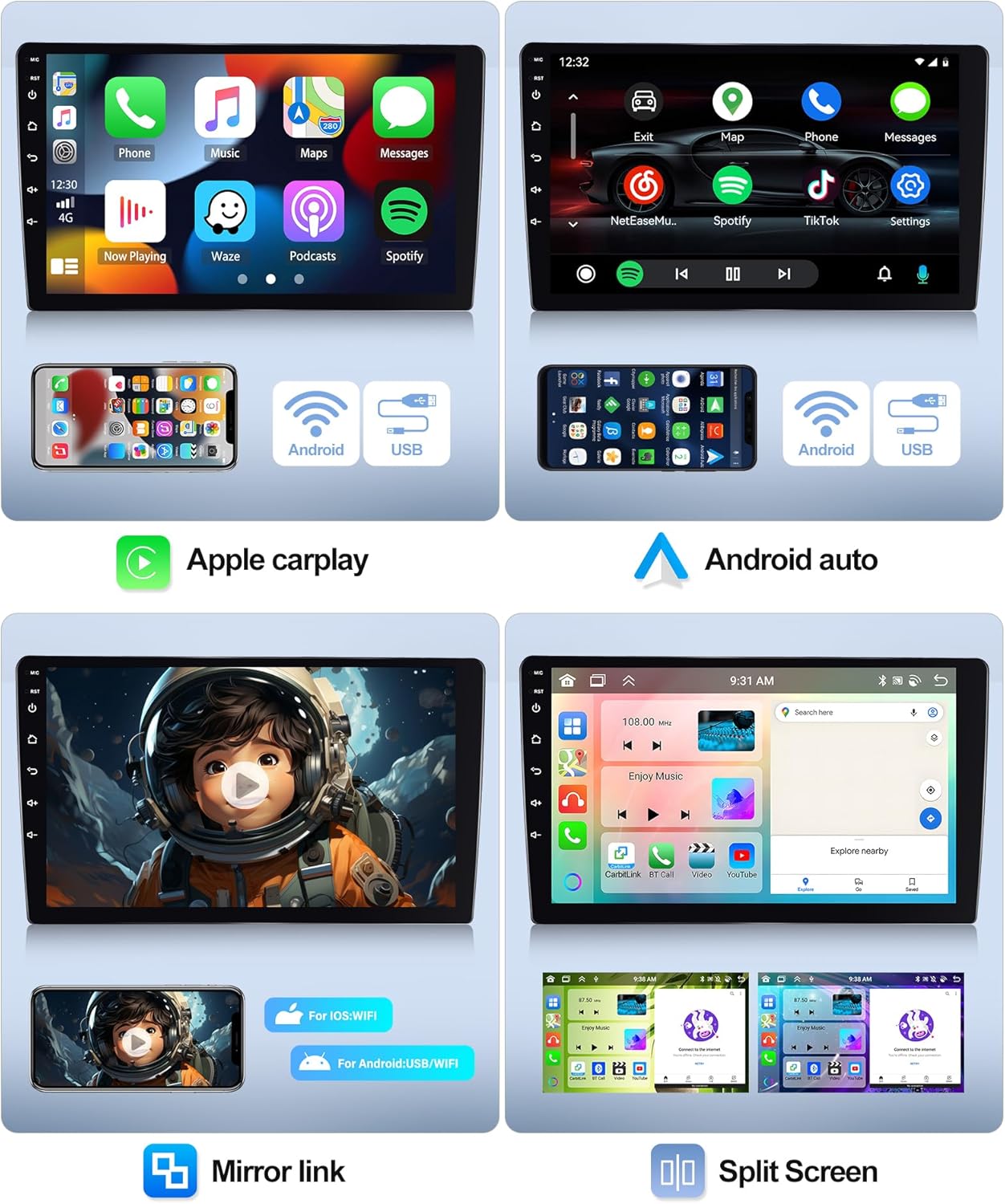
Image: Wireless Carplay, Android Auto, and Mirror Link features with split screen functionality.
5.2 GPS navigace a Wi-Fi
The unit comes with pre-installed offline maps. Connect to a Wi-Fi network to download additional map data, receive real-time traffic updates, and access online navigation services.
- Chcete-li se připojit k Wi-Fi, přejděte na Nastavení > Síť a internet > Wi-Fi. Select your network and enter the password.
- Open the Navigation app to set your destination.

Image: GPS Navigation and WiFi connectivity.
5.3 Bluetooth 5.0
Spárujte svůj smartphone přes Bluetooth pro hands-free volání a streamování zvuku.
- On the car stereo, open the Bluetooth app.
- Zapněte Bluetooth v telefonu a vyhledejte dostupná zařízení.
- Vyberte autorádio ze seznamu a potvrďte párování.
5.4 FM/RDS rádio
Access FM radio stations and receive RDS (Radio Data System) information, such as station names and traffic announcements.
- Otevřete aplikaci Rádio.
- Use the scan function to find stations or manually tune to a frequency.
- Uložte si své oblíbené stanice pro rychlý přístup.

Image: Bluetooth connectivity, DSP EQ settings, FM/RDS radio, and Internet radio.
5.5" DSP (digitální zvukový procesor)
Utilize the built-in DSP to customize audio settings, including equalizer presets, balance, and fader, for an optimized listening experience.
5.6 Zrcadlový odkaz
Mirror your smartphone's screen onto the car stereo display. Supports one-way control for iOS devices and two-way control for Android devices.
- Open the Mirror Link app on the stereo.
- Follow the instructions for connecting your specific phone model via USB or Wi-Fi.
5.7 Rozdělená obrazovka
Spouštějte na obrazovce dvě aplikace současně, například navigaci a hudbu, pro vylepšený multitasking.
- While an app is open, long-press the recent apps button or drag the app to one side of the screen (depending on UI).
- Select a second app to open on the other side.
5.8 Funkce couvací kamery
When the vehicle is shifted into reverse gear, the display will automatically switch to the reversing camera view, poskytující pomoc při parkování a manévrování.
6. Specifikace
| Funkce | Specifikace |
|---|---|
| Systém | Android 13 |
| Čipová sada | 8257 (8-Core) |
| Velikost obrazovky | 9 palců |
| Paměť (RAM+ROM) | 6GB RAM + 128GB ROM |
| Rozlišení obrazovky | 1280*720 |
| Rádiový čip | 8035 |
| Výkon | 4*45W |
| Verze Bluetooth | 5.0 |
| Pracovní teplota | -20 ℃ až 75 ℃ |
| Ovládání na volantu | Podpora |
| Moc Ampliifier Chip | YD7388 |
| Rozhlasové pásmo | FM/RDS |
| Video výstup | Podpora |
| Reverzní vstup | AHD/CVBS |
| Externí mikrofon | Podpora |
| Rozdělená obrazovka | Podpora |
| Mapy | Vestavěné offline mapy (pro stahování dat je vyžadováno připojení k internetu) |
| WiFi | Podpora |
| USB | Duální USB rozhraní |
| Formát zvuku | APE/FLAC/WAV/MP3/WMA atd |
| Formát videa | MKV/RMVB/AVI/MP4/MDV atd |
| Formát obrázku | PNG/JPEG/JPG/GIF/WBMP/BNP atd |
| Klíčové slovo pro tovární nastavení | 1234 |
| Podporované jazyky | Čínština/Angličtina/Francouzština/Italština/Korejština/Japonština/Arabština/Španělština/Portugalština/Ruština/Turečtina/Vietnamština/Hebrejština/Polština/Němčina |
7. Řešení problémů
Pokud narazíte na problémy s autorádiem, podívejte se na následující běžné problémy a jejich řešení:
- Bez napájení: Check all power connections, including the main power harness, ACC wire, and ground wire. Ensure the vehicle's fuse for the stereo is intact.
- Žádný zvuk: Verify speaker connections. Check volume levels and ensure the mute function is not active. Confirm RCA audio outputs are correctly connected if using an external ampživější.
- Ztráta signálu GPS: Ujistěte se, že je anténa GPS namontována na místě s volným view oblohy a je bezpečně připojen.
- Problémy s připojením Bluetooth: Ujistěte se, že je Bluetooth zapnutý na stereo i v telefonu. Smažte předchozí párování a zkuste se znovu připojit.
- Dotyková obrazovka nereaguje: Try restarting the unit by turning the vehicle's ignition off and on. If the issue persists, a factory reset might be necessary (Factory Setting Keyword: 1234).
- Couvací kamera se nezobrazuje: Check the camera's power and video signal connections. Ensure the reverse trigger wire is correctly connected to the vehicle's reverse light.
V případě přetrvávajících problémů kontaktujte zákaznickou podporu.
8. Údržba
Abyste zajistili dlouhou životnost a optimální výkon vašeho autorádia, dodržujte tyto pokyny pro údržbu:
- Čištění: K čištění obrazovky a vnějšího povrchu používejte měkký, suchý hadřík. Nepoužívejte abrazivní čisticí prostředky ani rozpouštědla, která by mohla poškodit povrch.
- Aktualizace softwaru: Periodically check for available software updates to ensure the system runs efficiently and has the latest features. Updates can typically be found on the manufacturer's webwebu nebo prostřednictvím nastavení jednotky, pokud je připojena k Wi-Fi.
- Teplota: Nevystavujte jednotku extrémním teplotám po delší dobu.
9. Informace o záruce
This product comes with a manufacturer's warranty. Key warranty terms include:
- Záruční doba: 2 roky od data nákupu.
- Vrácení: 30denní lhůta pro vrácení zboží od data nákupu.
- Support Response: Manufacturer aims to respond to inquiries within 24 hours.
Uschovejte si prosím doklad o koupi pro uplatnění záruky.
10. Zákaznická podpora
For technical assistance, troubleshooting, or warranty inquiries, please contact CAMECHO customer support:
- E-mail: bs_support21@126.com
Please provide your product model number and a detailed description of the issue when contacting support.

Image: Customer support representative available for online assistance.


