1. Úvod
Welcome to the user manual for your new FLEXISPOT 63x28 Inch Dual Motor Electric Standing Desk. This manual provides essential information for the safe assembly, operation, maintenance, and troubleshooting of your desk. Please read it thoroughly before use and retain it for future reference.
2. Bezpečnostní pokyny
- Před montáží se ujistěte, že jsou všechny součásti přítomny a nepoškozené. Nepoužívejte, pokud některé součásti chybí nebo jsou poškozené.
- Během práce držte děti a domácí zvířata v dostatečné vzdálenosti od stolu, abyste předešli zranění.
- Do not place hands or other body parts near moving parts of the desk during height adjustment.
- Ujistěte se, že stůl je umístěn na rovném povrchu, aby se nepřevrátil.
- Nepřetěžujte stůl. Maximální nosnost naleznete ve specifikacích.
- Keep all electrical cords organized and away from moving parts to prevent damage or entanglement.
- Před čištěním nebo jakoukoli údržbou odpojte stůl ze zásuvky.
- Only use the desk for its intended purpose as a workstation.
3. Obsah balení
Ověřte, zda jsou v balení obsaženy všechny níže uvedené položky:
- Desktop Surface (Black)
- Desk Frame (Black, including dual motors and lifting columns)
- Control Panel with Memory Controller
- Napájecí adaptér a kabel
- Montážní materiál (šrouby, nástroje atd.)
- Návod k použití

Obrázek: Overview of the FLEXISPOT 63x28 Inch Dual Motor Electric Standing Desk, showing the desktop, frame, and control panel.
4. Pokyny k nastavení
4.1 Vybalení
Carefully remove all components from the packaging. Place them on a soft, clean surface to prevent scratches or damage during assembly. Keep all packaging materials until assembly is complete and you are satisfied with the product.
4.2 Sestavení rámu
Follow the detailed diagrams provided in the separate assembly guide to connect the lifting columns to the crossbar and attach the footings. Ensure all screws are tightened securely.
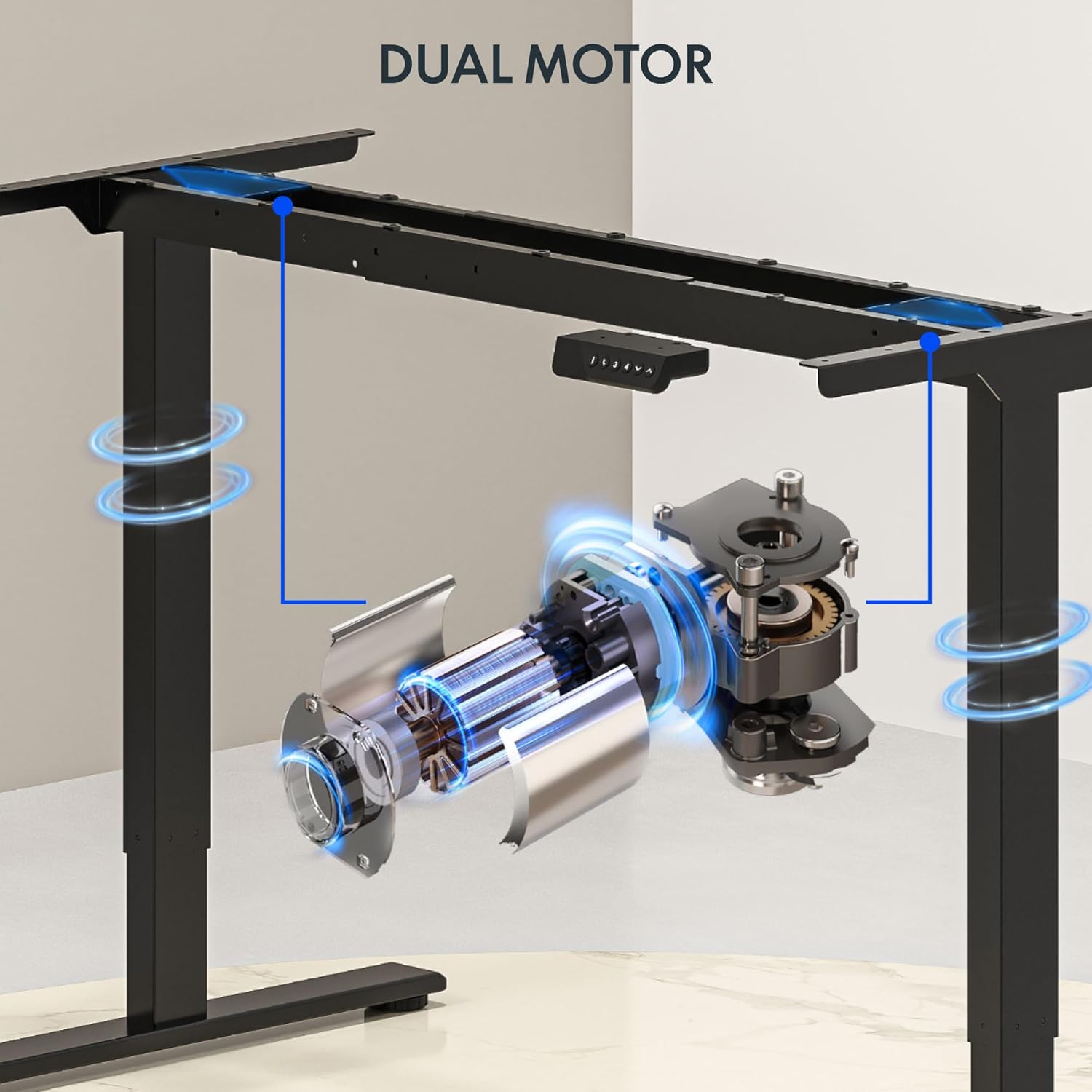
Obrázek: Podrobný view of the dual motor desk frame, illustrating the motor placement and structural components.
4.3 Připevnění pracovní desky
Carefully place the desktop upside down on a soft surface. Align the assembled frame with the pre-drilled holes on the desktop. Secure the desktop to the frame using the provided screws. Once secured, carefully flip the desk upright with assistance.
4.4 Connecting the Control Panel and Power
Connect the control panel cable to the control box, and then connect the power adapter to the control box. Plug the power cable into a standard electrical outlet. The desk is now ready for initial operation.

Image: Close-up of the desk's control panel, showing the LED display and buttons for height adjustment and memory presets.
Video: Demonstrates the dual-motor strength and smooth operation of the FLEXISPOT standing desk, highlighting its robust design and functionality.
5. Návod k obsluze
5.1 Nastavení výšky
- Stiskněte tlačítko Nahoru (∧) tlačítko pro zvednutí stolu.
- Stiskněte tlačítko Dolů (∨) tlačítko pro spuštění stolu.
- Uvolněte tlačítko v požadované výšce. LED displej zobrazí aktuální výšku.
5.2 Using Memory Presets
The control panel features four memory presets (1, 2, 3, 4) to save and recall your preferred sitting and standing heights.
- Nastavte stůl do požadované výšky pomocí tlačítek Nahoru/Dolů.
- Stiskněte tlačítko „M“ button (or similar memory set button, indicated by 'i' on some models) once. The display will flash.
- Immediately press one of the number buttons (1, 2, 3, or 4) to save the current height to that preset.
- To recall a saved height, simply press the corresponding number button (1, 2, 3, or 4). The desk will automatically move to the saved position.

Image: Close-up of the memory controller, highlighting the numbered preset buttons and the up/down controls for precise height adjustments.
5.3 Protikolizní systém
The desk is equipped with an anti-collision system. If the desk encounters an obstacle during height adjustment, it will automatically stop and reverse slightly to prevent damage. This feature enhances safety during operation.
6. Údržba
- Čištění: Otřete povrch stolu a rám měkkým hadříkemamp hadříkem. Nepoužívejte abrazivní čisticí prostředky ani agresivní chemikálie, které by mohly poškodit povrchovou úpravu.
- Inspekce: Regularly check all screws and connections to ensure they are tight. Re-tighten if necessary.
- Správa kabelů: Ensure all cables are neatly organized and not pinched or tangled, especially during height adjustments.
- Napájecí kabel: Zkontrolujte napájecí kabel, zda nevykazuje známky poškození. Pokud je poškozen, přestaňte jej používat a kontaktujte zákaznickou podporu.
7. Řešení problémů
| Problém | Možná příčina | Řešení |
|---|---|---|
| Stůl se nehýbe. | Power cable disconnected; motor cable loose; overload. | Check power connection; ensure all cables are securely plugged in; reduce weight on desk. |
| Stůl se pohybuje nerovnoměrně nebo vydává neobvyklé zvuky. | Nerovnoměrné zatížení; uvolněné spoje; ucpání. | Distribute weight evenly; check and tighten all screws; remove any obstructions. |
| Přednastavení výšky nefunguje. | Presets not properly set. | Re-program the memory presets following section 5.2. |
| Protikolizní systém se často spouští. | Obstacles in the path of movement; sensitivity setting too high. | Clear the area around the desk; consult the full manual for adjusting anti-collision sensitivity if available. |
If you encounter issues not listed here or if the solutions do not resolve the problem, please contact FLEXISPOT customer support.
8. Specifikace
| Funkce | Detail |
|---|---|
| Značka | FLEXISPOT |
| Model | 63x28 Inch Dual Motor Electric Standing Desk |
| Rozměry pracovní plochy | 63 cm Š x 28 cm H |
| Výškový rozsah | 28.3" až 47.6" |
| Maximální nosnost | 198 liber |
| Typ motoru | Duální motor |
| Ovládací panel | Memory Controller with 4 Presets |
| Materiál pro stolní počítače | Engineered Wood (Black Top) |
| Materiál rámu | Alloy Steel (Black Frame) |
| Speciální funkce | Dual Motor, 198 lbs Heavy-Duty Capacity, Memory Controller, 63"x28" Large Desktop |

Image: Diagram illustrating the dimensions of the FLEXISPOT 63x28 Inch Electric Standing Desk, including height range, width, and depth.
9. Záruka a podpora
9.1 Omezená záruka
This FLEXISPOT product comes with a limited warranty against defects in materials and workmanship. The specific terms and duration of the warranty may vary. Please refer to the warranty card included in your package or visit the official FLEXISPOT webpodrobné záruční informace.
The warranty typically covers the desk frame, motors, and control panel under normal use conditions. Damage resulting from misuse, accidents, unauthorized modifications, or improper assembly is not covered.
9.2 Zákaznická podpora
For technical assistance, warranty claims, or any questions regarding your FLEXISPOT standing desk, please contact our customer support team:
- Webmísto: www.flexispot.com
- E-mail: support@flexispot.com
- Telefon: (Viz obal vašeho produktu nebo webstránky s regionálními kontaktními čísly)
Please have your model number (B0F29ZD4DN) and purchase date ready when contacting support.


