1. Úvod
Welcome to the user manual for your new ASUS Zen AIO 23.8" FHD Touchscreen Desktop Computer. This manual provides essential information for setting up, operating, maintaining, and troubleshooting your device. Please read this manual thoroughly to ensure proper use and to maximize the performance and longevity of your computer.
The ASUS Zen AIO is an all-in-one desktop solution designed for efficiency and user experience, featuring a 23.8-inch Full HD touchscreen display, an AMD Ryzen 7 5825U processor, 16GB DDR4 RAM, and a 512GB PCIe NVMe M.2 SSD, running on Windows 11 Pro.
2. Konec produktuview
2.1. Obsah balení
- ASUS Zen AIO Desktop Computer
- Bezdrátová klávesnice
- Bezdrátová myš
- Napájecí adaptér
- Uživatelská příručka (tento dokument)
2.2. Identifikace součásti
Familiarize yourself with the various components and ports of your ASUS Zen AIO.

Obrázek 2.1: Přední strana View. The ASUS Zen AIO features a 23.8-inch Full HD touchscreen display with a narrow bezel, and a speaker bar integrated below the screen. The webcam is located at the top center of the display.
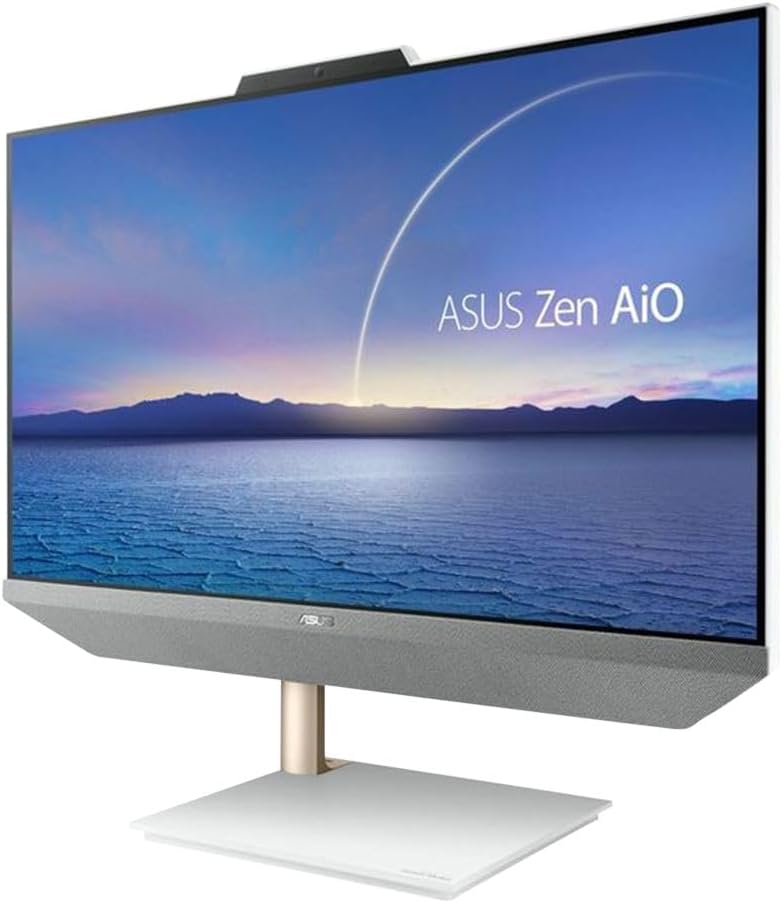
Obrázek 2.2: Úhlové View. This image shows the ASUS Zen AIO from an angled perspective, highlighting the slim profile and the elegant stand design.

Obrázek 2.3: Strana View s porty. The side of the ASUS Zen AIO features various connectivity options for peripherals and external devices.

Obrázek 2.4: Zpět View. The rear of the ASUS Zen AIO shows the ASUS logo and the main port cluster for power and additional connections.

Figure 2.5: Included Peripherals. The ASUS Zen AIO comes with a matching wireless keyboard and mouse for immediate use.
2.3. Funkce displeje a zvuku

Figure 2.6: Display Features. The 23.8-inch Full HD (1920x1080) WVA Anti-Glare Touch Screen offers a 93% screen-to-body ratio, 100% sRGB color gamut, IPS-level wide-view technology, and a 7.7 mm thin bezel for an immersive visual experience. It supports 10-point multi-touch input.

Figure 2.7: Audio Features. The ASUS Zen AIO is equipped with array microphones for clear voice input and Harman/Kardon certified upward-facing speakers with a 300cc chamber for rich audio output.
3. Nastavení
3.1. Vybalení a umístění
- Carefully remove the ASUS Zen AIO and its accessories from the packaging.
- Place the computer on a stable, flat surface with adequate ventilation. Ensure there is enough space around the device for heat dissipation.
- Neumísťujte počítač na přímé sluneční světlo nebo do blízkosti zdrojů tepla.
3.2. Připojení napájení
- Connect the power adapter to the power input port on the back of the ASUS Zen AIO.
- Zapojte napájecí kabel do uzemněné elektrické zásuvky.
3.3. Připojení periferií
- Bezdrátová klávesnice a myš: The included keyboard and mouse are pre-paired. Insert the USB receiver (usually found in the mouse or keyboard battery compartment) into an available USB port on the computer. Ensure batteries are installed in both devices.
- Externí zařízení: Connect any other external devices (e.g., external hard drives, printers) to the appropriate USB ports.
- Internetové připojení: For a wired network connection, connect an Ethernet cable from your router or modem to the LAN RJ-45 port on the back of the computer. For Wi-Fi, the device supports Wi-Fi 6 (802.11ax) and will guide you through setup during the initial Windows configuration.
3.4. Počáteční zapnutí a nastavení systému Windows
- Stiskněte tlačítko napájení, které se obvykle nachází na boku nebo zadní straně displeje.
- Follow the on-screen instructions to complete the Windows 11 Pro setup process. This includes selecting your region, connecting to a network, creating a user account, and configuring privacy settings.
4. Návod k obsluze
4.1. Pomocí dotykové obrazovky
- Klepněte na: Ekvivalent kliknutí myší.
- Dvojité klepnutí: Equivalent to a double-click.
- Stiskněte a podržte: Ekvivalent kliknutí pravým tlačítkem myši.
- Výpad: Move your finger across the screen to scroll or navigate.
- Přiblížení roztažením/roztažením prstů: Pro přiblížení nebo oddálení obsahu použijte dva prsty.
4.2. Windows 11 Pro Basics
- Nabídka Start: Access applications, settings, and power options from the Start button on the taskbar.
- Hlavní panel: Pin frequently used applications for quick access.
- Centrum akcí: Access quick settings and notifications by clicking the icons on the far right of the taskbar.
- Multitasking: Use Snap Layouts to organize multiple windows on your screen efficiently.
4.3. Řízení spotřeby
- Vypnout: Go to Start > Power > Shut down.
- Restartovat: Přejděte na Start > Napájení > Restartovat.
- Spát: Go to Start > Power > Sleep.
5. Údržba
5.1. Čištění zařízení
- Obrazovka: Použijte měkký hadřík, který nepouští vlákna dampened with water or a screen cleaner specifically designed for LCD/LED displays. Do not spray cleaner directly onto the screen.
- Podvozek: Wipe the exterior surfaces with a soft, dry cloth. Avoid abrasive cleaners or solvents.
- Větrání: Periodically check and clean the ventilation openings to prevent dust buildup, which can affect performance and lead to overheating. Use compressed air if necessary.
5.2. Aktualizace softwaru
Regularly update your Windows operating system and drivers to ensure optimal performance, security, and compatibility.
- Aktualizace systému Windows: Go to Start > Settings > Windows Update.
- Aktualizace ovladačů: Navštivte oficiální podporu ASUS website for the latest drivers for your Zen AIO model.
6. Řešení problémů
This section addresses common issues you might encounter with your ASUS Zen AIO.
6.1. Bez napájení
- Ujistěte se, že je napájecí adaptér bezpečně připojen k počítači i k funkční elektrické zásuvce.
- Otestujte zásuvku pomocí jiného zařízení, abyste se ujistili, že je pod proudem.
- Zkontrolujte napájecí adaptér, zda nevykazuje viditelné poškození.
6.2. Problémy se zobrazením
- If the screen is blank, ensure the computer is powered on and not in sleep mode.
- Adjust the display brightness settings in Windows.
- If using an external monitor, ensure the correct input source is selected on the external monitor.
6.3. Peripheral Not Responding
- Wireless Keyboard/Mouse: Check battery levels and ensure the USB receiver is properly inserted into a functional USB port. Try a different USB port.
- Další USB zařízení: Try connecting the device to a different USB port. Restart the computer.
6.4. Pomalý výkon
- Zavřete nepotřebné aplikace běžící na pozadí.
- Ujistěte se, že systém Windows a ovladače jsou aktuální.
- Zkontrolujte přítomnost malwaru nebo virů pomocí renomovaného antivirového softwaru.
- Zajistěte dostatek volného místa na SSD disku.
7. Specifikace
Below are the detailed technical specifications for the ASUS Zen AIO Desktop Computer.
| Funkce | Specifikace |
|---|---|
| Název modelu | Zen AIO |
| Operační systém | Windows 11 Pro |
| CPU | AMD Ryzen 7 5825U (2.0GHz, Up to 4.5GHz), Eight-Core, 16 Threads |
| Grafika | Grafika AMD Radeon |
| BERAN | 16 GB DDR4 |
| Skladování | 512GB PCIe 3.0 x4 NVMe M.2 SSD |
| Zobrazit | 23.8" Full HD (1920x1080) WVA Anti-Glare Touch Screen |
| Webvačka | 720p |
| Zvuk | Built-in Speaker, Built-in Microphone (Array Microphones), Harman/Kardon certified |
| LAN | Gigabit LAN (10/100/1000Mbps) |
| WLAN | 2x2 Wi-Fi 6 802.11ax |
| Bluetooth | Bluetooth 5.2 |
| Ports (Back Panel) |
|
| Napájení | 90 Watt External Adapter |
| Rozměry (DxŠxV) | 21.30 x 17.83 x 0.55 palce |
| Hmotnost | 15.43 liber |
8. Záruka a podpora
Your ASUS Zen AIO Desktop Computer comes with a standard manufacturer's warranty. Please refer to the warranty card included in your package for specific terms and conditions, including warranty period and coverage details.
Pro technickou podporu, stažení ovladačů, odpovědi na nejčastější dotazy a další pomoc navštivte oficiální stránky podpory ASUS. webmísto: www.asus.com/support/.
When contacting support, please have your product model (Zen AIO) and serial number ready. The serial number is typically located on a sticker on the back or bottom of the device.


