Zavedení
Thank you for choosing the Macap MI40 Touch Instant Burr Coffee Grinder. This manual provides essential information for the safe and efficient operation, maintenance, and troubleshooting of your new coffee grinder. Please read this manual thoroughly before using the appliance and retain it for future reference.
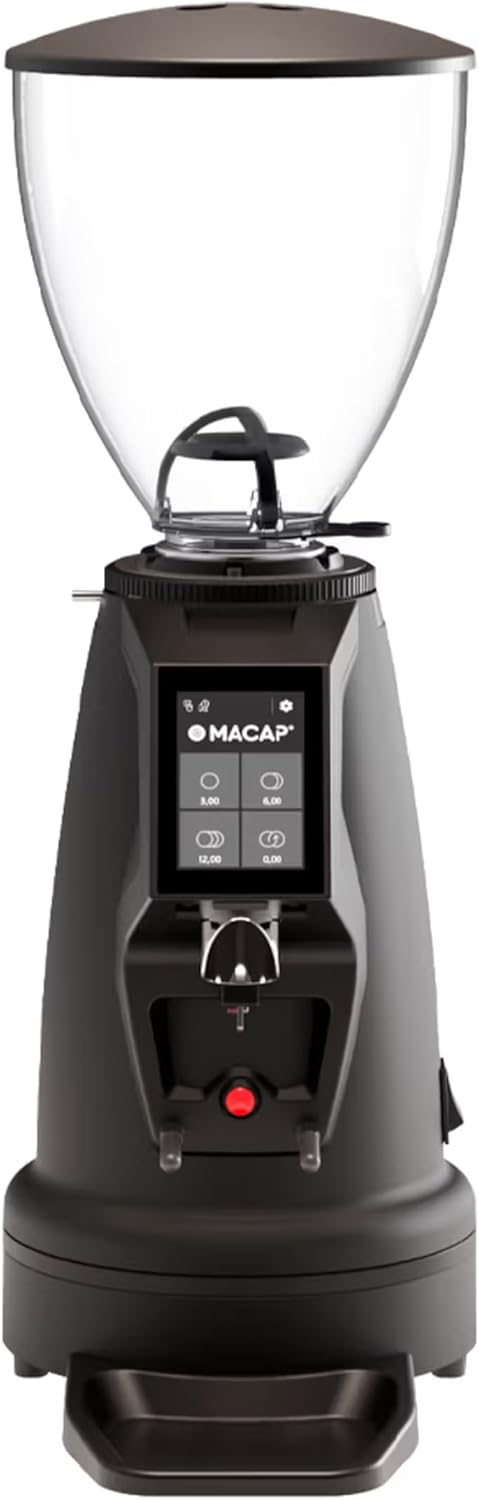
Obrázek 1: Přední strana view of the Macap MI40 Touch Instant Burr Coffee Grinder, showcasinjeho kompaktní design a dotykové rozhraní.
Důležité bezpečnostní pokyny
Při používání elektrických spotřebičů vždy dodržujte základní bezpečnostní opatření, abyste snížili riziko požáru, úrazu elektrickým proudem a/nebo zranění osob, včetně následujících:
- Přečtěte si všechny pokyny.
- Neponořujte spotřebič, kabel ani zástrčku do vody nebo jiných kapalin.
- Když je jakýkoli spotřebič používán dětmi nebo v jejich blízkosti, je nutný pečlivý dohled.
- Vytáhněte zástrčku ze zásuvky, když ji nepoužíváte, před nasazením nebo sejmutím dílů a před čištěním.
- Vyvarujte se kontaktu s pohyblivými částmi.
- Neprovozujte žádné zařízení s poškozenou šňůrou nebo zástrčkou nebo poté, co zařízení nefunguje správně, spadlo nebo bylo jakkoli poškozeno.
- Použití příslušenství, které není doporučeno nebo prodáno výrobcem, může způsobit požár, úraz elektrickým proudem nebo zranění.
- Nepoužívejte venku.
- Nenechávejte kabel viset přes okraj stolu nebo pultu ani se dotýkat horkých povrchů.
- Před použitím zkontrolujte, zda v zásobníku nejsou cizí předměty.
- Tento spotřebič je určen pouze pro použití v domácnosti.
Komponenty produktu
Familiarize yourself with the main components of your MI40 Touch coffee grinder:
- Zásobník na fazole: Transparent container for whole coffee beans (1.2 kg capacity).
- Víko násypky: Covers the bean hopper to keep beans fresh.
- Grind Adjustment Collar: Stepless micrometric adjustment for precise grind size control.
- 3.5'' Touchscreen Display: User interface with programmable doses and built-in LED light.
- Výstup pro mletí: Where ground coffee is dispensed.
- Portafilter Fork: Adjustable support for holding portafilters during grinding, with anti-vibration coating.
- Odkapávač: Removable tray to catch excess coffee grounds.
- Vypínač: Located on the side/rear of the unit.
- 65mm Flat Burrs: High-efficiency burrs for consistent grinding.

Obrázek 2: Strana view illustrating the hopper, grind adjustment collar, and portafilter fork.

Figure 3: Close-up of the bean hopper interior, showing the bean flow mechanism.
Nastavení a první použití
- Rozbalení: Opatrně vyjměte všechny součásti z obalu. Obal uschovejte pro budoucí přepravu nebo skladování.
- Umístění: Umístěte mlýnek na stabilní, rovný a suchý povrch. Zajistěte dostatečné větrání kolem jednotky.
- Sestavení násypky: Securely place the bean hopper onto the grinder body. Ensure it clicks into place if applicable.
- Připojení napájení: Zapojte napájecí kabel do uzemněné elektrické zásuvky.
- Počáteční čištění: Před prvním použitím otřete vnější povrch čisticím prostředkemamp cloth. The burrs and grind path are typically clean from the factory, but a small amount of sacrificial coffee can be ground through to season the burrs.
Návod k obsluze
The MI40 Touch offers intuitive operation through its 3.5'' touchscreen and multiple grinding modes.
1. Plnění násypky
Lift the hopper lid and pour whole coffee beans into the hopper. Replace the lid securely.
2. Nastavení hrubosti mletí
The MI40 Touch features stepless micrometric grind adjustment. To adjust, rotate the grind adjustment collar located below the hopper. Rotate clockwise for finer grinds and counter-clockwise for coarser grinds. Make small adjustments and test the grind to achieve the desired consistency for your brewing method (e.g., espresso, drip, moka pot, cold brew).

Figure 4: Grind adjustment collar for stepless precision control, allowing fine-tuning of particle size.
3. Using the Touchscreen Interface
The 3.5'' touchscreen allows for programming up to 4 doses and selecting operating modes. The built-in LED light improves visibility in low-light conditions.

Figure 5: Close-up of the 3.5'' touchscreen display, showing programmable dose options.
Dose Programming:
- From the home screen, tap on a dose button (e.g., single shot, double shot) to select it.
- To program a dose, press and hold the desired dose button until the programming interface appears.
- Adjust the grinding time using the '+' and '-' buttons.
- Press the checkmark or save icon to confirm and save the new dose setting.
4. Provozní režimy
The MI40 Touch supports three primary operating modes, automating workflow for various needs:
- Standardní režim: Select a pre-programmed dose, place your portafilter on the fork, and press the corresponding dose button to start grinding. The grinder will stop automatically after the set time.
- Režim Push and Grind: Place your portafilter on the fork. The grinder will start grinding when the portafilter activates the switch and will continue as long as the portafilter is held in place. Release the portafilter to stop grinding.
- Barista Hands-Free Mode: Designed for continuous grinding without holding the portafilter. The grinder will start when the portafilter is inserted and stop when removed. This mode is ideal for high-volume use in cafes or busy home settings.
Refer to the video below for a visual guide on the interface and operating modes:
Video 1: MACAP MI Series Interface Specifications. This video demonstrates the touchscreen interface, dose customization, and different operating modes (Standard, Push and Grind, Barista) for the MI series grinders, providing a comprehensive overview of user interaction.
Údržba a čištění
Regular cleaning and maintenance ensure optimal performance, consistent grind quality, and longevity of your grinder.
Denní úklid
- Odkapávač: Empty and wipe the drip tray daily to remove accumulated coffee grounds and maintain cleanliness.
- Vnější: Otřete vnější povrch mlýnku měkkým hadříkemamp cloth. Do not use abrasive cleaners or immerse the unit in water, as this can damage electronic components.
- Výstup pro mletí: Use a brush or vacuum to clear any visible coffee grounds from the grind outlet to prevent blockages.
Weekly / Bi-Weekly Cleaning (Burr Cleaning)
To maintain grind consistency and prevent clogging, clean the burrs regularly. Frequency depends on usage and coffee bean oiliness.
- Odpojit: Always unplug the grinder from the power outlet before performing any cleaning or maintenance on the burrs.
- Remove Hopper: Empty the bean hopper and remove it from the grinder body.
- Odstranění horního otřepu: Carefully unscrew or unlock the upper burr assembly according to the grinder's design. Refer to specific diagrams in the full product manual if available.
- Čištění kartáčem: Use a stiff brush (a dedicated grinder brush is recommended) to brush away all coffee grounds and oils from both the upper and lower burrs, as well as the burr chamber.
- Znovu sestavit: Reassemble the burr components and hopper, ensuring all parts are securely in place. Test the grind adjustment after reassembly.
- Grinder Cleaning Tablets (Optional): For a deeper clean, you can use specialized grinder cleaning tablets (e.g., Grindz). Follow the product instructions for these tablets, typically by grinding them through the machine.
Odstraňování problémů
This section addresses common issues you might encounter with your MI40 Touch grinder and provides potential solutions.
| Problém | Možná příčina | Řešení |
|---|---|---|
| Mlýnek se nezapne. | Not plugged in; Power switch off; Circuit breaker tripped; Internal fuse. | Ensure power cord is securely plugged in; Turn power switch to ON; Reset circuit breaker; If problem persists, contact support. |
| No coffee grounds dispensed. | Hopper empty; Grind chute clogged; Burrs jammed by foreign object (e.g., stone). | Fill hopper with beans; Clean grind chute thoroughly; Unplug and inspect burrs for obstructions, then carefully remove. |
| Nekonzistentní velikost mletí. | Burrs are dirty or worn; Grind setting too coarse/fine for desired brew method; Beans are stale or oily. | Clean burrs thoroughly; Adjust grind setting incrementally; Use fresh, quality beans. Consider burr replacement if wear is evident. |
| Grinder is unusually loud or makes grinding noise without beans. | Foreign object in burrs; Loose components; Burrs misaligned. | Unplug and inspect burrs for foreign objects; Ensure all components are securely fastened; Contact customer support if noise persists or burrs seem misaligned. |
| Touchscreen unresponsive or displaying errors. | Temporary software glitch; Power fluctuation. | Unplug the grinder for 30 seconds, then plug back in and restart. If the issue persists, contact customer support. |
If the problem persists after attempting these solutions, please contact Macap customer support for further assistance.
Specifikace
| Funkce | Detail |
|---|---|
| Model | MI40 Touch |
| Značka | Macap |
| Typ otřepů | 65mm Flat Burrs |
| Nastavení mletí | Plynulý mikrometrický |
| Kapacita zásobníku | 1.2 kg |
| Zobrazit | 3.5'' Touchscreen with LED Light |
| Provozní režimy | Standard, Push and Grind, Barista Hands-Free |
| Rozměry produktu (D x Š x V) | 12 cm D x 7.63 cm Š x 22 cm V |
| Hmotnost položky | 19.58 libry |
| Barva | Černý |
| Výrobce | MACAP |
| První dostupný termín | 19. března 2025 |
Záruka a podpora
For detailed warranty information and customer support, please refer to the official documentation included with your purchase or visit the official Macap website. Ensure you have your product's model number (MI40 Touch) and purchase date available when contacting support for efficient service.
Výrobce: MACAP
Official U.S. Branch: Pro Coffee Gear LLC