Zavedení
Thank you for choosing the Macap MI20 Touch Instant Burr Coffee Grinder. This manual provides essential information for the safe and efficient operation, maintenance, and troubleshooting of your new coffee grinder. Please read this manual thoroughly before first use and keep it for future reference.

Obrázek 1: Přední strana view of the Macap MI20 Touch Coffee Grinder in black.
Důležité bezpečnostní informace
Abyste snížili riziko požáru, úrazu elektrickým proudem nebo zranění, vždy dodržujte základní bezpečnostní opatření při používání elektrických spotřebičů.
- Před použitím spotřebiče si přečtěte všechny pokyny.
- Neponořujte spotřebič, kabel ani zástrčku do vody nebo jiných kapalin.
- Vytáhněte zástrčku ze zásuvky, když ji nepoužíváte, před nasazením nebo sejmutím dílů a před čištěním.
- Když je jakýkoli spotřebič používán dětmi nebo v jejich blízkosti, je nutný pečlivý dohled.
- Vyvarujte se kontaktu s pohyblivými částmi.
- Neprovozujte žádný spotřebič s poškozenou šňůrou nebo zástrčkou nebo poté, co spotřebič nefunguje správně, upadl nebo byl jakýmkoli způsobem poškozen.
- Použití příslušenství, které není doporučeno nebo prodáno výrobcem, může způsobit požár, úraz elektrickým proudem nebo zranění.
- Nepoužívejte venku.
- Nenechávejte kabel viset přes okraj stolu nebo pultu ani se dotýkat horkých povrchů.
- Neumisťujte na horký plynový nebo elektrický hořák nebo do jeho blízkosti nebo do vyhřáté trouby.
Konec produktuview a klíčové vlastnosti
The Macap MI20 Touch is a high-performance coffee grinder designed for precision and ease of use, featuring a modern design with a colored touchscreen interface.
Klíčové vlastnosti:
- 3.5'' TOUCHSCREEN & LED LIGHT: Large display with 4 programmable doses and user-friendly interface. Built-in LED for visibility in low-light kitchens or cafés.
- MULTI-MODE GRINDING: Choose from Standard, Push and Grind, or Barista Hands-Free mode—tailored workflow for every espresso prep style.
- HANDS-FREE OPERATION: Insert portafilter and grinding begins automatically—ensures consistent dosing with minimal effort.
- STEPLESS ADJUSTMENT SYSTEM: Micrometric grind control with zero setting—dial in perfect texture for espresso, drip, moka pot, or cold brew.
- DURABLE, QUIET, CLEAN: 58mm flat burrs and anti-vibration fork ensure stable grinding. Quiet motor with low retention and mess-reducing design.
- HIGH-CAPACITY HOPPER: 500g bean hopper built for daily use in high-demand environments—ideal for home baristas or light commercial use.

Obrázek 2: Přesview of the Macap MI20 Touch's main features, including 58mm flat burrs, 500g coffee hopper capacity, instant productivity of 2-2.6 g/s, and 300W motor power.
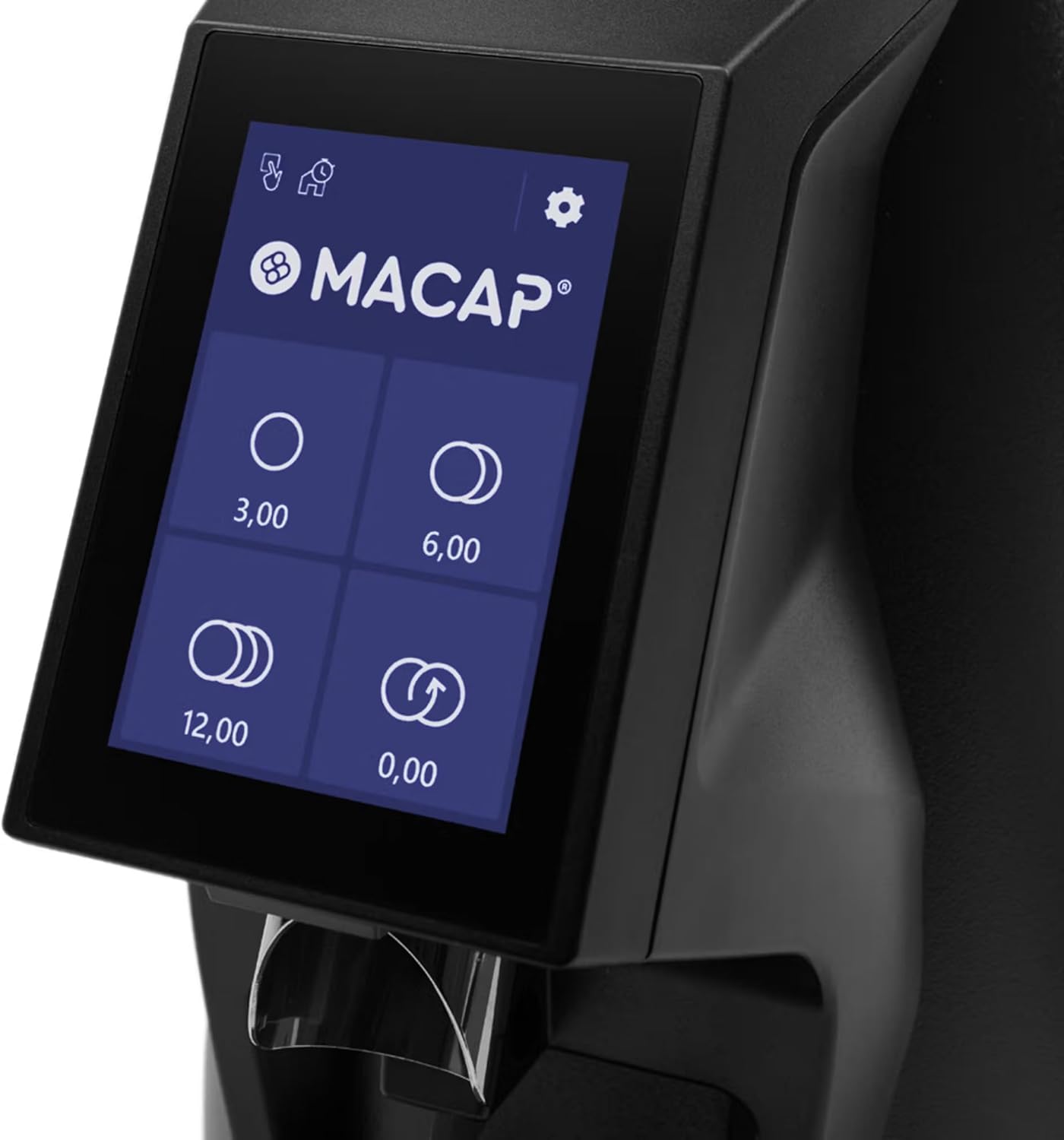
Figure 3: Close-up of the 3.5-inch colored touchscreen display, showing dose programming options.

Figure 4: Detail of the USB-C socket and the adjustable LED light for illuminating the working area.

Obrázek 5: View of the stepless grind adjustment ring, allowing for precise control over grind size.

Figure 6: Close-up of the 500g bean hopper, showing the internal design for efficient bean feeding.
Nastavení
Vybalování
- Opatrně vyjměte mlýnek a veškeré příslušenství z obalu.
- Check for any signs of damage during transit. If damaged, contact your retailer immediately.
- Retain the original packaging for future storage or shipping.
Počáteční montáž
- Umístěte mlýnek na stabilní, rovný a suchý povrch.
- Ujistěte se, že je vypínač v poloze OFF.
- Attach the bean hopper to the top of the grinder by aligning the tabs and twisting until it locks securely in place.
- Insert the removable tray into its designated slot at the base of the grinder.

Obrázek 7: Strana view of the Macap MI20 Touch Coffee Grinder, showing the hopper and removable tray.
Návod k obsluze
Plnění zásobníku
Lift the hopper lid and pour fresh, whole coffee beans into the hopper. The hopper has a capacity of 500g. Close the lid securely after filling.
Nastavení velikosti mletí
The MI20 Touch features a stepless micrometric grind adjustment system. To adjust the grind size, rotate the grind adjustment ring located below the bean hopper. Turn clockwise for a finer grind and counter-clockwise for a coarser grind. Make small adjustments and test the grind to achieve your desired consistency.
Grinding Modes
The grinder offers three distinct grinding modes, selectable via the touchscreen:
- Standardní režim: Manually activate grinding for a set duration or until stopped.
- Režim Push and Grind: Grinding starts when the portafilter activates the button and stops when the portafilter is removed.
- Barista Hands-Free Mode: Grinding automatically starts when the portafilter is inserted and stops after dispensing the programmed dose.
Programming Doses
The 3.5-inch touchscreen allows for programming up to four different doses. Refer to the on-screen menu for detailed instructions on setting and saving your preferred dose quantities. The display also provides options for adjusting LED lighting intensity, customizing the interface, and viewing daily, weekly, and total dose counts.

Figure 8: The Macap MI20 Touch Coffee Grinder positioned in a kitchen environment, ready for use.
Video 1: Official video detailing the specifications and features of the MACAP MI20 Touch coffee grinder. This video provides a visual guide to the grinder's capabilities and design elements.
Údržba a čištění
Regular cleaning and maintenance will ensure the longevity and optimal performance of your Macap MI20 Touch grinder.
Denní úklid
- Empty any remaining beans from the hopper.
- Remove the removable tray and discard any spilled grounds. Wipe the tray clean with a damp tkanina.
- Use a soft brush or dry cloth to wipe down the exterior of the grinder and the grinding chute to remove coffee dust.
Hloubkové čištění (měsíčně nebo dle potřeby)
- Odpojte brusku ze zásuvky.
- Remove the bean hopper and clean it with warm, soapy water. Ensure it is completely dry before reattaching.
- Carefully remove the upper burr. Use a brush or vacuum cleaner to remove any accumulated coffee grounds from the burrs and grinding chamber.
- Do not wash the burrs with water.
- Reassemble the burrs and hopper, ensuring all parts are securely in place.
Odstraňování problémů
If you encounter issues with your grinder, refer to the table below for common problems and solutions.
| Problém | Možná příčina | Řešení |
|---|---|---|
| Mlýnek se nezapne | Není zapojeno do zásuvky; Vypnutý vypínač; Vypnutý jistič | Ujistěte se, že je zástrčka bezpečně zasunuta do zásuvky; Zapněte hlavní vypínač; Resetujte jistič. |
| No coffee grinding | No beans in hopper; Hopper not properly seated; Grinding mechanism jammed | Fill hopper with beans; Securely attach hopper; Clean grinding chamber and burrs |
| Nekonzistentní mletí | Burrs are worn; Improper grind setting | Consider replacing burrs; Adjust grind setting incrementally |
| Bruska je hlučná | Foreign object in grinding chamber; Loose components | Unplug and inspect/remove foreign objects; Check for loose parts and tighten if possible |
Specifikace
| Atribut | Hodnota |
|---|---|
| Číslo modelu | MI20 Touch |
| Značka | Macap |
| Barva | Černý |
| Rozměry produktu (D x Š x V) | 12 cm D x 7.6 cm Š x 17.3 cm V |
| Capacity (Bean Hopper) | 0.5 kg (500 g) |
| Hmotnost položky | 16.5 libry |
| Typ otřepů | 58mm Flat Burrs |
| Výkon motoru | 300 W |
| Instant Productivity (Espresso) | 2 - 2.6 g/s |
| Výrobce | MACAP |
| ASIN | B0F2293LY3 |
| Datum první dostupnosti | 20. března 2025 |
Záruka a podpora
Macap products are manufactured to the highest quality standards and are backed by a manufacturer's warranty. For specific warranty details, please refer to the warranty card included with your product or visit the official Macap webmísto.
For technical support, service, or replacement parts, please contact your authorized Macap dealer or the customer support team. When contacting support, please have your product model number (MI20 Touch) and serial number ready.
Online zdroje: For additional information, FAQs, and video tutorials, please visit the official Macap support page.


