1. Úvod
The THINKCAR ACT20 is an advanced automotive electrical circuit tester designed for professionals in the automotive sector. This versatile device enables precise diagnostics of a vehicle's electrical system with its easy-to-read digital display. It offers multiple essential functions such as AC/DC voltage testing, polarity verification, continuity testing, short-circuit detection, and component activation. Its ergonomic design includes a precision probe and an extended cable for accessing difficult areas. The intuitive interface facilitates result interpretation, while its overload protection functions ensure safe use. It is ideal for mechanical workshops and automotive technicians seeking a reliable tool for electrical diagnostics. The equipment allows for quick and efficient identification and resolution of problems in injection systems, signal circuits, and ground connections.
2. Bezpečnostní informace
Always observe the following safety precautions when using the THINKCAR ACT20:
- Ensure the vehicle's ignition is off before connecting or disconnecting the tester, unless specifically instructed otherwise for a test.
- Wear appropriate personal protective equipment, including safety glasses, to prevent eye injury from sparks or debris.
- Do not use the device if it appears damaged or if the cables are frayed.
- Avoid contact with live electrical components. The probe is designed for safe testing, but caution is always advised.
- Nepřekračujte maximální objemtage ratings specified for the device.
- Keep the device away from water, oil, and other liquids.
- The device includes overload and short-circuit protection; however, always follow proper testing procedures to prevent damage to the device or vehicle.
3. Konec produktuview
The THINKCAR ACT20 is a compact and robust electrical circuit tester. Key components include:
- Hlavní jednotka: Houses the digital display, control buttons, and internal circuitry.
- Precision Probe: A sharp, insulated tip for making contact with electrical circuits.
- Prodloužený kabel: Poskytuje ample reach for testing various points in a vehicle.
- Alligator Clips/Battery Clamps: For connecting to the vehicle's battery for power.
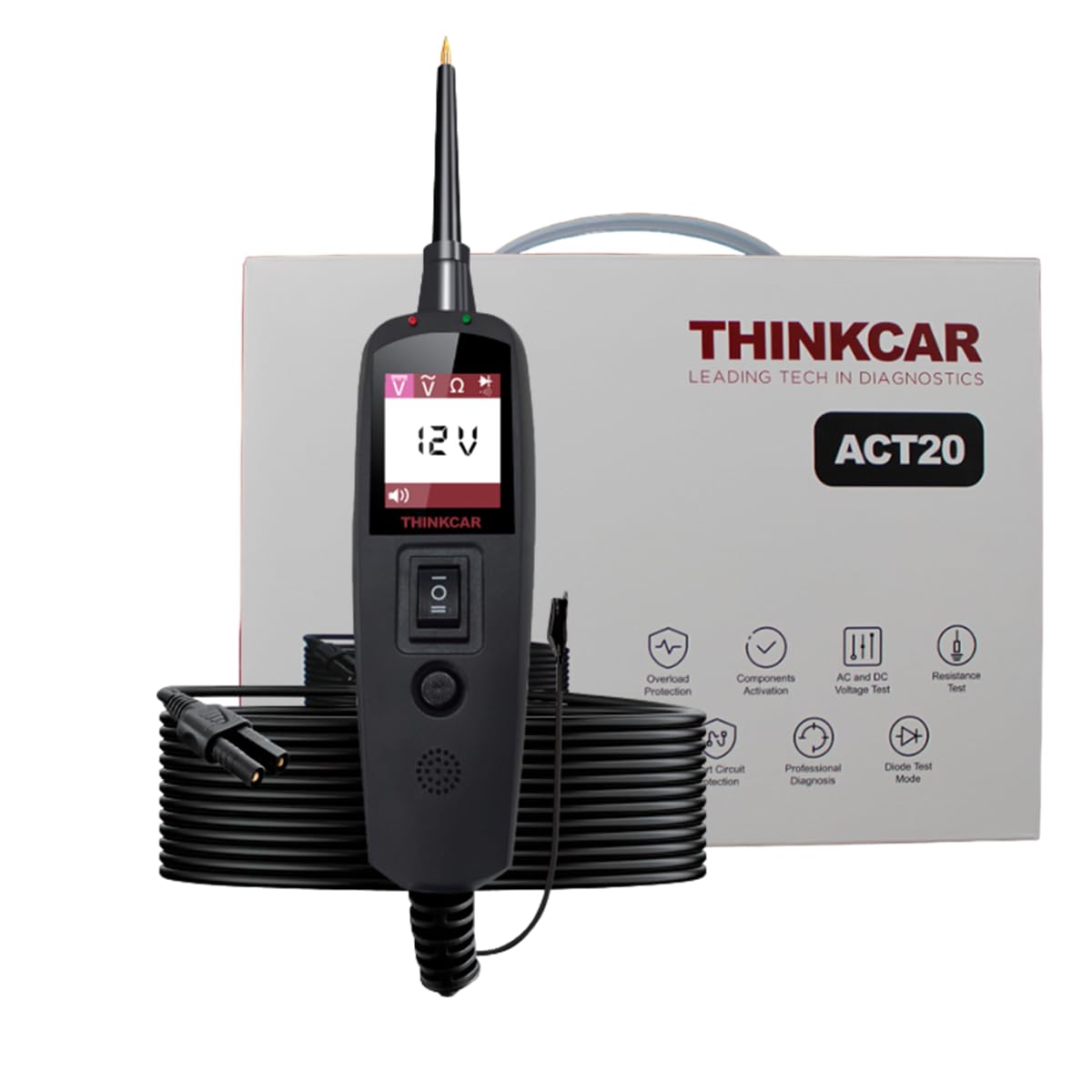
Figure 3.1: THINKCAR ACT20 main unit and packaging. This image shows the device itself, the extended cable, and the product box, highlighting its compact design and the included accessories.

Figure 3.2: Complete set of THINKCAR ACT20 components. This image displays all items included in the package: the ACT20 tester, connection cables, battery clamps, and the user manual, illustrating the comprehensive nature of the kit.
4. Nastavení
Follow these steps to set up your THINKCAR ACT20 for first use:
- Připojení napájení: Connect the ACT20's power cable to the vehicle's 12V or 24V battery using the provided alligator clips. Ensure correct polarity: red clip to positive (+), black clip to negative (-). The device will power on automatically.
- Počáteční zobrazení: Once powered, the digital display will illuminate, showing the current battery voltage.
- Nástavec sondy: Ensure the precision probe is securely attached to the main unit.
5. Návod k obsluze
The THINKCAR ACT20 offers various testing modes for comprehensive electrical diagnostics.
5.1. AC/DC Voltage Test
This function allows you to measure both alternating current (AC) and direct current (DC) voltages in the vehicle's electrical system.
- Connect the ACT20 to the vehicle's power source as described in Section 4.
- Touch the precision probe to the circuit or component you wish to test.
- The digital display will show the measured voltage. The device automatically detects AC or DC voltage.
- Observe the polarity indicator on the screen for DC voltage čtení.
5.2. Polarity Verification
Quickly determine the positive or negative polarity of a circuit.
- With the device powered on, touch the probe to the test point.
- The display will indicate whether the point is positive (+) or negative (-).
5.3. Test kontinuity
Use this function to check for open circuits or good connections.
- Ensure the circuit is de-energized before performing a continuity test.
- Connect the ACT20's ground lead to a known good ground point on the vehicle chassis.
- Touch the probe to one end of the circuit or component you want to test.
- If continuity exists, the device will emit an audible tone and/or display a specific indicator.
5.4. Short-Circuit Detection
Identify short circuits quickly and safely.
- Connect the ACT20 to the vehicle's power source.
- Carefully probe the suspected shorted circuit.
- The device will indicate a short circuit, often with an audible alarm or specific display message, and its internal protection will activate to prevent damage.
5.5. Component Activation
Safely activate components directly from the device to test their functionality.
- Connect the ACT20 to the vehicle's power source.
- Connect the probe to the positive terminal of the component you wish to activate.
- Use the activation button on the device to supply power to the component. Observe the component's reaction.
- Pozor: Ensure the component's current draw does not exceed the device's maximum output to prevent damage.
6. Údržba
Proper maintenance ensures the longevity and accuracy of your THINKCAR ACT20.
- Čištění: Wipe the device and cables with a soft, dry cloth after each use. Do not use abrasive cleaners or solvents.
- Skladování: Store the ACT20 in its original case or a protective pouch in a cool, dry place, away from direct sunlight and extreme temperatures.
- Kontrola kabelů: Regularly inspect the cables and probe for any signs of wear, cuts, or damage. Replace if necessary.
- Tip sondy: Keep the probe tip clean and sharp for optimal contact.
7. Řešení problémů
If you encounter issues with your THINKCAR ACT20, refer to the following common problems and solutions:
| Problém | Možná příčina | Řešení |
|---|---|---|
| Zařízení se nezapne. | Incorrect battery connection; Vehicle battery is dead; Damaged power cable. | Ensure correct polarity (+ to +, - to -). Check vehicle battery voltage. Inspect power cable for damage. |
| Nepřesný svtage čtení. | Poor probe contact; Corroded battery terminals; Device malfunction. | Ensure firm contact with the test point. Clean battery terminals. Contact support if issue persists. |
| Continuity test fails on a known good circuit. | Circuit is de-energized; Poor ground connection; Damaged probe/cable. | De-energize the circuit. Ensure a solid ground connection. Check probe and cable integrity. |
| Overload protection frequently activates. | Attempting to activate a high-current component; Short circuit in the tested component. | Verify the component's current draw is within the device's limits. Check the component for internal shorts. |
8. Specifikace
- Model: ACT20
- Značka: MYSLETE AUTOM
- Rozměry: 20 x 15 x 4 cm
- Hmotnost: 350 gramů
- Zdroj napájení: Vehicle Power (12V/24V DC)
- Zobrazit: Digitální LCD
- Funkce: AC/DC Voltage Test, Polarity Test, Continuity Test, Short-Circuit Detection, Component Activation
- Ochrana: Overload Protection, Short-Circuit Protection
9. Záruka a podpora
The THINKCAR ACT20 comes with a 1-year warranty from the date of purchase, covering manufacturing defects. For warranty claims or technical support, please contact your authorized THINKCAR dealer or visit the official THINKCAR webmísto.
For further assistance, please refer to the contact information provided with your purchase documentation.

Figure 9.1: THINKCAR ACT20 highlighting key features and warranty. This image emphasizes the 1-year warranty, the 1.77-inch display, and the 36V voltage capacity, reinforcing product reliability and key specifications.


