1. Úvod
This manual provides detailed instructions for the operation and maintenance of your Aiworth LD629 Digital Voice Activated Recorder. Please read this manual thoroughly before using the device to ensure proper function and to maximize its capabilities.
Obsah balení:
- Aiworth LD629 Digital Voice Recorder
- Stand stativ
- Line-in kabel
- USB kabel (USB-C)
- 128GB paměťová karta (předinstalovaná)
- Poprodejní servisní karta

Image: The Aiworth LD629 Digital Voice Recorder shown with its accessories, including the tripod stand, USB cable, and memory card.
2. Bezpečnostní informace
- Nevystavujte zařízení extrémním teplotám, přímému slunečnímu záření nebo vysoké vlhkosti.
- Zabraňte pádu zařízení nebo jeho vystavení silným nárazům.
- Udržujte zařízení mimo dosah vody a jiných kapalin.
- Nepokoušejte se zařízení rozebírat ani opravovat sami. Obraťte se na kvalifikovaný servisní personál.
- Use only the provided or recommended charging cables and accessories.
- Zařízení a jeho baterii zlikvidujte zodpovědně v souladu s místními předpisy.
3. Konec produktuview
The Aiworth LD629 features a user-friendly design with all primary operation buttons located on the front. It includes dual sensitive microphones for high-quality audio capture and a built-in speaker for playback.

Image: A detailed diagram illustrating the various ports and buttons on the Aiworth LD629 Digital Voice Recorder, including the dual mics, earphone jack, TF card slot, USB-C port, and control buttons.
Klíčové vlastnosti:
- 1536Kbps PCM High-Quality Recording
- Dual Sensitive Microphones
- 128GB Internal Memory (via pre-installed TF card)
- 1000mAh Rechargeable Battery (up to 60 hours continuous recording)
- Hlasově aktivované nahrávání (VOR)
- Ochrana heslem při zapnutí
- Variable Play Speed (16 levels)
- Funkce AB Repeat
- Line-in nahrávání
- Timed Automatic Recording
- Monitorování v reálném čase
- Tripod Stand Compatibility (standard 1/4" screw)
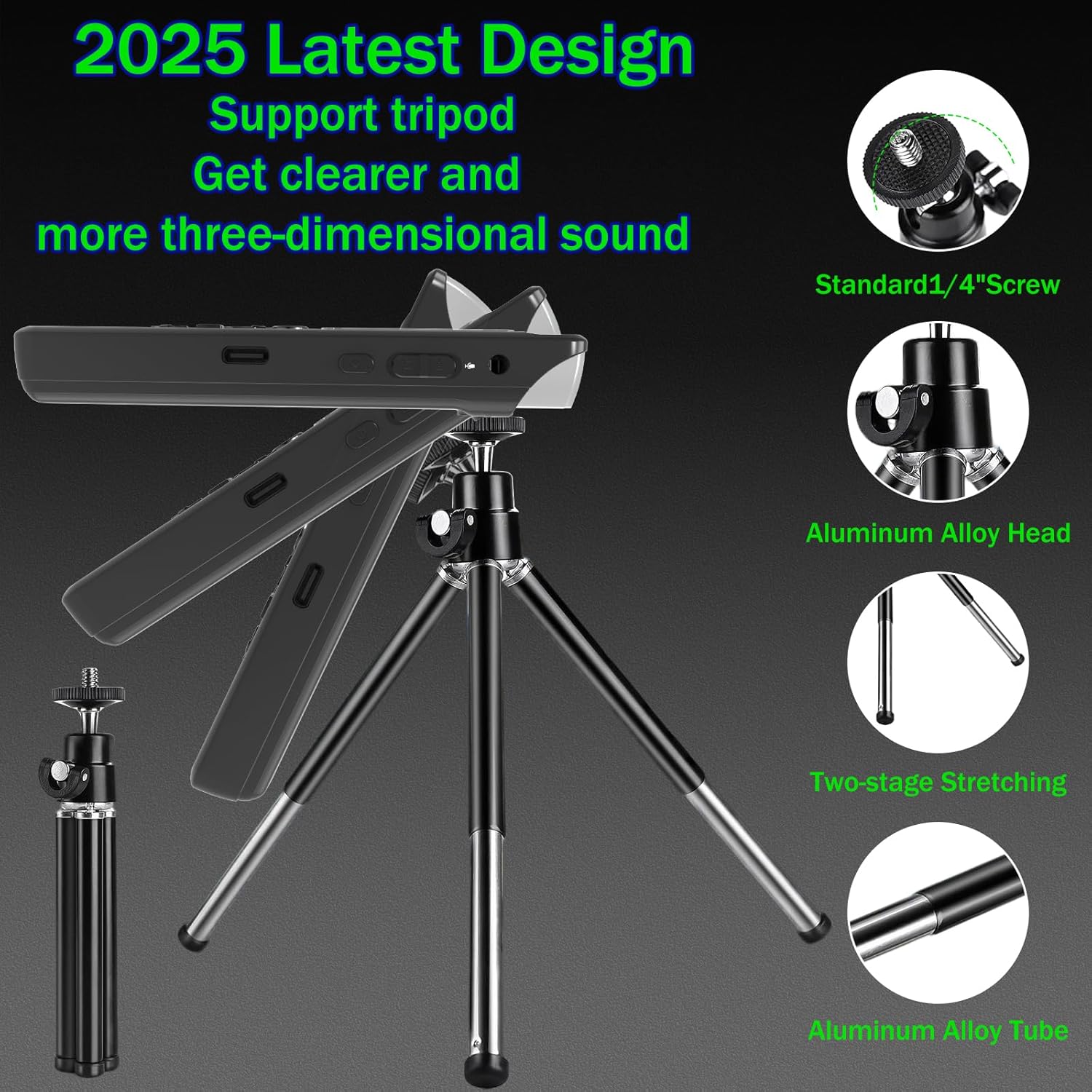
Image: The Aiworth LD629 Digital Voice Recorder shown attached to its included tripod stand, highlighting its stability and adjustable angles for optimal recording.
4. Nastavení
4.1. Počáteční nabíjení
Before first use, fully charge the device. Connect the included USB cable to the recorder's USB-C port and the other end to a USB power adapter (not included) or a computer's USB port. The battery indicator on the screen will show charging status. A full charge typically takes approximately 2-3 hours.

Image: The Aiworth LD629 Digital Voice Recorder displaying its 128GB memory capacity and a visual representation of its 1000mAh battery, indicating up to 60 hours of continuous recording.
4.2. Zapnutí/vypnutí
- Zapnutí: Stiskněte a podržte tlačítko napájení, dokud se obrazovka nerozsvítí.
- Vypnutí: Stiskněte a podržte tlačítko napájení, dokud se obrazovka nevypne.
4.3. Nastavení data a času
It is recommended to set the correct date and time for accurate file management. Refer to the on-screen menu for "System Settings" to adjust these parameters.
5. Provoz
5.1. Základní nahrávání
- Ujistěte se, že je zařízení zapnuté.
- Stiskněte tlačítko REC button to start recording. The recording indicator will appear on the screen.
- Chcete-li nahrávání pozastavit, stiskněte tlačítko Přehrát/Pozastavit tlačítko. Stiskněte znovu pro obnovení.
- Chcete-li zastavit nahrávání a uložit file, stiskněte tlačítko ZASTÁVKA tlačítko.
The device supports 1536Kbps PCM recording with dual sensitive microphones, capturing clear audio from up to 60 feet away.

Image: The Aiworth LD629 Digital Voice Recorder's screen displaying recording in progress, with visual cues indicating its effective recording range of up to 60 feet using dual sensitive microphones.
5.2. Hlasově aktivované nahrávání (VOR)
When VOR is enabled, the recorder will automatically start recording when sound is detected (above 60dB) and pause/save when silent. This conserves memory and battery life.
- Navigate to the "Recording Settings" menu.
- Select "VOR Mode" and set it to "ON".
- Adjust the VOR sensitivity level as needed.
- Stiskněte REC to enter VOR standby mode. The device will begin recording when sound is detected.

Image: The Aiworth LD629 Digital Voice Recorder illustrating its voice-activated recording feature, showing how it automatically starts recording when sound exceeds 60dB and saves when silent.
5.3. Přehrávání
- From the main menu, select "Recordings" or "Music" to browse files.
- Pomocí navigačních tlačítek vyberte file.
- Stiskněte tlačítko Přehrát/Pozastavit tlačítko pro spuštění přehrávání.
- Použijte Svazek +/- tlačítka pro nastavení hlasitosti přehrávání.
- Použijte Předchozí/Další tlačítka pro přeskakování skladeb.
Variable Play Speed:
During playback, you can adjust the speed across 16 levels. This allows for faster review or slower, more detailed listening.

Image: A visual representation of the variable play speed function, explaining how users can adjust playback speed across 16 levels for faster review or detailed listening.
Funkce opakování AB:
Tato funkce umožňuje smyčku určitého segmentu zvukového záznamu file.
- Během přehrávání stiskněte tlačítko Opakování AB button at the desired starting point (A).
- Stiskněte tlačítko Opakování AB button again at the desired ending point (B). The segment between A and B will loop.
- Stiskněte tlačítko Opakování AB button a third time to exit the loop.

Image: A diagram explaining the A-B loop playback function, showing how to set start and end points to repeatedly play a specific audio segment.
5.4. Ochrana heslem
The device supports a 3-digit power-on password for security, offering 8000 combinations. After three incorrect attempts, the device will automatically shut down.
- Navigate to "System Settings" and select "Password Protection".
- Enable the feature and set your desired 3-digit password.
- Remember your password, as there is no external reset pinhole.

Image: The Aiworth LD629 Digital Voice Recorder displaying its password input screen, illustrating the 3-digit password protection feature to secure recorded files.
5.5. Connecting to Computer/Phone (OTG)
Connect the recorder to a computer using the provided USB cable to transfer files. The device will appear as a removable disk. For phone connectivity via OTG, ensure your phone supports OTG functionality and use an appropriate adapter (not included).
5.6. Line-in Recording
The device supports direct recording from external audio sources like computers, radios, or other players using the line-in cable.
- Connect one end of the line-in cable to the audio output of the external device and the other end to the recorder's line-in jack.
- Spusťte přehrávání na externím zařízení.
- Stiskněte tlačítko REC button on the recorder to begin recording the audio input.

Image: A diagram demonstrating the line-in recording capability, showing how the recorder can be connected to external devices like computers or radios to directly record their audio output.
5.7. Timed Automatic Recording
You can schedule the recorder to start and stop recording automatically at specific times.
- Access the "Timed Recording" option in the settings menu.
- Set the desired start time and stop time.
- Ensure the device is powered on and in standby mode for the timed recording to activate.

Image: A diagram explaining the timed automatic recording feature, showing how to set specific start and stop times for automated recording and saving.
5.8. Monitorování v reálném čase
Connect headphones to the earphone jack to monitor the audio being recorded in real-time.

Image: A diagram illustrating the real-time monitoring function, showing how users can connect headphones to listen to the audio being recorded as it happens.
6. Údržba
- Zařízení čistěte měkkým, suchým hadříkem. Nepoužívejte tekuté čisticí prostředky ani aerosoly.
- Pokud zařízení nepoužíváte, skladujte jej na chladném a suchém místě.
- Regularly back up important recordings to a computer or cloud storage.
- Nevystavujte zařízení silným magnetickým polím.
7. Řešení problémů
| Problém | Možná příčina / řešení |
|---|---|
| Zařízení se nezapne. | Battery may be depleted. Charge the device fully. |
| Nelze nahrávat. | Memory full: Delete old filenebo je přeneste do počítače. Device is locked: Check if the key lock function is enabled. |
| Špatná kvalita záznamu. | Microphones obstructed: Ensure microphones are clear. Distance from source: Move closer to the audio source. High background noise: Use noise reduction settings if available, or record in a quieter environment. |
| Nelze se připojit k počítači. | Faulty USB cable: Try a different USB cable. Driver issue: Ensure your computer's USB drivers are up to date. Incorrect mode: Ensure the recorder is in data transfer mode if prompted. |
| Zapomenuté heslo. | There is no external reset pinhole. If you forget your password, contact Aiworth customer support for assistance. |
8. Specifikace
| Funkce | Detail |
|---|---|
| Číslo modelu | LD629 |
| Kapacita paměti | 128 GB |
| Čas digitálního záznamu | Až 9280 hodin |
| Výdrž baterie (nahrávání) | Až 60 hodin (nepřetržitě) |
| Typ baterie | 1000mAh Rechargeable (1 C battery included) |
| Formát záznamu | WAV (PCM up to 1536Kbps) |
| Tvarový faktor mikrofonu | Vestavěné duální mikrofony |
| Hardwarové rozhraní | USB 3.0 typ C |
| Kompatibilní zařízení | Smartphone (via OTG), PC |
| Hmotnost položky | 8.4 unce |
| Rozměry balení | 5.71 x 4.72 x 1.26 palce |
| Výrobce | Aiworth |
| Země původu | Čína |
9. Záruka a podpora
Your Aiworth LD629 Digital Voice Recorder comes with a standard manufacturer's warranty. Please refer to the "After-sales Service Card" included in your package for specific warranty terms and conditions.
For technical support, troubleshooting assistance, or warranty claims, please contact Aiworth customer service through their official channels. You can often find contact information on the manufacturer's website or the service card.
Visit the official Aiworth Store on Amazon for more information: Aiworth Store
