1. Úvod
This manual provides essential information for the setup, operation, and maintenance of your HUION KAMVAS Slate 11 standalone drawing tablet. The KAMVAS Slate 11 is designed for digital artists and creative professionals, offering a portable and versatile platform for drawing, note-taking, and general Android tablet usage.
The device operates on Android 14, features a 10.95-inch anti-glare screen, and comes with a high-precision H-Pencil stylus. Please read this manual thoroughly to ensure optimal performance and longevity of your device.
Popis videa: Konecview of the HUION KAMVAS Slate 11 & 13 standalone drawing tablets, highlighting their features and portability for creative work.
2. Co je v krabici
Ověřte, zda jsou v balení produktu obsaženy všechny níže uvedené položky:
- Android Tablet
- H-Pencil Pen
- Hroty pera x 3
- Napájecí kabel USB-C na USB-A
- Kožené pouzdro
- Palm Rejection Artist Glove
- Card Eject Tool
- Rychlý průvodce
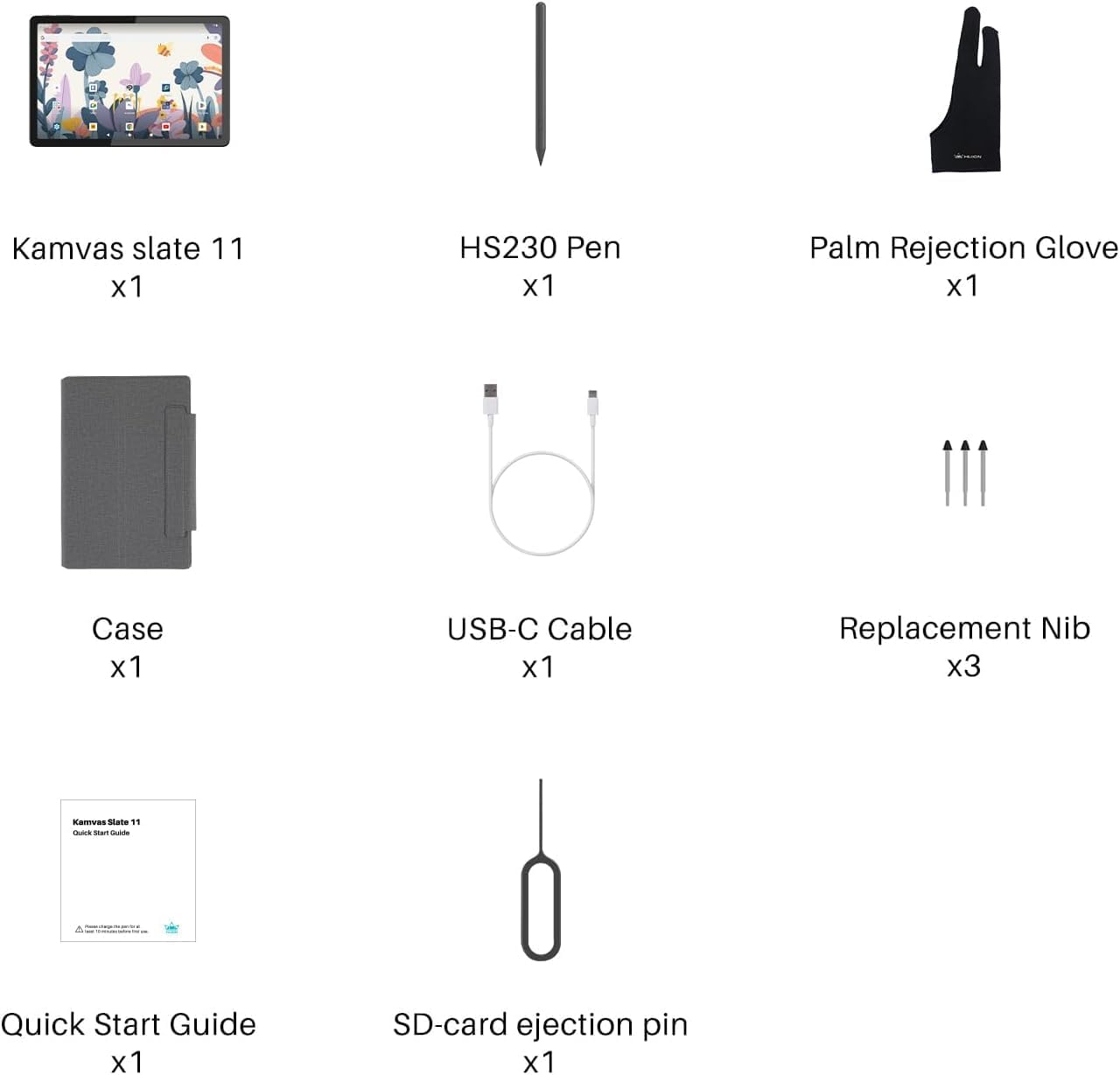
Popis obrázku: A visual representation of all components included in the HUION KAMVAS Slate 11 package, neatly arranged in their box.
3. Vlastnosti produktu
The HUION KAMVAS Slate 11 offers a range of features designed to enhance your creative and digital experience:
- Samostatný provoz: No computer connection required, allowing immediate use.
- 10.95palcový Full HD displej: Features a 1920x1200 resolution (207 PPI) with 99% sRGB color gamut for sharp and accurate visuals.
- Smooth 90Hz Refresh Rate: Ensures fluid visuals and a responsive creative experience.
- Full-Laminated Anti-Glare Screen: Nano-etched matte surface reduces glare and provides a paper-like texture, minimizing parallax and eye strain.
- High-Precision H-Pencil: Offers 4096 levels of pressure sensitivity and 60° tilt recognition for a natural writing and drawing feel.
- Silný výkon: Equipped with an 8-core CPU, 8GB RAM, and 128GB storage (expandable up to 1TB via Micro SD card).
- Dlouhá výdrž baterie: An 8000mAh battery provides up to 11 hours of continuous use.
- Operační systém Android 14: Runs on the latest Android operating system, supporting Google Play apps.
- Pre-installed Drawing Apps: Comes with Clip Studio Paint and ibisPaint X (including up to 3 months of free memberships for new users).
- Integrated Cameras: Features an 8MP front camera and a 13MP rear camera with flash.

Popis obrázku: This image illustrates the smooth 90Hz refresh rate and high-resolution display of the tablet.
Popis videa: A comparison demonstrating the anti-glare properties of the Kamvas Slate 11's matte screen versus a reflective screen under direct light.

Popis obrázku: Details the features of the H-Pencil, including its precision and pressure sensitivity.
4. Nastavení
Follow these steps for initial setup of your KAMVAS Slate 11:
- Rozbalení: Opatrně vyjměte všechny součásti z obalu.
- Počáteční poplatek: Connect the tablet and H-Pencil to the USB-C cable and a power adapter (not included) to fully charge them before first use.
- Zapnutí: Press and hold the power button located on the side of the tablet until the HUION logo appears.
- Language & Region: Postupujte podle pokynů na obrazovce a vyberte preferovaný jazyk a region.
- Wi-Fi připojení: Connect to a stable Wi-Fi network to access online features and app downloads.
- Účet Google: Sign in with your Google account to access Google Play Store and synchronize your data.
Popis videa: This video guides users through the unboxing process, initial setup, and basic usage of pre-installed software on the tablet.
5. Návod k obsluze
Your KAMVAS Slate 11 is a versatile device. Here's how to get started with its main functions:
5.1 Using the H-Pencil
- Drawing & Writing: The H-Pencil offers precise input for drawing and writing. Its 4096 pressure levels and 60° tilt recognition simulate a natural pen-on-paper feel.
- Programovatelné tlačítko: The button on the H-Pencil can be customized for functions like undo, erase, or brush switching within compatible applications.
- Odmítnutí dlaně: Wear the included artist glove to prevent unintended marks from your palm while drawing.
5.2 Předinstalované aplikace
- HiPaint & ibisPaint X: These are powerful drawing applications pre-installed for immediate creative work. Explore their features for sketching, painting, and digital art.
- HiNote: Use HiNote for digital note-taking, annotating documents, and organizing your thoughts.
- Google Play: Access the Google Play Store to download additional apps, games, and content.
Popis videa: This video demonstrates various activities possible on the Kamvas Slate 11, including drawing, gaming, and general app usage.
Popis videa: This video showcases the book reading and note-taking experience on the Kamvas Slate 11, highlighting its suitability for academic and personal use.
6. Údržba
Proper care ensures the longevity and performance of your tablet:
- Čištění obrazovky: Use a soft, lint-free cloth to gently wipe the screen. Avoid harsh chemicals. The anti-fingerprint matte surface is designed to reduce smudges.
- Péče o baterie: To prolong battery life, avoid fully discharging the tablet frequently. Charge it regularly using the provided USB-C cable.
- Hroty stylusu: Replace the H-Pencil nibs when they show signs of wear to maintain optimal drawing precision. Extra nibs are included in the package.
- Skladování: When not in use, store the tablet in its leather case to protect it from dust and scratches.
7. Řešení problémů
Pokud narazíte na problémy, vyzkoušejte tato běžná řešení:
- Tablet nereaguje: Restart the tablet by holding the power button. If unresponsive, perform a forced restart (refer to the Quick Start Guide for specific instructions).
- H-Pencil Not Working: Ensure the H-Pencil is charged. Check if the nib is properly inserted. If issues persist, try replacing the nib.
- Blikání obrazovky: Ensure the tablet's software is up to date. If the issue continues, contact customer support.
- Problémy s připojením: For Wi-Fi or Bluetooth problems, try restarting the tablet and your router/Bluetooth device.
- Výkon aplikace: Close background applications to free up RAM. Ensure apps are updated to their latest versions.
8. Specifikace
| Funkce | Specifikace |
|---|---|
| Rozměry produktu | 10.11 x 6.63 x 0.1 palce |
| Hmotnost položky | 1.12 libry |
| Číslo modelu položky | KT1101 |
| Baterie | Vyžadují se 1 9V baterie (součástí balení) |
| Značka | HUION |
| Technologie připojení | Bluetooth, WiFi |
| Citlivost na tlak | 4096 úrovní |
| Operační systém | Android 14 |
| Speciální funkce | 8-core CPU, 8GB + 128GB, 8000mAh Battery, 90Hz Refresh Rate, Anti-Glare Glass, Front Facing Camera and Rear Camera, Full Lamination |
9. Záruka a podpora
For warranty information and technical support, please refer to the official HUION website or contact their customer service directly. Protection plans are available for extended coverage.


