Zavedení
The Zoom H5studio Handy Recorder is a versatile audio recording device designed for filmmakers, musicians, and creators. It features 32-bit float recording for clip-free audio, dedicated gain knobs for precise control, and a large 19.4mm XY stereo microphone capsule for superior sound capture. This manual provides essential information for setting up, operating, maintaining, and troubleshooting your H5studio recorder.

Obrázek 1: Přední strana view of the Zoom H5studio Handy Recorder with its large XY stereo microphone capsule.
Nastavení
Follow these steps to prepare your Zoom H5studio for use:
- Nainstalujte baterie: Open the battery compartment cover on the rear of the unit. Insert four AA batteries, ensuring correct polarity. Close the cover securely.

Obrázek 2: Zadní view showing the battery compartment of the H5studio.
- Attach Microphone Capsule: Align the XY stereo microphone capsule with the input connector on top of the H5studio and push firmly until it clicks into place.
- Vložte SD kartu: Locate the SD card slot on the side of the unit. Insert a compatible SD card (up to 512GB) until it locks into place. Ensure the card is formatted by the H5studio before first use.
- Zapnutí: Stiskněte a podržte tlačítko napájení, dokud se nerozsvítí displej.
Návod k obsluze
The H5studio offers advanced features for high-quality audio capture.
Basic Recording with XY Microphone
- Ensure the XY microphone capsule is securely attached.
- Adjust the dedicated gain knobs for the XY input (labeled "MIC") to set appropriate recording levels. The 32-bit float recording minimizes clipping, but optimal levels are still recommended.
- Stiskněte tlačítko REC button to start recording. The display will show recording time and levels.
- Stiskněte tlačítko ZASTÁVKA tlačítko pro ukončení nahrávání.

Figure 3: Adjusting gain knobs for precise control over recording levels.
6-Track Simultaneous Recording
The H5studio supports up to 6 tracks of simultaneous recording, utilizing the XY microphone and two additional XLR/TRS combo inputs.
- Connect external microphones or line-level sources to the XLR/TRS combo jacks (Inputs 1 and 2) at the bottom of the unit.
- Activate the desired input channels by pressing their corresponding buttons (1, 2, MIC) below the display.
- Adjust individual gain knobs for each active input to achieve balanced levels.
- Stiskněte REC to begin multi-track recording.
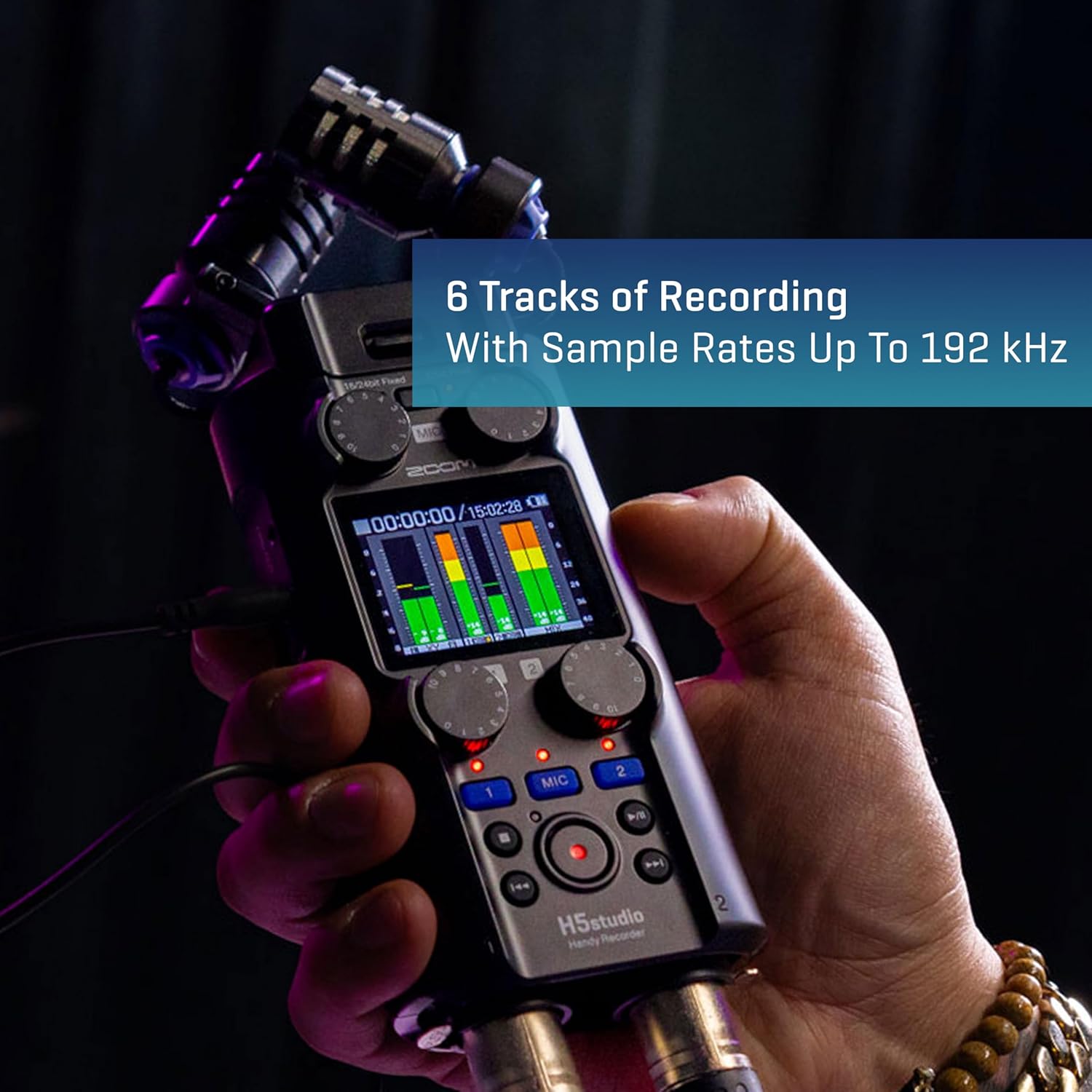
Figure 4: The H5studio is capable of recording up to 6 tracks simultaneously.
Using as a USB Audio Interface
Connect the H5studio to your computer via a USB-C cable to use it as a multi-channel audio interface for recording directly into your DAW or for live streaming.
- Connect the H5studio to your computer using a USB-C cable.
- Select "Audio Interface" mode on the H5studio when prompted.
- Configure your computer's audio settings or DAW to recognize the H5studio as the input/output device.

Figure 5: The H5studio can be integrated into various setups with different cables.
Monitorování a přehrávání
- Connect headphones to the 3.5mm headphone jack for real-time monitoring during recording or for playback.
- Use the volume control to adjust headphone output level.
- Navigate recorded files using the transport controls (Play, Stop, Fast Forward, Rewind) and the menu system.
Official Product Video: Audio Samples
Video 1: This video provides audio samples recorded with the Zoom H5studio Handy Recorder, demonstrating its sound capture capabilities in various environments. It showcases the quality of the XY microphone and 32-bit float recording.
Údržba
Proper maintenance ensures the longevity and optimal performance of your H5studio:
- Čištění: Use a soft, dry cloth to wipe the exterior of the unit. Do not use liquid cleaners or solvents. For the microphone capsule, use a soft brush to gently remove dust.
- Skladování: Store the H5studio in a cool, dry place away from direct sunlight and extreme temperatures. If storing for extended periods, remove the batteries to prevent leakage.
- Péče o baterie: Always use fresh, high-quality AA batteries. If using rechargeable batteries, ensure they are fully charged before critical recording sessions.
Odstraňování problémů
If you encounter issues with your H5studio, refer to the following common solutions:
| Problém | Možná příčina | Řešení |
|---|---|---|
| Žádná síla | Dead or incorrectly inserted batteries; power adapter issue. | Replace batteries, check polarity. Ensure power adapter is securely connected and functional. |
| No sound during recording/playback | Microphone not properly connected; input gain too low; headphones not connected or volume too low; incorrect input selection. | Ensure microphone capsule is firmly attached. Increase input gain. Check headphone connection and volume. Verify correct input channels are enabled. |
| Recording distorted or noisy | Input gain too high (though 32-bit float minimizes this, extreme levels can still cause issues); external interference. | Reduce input gain. Move away from sources of electromagnetic interference (e.g., mobile phones, power cables). |
| Chyba SD karty | Karta není naformátována; nekompatibilní karta; poškozená karta. | Format the SD card using the H5studio's menu. Use a compatible SDHC/SDXC card. Try a different SD card. |
For further assistance, please visit the official Zoom support website or consult the full digital manual available online.
Specifikace
Key technical specifications for the Zoom H5studio Handy Recorder:
| Funkce | Detail |
|---|---|
| Formát záznamu | WAV (32-bit float, 16/24-bit depth available) |
| Simultaneous Recording Tracks | 4 (up to 6 with optional modules) |
| Max Sampsazba ling | 192 kHz |
| Kapsle mikrofonu | 19.4mm XY Stereo Microphone Capsule |
| Předamps | F-Series Preamps |
| Audio rozhraní | USB Audio Interface functionality |
| Zdroj napájení | 4 AA baterie |
| Rozměry (D x Š x V) | 9.1 x 9.1 x 9.1 palce |
| Hmotnost položky | 1.06 libry |
Záruka a podpora
The Zoom H5studio Handy Recorder comes with a standard manufacturer's warranty. For detailed warranty information, product registration, and technical support, please visit the official Zoom webweb nebo jejich stránku v obchodě na Amazonu.


