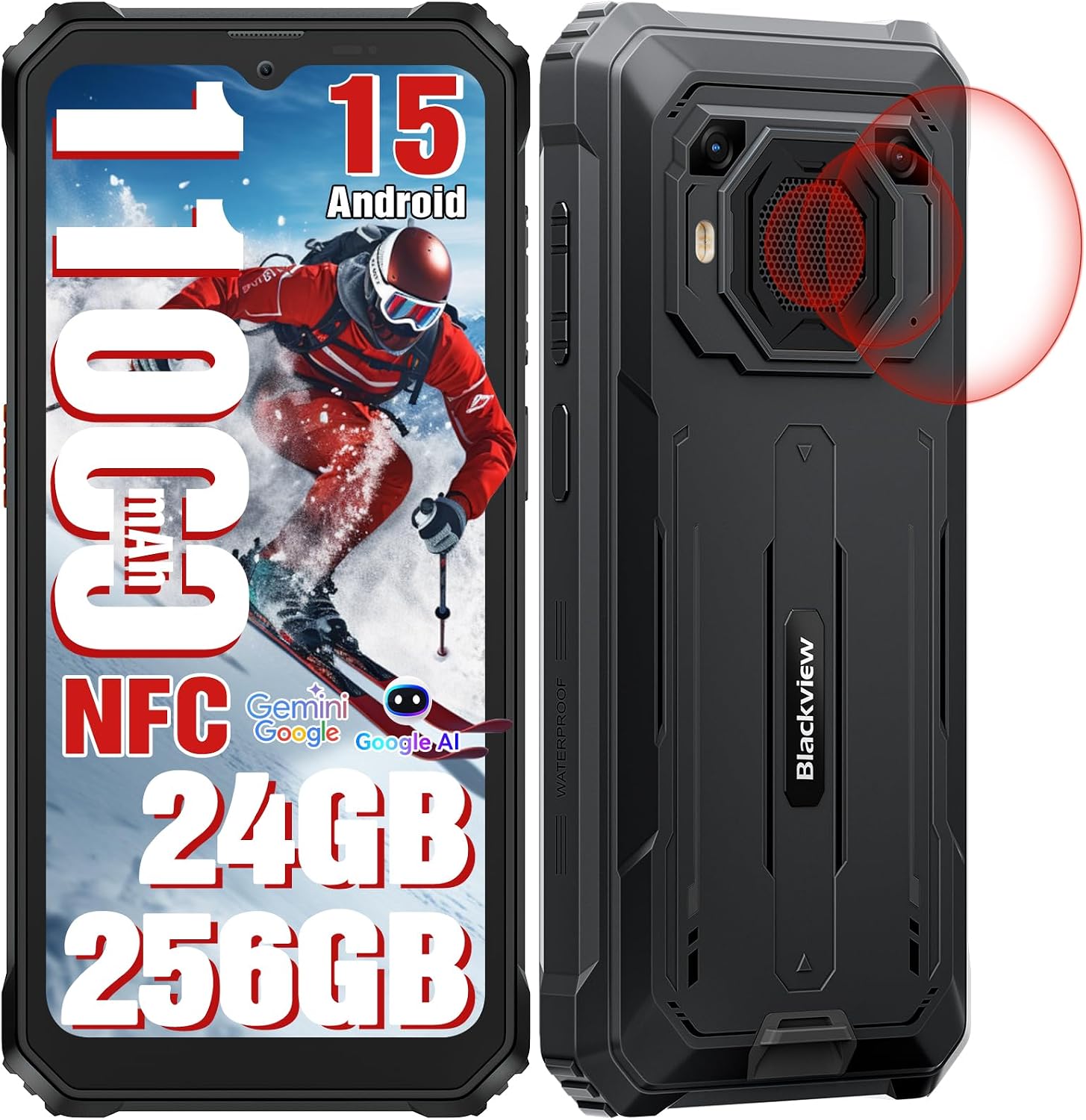
Černýview Uživatelská příručka k odolnému telefonu BV6200Plus
Model: BV6200PLUS | Brand: Blackview
1. Úvod
Vítejte v uživatelské příručce k vašemu novému Blacku.view BV6200Plus Rugged Phone. This device is engineered for durability and high performance, designed to withstand challenging environments while providing a seamless smartphone experience. Featuring an ultra-loud speaker, a massive 11000mAh battery, and the latest Android 15 operating system, the BV6200Plus is your reliable companion for any adventure.
This manual provides essential information on setting up, operating, maintaining, and troubleshooting your device to ensure you get the most out of its robust features.
2. Co je v krabici
Po vybalení vašeho černéhoview BV6200Plus, please verify that all the following items are included:
Černýview BV6200Plus Outdoor Smartphone
Nabíjecí adaptér
USB kabel (typ C)
Nástroj pro vysunutí SIM karty
Předem nanesená ochranná fólie na displej
Uživatelská příručka (tento dokument)
Obrázek: Obsah černéview BV6200Plus retail package.
3. Konec produktuview
Seznamte se s fyzickými součástmi vašeho Blackview BV6200Plus:
Obrázek: Přední a zadní view Černéhoview BV6200Plus.
3.1. Fyzikální komponenty
Přední displej: 6.56-inch HD+ IPS display with 90Hz refresh rate.
Přední kamera: 13MP AI camera, located at the top center of the display.
Zadní kamery: 16MP AI main camera and a secondary camera.
Super Speaker: Large 3W peak stereo speaker on the rear, delivering up to 98dB loudness.
Tlačítko napájení/Snímač otisků prstů: Located on the right side for secure unlock and power control.
Tlačítka hlasitosti: Located on the left side, above the customizable shortcut button.
Port USB Type-C: Located at the bottom, protected by a rubber flap, for charging and data transfer.
Slot pro SIM/TF kartu: Located on the left side, protected by a rubber flap, for dual SIM cards and expandable storage.
3.5mm audio jack: Pro připojení sluchátek.
Image: Key features and component locations.
4. Počáteční nastavení
4.1. Instalace SIM a TF karty
Vyhledejte slot pro SIM/TF kartu na levé straně telefonu.
Carefully open the protective rubber flap.
Vložte nástroj pro vysunutí SIM karty do malého otvoru vedle ní a jemně zatlačte, dokud se táhlo nevysune.
Place your Nano-SIM cards (up to two) and/or a TF (microSD) card into the designated slots on the tray. Ensure the gold contacts face downwards.
Jemně zatlačte zásobník zpět do slotu, dokud nebude v jedné rovině s tělem telefonu.
Close the rubber flap firmly to maintain water and dust resistance.
Image: Three-card slot for SIM and TF card installation.
4.2. Nabíjení baterie
Vaše černáview BV6200Plus is equipped with a large 11000mAh battery. For optimal performance, fully charge the device before first use.
Open the protective rubber flap covering the USB Type-C port at the bottom of the phone.
Connect the USB cable to the phone and the charging adapter.
Zapojte nabíjecí adaptér do elektrické zásuvky.
Indikátor nabíjení na obrazovce bude zobrazovat stav nabíjení. Telefon podporuje rychlé nabíjení 18W.
Once fully charged, disconnect the cable and firmly close the rubber flap to maintain water resistance.
Image: Battery and charging features.
4.3. Zapnutí/vypnutí
Zapnutí: Press and hold the Power button (right side) until the Blackview zobrazí se logo.
Vypnutí: Stiskněte a podržte tlačítko napájení a poté z možností na obrazovce vyberte možnost „Vypnout“.
Restartovat: Stiskněte a podržte tlačítko napájení a poté z možností vyberte „Restartovat“.
5. Ovládání telefonu
5.1. Android 15 a DokeOS 4.0
Your BV6200Plus runs on the latest Android 15 system, customized with Blackview's DokeOS 4.0 for an enhanced user experience. DokeOS 4.0 offers improved privacy protection, app widgets, easy app sharing, and seamless customization with themes, file folders, and icons.
Image: DokeOS 4.0 user interface features.
5.2. Hovory a zprávy
To make a call, open the Phone app and dial the number or select a contact. To send a message, open the Messages app and compose your text.
5.3. Internet a připojení
Wi-Fi: Pro připojení k dostupným sítím přejděte do Nastavení > Síť a internet > Wi-Fi.
Bluetooth: Go to Settings > Connected devices > Bluetooth to pair with Bluetooth devices (BT 5.0 supported).
Mobilní data: Ensure your SIM card is active and mobile data is enabled in Settings > Network & internet > Mobile network. The phone supports Dual SIM 4G.
NFC: Use NFC for contactless payments (Google Pay) and quick data sharing. Enable NFC in Settings > Connected devices > Connection preferences > NFC.
5.4. Funkce fotoaparátu
The BV6200Plus features a 16MP AI main camera and a 13MP AI front camera. Open the Camera app to capture photos and 1080P videos.
Režimy: Explore various modes like Photo, Video, Portrait, and Underwater mode.
AI Tools: Utilize AI features such as AI Erase and Sky Edit for professional-grade photo enhancements.
Image: Camera features and AI editing capabilities.
5.5. Super Speaker
Experience powerful audio with the 98dB Super Speaker. Ideal for music, movies, and hands-free calls in noisy environments.
Image: Detail of the 3W Ultra-loud Stereo Speaker.
5.6. Navigation and Outdoor Toolkit
The phone supports multiple navigation systems including GPS, GLONASS, Beidou, and Galileo for accurate positioning. The built-in Outdoor Toolkit app provides useful tools like a compass, barometer, and more.
Image: Navigation and Outdoor Toolkit features.
5.7. Bezpečnostní prvky
Unlock your phone instantly and securely using Face Unlock or the side-mounted Fingerprint Sensor.
6. Robustnost a trvanlivost
Černýview BV6200Plus is built to endure harsh conditions, certified with IP68, IP69K, and MIL-STD-810H standards.
Water Resistance (IP68 & IP69K): Submersible up to 1.5 meters for 30 minutes. Protected against high-pressure, high-temperature water jets.
Dust Resistance (IP68 & IP69K): Plně chráněno proti vnikání prachu.
Drop Resistance (MIL-STD-810H): Can survive drops from up to 1.2 meters. Features a padded TPU cover, silicone-sealed display, thickened corners, reinforced double-shot molding back shell, and an anti-collision body design.
Image: Ruggedness features and certifications.
Image: Water and dust protection mechanisms.
7. Údržba a péče
Pro zajištění dlouhé životnosti a optimálního výkonu vašeho Blackview BV6200Plus, follow these maintenance guidelines:
Čištění: Použijte měkký, damp cloth to clean the phone's surface. Avoid harsh chemicals or abrasive materials. Ensure all rubber flaps are securely closed before cleaning with water.
Péče o baterie: While the 11000mAh battery is robust, avoid extreme temperatures (both hot and cold) as they can affect battery life. Do not fully discharge the battery regularly.
Aktualizace softwaru: Regularly check for system updates (Settings > System > System update) to ensure your phone has the latest features, security patches, and performance improvements.
Ochrana portů: Always keep the rubber flaps covering the USB port and SIM/TF card slot securely closed when not in use to prevent water and dust ingress.
8. Řešení problémů
Zde jsou řešení běžných problémů, se kterými se můžete setkat:
Problém
Možné řešení
Telefon se nezapne
Ensure the battery is charged. Connect to the charger for at least 10 minutes, then try powering on. If it still doesn't turn on, perform a forced restart by holding the Power button for 10-15 seconds.
Slabý signál sítě / Žádné připojení
Check if your SIM card is properly inserted. Verify that your carrier is supported (supports GSM networks like T-mobile and MetroPCS; incompatible with CDMA carriers like AT&T, Cricket Wireless, Verizon, Straight Talk, or U.S.Cellular). Try restarting the phone or toggling Airplane Mode on/off.
Baterie se rychle vybíjí
Zavřete nepoužívané aplikace běžící na pozadí. Snižte jas obrazovky. Vypněte Wi-Fi, Bluetooth nebo GPS, když je nepoužíváte. Zkontrolujte v Nastavení spotřebu baterie a identifikujte aplikace s vysokou spotřebou energie.
Aplikace padá nebo zamrzávají
Clear the cache of the problematic app (Settings > Apps > [App Name] > Storage & cache > Clear cache). If the issue persists, try reinstalling the app. Ensure your system software is up to date.
Speaker volume is low
Ensure the volume is turned up. Check if the speaker grille is obstructed by dirt or debris. Clean gently if necessary.
Černýview nabízí a 2-letá záruka for your BV6200Plus Rugged Phone, ensuring peace of mind regarding manufacturing defects and hardware issues. Additionally, we provide doživotní technická podpora to assist you with any questions or problems you may encounter during the product's lifespan.
Pro technickou pomoc, řešení problémů nebo reklamaci kontaktujte prosím společnost Black.view customer support. You can find contact information on the official Blackview webwebu nebo prostřednictvím vaší nákupní platformy.
Obrázek: Černáview informace o zákaznické podpoře.
Oficiální video produktu
Video: Oficiální video s produktemasing Černýview BV6200Plus's features, including its rugged design, powerful speaker, and long-lasting battery. This video provides a visual overview of the phone's capabilities and durability.
Černýview ROCK 1 Series Smartphone User Manual Komplexní uživatelská příručka pro Blackview ROCK 1 Series rugged smartphone. Covers setup, features, safety guidelines, maintenance, and technical specifications.
Černýview ROCK 2 Series Rugged Smartphone User Manual Oficiální uživatelská příručka pro Blackview ROCK 2 Series rugged smartphone. Learn about setup, features, safety, maintenance, and regulatory compliance for your device.
Černýview FORT 1 Series User Manual - Setup and Features Komplexní uživatelská příručka pro Blackview FORT 1 Series smartphone, covering setup, usage, safety, and maintenance. Discover how to get the most out of your device.