1. Úvod
This manual provides detailed instructions for the safe and effective use of your TOTAL TMT57026 Laser Distance Meter. Please read this manual thoroughly before operating the device and keep it for future reference. This device is designed for accurate distance measurements up to 70 meters, suitable for various professional and DIY applications.
2. Bezpečnostní pokyny
- Laserové záření: This device emits Class 2 laser radiation. Do not stare into the laser beam or direct it at other people or animals.
- Ochrana očí: Zabraňte přímému vystavení očí laserovému paprsku.
- Provozní prostředí: Nepoužívejte zařízení ve výbušném prostředí nebo v blízkosti hořlavých materiálů.
- Voděodolnost: Toto zařízení je není voděodolnýZabraňte vystavení vodě nebo vysoké vlhkosti.
- Údržba: Only qualified personnel should repair the device.
- Baterie: Use only specified AAA batteries. Do not mix old and new batteries or different types of batteries.
3. Konec produktuview
Familiarize yourself with the components of your TOTAL TMT57026 Laser Distance Meter.
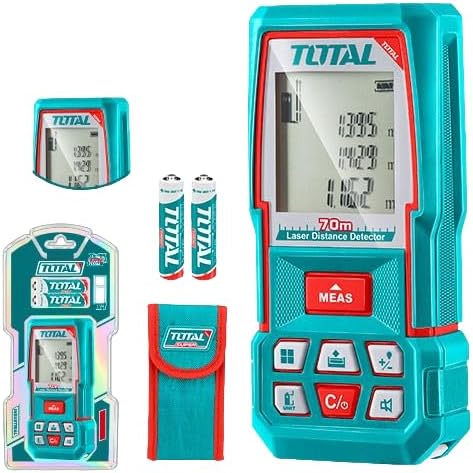
Figure 1: The TOTAL TMT57026 Laser Distance Meter, showing the device itself, two AAA batteries, a carrying pouch, and retail packaging. The device features a digital display and multiple function buttons.
Klíčové komponenty:
- Laserový vysílač/přijímač: Nachází se v horní části zařízení.
- Displej: Shows measurements, units, and mode indicators.
- Tlačítko MĚŘENÍ: Initiates single or continuous measurement.
- Tlačítko UNIT: Changes measurement units (e.g., meters, feet, inches).
- C/O Button: Clears the last measurement or turns the device off.
- Funkční tlačítka: For area, volume, addition, subtraction, and other calculations.
- Přihrádka na baterie: Located at the rear of the device.
4. Nastavení
4.1 Instalace baterie
- Vyhledejte kryt přihrádky na baterie na zadní straně zařízení.
- Posuňte nebo odepněte kryt a otevřete jej.
- Insert two (2) AAA 1.5V disposable batteries, ensuring correct polarity (+/-). The device includes two AAA batteries.
- Bezpečně zavřete kryt bateriového prostoru.
4.2 Zapnutí/vypnutí
- Zapnutí: Stiskněte tlačítko MEAS button briefly. The display will light up.
- Vypnutí: Stiskněte a podržte C/O button for approximately 3 seconds. The device will also automatically power off after a period of inactivity to conserve battery life.
5. Návod k obsluze
5.1 Základní měření vzdálenosti
- Ujistěte se, že je zařízení zapnuté.
- Namiřte laserový paprsek na cílový povrch.
- Stiskněte tlačítko MEAS button once. The laser will activate, and the measurement will appear on the display.
- The measurement will be held on the screen until a new measurement is taken or the device is turned off.
5.2 Kontinuální měření (sledování)
- Stiskněte a podržte MEAS tlačítko po dobu přibližně 2 sekund.
- The device will enter continuous measurement mode, displaying real-time distance as you move the device.
- Stiskněte tlačítko MEAS znovu stiskněte tlačítko pro zastavení nepřetržitého měření a uložení poslední hodnoty.
5.3 Změna měrných jednotek
- Stiskněte tlačítko JEDNOTKA button repeatedly to cycle through available units: meters (m), feet (ft), and inches (in).
- Vybraná jednotka se zobrazí na displeji.
5.4 Area and Volume Measurement
The device supports calculation of area and volume. Refer to the icons on the function buttons for specific modes.
- Press the appropriate function button (e.g., the button with the square icon for area, or cube icon for volume).
- Follow the on-screen prompts to take the required measurements (e.g., length, width for area; length, width, height for volume).
- Zobrazí se vypočítaný výsledek.
5.5 Sčítání a odčítání
Použijte +/- button to add or subtract measurements.
- Take the first measurement.
- Stiskněte tlačítko +/- button to select addition or subtraction mode.
- Take the second measurement. The device will automatically perform the calculation and display the result.
6. Údržba
6.1 Čištění
- Otřete zařízení měkkým, damp tkanina. Nepoužívejte abrazivní čisticí prostředky nebo rozpouštědla.
- Clean the laser lens carefully with a soft, lint-free cloth, similar to cleaning camera lenses.
6.2 Skladování
- Přístroj skladujte na suchém a chladném místě, mimo dosah přímého slunečního záření a extrémních teplot.
- Pokud skladujete po delší dobu, vyjměte baterie, abyste zabránili vytečení.
6.3 Výměna baterie
- When the battery indicator on the display shows low power, replace both AAA batteries following the instructions in Section 4.1.
7. Řešení problémů
| Problém | Možná příčina | Řešení |
|---|---|---|
| Zařízení se nezapne. | Baterie jsou vybité nebo nesprávně nainstalované. | Zkontrolujte polaritu baterií nebo je vyměňte za nové baterie AAA. |
| Nepřesná měření. | Laser lens is dirty; target surface is too reflective/non-reflective; device is unstable. | Clean the laser lens. Measure against a suitable, stable surface. Ensure device is held steady. |
| Laserový paprsek není viditelný. | Bright ambient light; laser is off. | Operate in lower light conditions. Ensure device is powered on and MEAS button is pressed. |
| Displej zobrazuje chybový kód. | Měření mimo rozsah; interní chyba. | Ensure target is within 0.05m to 70m range. Try restarting the device. If error persists, contact support. |
8. Specifikace
- Model: TMT57026
- Značka: CELKOVÝ
- Rozsah měření: 0.05 až 70 metrů
- Jednotky měření: Meters (m), Feet (ft), Inches (in)
- Třída laseru: třída 2
- Baterie: 2 x AAA, 1.5V (included)
- Typ baterie: Jednorázové
- Automatic Laser Shut-off: Ano (po nečinnosti)
- Automatic Device Shut-off: Ano (po nečinnosti)
- Rozměry produktu: Přibližně 17 x 5 x 0.1 cm
- Hmotnost položky: Approximately 160 g (0.16 Kilograms)
- Materiál: Plast
- Barva: Tyrkysový
- Úroveň odolnosti proti vodě: Není odolný vůči vodě
- Výrobce: Celkový
- Země původu: Čína
9. Záruka a podpora
For warranty information and technical support, please contact TOTAL customer service. Keep your purchase receipt as proof of purchase.
For further assistance, please refer to the official TOTAL webstránky nebo se obraťte na svého místního distributora.


